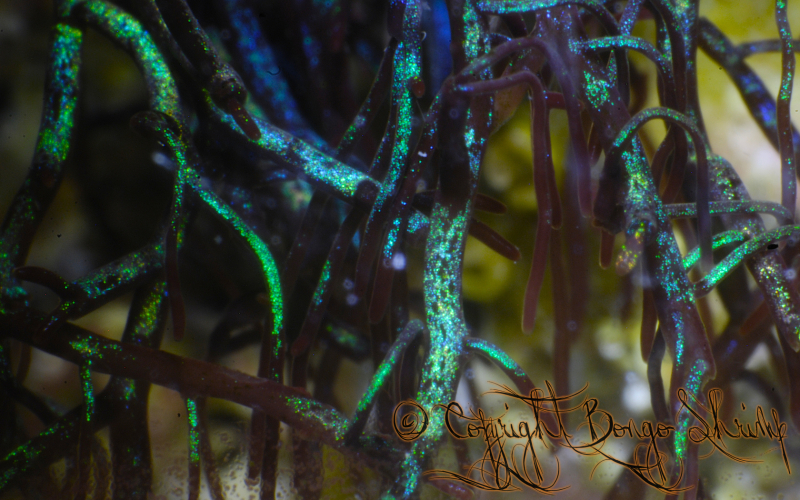
Use any lens as a macro lens DIY for less than $15

Bongo Shrimp

Well-Known Member
View Badges
Joined
Feb 14, 2010
Messages
885
Reaction score
350
Location
Michigan
Rating - 0%
0   0   0
So recently I started trying to take some macro photos of my reef and I figured I'd show you all my little trick to take these pics without a macro lens. I use a Nikon D80, a standard 30mm lens and parts I already had on hand to build this adapter. However, the most important parts can be purchased for less than $15 (other than the camera and the lens or course).

What you need:
  • A DSLR Camera
  • A Lens
  • A Camera Body Cap (should have come with your camera but can be purchased here, make sure you get the one that fits your camera)
  • A Lens Protector (can be purchased here, and again, make sure it fits your lens)
  • A Drill and/or small saw or knife (can be done without a drill, just helps start cutting, see below)
  • Superglue
  • Suggested: Tripod
I don't have a second camera body cap to demonstrate the exact steps but I think you'll understand. Feel free to ask if you don't.

First, take the camera body cap and cut out the inner plastic. Make sure you don't cut out the part that locks into the camera, only cut out the inner most part. You can use a small drill bit to make a hole to get you started, then a serrated knife or small saw works best on the plastic. You could also try heating up a knife with a lighter so that it melts through the plastic to get you started.

Camera Body Cap:
51aN3U2LrlL.jpg


What to cut:
lenscapcutout_zpsec37b66f.jpg


Next, identify the male and female sides of the lens protector and super glue the female side down, onto the top of the camera body cap. Try not to touch the lens protector with superglue on your hands or you may not be able to get the smudges off.

Lens Protector (female side is facing upwards in this picture):
IMG_3531_zps6db0ba56.jpg


And you're done. Yes, really.

This is the finished product:
IMG_3522_zps6a984658.jpg


IMG_3523_zps79be6280.jpg


IMG_3524_zps944ad8b4.jpg


Now screw the camera body cap into the camera body:
IMG_3527_zpsdc2302e1.jpg


Then screw the lens onto the adapter:
lensadapterdiagram_zps341a6155.jpg


IMG_3528_zps8c2005ab.jpg


IMG_3529_zpse2115c96.jpg


A few shooting tips:
  • Because the lens was not meant to be mounted this way, very little light is let into the lens. Even when looking through the viewfinder, it will be extremely dark. To see what I am aiming at, I hold a small bright LED flashlight with one hand and point it at my target while looking through the viewfinder. It's a juggling act but you will get used to it.
  • I also use a tripod and take a long exposure shot. I usually play with the settings until I get it right. You cannot use "auto" mode to take pictures using this method. I also use the timer setting to take the pics because when you are zoomed in so close, the tiniest movement will cause blur.
  • The timer setting will allow you to focus everything, hit the shutter button, and then let go of the camera completely while it takes the pic so that it sits perfectly still while the shutter is open. You'll also want to turn off all flow and for the most part limit yourself to stationary objects because of blur.
This method of taking macro photos is a little unconventional and takes getting used to. However, once you get used to it and practice practice practice, you'll find the results very rewarding.

_DSC04731_zps6939cd04.jpg


_DSC04711_zpsb2be86fe.jpg


_DSC04691_zps8cbd8861.jpg


_DSC0371_zps1da75c40.jpg


Some older ones when I first tried this method years ago. (I just recently tried it again after getting frustrated with it when I was newer to the DSLR)
_DSC0066.jpg


_DSC0063.jpg


_DSC0071.jpg


Hope you all like this little how-to.

I'll post more of my macro shots using this method in this thread as I take them if anyone wants to see more. https://www.reef2reef.com/forums/photography-forum/107907-trying-my-hand-some-macro-shots.html
 
Last edited:

Nice might have to try this thanks for the info

Sent from my LG-P999 using Reef2Reef Aquarium Forum mobile app
 
Cool!!! Gotta dig out the spare parts now and give this a try
Thanks! :clap2:
 
Cool, I've heard of this being done before... nice write up! Looks like you are getting more magnification than 1:1

Thanks! I'm sure this question makes me sound like a noob but what do you mean about the more than 1:1 magnification?

Nice! Rep added.

Thank you.

Nice might have to try this thanks for the info

Sent from my LG-P999 using Reef2Reef Aquarium Forum mobile app

Thank you!

Cool!!! Gotta dig out the spare parts now and give this a try
Thanks! :clap2:

Thank you!
 
Thanks! I'm sure this question makes me sound like a noob but what do you mean about the more than 1:1 magnification?
1:1 is the ratio of the size of the object to the size of its image hitting the sensor. Real macro lenses are supposed to have at least 1:1 magnification, but some photographers take exception when cheaper, entry-level lenses that don't have that 1:1 magnification are labelled "macro." (i.e. Sigma has a couple lenses like this IIRC.)

The pics of the hermit crab and the blue algae came out particularly sharp. Nicely done and great write up! What algae is that, btw?
 
1:1 is the ratio of the size of the object to the size of its image hitting the sensor. Real macro lenses are supposed to have at least 1:1 magnification, but some photographers take exception when cheaper, entry-level lenses that don't have that 1:1 magnification are labelled "macro." (i.e. Sigma has a couple lenses like this IIRC.)

The pics of the hermit crab and the blue algae came out particularly sharp. Nicely done and great write up! What algae is that, btw?

Thank you and thanks for the explanation. The trick with this method is getting the image that sharp. It's tough when it looks super dark. I kinda got lucky that the hermit didn't move while the shutter was open.

The algae is Coelothrix irregularis.
 
I like your method, but how do u attach the lens to the camera if the camera body cap is already attached??
 
I like your method, but how do u attach the lens to the camera if the camera body cap is already attached??

You glue a lens protector, male side up, to the camera body cap after you cut a hole in it. Then the lens will screw onto the lens protector.
 
Oh, I get it now......and how exactly does this method turn any lens into a macro?
 
Oh, I get it now......and how exactly does this method turn any lens into a macro?

I'm not sure of the exact physics of it but basically instead of the lens focusing on a far away object like normal, you can zoom in super close to a near by object. You can use bigger zoom lenses too to let you get close ups of things that are not as physically close to you as well. For example to take those example pics I posted, the end of the lens was physically about an inch or two away from the target. So the lens was almost touching the glass and the target was very close to the glass as well. If I take my 50mm or 70mm zoom lenses, I can take close ups of corals further back in the tank. Using the 50mm or 70mm however I have to be physically 2-3 feet from the target.
 
This is pretty cool, decided to try this while waiting for my macro lens to get here in the mail, but everything is just 100% blurry no way to determine anything from anything. Could it be because I used a spare polarized lense protector? Any input would be appreciated.
 
This is pretty cool, decided to try this while waiting for my macro lens to get here in the mail, but everything is just 100% blurry no way to determine anything from anything. Could it be because I used a spare polarized lense protector? Any input would be appreciated.

I doubt it is the polarized lens protector because the lens protector is flat and wouldn't distort the focus (unless it was really dirty). I think the reason you are having a hard time focusing is that you have to figure out the physical distance you need to be from the object to focus on it. Depending on the type of lens you are using, you may need to be right up next to the object or several feet away. When I use my 30mm for this method, I can only really focus on things that are right up against the glass. If I use my 50mm or 70mm I have to stand several feet away from the tank and I can focus on anything in the tank by adjusting my physical distance from the tank. It takes playing around with but I can tell you that the less zoom a lens has, the closer to the object you'll have to be. Hope that helps and isn't too confusing.
 
I doubt it is the polarized lens protector because the lens protector is flat and wouldn't distort the focus (unless it was really dirty). I think the reason you are having a hard time focusing is that you have to figure out the physical distance you need to be from the object to focus on it. Depending on the type of lens you are using, you may need to be right up next to the object or several feet away. When I use my 30mm for this method, I can only really focus on things that are right up against the glass. If I use my 50mm or 70mm I have to stand several feet away from the tank and I can focus on anything in the tank by adjusting my physical distance from the tank. It takes playing around with but I can tell you that the less zoom a lens has, the closer to the object you'll have to be. Hope that helps and isn't too confusing.

Thank you for the response. I was able to get something going, but getting it focused is really hard and right now seems to be near in possible, at least for me, lol. I am using a Canon T2i with the stock 18-55mm lens and your mod. I have found that I have to be really close or really far depending on the piece I am trying to snap a picture of. And although I am running very bright leds, I still need supplemental light around the camera in order to be able to find my subject which I found quite odd, but I guess at the same time it makes sense considering the mod.

I really appreciate you putting this up, gives me a little time to practice my patience before my Macro Lens gets here.

Thanks again for the tips, gonna keep messing with this for a while ;)
 
No problem and glad you like it so much! The focusing is really the trickiest part and I also have to use supplemental lighting with my high power LEDs. I typically hold a bright LED flashlight right next to my lens to spotlight the target and then have the shutter stay open longer using a tripod. Like you said the mod is the reason for the lighting issue. The lens wasn't meant for letting light in that way :P.

When you do get pics post them here!
 
With a lot of patience and a much better tripod, someone could really do wonders with this little mod (like you did), pretty awesome, but I have to say patience is not my best characteristic, so I am still very much eagerly waiting for my Macro Lens in the mail :)

Here is probably the best shot I was able to get with this mod so far, a shot of one of my Rainbow Acans:

859415_207756272699991_1775144163_o.jpg
 
Last edited:
I decided to keep trying and I now used one of our PAR38 Leds as the spot light, aligned the camera parallel to the tank as much as I could and got really close to the glass... I am actually VERY impressed with the results. Take a look:

856957_207756326033319_1701904580_o.jpg


856523_207756279366657_1382426106_o.jpg


859427_207756292699989_1514772895_o.jpg


861156_207756316033320_1399542315_o.jpg


Thanks for the idea on the mod, it's pretty awesome!
 

TOP 10 Trending Threads

WHAT DOES YOUR REEFING AREA LOOK LIKE BETWEEN MAINTENANCE SESSIONS?

  • Clean and tidy—everything gets put away

    Votes: 4 44.4%
  • Mostly cleaned up, but a few tools stay out

    Votes: 1 11.1%
  • Organized chaos—I know where everything is

    Votes: 2 22.2%
  • Enter at your own risk! Buckets, hoses, and towels are basically permanent fixtures

    Votes: 1 11.1%
  • It depends on where I am in the maintenance cycle...

    Votes: 0 0.0%
  • The tsunami hit. Hard.

    Votes: 1 11.1%
  • A different take... (Post in the comments)

    Votes: 0 0.0%
Back
Top
Home
Post thread…
Market
What's new