

Apex code question

BriansBrain

Well-Known Member
View Badges
Joined
Jul 31, 2014
Messages
691
Reaction score
793
Location
Ohio
What state or country do you live in
Ohio
Rating - 0%
0   0   0
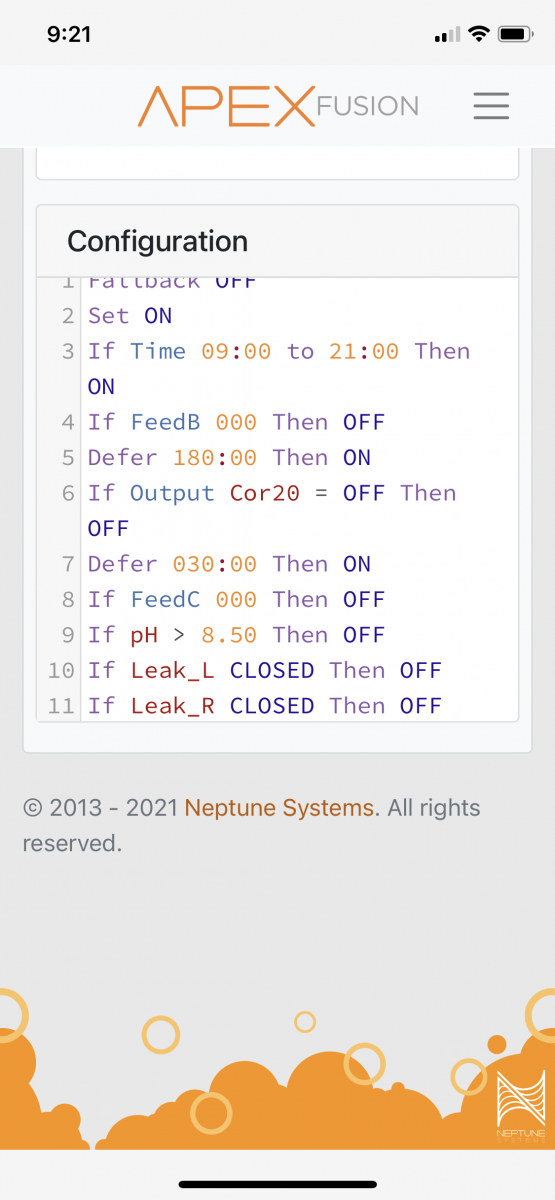
Pretty simple I just want my skimmer to run from 09:00 to 21:00 and off from 21:00 to 09:00. The outlet does not turn on at 09:00 unless you manually run it on and set in auto. I’m pretty sure it shuts off at 21:00 while in auto.
0BA2E5E0-3B4E-4E1A-A6C1-4BF44CAF9366.png
 
I simply name the outlet as skimmer and on time 9a and off time 9p(2100) and save it
 
One other thing:
Fallback OFF
Set OFF
If you don't set it to off, the on statements are useless.

And you have 2 defer statements. You only need one.
Otherwise, it looks good.
 
Have you tried removing the DEFER statements to test?

You have multiple DEFER statements defined.

You can only use one per program per state (ON/OFF) if I am not mistaken. As defined, the DEFERs would only run for the ON conditions that evaluate as true.

For instance:
Code:
If Time 09:00 to 21:00 Then ON
DEFER 180:00 Then ON
Would work together.

Until line 7 overrides line 5:
Code:
DEFER 030:00 Then ON

The way I read the code node, provided all feed, probe, and sensor states are FALSE:
  1. If time is between 09:00 to 21:00 then turn ON
  2. But first wait 30 minutes, then turn ON.
I would also suggest you create a few virtual outlets to clean up the code. It also allows you an easy way to determine state of each condition (via outlet state).

Code:
-- Virtual Outlet SKIM_TIME
If Time 09:00 to 21:00 Then ON
DEFER 180:00 Then ON

-- Virtual Outlet FEEDTIME
If FeedB 000 Then ON
If FeedC 000 Then ON

-- Virtual Outlet COR_ON
Set ON
If Output Cor20 = OFF Then OFF

-- Virtual Outlet PH_HIGH
Set OFF
If pH > 8.5 Then ON

-- Then in the program use these virtual outlets:
If Outlet COR_ON = OFF Then OFF
If Outlet PH_HIGH = ON Then OFF
If Outlet FEEDTIME = ON Then OFF
If Outlet SKIM_TIME = ON Then ON

You can view the outlet states and reuse them in other programs, too.

 
Thanks all! It is the defer that was keeping it from turning on. I also deleted the the 180 minute defer because I had that for a feed mode but it’s unimportant and unread anyway. I didn’t know you could have only 1 defer.

The 30 minute defer I had for when the COR pump turns on to wait 30 minutes for the skimmer to turn on.

I cleaned up the coding. So with keeping the 30 minute defer in, should I set:

If Time 08:30 to 21:00 Then ON. To get the skimmer to come at 09:00?
8E2CA688-EC01-4D3F-9275-BBB3F5DB93A3.png
 
Yes sir.
The defer will be triggered when you set the outlet to “auto” so 8:30 is correct.
You could bypass the “defer” if you ever needed to by turning the outlet “on” and then putting it back to “auto” afterward.
 

TOP 10 Trending Threads

WHAT’S USUALLY THE FIRST CLUE THAT SOMETHING IS OFF IN YOUR REEF?

  • A fish’s behavior or appetite changes

    Votes: 13 16.3%
  • A coral looks different or stops opening normally

    Votes: 49 61.3%
  • Water clarity or surface appearance changes

    Votes: 12 15.0%
  • Equipment sounds or flow seem different

    Votes: 9 11.3%
  • A test result catches my attention

    Votes: 17 21.3%
  • Algae or other growth starts changing

    Votes: 16 20.0%
  • I usually notice when the problem is already obvious

    Votes: 4 5.0%
  • It depends on what’s going on

    Votes: 16 20.0%
  • Other (Post in the comments)

    Votes: 1 1.3%
Back
Top
Home
Post thread…
Market
What's new