Hydros Help - Can't connect my gyres

Mr. Mojo Rising

10K Club member
View Badges
Joined
Feb 14, 2021
Messages
14,505
Reaction score
17,626
Location
Toronto
What state or country do you live in
Canada
Rating - 0%
0   0   0
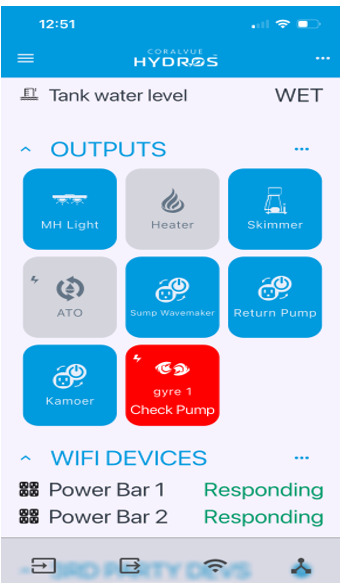
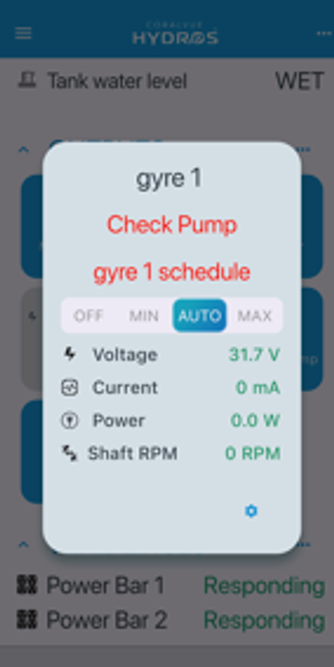
I had to replace a gyre, and couldn't get it connected, so decided to delete gyre 1 thinking it would be easier to start all over but that was a big mistake.

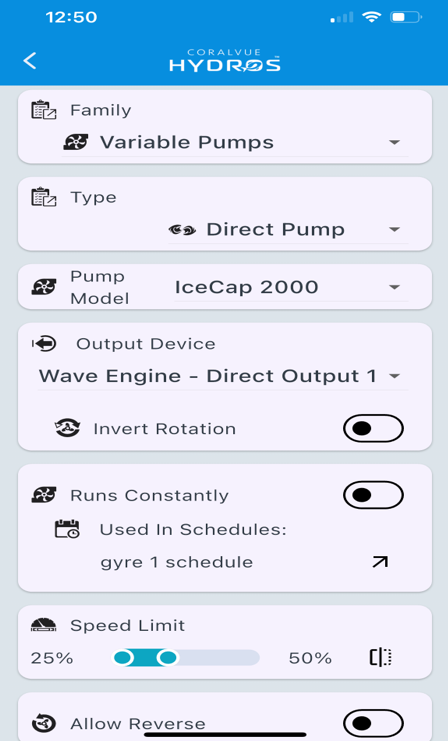
I add my gyres in the output, I create the schedule, and it should work but it keeps telling me to check the schedule.

Any idea's? @n2585722 ? Thank you.

1743958723638.png


1743958759355.png


1743958793378.png


1743958823366.png
 
I have not used the direct drive ports yet myself since I use MP10's for flow pumps but I have seen where there is a minimum speed on some models. This could be one of those. It could be 30%. Also make sure the power supply for the wave engine is connected to the wave engine and has power. Another thing that happens is the pump cable pins can get bent and cause this issue. Also if you set the maximum of the pump at 50% and the schedule the max would be closer to 25% since the schedule will fit within the max and min settings on the pump output. So schedule 100% on your setting would be 50% which is the max for the pump. So that could also be an issue.
 
thank you for the reply. I did double check all the attachments, and one gyre is brand new out of the box and the other gyre was on and working this morning. All I did was add the new gyre and it didn't work, so I stupidly deleted the gyre that was working.

I can't help but feel that somehow the collective is to blame. I programmed the gyres long ago before I had the hydros and created the collective.

I did submit a ticket so will see what they say. Otherwise I think I will delete the WE from the collective and put it back to factory settings, and just start all over again. But I'm about to turn into the hulk and smash so I'll just leave it till tomorrow. Thanks again for the help.
 
thank you for the reply. I did double check all the attachments, and one gyre is brand new out of the box and the other gyre was on and working this morning. All I did was add the new gyre and it didn't work, so I stupidly deleted the gyre that was working.

I can't help but feel that somehow the collective is to blame. I programmed the gyres long ago before I had the hydros and created the collective.

I did submit a ticket so will see what they say. Otherwise I think I will delete the WE from the collective and put it back to factory settings, and just start all over again. But I'm about to turn into the hulk and smash so I'll just leave it till tomorrow. Thanks again for the help.
Did you just add the WE to the collective? If so then that is the issue as any controller added to a collective will have all it's settings erased and all of them will have to be added to the collective including the schedules. Are you sure it is not just settings in the new settings that were setup in the collective that is preventing it from working? Also do not do a factory reset until you hear from CoralVue. That can cause it to be harder to troubleshoot the issue. I have 16 controllers and the only time I have done a factory reset was when I was asked to do it by someone at CoralVue. That happened to be a beta unit and not a production unit.
 
The 'collective' has been running for over a year, the system has been great. All I did was plug a brand new gyre into the direct slot #2, I created the output and the schedule and it should have worked.
Noted for the factory reset, I'll wait for Coralvue. before doing anything else.
 
Have you posted the issue to the Hydros Facebook group or on the Hydros forum? Someone that actually uses the same pump may be able to tell if it is a issue with the settings. My guess when the one that was working was added back one of the settings is probably different than it was before and causing the issue with it.
 
no I didn't know about the facebook group (I'll join that right away) and didn't think of the hydros forum.

I'm sure you're right, it must be something in the settings that I did previously. But I'll never be able to find it on my own, thats why I had the bright idea of the factory reset. I'll try the FB group and the forum , and Coralvue is pretty fast in replying to tickers so hope to fix this tomorrow

I'll update this thread as an FYI when I get it figured out. Thanks again for the help.
 
Have you posted the issue to the Hydros Facebook group or on the Hydros forum? Someone that actually uses the same pump may be able to tell if it is a issue with the settings. My guess when the one that was working was added back one of the settings is probably different than it was before and causing the issue with it.
As an FYI, foolish me must have knocked the power cord slightly out of the socket when messing with the wires, my sump space is super tight. So the wave engine had power from the bus cable, but not enough to power the gyres.

I feel foolish... trouble shooting rule #1 - check the power cord!
 
As an FYI, foolish me must have knocked the power cord slightly out of the socket when messing with the wires, my sump space is super tight. So the wave engine had power from the bus cable, but not enough to power the gyres.

I feel foolish... trouble shooting rule #1 - check the power cord!
You are not the only one that has had that happen to them. The direct drive ports get their power from the power input port and not the command bus. The same would apply to other Hydros controllers that have a separate power input such as the X10, XD and Sole.
 

TOP 10 Trending Threads

IF YOU WERE CHOOSING YOUR MAIN REEF TANK TODAY, WHAT SIZE WOULD YOU PICK COMPARED WITH YOUR CURRENT

  • Much smaller

    Votes: 2 2.9%
  • A little smaller

    Votes: 0 0.0%
  • About the same

    Votes: 5 7.4%
  • A little larger

    Votes: 22 32.4%
  • Much larger

    Votes: 22 32.4%
  • About the same volume, but different dimensions

    Votes: 9 13.2%
  • I’d keep this one and add a second tank

    Votes: 5 7.4%
  • I don’t have a reef tank yet

    Votes: 0 0.0%
  • Other (Post in the comments)

    Votes: 3 4.4%
Back
Top
Home
Post thread…
Market
What's new