




I wrote a simple, step-by-step tutorial last spring using Photobucket as an example, but it looks like Photobucket has changed their layout a bit since then. I figured that it's time for an update and that I would also offer a troubleshooting tip for those of us experiencing problems in getting the pics to display properly.
I am going to assume that you can create a Photobucket account and have figured out how to upload photos. (Alternatively, try imgur.com. It has a clean layout that I really like, and uploading photos is literally drag-and-drop. It's my new favorite.)
HOW TO POST PICS FROM PHOTOBUCKET
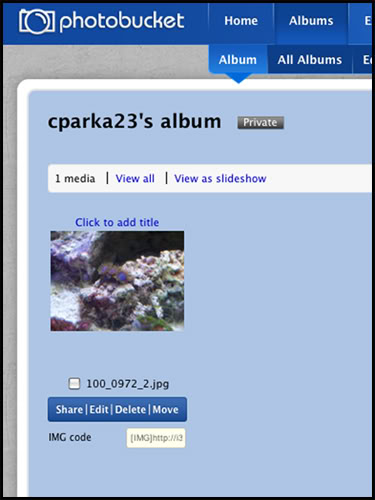
This is the layout of the album screen. Notice the last line underneath the photo that you want to share. If it is labelled IMG Code, then you're in good shape.
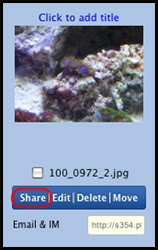
If your photo doesn't have "IMG code" showing, click the "Share" link.
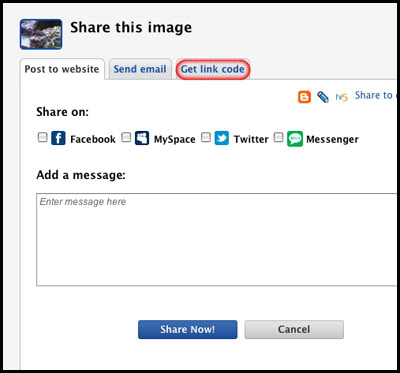
Click "Get link code"...
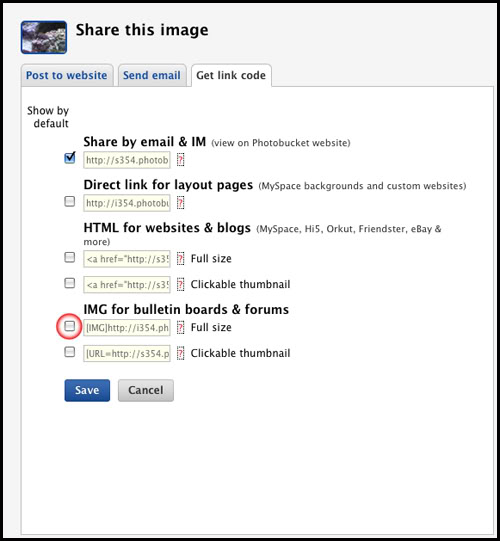
And fill in the check box "IMG for bulletin boards & forums".
Now, go back to the album view. The pictures should all have a line called "IMG code."
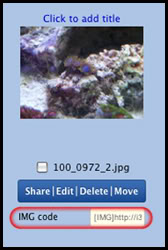
Now, we're ready to post the picture to R2R. Just click on the box next to the label "IMG code" and copy the text in it. As you create your post on Reef2Reef, all you have to do is paste the text into the area where you are typing. It will look like this before you click the "Submit Reply" or "Post Quick Reply" button.
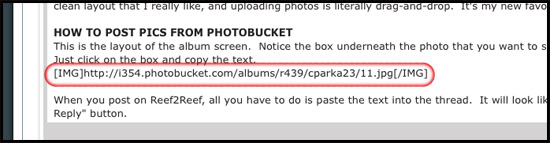
When you submit your post to the forum, everything between the square brackets will go away, leaving the photo in it's place.
I am going to assume that you can create a Photobucket account and have figured out how to upload photos. (Alternatively, try imgur.com. It has a clean layout that I really like, and uploading photos is literally drag-and-drop. It's my new favorite.)
HOW TO POST PICS FROM PHOTOBUCKET
This is the layout of the album screen. Notice the last line underneath the photo that you want to share. If it is labelled IMG Code, then you're in good shape.
If your photo doesn't have "IMG code" showing, click the "Share" link.
Click "Get link code"...
And fill in the check box "IMG for bulletin boards & forums".
Now, go back to the album view. The pictures should all have a line called "IMG code."
Now, we're ready to post the picture to R2R. Just click on the box next to the label "IMG code" and copy the text in it. As you create your post on Reef2Reef, all you have to do is paste the text into the area where you are typing. It will look like this before you click the "Submit Reply" or "Post Quick Reply" button.
When you submit your post to the forum, everything between the square brackets will go away, leaving the photo in it's place.
Last edited by a moderator:
















