Help apex app

yellow tang lover

Community Member
View Badges
Joined
Nov 27, 2023
Messages
89
Reaction score
31
Location
kcmo
Rating - 0%
0   0   0
Ok I have so questions how do I remove the outlets I’m not using, what alarm 1_2 on the top, and also what open and closed on the fmm ports and how do I add outlets to feed modes

500332D1-D464-4C82-9DA7-4F1A58F3BD16.png
 
Last edited:
1) There’s a padlock button on the top right. Click that and you can drag unused tiles into the space that opens at the top. Click the padlock again when you’re finished.

2) I’m not sure on yours

3) I assume you have a water level sensor and a leak detector plugged in to the FMM (or the Apex head unit, which also shows up as a FMM). Sensors are either open or closed. If a water level sensor is under water, it’s in the “closed” state. If it’s out of the water, it’s “open.” Leak sensors work similarly… an open leak sensors means there isn’t a leak there. If a leak occurs, it will complete the circuit in the sensor and then change states to “closed,” which would trigger the alarm.

4) Do you mean feed cycles?
 
Ok I have so questions how do I remove the outlets I’m not using, what alarm 1_2 on the top, and also what open and closed on the fmm ports and how do I add outlets to feed modes
500332D1-D464-4C82-9DA7-4F1A58F3BD16.png
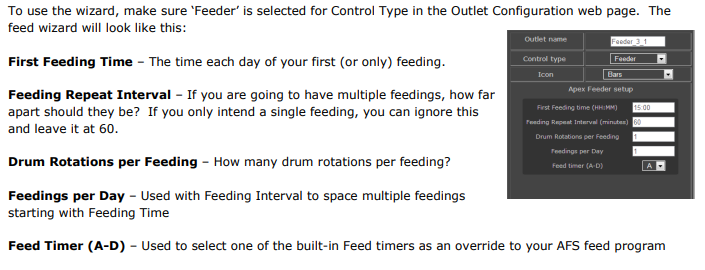
For feeding:

impLogo320x320.png


Pcqo9uxXBJhfWJbksKa79VtpN
 

TOP 10 Trending Threads

Back
Top
Home
Post thread…
Market
What's new