

Trouble connecting IceCap Gyre to Hydros controller

Gregg @ ADP

Valuable Member
View Badges
Joined
Sep 20, 2018
Messages
1,726
Reaction score
3,966
Location
Chicago
What state or country do you live in
Illinois
Rating - 0%
0   0   0
Hey everybody,

I have a new IceCap 4K gyre that I can’t get connected to the Hydros controller. When I go to set it up, the only options it go es me as an output is either Flow Pump or Alert.

I’ve set these up before and know there is an output option for wave gyre with all the different wave options (sine, square, etc). That option came up for me once, but now I can’t seem to get back to that.
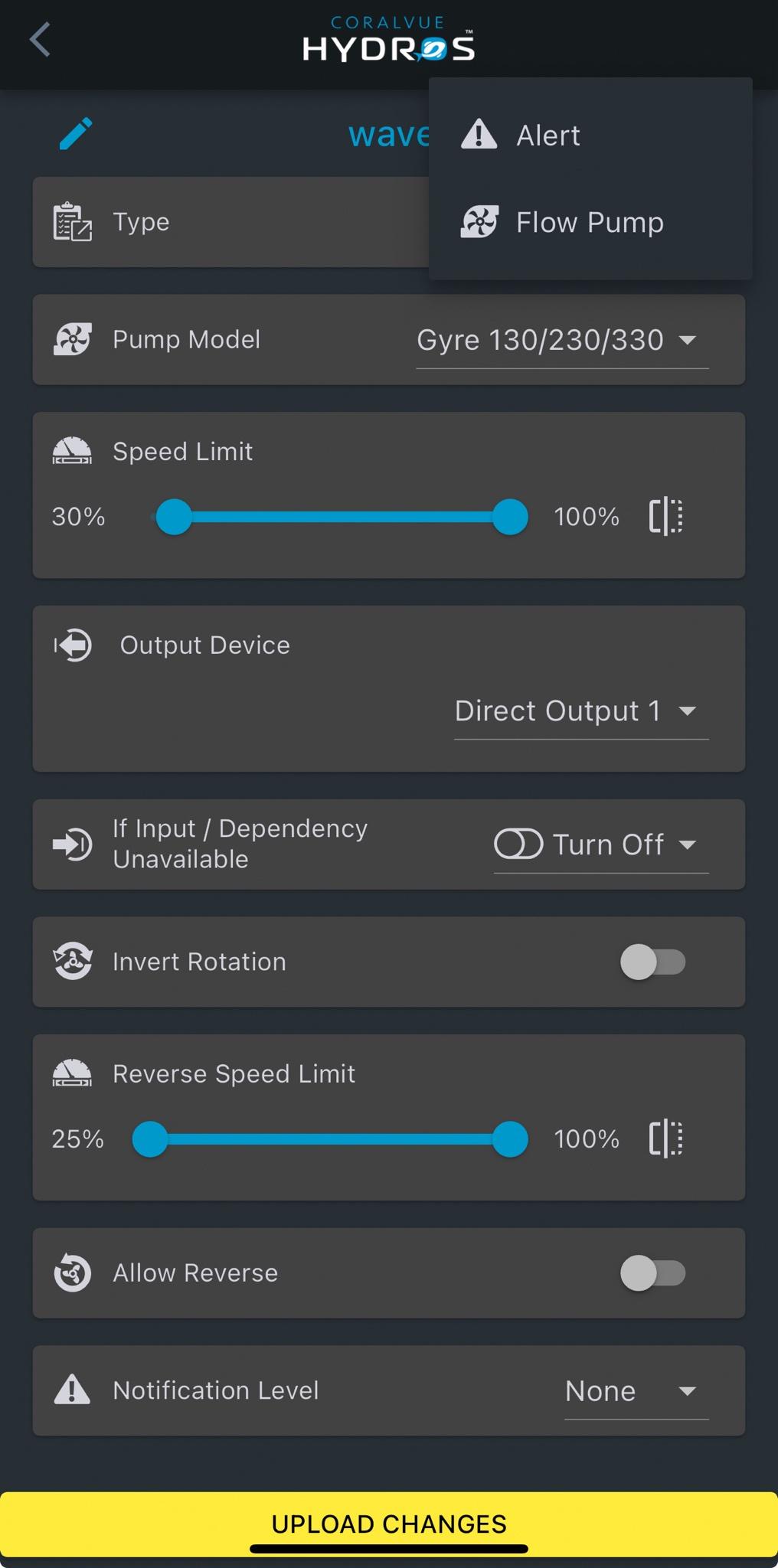
1lpsHxe.jpeg


Any ideas? Of course, every YouTube video out there is 4 years old, and the CoralVue troubleshooting doesn’t help with this.

Thanks.
 
It gives me the IceCap 4K option in the Pump Model menu, but it’s not go into me the wave gyre options.

And the gyre isn’t functioning at all.

I also did a hard reset w/magnet.

Any ideas?
 
OK, I just essentially pushed a bunch of buttons, and was able to override something…not sure what.

I set it to run between 50%-100%. Not sure exactly what program it’s on, because it is definitely switching flow output, seemingly on a random pattern.

So, better than nothing…but I still need to be able to get that wave gyre tile open to actually program it.
 
I just got the 4k gyre myself. I accepted the flow pump and gyre settings are available in the schedule tab.
 
Hey everybody,

I have a new IceCap 4K gyre that I can’t get connected to the Hydros controller. When I go to set it up, the only options it go es me as an output is either Flow Pump or Alert.

I’ve set these up before and know there is an output option for wave gyre with all the different wave options (sine, square, etc). That option came up for me once, but now I can’t seem to get back to that.

1lpsHxe.jpeg


Any ideas? Of course, every YouTube video out there is 4 years old, and the CoralVue troubleshooting doesn’t help with this.

Thanks.

Once you get your output for the pump setup. You will need to create a schedule from the left menu. The type would be flow pattern. It then let you choose a pattern the maximum flow rate and set the number of pump and select the pump outputs you want in the schedule. You can use one schedule if you set it to run a 24 hour time frame are use multiple schedule through out a 24 hour time frame.
 

TOP 10 Trending Threads

HOW WOULD YOU FEEL ABOUT RECEIVING A FISH OR CORAL AS A HOLIDAY GIFT?

  • I’d love one, as long as it’s a species I chose

    Votes: 15 35.7%
  • I’d trust someone who knows my tank to choose

    Votes: 1 2.4%
  • I’d rather get a gift card and pick it myself

    Votes: 14 33.3%
  • I’d prefer gear or supplies instead

    Votes: 0 0.0%
  • Please don’t surprise me with livestock

    Votes: 12 28.6%
  • Other (Post in the comments)

    Votes: 0 0.0%
Back
Top
Home
Post thread…
Market
What's new