

Apex Fusion Bug? Controlled Dosing display for Alkalinity and Calcium

  • Thread starter Thread starter NanJ
  • Start date Start date
  • Tagged users Tagged users None

NanJ

Active Member
View Badges
Joined
Jun 25, 2019
Messages
132
Reaction score
105
Location
Upstate SC
What state or country do you live in
South Carolina
Rating - 0%
0   0   0
From the Dashboard if I click on the dosing graph display for ALK, then open Control Interval this is what I see. This is how I need to system to dose.
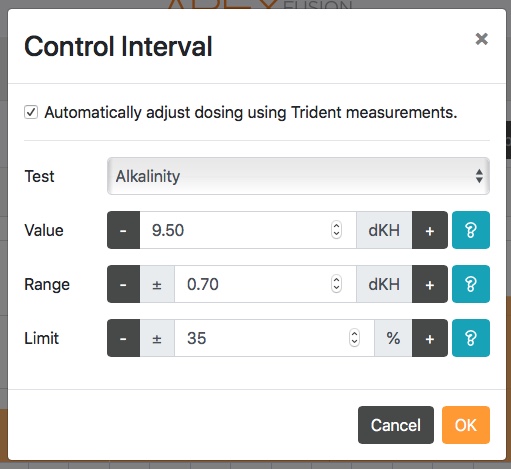
From ALK graph.jpeg


From the Dashboard, if I click on the Calcium dose graph, open the Control Interval box but click on Alkalinity, these are the settings I see. These are the settings that were originally programmed in the Controlled Dosing program when the system was set up in January.
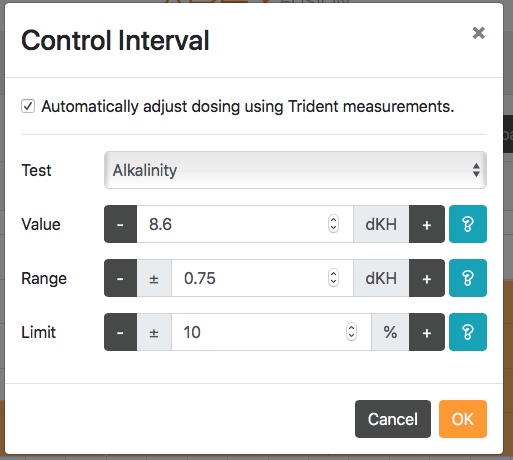
From CA drop down.jpeg


This flip-flop happens if I view the Calcium controlled dosing Control Interval using the same process - first going in via the graph then going in via the other graph and using the drop down box to review. In other words, I see the issue for both sets of Controlled Dosing.

Does your system have this issue?
I have also posted this to the Neptune Forums but I don't know if they are as active as R2R. Thanks for your input.
 
Following.
 
From the Dashboard if I click on the dosing graph display for ALK, then open Control Interval this is what I see. This is how I need to system to dose.
From ALK graph.jpeg


From the Dashboard, if I click on the Calcium dose graph, open the Control Interval box but click on Alkalinity, these are the settings I see. These are the settings that were originally programmed in the Controlled Dosing program when the system was set up in January.
From CA drop down.jpeg


This flip-flop happens if I view the Calcium controlled dosing Control Interval using the same process - first going in via the graph then going in via the other graph and using the drop down box to review. In other words, I see the issue for both sets of Controlled Dosing.

Does your system have this issue?
I have also posted this to the Neptune Forums but I don't know if they are as active as R2R. Thanks for your input.
Once you have set your new ALK or Ca dosing in the control menu and click ok, are you then updating/ applying the change by clicking the cloud with arrow at top of page?

Also, if you are using Trident based dosing, have you tried updating the dosing thru the Task menu?

Cant tell you the number of times I’ve forgotten that...
 
Once you have set your new ALK or Ca dosing in the control menu and click ok, are you then updating/ applying the change by clicking the cloud with arrow at top of page?

Cant tell you the number of times I’ve forgotten that...
Yes, I do upload to the cloud - but a good question! I even tried to upload one parameter at a time versus making several changes and then uploading. It didn’t make a difference.
 
Deleted wrong thread
 

TOP 10 Trending Threads

WHAT’S YOUR MOST MEMORABLE EXPERIENCE WITH A CORAL THAT LOOKED LIKE IT MIGHT NOT MAKE IT?

  • I’ve seen a dramatic comeback. I would have sworn it was a goner

    Votes: 21 42.0%
  • A slow recovery, and it got back to looking healthy

    Votes: 11 22.0%
  • It came back some, but never looked as good as it used to

    Votes: 4 8.0%
  • I tried to save one, but it didn’t make it

    Votes: 7 14.0%
  • Mine is still struggling...no comeback yet

    Votes: 3 6.0%
  • I’ve never had a coral in serious trouble

    Votes: 0 0.0%
  • See, this is why I don’t keep corals

    Votes: 2 4.0%
  • Other (Post in the comments)

    Votes: 2 4.0%
Back
Top
Home
Post thread…
Market
What's new



