



Ecosmart Live taking forever to "Complete configuration?"

  • Thread starter Thread starter SallyWho
  • Start date Start date
  • Tagged users Tagged users None

SallyWho

Well-Known Member
View Badges
Joined
Jul 20, 2017
Messages
876
Reaction score
668
Location
SW Missouri
Rating - 0%
0   0   0
I'm trying to get some new-to-me Radions ready for my tank, so I've got one of them plugged into my laptop via USB, logged into Ecosmart Live, clicked on "Devices" and then the + sign to add a device, and now I'm stuck on this screen. It's been a solid 45mins. Was I supposed to hit some of those buttons on the fixture itself at some point? If I try to hit a button now (like to lower the blazing intensity...) it just beeps at me as if I touched something I wasn't supposed to. Is this a normal/expected length of time to configure a used light? I didn't even try to program it! I'm just trying to connect it! Any advice? Thanks!
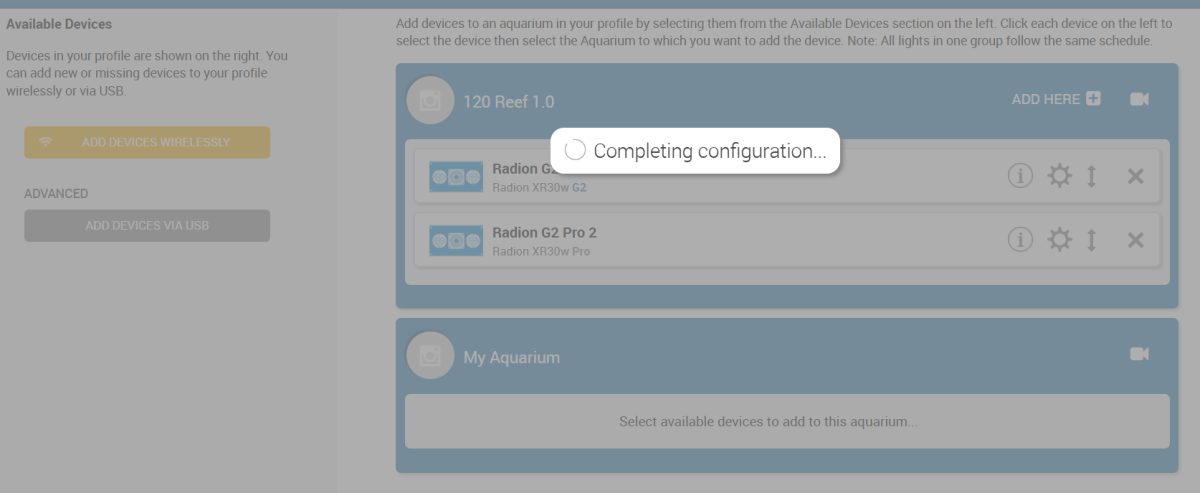
Screenshot (16).png
 
Just the USB from the Radion to my laptop, with Ecosmart Live running on the Chrome web browser. I did do a factory reset on them both
I remember that sometimes this takes more than one attempt. Are you sure that the version of Echosmart live is still compatible as well? (as far as I can see it is)
 
I remember that sometimes this takes more than one attempt. Are you sure that the version of Echosmart live is still compatible as well? (as far as I can see it is)
Also - were the lights previously controlled with a reef link?
I think Ecosmart Live is up to date? At least, I can access the lights currently in use on my tank. And y'know, I'm not sure how they were previously connected. But wouldn't a factory reset fix any digital confusion?
 
Do you have a Reef link? Its how I ran my gen4s and older MPs. I never tried the cable because you won't be able to use the PC to change setting once the lights are mounted without a reef link. At least that my understanding.
Mm, don't have a Reef Link either. But I don't need to mess with the programming very often. My lights just slide off their rails and I can plug one into my laptop as needed (maybe 3x in the past 5-6yrs?). Guess I'm not very high tech LOL!
 
Too bad you don't have a reef link, it would tell you if the lights are Mobius ready and you can perform the upgrade from their. If I remember correctly mine were but I had to change the RF module on some vortechs. Sorry I can't help with a wired connection to PC
 
Too bad you don't have a reef link, it would tell you if the lights are Mobius ready and you can perform the upgrade from their. If I remember correctly mine were but I had to change the RF module on some vortechs. Sorry I can't help with a wired connection to PC
No worries!
 
https://www.reef2reef.com/threads/setting-up-new-xr15-ecosmart-live-wont-connect.661244/https://www.reef2reef.com/threads/radions-won’t-connect-via-usb.583158/I'd try different USB ports ect...

And here is a Mobius chart...
https://support.ecotechmarine.com/hc/en-us/articles/360049391953-What-Radions-are-Mobius-CompatibleFor 4's..
Ready*: Devices marked as "Ready*" will need a Mobius compatible RF Module installed if built prior to February 2017. Once the RF Module is installed, they will simply need a "Legacy Device" firmware update via the Mobius app.
 
I think Ecosmart Live is up to date? At least, I can access the lights currently in use on my tank. And y'know, I'm not sure how they were previously connected. But wouldn't a factory reset fix any digital confusion?
One would think so - but as I said - I remember this being a little tricky.
 
Well, I'm a night shifter and it's time for bed. I'll keep fiddling with it later! Thanks for your help, folks!

 

TOP 10 Trending Threads

ARE YOU READY TO CONFESS TO CRAZIEST, DUMBEST, FUNNIEST THING YOU’VE EVER DONE IN REEFING?

  • Yeah, I'll confess! (Share your story in the comments!)

    Votes: 44 52.4%
  • Nah, I'll keep mine a secret...(Don't be like that, share with the class!)

    Votes: 40 47.6%
Back
Top
Home
Post thread…
Market
What's new





