



- Joined
- Oct 6, 2015
- Messages
- 1,499
- Reaction score
- 613
- Location
- Sweden
- What state or country do you live in
- Other International
Hi
Just purchased salinity probe to apex.
Through the pm2
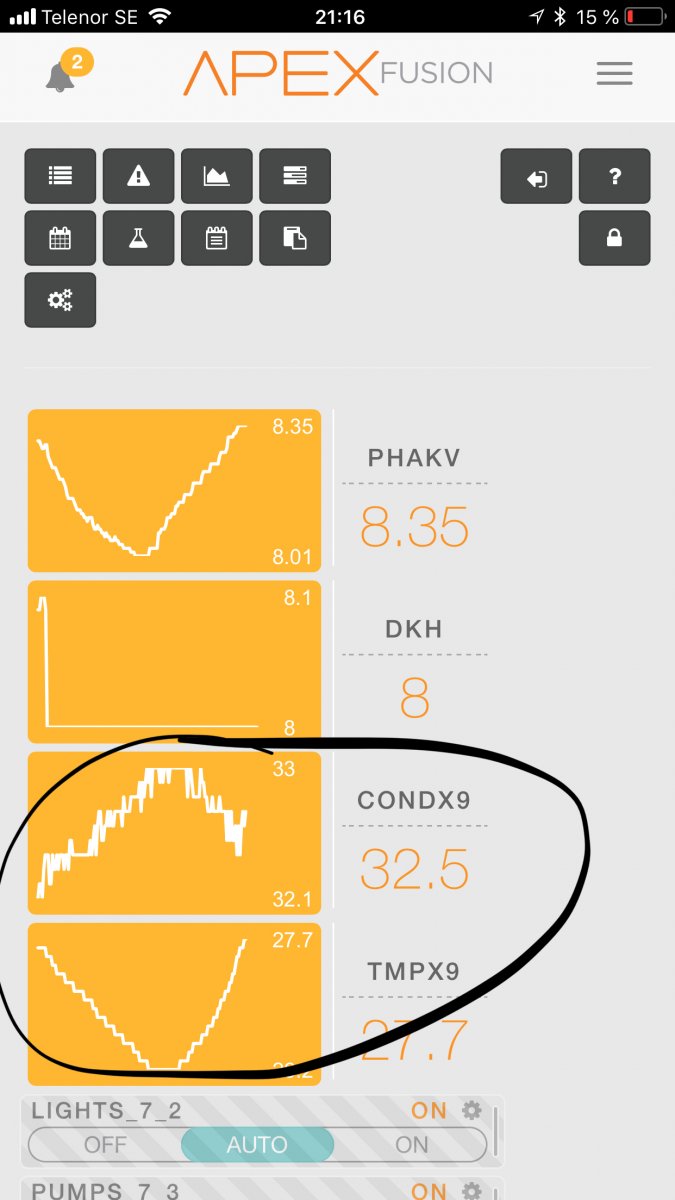
I use temp comp but it seems to overcompensate. With temp compensation there should be a reasonable straight line but it still follows the temperature BUT in opposite direction than within compensation thus an overcompensation. I guess?
So I settled the factor to the lowest recommendation 2.0% but still the “salinity “ graph is inverted the temp.
You with this feature and temp compensation. Have you managed it to temp compensate properly? What factor do you use? Maybe I shall lower to 1.9%??
But that is lower than “science “ that says it’s around 2.0-2.1 when a solution is NaCl dominated.
I have talked to support and they been very quick and good, and advise me to recalibrate , I will do that. But this shouldn’t just change the baseline but not change the temp behaviour..??
If I use temp comp I would like to see a reasonable straight graph. Isn’t that true?
Thanks for input
Jonas Roman
Just purchased salinity probe to apex.
Through the pm2
I use temp comp but it seems to overcompensate. With temp compensation there should be a reasonable straight line but it still follows the temperature BUT in opposite direction than within compensation thus an overcompensation. I guess?
So I settled the factor to the lowest recommendation 2.0% but still the “salinity “ graph is inverted the temp.
You with this feature and temp compensation. Have you managed it to temp compensate properly? What factor do you use? Maybe I shall lower to 1.9%??
But that is lower than “science “ that says it’s around 2.0-2.1 when a solution is NaCl dominated.
I have talked to support and they been very quick and good, and advise me to recalibrate , I will do that. But this shouldn’t just change the baseline but not change the temp behaviour..??
If I use temp comp I would like to see a reasonable straight graph. Isn’t that true?
Thanks for input
Jonas Roman