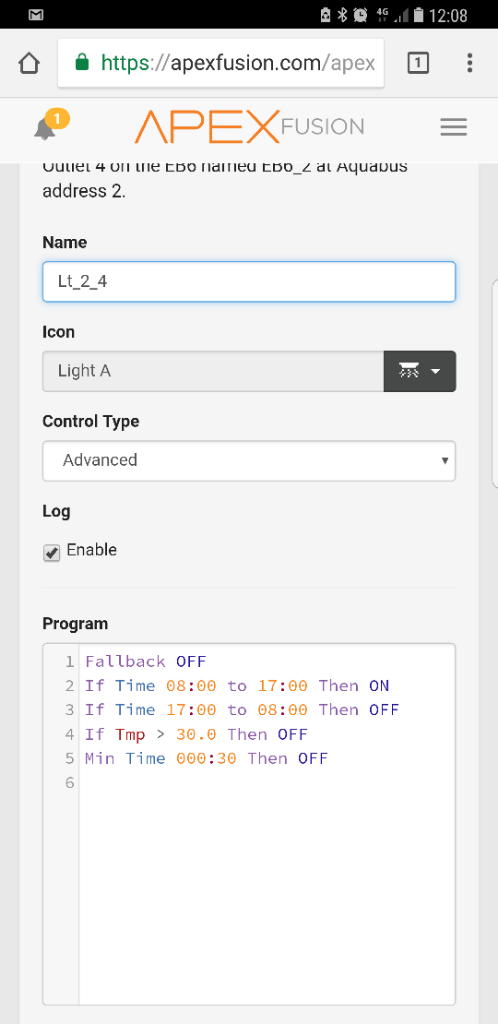
Apex Light Issue

Chad20056

New Member
View Badges
Joined
Jun 16, 2017
Messages
7
Reaction score
5
Rating - 0%
0   0   0
Hi I'm having trouble I'm trying to get my apex (2016) to turn a led grow light on and off at a specific time, I've tried several different ways from posts on Google etc but the lights either stay on and don't go off, come on and go straight off again or just don't come on at all just want them to come on at 8 and go off at 4 pics are just examples I've tried any help much appreciated
fa8d694707242683a041e41a6eb1465e.jpg
342e84cf1507eeac0be8baec9830d011.jpg
 

fermentedhiker

Well-Known Member
View Badges
Joined
Feb 11, 2016
Messages
813
Reaction score
637
Location
Maine
Rating - 0%
0   0   0
The first one should work do you have a different outlet to try it on?

The second one looks a little strange. Your on/off times are exactly the same just reversed. I would think you would need to stagger them by a minute, but I've never had to manually set up a light schedule so I might be wrong. Also why is your shutdown temp 30 degrees in the second on and 82 in the first? One F and one C. I would think that should be consistent across all programming on a specific unit.
 
OP
OP
C

Chad20056

New Member
View Badges
Joined
Jun 16, 2017
Messages
7
Reaction score
5
Rating - 0%
0   0   0
The first one should work do you have a different outlet to try it on?

The second one looks a little strange. Your on/off times are exactly the same just reversed. I would think you would need to stagger them by a minute, but I've never had to manually set up a light schedule so I might be wrong. Also why is your shutdown temp 30 degrees in the second on and 82 in the first? One F and one C. I would think that should be consistent across all programming on a specific unit.
I've tried it on all 6 sockets still the same thing happens, in the pic I'd just been playing about with it trying different things I also thought it should just work easily but it doesn't seem to want to play ball
 

Jimbo662

2500 Club Member
View Badges
Joined
Oct 1, 2013
Messages
4,940
Reaction score
2,163
Location
Austin, Tx
Rating - 0%
0   0   0
Try removing the If Time 1700 To 0800 Then Off. Since you have the Fallback Off statement it'll turn off once the time hits 1700. Like fermented said you can't have start / stop times the same. When apex looks at a time it see it as 00:00:00. In your first line you say to stop the ON command at 1700 it's actually going to stop at 17:00:59 then your second line says to start the OFF command at 1700 which the system sees as starting that command at 17:00:00...so you have an overlap.
 

Reefer1978

2500 Club Member
View Badges
Joined
Sep 22, 2014
Messages
4,139
Reaction score
3,643
Location
New Jersey
Rating - 100%
4   0   0
Couple of very dumb questions for you:
  1. Are you sure the light works? Try just turning on with the dashboard slider.
  2. What's the tank temperature?
  3. I do believe in the programming, the temp is in F, so Tmp > 30 is always true, but I could be mistaken here.
Try using just the timers without temp settings.
 

Reefer1978

2500 Club Member
View Badges
Joined
Sep 22, 2014
Messages
4,139
Reaction score
3,643
Location
New Jersey
Rating - 100%
4   0   0
Yep I am wrong on the celsius part, if you changed your apex to run on celsius programming should be fine.
 

lake985

Active Member
View Badges
Joined
Dec 2, 2015
Messages
158
Reaction score
199
Location
New York
Rating - 0%
0   0   0
Here's the code for my fuge light. Comes on at 8:15pm and off at 2:00pm.

Fallback OFF
Set OFF
If Time 20:15 to 14:00 Then ON
If Tmp > 81.0 Then OFF
Min Time 005:00 Then OFF

Maybe you need the SET command?
 
OP
OP
C

Chad20056

New Member
View Badges
Joined
Jun 16, 2017
Messages
7
Reaction score
5
Rating - 0%
0   0   0
Cheers guys yes it works perfectly fine when slider is set to on as I said the pics are just some of the things I've tried not all I'll give what you have suggested a try and report back
 
OP
OP
C

Chad20056

New Member
View Badges
Joined
Jun 16, 2017
Messages
7
Reaction score
5
Rating - 0%
0   0   0
Here's the code for my fuge light. Comes on at 8:15pm and off at 2:00pm.

Fallback OFF
Set OFF
If Time 20:15 to 14:00 Then ON
If Tmp > 81.0 Then OFF
Min Time 005:00 Then OFF

Maybe you need the SET command?
Thanks mate this seems to have worked no idea why it wouldn't do it before it's gone off now hopefully it'll come back on in the morning fingers crossed
 

RussM

Active Member
View Badges
Joined
Jun 4, 2011
Messages
278
Reaction score
200
Location
El Cajon, CA
Rating - 0%
0   0   0
@Chad20056, I am assuming that this is a new setup; one of the most common oversights is not setting the Apex clock properly for your location (timezone); this could be why the light did not operate as expected. The other is the temp setting - it's not clear which scale you are using, F or C. Depending on what kinds of liughts you use, and depending on how much heat they contribute to the water temperature, you may not even need or want to high temp shutdown for your primary lighting.

You were given some bogus/incorrect info in this thread.

1. Fallback does not work as jimbo described. Fallback is a special programming command that has no effect during normal operations; it will not turn off the output whenever an If Time ... Then ON statement is not true. For that, you need a Set statement, as was later brought out.

If you have this programming:

Fallback OFF
If Time 08:00 To 17:59 Then ON​

The output will turn on when the Apex clock hits 08:00 first time after the Apex starts up, but will never shut OFF because there is no programming to do that.

There is a sticky post on the Neptune Systems Community Forum that goes into greater detail about Fallback: https://forum.neptunesystems.com/showthread.php?8510-All-About-FALLBACK

Next, let's talk about If Time statements:

You could do what you'd done earlier and use an If Time to turn the output on and another If Time to turn the output OFF, like this:

If Time 08:00 to 17:59 Then ON
If Time 18:00 to 07:59 Then OFF​

But this is inelegant. The proper way to do simple time-based programming is to use a Set statement to establish the default state (ON or OFF) of the output, then an If Time statement to turn the output ON (or OFF) when desired.

For a primary light:

Set OFF
If Time 08:00 to 17:59 Then ON​

Let's carry this a bit further, and have multiple ON and OFF periods throughout a 24-hour day, and do it all with only If Time Statements:

If Time 00:00 to 05:59 Then OFF
If Time 06:00 to 07:59 Then ON
If Time 08:00 to 13:59 Then OFF
If Time 14:00 to 18:59 Then ON
If Time 19:00 to 20:59 Then OFF
If Time 21:00 to 21:59 Then ON
If Time 22:00 to 23:59 Then OFF​

This will work, but is kinda sloppy and inefficient programming.

Let's re-do it properly using a Set OFF statement instead of all of those Time HH:MM to HH:MM Then OFF statements:

Set OFF
If Time 06:00 to 07:59 Then ON
If Time 14:00 to 18:59 Then ON
If Time 21:00 to 21:59 Then ON​

This is simpler, shorter, and cleaner, eh?

The other bit of incorrect info given was about the overlapping If Time statements... while it's not good clean programming to have that condition, there is no conflict as was implied; the Apex will handle that gracefully... the last true statement will simply prevail.

There is another sticky post on the Neptune Systems Community Forum that covers the use of the Set statement: https://forum.neptunesystems.com/sh...d-This-Thread!&p=114462&viewfull=1#post114462

 
OP
OP
C

Chad20056

New Member
View Badges
Joined
Jun 16, 2017
Messages
7
Reaction score
5
Rating - 0%
0   0   0
@Chad20056, I am assuming that this is a new setup; one of the most common oversights is not setting the Apex clock properly for your location (timezone); this could be why the light did not operate as expected. The other is the temp setting - it's not clear which scale you are using, F or C. Depending on what kinds of liughts you use, and depending on how much heat they contribute to the water temperature, you may not even need or want to high temp shutdown for your primary lighting.

You were given some bogus/incorrect info in this thread.

1. Fallback does not work as jimbo described. Fallback is a special programming command that has no effect during normal operations; it will not turn off the output whenever an If Time ... Then ON statement is not true. For that, you need a Set statement, as was later brought out.

If you have this programming:

Fallback OFF
If Time 08:00 To 17:59 Then ON​

The output will turn on when the Apex clock hits 08:00 first time after the Apex starts up, but will never shut OFF because there is no programming to do that.

There is a sticky post on the Neptune Systems Community Forum that goes into greater detail about Fallback: https://forum.neptunesystems.com/showthread.php?8510-All-About-FALLBACK

Next, let's talk about If Time statements:

You could do what you'd done earlier and use an If Time to turn the output on and another If Time to turn the output OFF, like this:

If Time 08:00 to 17:59 Then ON
If Time 18:00 to 07:59 Then OFF​

But this is inelegant. The proper way to do simple time-based programming is to use a Set statement to establish the default state (ON or OFF) of the output, then an If Time statement to turn the output ON (or OFF) when desired.

For a primary light:

Set OFF
If Time 08:00 to 17:59 Then ON​

Let's carry this a bit further, and have multiple ON and OFF periods throughout a 24-hour day, and do it all with only If Time Statements:

If Time 00:00 to 05:59 Then OFF
If Time 06:00 to 07:59 Then ON
If Time 08:00 to 13:59 Then OFF
If Time 14:00 to 18:59 Then ON
If Time 19:00 to 20:59 Then OFF
If Time 21:00 to 21:59 Then ON
If Time 22:00 to 23:59 Then OFF​

This will work, but is kinda sloppy and inefficient programming.

Let's re-do it properly using a Set OFF statement instead of all of those Time HH:MM to HH:MM Then OFF statements:

Set OFF
If Time 06:00 to 07:59 Then ON
If Time 14:00 to 18:59 Then ON
If Time 21:00 to 21:59 Then ON​

This is simpler, shorter, and cleaner, eh?

The other bit of incorrect info given was about the overlapping If Time statements... while it's not good clean programming to have that condition, there is no conflict as was implied; the Apex will handle that gracefully... the last true statement will simply prevail.

There is another sticky post on the Neptune Systems Community Forum that covers the use of the Set statement: https://forum.neptunesystems.com/sh...d-This-Thread!&p=114462&viewfull=1#post114462

Hi thanks for the info, my unit is in c because my chiller, heaters etc are all in centigrade my clock is also correct the apex unit itself is just over 3 months old I believe I've done it now with thanks to above posts but will definitely check out the stickies, the lights definitely gone off when I expected it to but wether it'll come back on when I expect it to I'll find out in the morning
 

TOP 10 Trending Threads

HOW DO YOU ADJUST YOUR CUC AS ALGAE DISAPPEARS?

  • Capture and re-home CUC

    Votes: 6 6.4%
  • Increase white light/hours in tank to spur algae growth to feed CUC

    Votes: 6 6.4%
  • Feed nori to support CUC

    Votes: 33 35.1%
  • Feed herbivore pellets to support CUC

    Votes: 30 31.9%
  • Allow attrition to balance CUC and algae

    Votes: 40 42.6%
  • Provide macro algae to feed CUC

    Votes: 6 6.4%
  • Introduce CUC predators

    Votes: 1 1.1%
  • Other (please explain)

    Votes: 10 10.6%
Back
Top