reef-pi :: An opensource reef tank controller based on Raspberry Pi.

Erica-Renee

Valuable Member
View Badges
Joined
Oct 4, 2017
Messages
1,596
Reaction score
3,288
Location
lost
Rating - 0%
0   0   0
Totally jealous of the dosing pump setup. Can you tell us more about it?
Its 4 dosing heads out of a jabao dosing pump...
the pumps connect to ln2803 ic then out of that ic into the pca9685 using 4 ports .. the pca9685 is connect to the pi of course..... The Power and ground on the pumps are isolated from pca9685 and powered with a 12v ps connected to input and ground on ln2803 .. Again this keeps it somewhat isolated . the reef-pi ..

Its only being tested on the desk at this time.. Soon I am going to sort things out in isolated components data cables only will be connected to the pi . either with serial cables or hdmi.....

everything in my setup has been from reading this forum thread.. All the info is here . I just duplicated

OHH Also i am Worn out I have i layed 350 sq ft of floor tile today ..... back splash tomorrow... Will give the customer there Kitchen back End of the Week..
 

Erica-Renee

Valuable Member
View Badges
Joined
Oct 4, 2017
Messages
1,596
Reaction score
3,288
Location
lost
Rating - 0%
0   0   0
In other news... The support hoops are machined for the aluminum fan cover. I'll try to get the sheet metal bent tonight. We have a press brake at work, but it's an animal and not well suited to delicate .032" aluminum sheet.

IMAG0131.jpg


IMAG0133.jpg

Where did you get those sinks if you do not mind me asking ?
 

Erica-Renee

Valuable Member
View Badges
Joined
Oct 4, 2017
Messages
1,596
Reaction score
3,288
Location
lost
Rating - 0%
0   0   0
Well if the heater has an adjustable temp and you have it set to stay on for example, mine is a 50 watt heater preset to 78 degrees and I have the reef pi set to 76, so the heater is always in an on state(it has an internal sorta mechanical thermostat) so it acts as a resistive load only, no major inrush of current to pit and damage the relay contact on the relay board. In my case only about .45 amps, well with in the rating of the relays.
wow 50w heaters.. you guys are very lucky I have 4 500w heaters running two each on ink-bird controllers.. Some times in the winter they all 4 will run I forget the brand of them...
 

cheeseclock

Community Member
View Badges
Joined
Apr 4, 2018
Messages
41
Reaction score
69
Rating - 0%
0   0   0
Where did you get those sinks if you do not mind me asking ?

They used to hang out the back of stainless enclosures (like the one I posted a picture of previously). They were part of a system that monitored arc welding parameters. They were originally a touchscreen, single board computer, hard drive, and power supply. The heatsink was connected directly to the Celeron processor and it cooled itself passively. Unfortunately, the mounting lugs are just far enough off dimensionally from a 120mm fan to irritate me. I have a stash of all manner of stuff I've collected over the years. The girlfriend wants me to begin uncluttering the basement and garage and honestly, she has a valid point. I have some power supplies if anyone is in need.
 

cheeseclock

Community Member
View Badges
Joined
Apr 4, 2018
Messages
41
Reaction score
69
Rating - 0%
0   0   0
wow 50w heaters.. you guys are very lucky I have 4 500w heaters running two each on ink-bird controllers.. Some times in the winter they all 4 will run I forget the brand of them...

How are the ink-bird controllers? I saw them on Ebay and I had thought about trying one because I can get it with 0-10v analog output.
 

Nate'sreef

New Member
View Badges
Joined
Apr 23, 2018
Messages
1
Reaction score
1
Location
Queensland
Rating - 0%
0   0   0
How are you all,

First off, @Ranjib - Love you work, you are definitely a valuable contributor to the hobby.

I have joined this forum specifically for Reef-Pi, I have been trying set up an emulator to ***** the ease of use. Its been awhile since playing with computers I'll pick it up really fast, however, I'm struggling to get the environment running on a windows 10 emulator.

The below commands were entered in to the control however, no response was provided
dtparam=i2c_arm=on
dtparam=spi=on
dtparam=audio=on
enable_uart=1 dtoverlay=w1-gpio

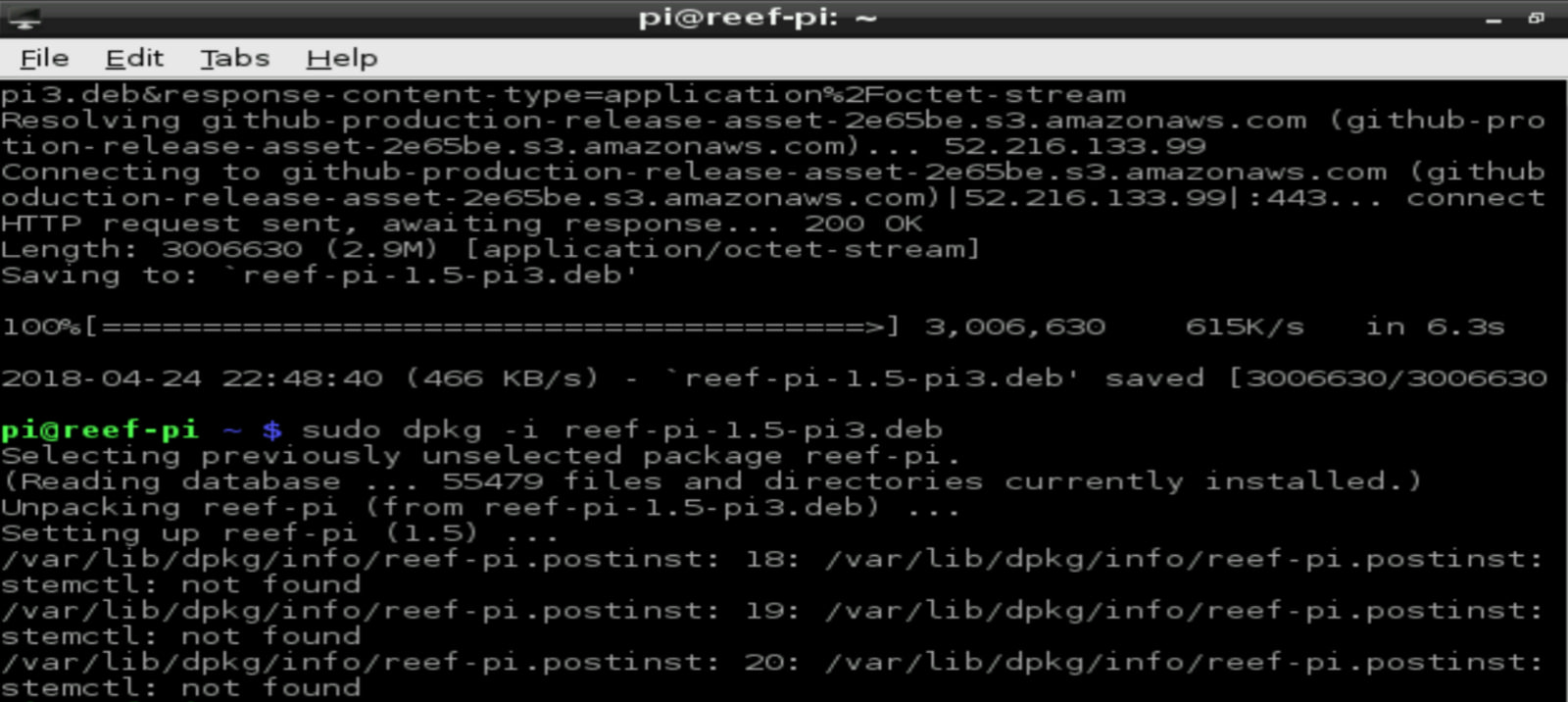
I could get up to - wget -c https://github.com/reef-pi/reef-pi/releases/download/1.5/reef-pi-1.5-pi3.deb

The package would download, then when attempting to run sudo dpkg -i reef-pi-1.5-pi3.deb

I would receive 4 lines of errors relating to missing files.

Could someone please assist me getting the solution installed on the emulator to assess if the solution is a viable option for me.

Many thanks in advance
 
OP
OP
Ranjib

Ranjib

7500 Club Member
View Badges
Joined
Apr 16, 2016
Messages
9,876
Reaction score
16,680
Location
Pleasant Hill, Concord
Rating - 0%
0   0   0
How are you all,

First off, @Ranjib - Love you work, you are definitely a valuable contributor to the hobby.

I have joined this forum specifically for Reef-Pi, I have been trying set up an emulator to ***** the ease of use. Its been awhile since playing with computers I'll pick it up really fast, however, I'm struggling to get the environment running on a windows 10 emulator.

The below commands were entered in to the control however, no response was provided
dtparam=i2c_arm=on
dtparam=spi=on
dtparam=audio=on
enable_uart=1 dtoverlay=w1-gpio

I could get up to - wget -c https://github.com/reef-pi/reef-pi/releases/download/1.5/reef-pi-1.5-pi3.deb

The package would download, then when attempting to run sudo dpkg -i reef-pi-1.5-pi3.deb

I would receive 4 lines of errors relating to missing files.

Could someone please assist me getting the solution installed on the emulator to assess if the solution is a viable option for me.

Many thanks in advance

those dtparam=i2c_arm=on stuff are not commands, they are supposed to be in /boot/config.txt file. Which documentation you are following?
When you encounter an error in pi, share the screenshot of the error, so that we can see what command you are typing and what exact error is. Otherwise, it will be hard to troubleshoot
 
OP
OP
Ranjib

Ranjib

7500 Club Member
View Badges
Joined
Apr 16, 2016
Messages
9,876
Reaction score
16,680
Location
Pleasant Hill, Concord
Rating - 0%
0   0   0
2.0 features are coming along slowly. Almost done with customizable dashboard and chart selector. The UI is still hideous, but it works. We can now specify the grid layout (row x column) in dashboard, along side individual grids width/height and the exact chart we want to see. The entire dashboard is customizable now.

Screen Shot 2018-04-23 at 7.12.00 PM.png
 

xevox

New Member
View Badges
Joined
Mar 13, 2018
Messages
9
Reaction score
0
Rating - 0%
0   0   0
@Ranjib Sorry I have 2 accounts by accident, Work computer and home computer.

I have QEMU installed, I have the raspian environment loaded, Can't for the life of my find this config file. Even if I show hidden files.

Im now trying to install reef-pi

command line errors by Nathan Pallavicini, on Flickr

command line errors.PNG


command line errors.PNG


command line errors.PNG


command line errors.PNG
 
Last edited:
OP
OP
Ranjib

Ranjib

7500 Club Member
View Badges
Joined
Apr 16, 2016
Messages
9,876
Reaction score
16,680
Location
Pleasant Hill, Concord
Rating - 0%
0   0   0
@Ranjib Sorry I have 2 accounts by accident, Work computer and home computer.

I have QEMU installed, I have the raspian environment loaded, Can't for the life of my find this config file. Even if I show hidden files.

Im now trying to install reef-pi

command line errors by Nathan Pallavicini, on Flickr

command line errors.PNG


command line errors.PNG


command line errors.PNG


command line errors.PNG
so, this is not a physical raspberry pi, its a vm?? the errors look like missing systemd. what version of raspbian you are trying? it should be jessie (debian)
 

PeculiarReef

New Member
View Badges
Joined
Apr 24, 2018
Messages
6
Reaction score
4
Rating - 0%
0   0   0
Hello from Europe! :)

I´m already reef-pi user too.;) and I´m so excited with it! Good job Ranjib!

Is there any way to update the system to do Celsius readouts on the graph? I found same question on 202page but that link it does not work.
 
OP
OP
Ranjib

Ranjib

7500 Club Member
View Badges
Joined
Apr 16, 2016
Messages
9,876
Reaction score
16,680
Location
Pleasant Hill, Concord
Rating - 0%
0   0   0
Hello from Europe! :)

I´m already reef-pi user too.;) and I´m so excited with it! Good job Ranjib!

Is there any way to update the system to do Celsius readouts on the graph? I found same question on 202page but that link it does not work.
Not yet. But this has been a constant request. I'll get it going for 2.0 release.
Thank you for trying out reef-pi
 

xevox

New Member
View Badges
Joined
Mar 13, 2018
Messages
9
Reaction score
0
Rating - 0%
0   0   0
@Ranjib

Qemu is zipped on desktop
Kernal is qemu-4.4.34-jessie
Raspian is 2017-04-10-raspbian-jessie.img

Start File
qemu-system-arm -kernel kernel-qemu-4.4.34-jessie -cpu arm1176 -m 256 -M versatilepb -no-reboot -serial stdio -append "root=/dev/sda2 panic=1 rootfstype=ext4 rw init=/bin/bash" -drive "file=2017-04-10-raspbian-jessie.img,index=0,media=disk,format=raw" -redir tcp:2222::22

sudo nano /etc/udev/rules.d/90-qemu.rules

KERNEL=="sda", SYMLINK+="mmcblk0"
KERNEL=="sda?", SYMLINK+="mmcblk0p%n"
KERNEL=="sda2", SYMLINK+="root"

Reboot
upload_2018-4-25_9-36-48.png


qemu-img.exe resize 2017-04-10-raspbian-jessie.img +4G - doesn't work

upload_2018-4-25_9-36-0.png


Start File
qemu-system-arm -kernel kernel-qemu-4.4.34-jessie -cpu arm1176 -m 256 -M versatilepb -no-reboot -serial stdio -append "root=/dev/sda2 panic=1 rootfstype=ext4 rw -drive "file=2017-04-10-raspbian-jessie.img,index=0,media=disk,format=raw" -redir tcp:2222::22

QEMU opens but the shuts down
 
OP
OP
Ranjib

Ranjib

7500 Club Member
View Badges
Joined
Apr 16, 2016
Messages
9,876
Reaction score
16,680
Location
Pleasant Hill, Concord
Rating - 0%
0   0   0
@Ranjib

Qemu is zipped on desktop
Kernal is qemu-4.4.34-jessie
Raspian is 2017-04-10-raspbian-jessie.img

Start File
qemu-system-arm -kernel kernel-qemu-4.4.34-jessie -cpu arm1176 -m 256 -M versatilepb -no-reboot -serial stdio -append "root=/dev/sda2 panic=1 rootfstype=ext4 rw init=/bin/bash" -drive "file=2017-04-10-raspbian-jessie.img,index=0,media=disk,format=raw" -redir tcp:2222::22

sudo nano /etc/udev/rules.d/90-qemu.rules

KERNEL=="sda", SYMLINK+="mmcblk0"
KERNEL=="sda?", SYMLINK+="mmcblk0p%n"
KERNEL=="sda2", SYMLINK+="root"

Reboot
upload_2018-4-25_9-36-48.png


qemu-img.exe resize 2017-04-10-raspbian-jessie.img +4G - doesn't work

upload_2018-4-25_9-36-0.png


Start File
qemu-system-arm -kernel kernel-qemu-4.4.34-jessie -cpu arm1176 -m 256 -M versatilepb -no-reboot -serial stdio -append "root=/dev/sda2 panic=1 rootfstype=ext4 rw -drive "file=2017-04-10-raspbian-jessie.img,index=0,media=disk,format=raw" -redir tcp:2222::22

QEMU opens but the shuts down
This is not really reef-pi related, you have to consult with someone more familiar with qemu/arm. From the error it looks like you are getting halted due to a wrong ioctl way before init/userland. I think it will be easier to just build reef-pi on windows straight if you want to tinker with code or see it live without a physical raspberry pi,. I develop it on macbook, and have not tried windows, but I'd be curious to know. I dont see anything obvious that will break.
 
OP
OP
Ranjib

Ranjib

7500 Club Member
View Badges
Joined
Apr 16, 2016
Messages
9,876
Reaction score
16,680
Location
Pleasant Hill, Concord
Rating - 0%
0   0   0
Celsius support is in. European users can now configure reef-pi to use celsius as temperature unit.
https://github.com/reef-pi/reef-pi/pull/346

UI:
Screen Shot 2018-04-26 at 3.00.27 PM.png


In addition , I have also added support for configuring the temperature range in charts.

This will be out in couple of weeks, as 2.0 beta release
 

James Golden

Community Member
View Badges
Joined
Apr 8, 2018
Messages
44
Reaction score
55
Rating - 0%
0   0   0
B04215FD-8D86-4E7B-8620-B5C441D035CE.png
B04215FD-8D86-4E7B-8620-B5C441D035CE.png Well, I have been working on a little project. Some background first. I made a garage door opening for me when I am on my motorcycle and it uses and esp8266. It was set up to be its own wifi device and I had to go to a website when I was close enough to the door to open it. That became tiring! In comes Blynk! I had never seen or heard about it so I gave it a try! It works great! I can open the door from anywhere now! Using the Blynk app, I can open the door for the ups, fedex etc when they call to deliver a package, also open the door for my daughter when she forgets her keys!

Soooooooo, I decided to try and get this to work with Blynk. Let me tell you, it was fun and a pain all at the same time. I have never wrote any type of program for the Raspberry Pi, so this was going to be and adventure. So I started playing with stuff and settled on NODE.JS, why, I have no freaking clue! It looked fun, but it really wasn't . But when I get my head wrapped around a problem, I get it figured out. And I did! Using Blynk and a NODE.JS program running on the pi, I can monitor any of the equipment output, ie on, off the temperature and other things. My next project is going to be to turn on and off the equipment outputs too. But for now, I can monitor the devices I have set up for now. More to come also!! If it was not for @Ranjib I would never have been able to do this
 

James Golden

Community Member
View Badges
Joined
Apr 8, 2018
Messages
44
Reaction score
55
Rating - 0%
0   0   0
well decided to work on the controlling of the outputs from the Blynk app and I am 3/4 of the way there. Test outlet is working from standalone program, so just have to get it in the main code now.
 
OP
OP
Ranjib

Ranjib

7500 Club Member
View Badges
Joined
Apr 16, 2016
Messages
9,876
Reaction score
16,680
Location
Pleasant Hill, Concord
Rating - 0%
0   0   0
B04215FD-8D86-4E7B-8620-B5C441D035CE.png
B04215FD-8D86-4E7B-8620-B5C441D035CE.png Well, I have been working on a little project. Some background first. I made a garage door opening for me when I am on my motorcycle and it uses and esp8266. It was set up to be its own wifi device and I had to go to a website when I was close enough to the door to open it. That became tiring! In comes Blynk! I had never seen or heard about it so I gave it a try! It works great! I can open the door from anywhere now! Using the Blynk app, I can open the door for the ups, fedex etc when they call to deliver a package, also open the door for my daughter when she forgets her keys!

Soooooooo, I decided to try and get this to work with Blynk. Let me tell you, it was fun and a pain all at the same time. I have never wrote any type of program for the Raspberry Pi, so this was going to be and adventure. So I started playing with stuff and settled on NODE.JS, why, I have no freaking clue! It looked fun, but it really wasn't . But when I get my head wrapped around a problem, I get it figured out. And I did! Using Blynk and a NODE.JS program running on the pi, I can monitor any of the equipment output, ie on, off the temperature and other things. My next project is going to be to turn on and off the equipment outputs too. But for now, I can monitor the devices I have set up for now. More to come also!! If it was not for @Ranjib I would never have been able to do this
Joy of programming :-)
I am giving back what I learned from the opensource community
 

TOP 10 Trending Threads

WHAT AMOUNT OF LIVE ROCK AND SAND SHOULD BE PRIORITIZED FOR OPTIMAL BIODIVERSITY/FILTRATION?

  • 100% live rock + bagged sand

    Votes: 37 27.2%
  • 100% dry rock + 100% live sand

    Votes: 46 33.8%
  • 50/50 live/dry rock, 50/50 live/bagged sand

    Votes: 30 22.1%
  • 75% live rock, 25% live sand

    Votes: 13 9.6%
  • 25% live rock, 75% live sand

    Votes: 10 7.4%
Back
Top