

Tunze Orca - Beyond Basic Programming Help

Detour

Community Member
View Badges
Joined
Jan 1, 2021
Messages
78
Reaction score
37
Location
Haslett
Rating - 0%
0   0   0
So, I'll start by saying that I run a variety of equipmet on my 150 tall tank (48x24x30), but try as best I can to control it with my Apex, including slower water movement overnight and fully automated feeding cycles.

Then the ORCA came out and I knew I wanted one for the back center of my tank - which after 4 monts of waiting for my tank lid, is now in the tank.

The "eye" indicator light doesn't appear to work - so I thought I had a power issue - but ended up trying to complete the initial setup despite not having a solid red light and got passed that.

The basic setup is pretty straightforward - set you end positions, flow speed and oscilating speed - while getting used the fact that the app uses "speed" as the title for both of those options (oscilating and fan).

Now what I'm struggling with how to adjust that to coordinate with my feed cycles, etc.

First issue - I couldn't get it to recognize the timezone I'm in. I'm in Michigan. It defaulted to Chicago - and was an hour off. Changed to Toronto, and it would show Toronto for the timezone, but I was still an hour off on the time bar on the Time Control screen. Got frustrated trying to get it to work, ignored it over night, and next day I'm on Tornoto time and the Time Control page screen seems to reflect current time.

Next issue - getting Time Control settings to slow down the fan speed during feed cycles. No matter what I did, it wouldn't seem to behave like it was programmed. Then one my one millionth Google AI serach results had a nugget of information in the response - you apparently can't use the Time Control without having either a Section for Flow configured. Or rather - any settings on the Time Control aren't recognized without a Section for Flow configured. Now, I have not found actual confirmation of this in instructions or references, but after configuring a single Flow, my Time Control setting seemed to work.

Or at least I thought it was....

I have 4 time controls set - 3 of 10 minute windows that align with feed cycles with other food sources, and a 4th from 9-11:59pm to slow the fan speed down during the night. I wanted a 5th to cover from 12:01 to 7:30am - but when I add a 5th, it shows as green (versus blue) and won't save. I haven't found anything about a limit to the number of time controls - so unsure what is causing that.

But here's where I got myself stumped....
My main device screen changed to having a "Flow" indicator - and my instant flow rate is not the same as my basic programming setting (20%) - but I can't figure out why it thinks I'm in any kind of flow mode -

1782769816711.png


I have no sections set up, and only one flow -

1782769870468.png


And at the time this was captured, I'm not in any active time control settings -
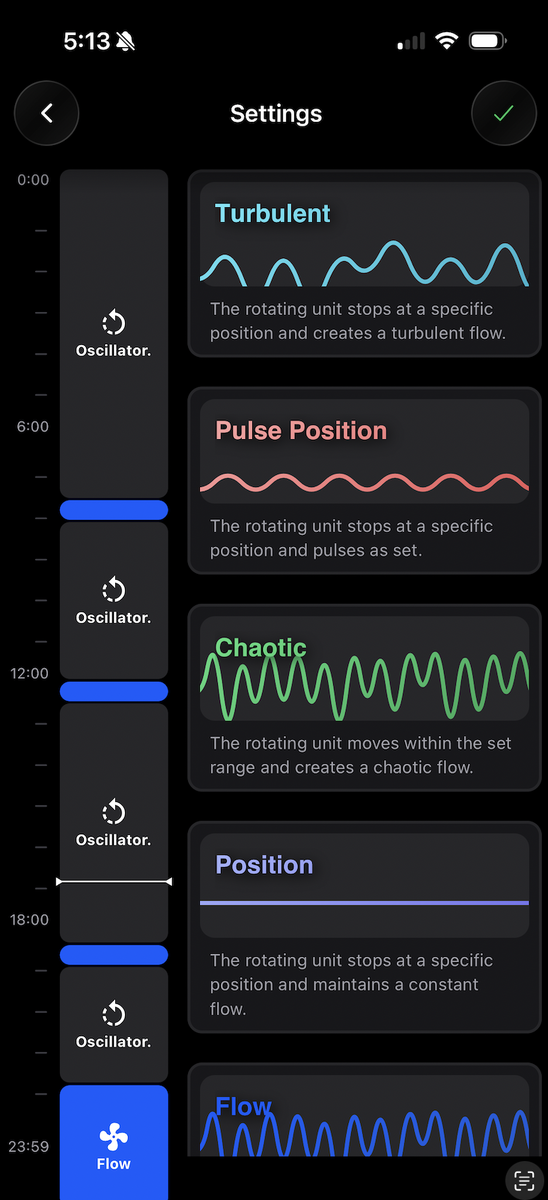
1782769926144.png


I did seem to get it out of the flow mode by manuall resetting the basic flow rate on the main device page - only to not have it follow my time control flow reduction for my 6pm feeding cycle.

So - is there a guide somewhere on the more complex programming of the orca - or anything other than the basic programming of a single flow speed between two end points?

 
OP
OP
D

Detour

Community Member
View Badges
Joined
Jan 1, 2021
Messages
78
Reaction score
37
Location
Haslett
Rating - 0%
0   0   0
In the settings (gear icon) there should be an English setting.
Thank you - changed and watched. And it aligns with what I've figured out by playing... but now I have settings that won't actually save even though the app acts like it is.
 

rvitko

Valuable Member
View Badges
Joined
Aug 20, 2012
Messages
2,360
Reaction score
1,541
Location
Buda, TX
Rating - 0%
0   0   0
Reach out to Roger @rvitko and he’ll get you sorted. Roger is amazing!
Thank you, I am a bit puzzled on this one. In general when an issue is more technically complex and not a simple mechanical issue the best support is through the whatsapp support in the app, this goes to the guys who made the app and the ORCA and they have access to the server and can request that you share your "aquarium" which lets them see both sides of the connection and debug the issue, they are all aquarists, not just engineers or IT guys, so they are able to understand what you are doing. I do know it is very sensitive to time, since it is a timed system, everything about time has to be correct for it to work. When the ORCA first launched, no matter where you were, it only had one time, Berlin time, as a result, the 7 hour difference made nothing make sense or work right. If the time is still 1 hour off, this is likely the problem, at a minimum, everything set will happen 1 hour earlier or later.
 

rvitko

Valuable Member
View Badges
Joined
Aug 20, 2012
Messages
2,360
Reaction score
1,541
Location
Buda, TX
Rating - 0%
0   0   0
So, I'll start by saying that I run a variety of equipmet on my 150 tall tank (48x24x30), but try as best I can to control it with my Apex, including slower water movement overnight and fully automated feeding cycles.

Then the ORCA came out and I knew I wanted one for the back center of my tank - which after 4 monts of waiting for my tank lid, is now in the tank.

The "eye" indicator light doesn't appear to work - so I thought I had a power issue - but ended up trying to complete the initial setup despite not having a solid red light and got passed that.

The basic setup is pretty straightforward - set you end positions, flow speed and oscilating speed - while getting used the fact that the app uses "speed" as the title for both of those options (oscilating and fan).

Now what I'm struggling with how to adjust that to coordinate with my feed cycles, etc.

First issue - I couldn't get it to recognize the timezone I'm in. I'm in Michigan. It defaulted to Chicago - and was an hour off. Changed to Toronto, and it would show Toronto for the timezone, but I was still an hour off on the time bar on the Time Control screen. Got frustrated trying to get it to work, ignored it over night, and next day I'm on Tornoto time and the Time Control page screen seems to reflect current time.

Next issue - getting Time Control settings to slow down the fan speed during feed cycles. No matter what I did, it wouldn't seem to behave like it was programmed. Then one my one millionth Google AI serach results had a nugget of information in the response - you apparently can't use the Time Control without having either a Section for Flow configured. Or rather - any settings on the Time Control aren't recognized without a Section for Flow configured. Now, I have not found actual confirmation of this in instructions or references, but after configuring a single Flow, my Time Control setting seemed to work.

Or at least I thought it was....

I have 4 time controls set - 3 of 10 minute windows that align with feed cycles with other food sources, and a 4th from 9-11:59pm to slow the fan speed down during the night. I wanted a 5th to cover from 12:01 to 7:30am - but when I add a 5th, it shows as green (versus blue) and won't save. I haven't found anything about a limit to the number of time controls - so unsure what is causing that.

But here's where I got myself stumped....
My main device screen changed to having a "Flow" indicator - and my instant flow rate is not the same as my basic programming setting (20%) - but I can't figure out why it thinks I'm in any kind of flow mode -

1782769816711.png


I have no sections set up, and only one flow -

1782769870468.png


And at the time this was captured, I'm not in any active time control settings -

1782769926144.png


I did seem to get it out of the flow mode by manuall resetting the basic flow rate on the main device page - only to not have it follow my time control flow reduction for my 6pm feeding cycle.

So - is there a guide somewhere on the more complex programming of the orca - or anything other than the basic programming of a single flow speed between two end points?
Assuming these screen shots were all taken at the same time, the time setting is off, being in flow mode means it is running the timed schedule but this does not sync with the schedule which shows it is roughly 5PM and it looks like flow would start at 6:45 and end at 7. I will say, I am seeing the same thing and it seems the system does not compensate for daylight savings time, I will report that issue. I set mine up in December so everything was spot on at the time.
 
OP
OP
D

Detour

Community Member
View Badges
Joined
Jan 1, 2021
Messages
78
Reaction score
37
Location
Haslett
Rating - 0%
0   0   0
Thank you, I am a bit puzzled on this one. In general when an issue is more technically complex and not a simple mechanical issue the best support is through the whatsapp support in the app, this goes to the guys who made the app and the ORCA and they have access to the server and can request that you share your "aquarium" which lets them see both sides of the connection and debug the issue, they are all aquarists, not just engineers or IT guys, so they are able to understand what you are doing. I do know it is very sensitive to time, since it is a timed system, everything about time has to be correct for it to work. When the ORCA first launched, no matter where you were, it only had one time, Berlin time, as a result, the 7 hour difference made nothing make sense or work right. If the time is still 1 hour off, this is likely the problem, at a minimum, everything set will happen 1 hour earlier or later.
I have tried to post to the WhatsApp app without reponse (yet). It doesn't help that even though I choose English as my language, automated responses are still in German. I do believe that I currently have the current time configured okay (current time and device time on the system page for the device are correct). Unsure what will happen come daylight savings time change... but for now, it should be good.

I am, however, having no luck with any new time control settings. Doesn't matter what setting I configure - it acts like it saves, but actually isn't. Since I run everything else on an Apex, being able to manually set time boxed settings is key to working with the rest of my setup....

I just don't know if there is a device issue since this a new setup out of the box - or if there is something else to try/do.
 
OP
OP
D

Detour

Community Member
View Badges
Joined
Jan 1, 2021
Messages
78
Reaction score
37
Location
Haslett
Rating - 0%
0   0   0
Assuming these screen shots were all taken at the same time, the time setting is off, being in flow mode means it is running the timed schedule but this does not sync with the schedule which shows it is roughly 5PM and it looks like flow would start at 6:45 and end at 7. I will say, I am seeing the same thing and it seems the system does not compensate for daylight savings time, I will report that issue. I set mine up in December so everything was spot on at the time.
Yes, all screen shots were taken at the same time when that issue was discovered.

My bigger issue right now is that I cannot get any new time control settings to actually stay after saving and udpating to the device. And in my many repeats of trying, one of the 4 I had previously set up disappeared - so now I have even less of the desired functionality I need with this.... I just don't know if I have a defective unit, or if it is something else.

This was my last submission to Tunze Support -

Malfunction:
Time Control Programming.

Device was just setup in the past week.
I updated to version 4.0.6.
I set up basic program.
I do not have any sectors defined.
I have one flow defined.

I created a couple of time controls for the Flow Setting, reducing the flow during small intervals. These appear as blue blocks on my time control screen.

I am unable to add any other time control settings.
I navigate to the time control screen.
I select the setting I want to program (e.g. position).
I set the start time, end time, and flow setting parameters. The time period displays as green on my time control view.
I click on the upper right green checkmark to save. The phone acknowledges.
I click on the back arrow, the "note" pop up appears and I confirm to save to device.
The app returns to the device Home Screen and then navigates to the device listing screen.
When I navigate back to the time control for the orca, the added setting not displayed.
 

TOP 10 Trending Threads

Back
Top
Home
Post thread…
Market
What's new




