Apex Trouble

MichaelReefer

2500 Club Member
View Badges
Joined
Aug 13, 2019
Messages
2,845
Reaction score
2,756
Location
Roseville
What state or country do you live in
California
Rating - 0%
0   0   0
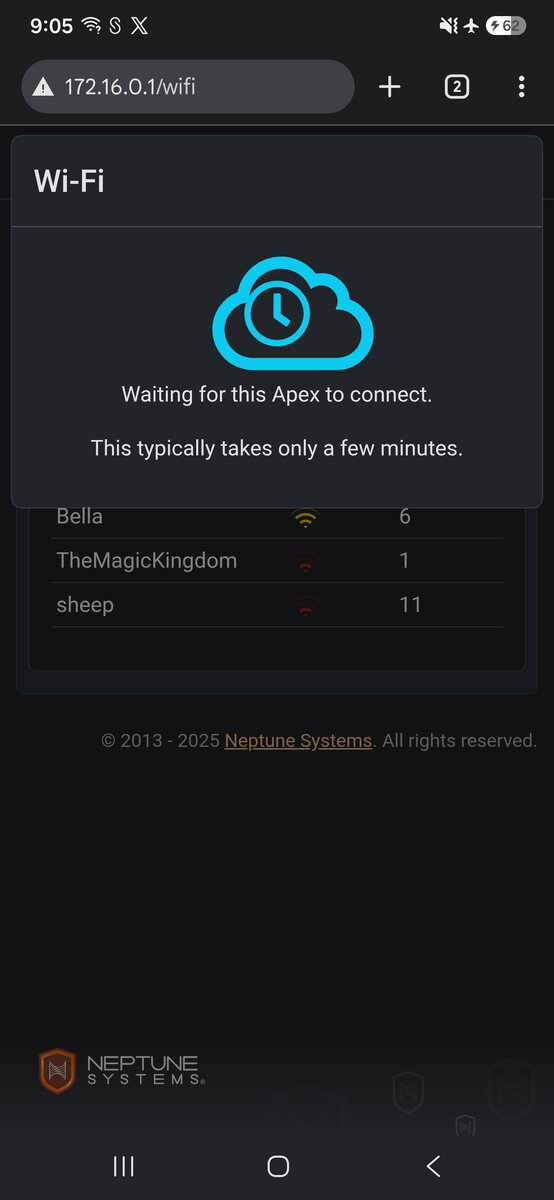
I was at work today and like every other day I wanted to pop in and check my apex but it said it was disconnected. When I got home tonight I pushed the reset button and tried to reconfigure the network. I got to connect to my wifi and I get stuck on this window. It appears my devices keep dropping the signal to my apex...not sure if its because they are trying to find something with a signal? I tried airplane mode, disabling my network, and using my laptop. About half the time the apex stays blue and half the time it starts to change colors like its loading but then i get the "uh oh" popup that it disconnected. Anyone have any advice or know how i can fix this?

1000040547.jpg
 
Best way to fix it is plug it into a ethernet cable to get it online. Then go in and manually apply your network settings from the fusion dashboard. Under Network - Configuration - Type - Wifi. You should also setup a dedicated 2.4ghz network. Most routers have that option. Even if you just use the guest network settings. I have one just for my smart devices/tank controllers. Once I did that 100% of my disconnects went away.
 
So, after hours on the phone with Taylor K. from Apex-Awesome guy, stayed up on overtime (to after 9pm his time with me) trying to figure this out), after two previous phone calls that lasted an hour. Very knowledgeable in coding, looked like my computer was getting hacked by the pentagon when he was working. I have a corrupt file or something. We replaced the SSID card and it still refused to connect and kept fighting with my Wifi (it would connect for a split second then kick itself off). I ended up having to get a cheap repeater that offered an ethernet plug and connected it that way. It would work just fine on Ethernet but whenever we connected it via wifi the Apex did not like my wifi for some reason (even though it's been connected for years).
He stated he has never, ever, seen apex have an issue like this, I believe we ended up tallying about 4-5 hours on the phone trying to figure it out.
 
Last edited:
So, after hours on the phone with Taylor K. from Apex-Awesome guy, stayed up on overtime (to after 9pm his time with me) trying to figure this out), after two previous phone calls that lasted an hour. Very knowledgeable in coding, looked like my computer was getting hacked by the pentagon when he was working. I have a corrupt file or something. We replaced the SSID card and it still refused to connect and kept fighting with my Wifi. I ended up having to get a cheap repeater that offered an ethernet plug and connected it that way. It would work just fine on Ethernet but whenever we connected it via wifi the Apex did not like my wifi for some reason (even though it's been connected for years).
He stated he has never, ever, seen apex have an issue like this, I believe we ended up tallying about 4-5 hours on the phone trying to figure it out.
this can happen because router blend the 2.4 and 5gz signal under the same SSID. They do this to provide seemless transition between devices. Sometime devices have a hard time connecting to the proper frequency. In the apex case it needs 2.4 not 5. While not always practical most routers allow you to rename the ssid so you can clearly distinguish between the two frequencies. Other alternatives if your router support connect the apex to the guest or IOT network (typically off my default and need to turn I. In setting) if supported. Both only run 2.4 signal. I personally use IOT
 
this can happen because router blend the 2.4 and 5gz signal under the same SSID. They do this to provide seemless transition between devices. Sometime devices have a hard time connecting to the proper frequency. In the apex case it needs 2.4 not 5. While not always practical most routers allow you to rename the ssid so you can clearly distinguish between the two frequencies. Other alternatives if your router support connect the apex to the guest or IOT network (typically off my default and need to turn I. In setting) if supported. Both only run 2.4 signal. I personally use IOT

Unfortunately I have the new Xfinity box (The top tier one, XB10) and it has a mixed signal so there is no way to split it apparently (according to Xfinity). The weird thing is that I have had this new box for a few months now and it had no issue until it all of a sudden disconnected. Taylor mentioned that Xfinity also uses weird IP addresses. He tried manually changing them but it still didnt work. I'm tech savvy but not at coding (tried it years ago in college and was not my thing lol). The interesting thing is he said he runs into a lot of people with issues on Xfinity.
 
Unfortunately I have the new Xfinity box (The top tier one, XB10) and it has a mixed signal so there is no way to split it apparently (according to Xfinity). The weird thing is that I have had this new box for a few months now and it had no issue until it all of a sudden disconnected. Taylor mentioned that Xfinity also uses weird IP addresses. He tried manually changing them but it still didnt work. I'm tech savvy but not at coding (tried it years ago in college and was not my thing lol). The interesting thing is he said he runs into a lot of people with issues on Xfinity.
Were you actually logging into setting via 192.168.1.1 or 10.0.0.1 to access the raw setting. Trying to do through apps which Comcast likes to push people toward sometime restricts some setting.
 
Were you actually logging into setting via 192.168.1.1 or 10.0.0.1 to access the raw setting. Trying to do through apps which Comcast likes to push people toward sometime restricts some setting.

We tried both, the Apex would connect for like three seconds, begin the connecting process then would just disconnect. Sometimes it would go orange like it was connected but wasn't, and others it would get pushed back into blue and try to connect again.
 

WHEN YOU SEE A REEF2REEF POLL, WHAT’S YOUR USUAL MOVE?

  • Vote right away, then head to the comments

    Votes: 6 46.2%
  • Read the comments first...then decide what I think

    Votes: 0 0.0%
  • Vote and explain my choice in the comments

    Votes: 2 15.4%
  • Dude, I just vote...I don't care about the comments

    Votes: 4 30.8%
  • Vote, then come back later to see how it turned out

    Votes: 0 0.0%
  • Pick “Other” because my opinion is too nuanced to fit any of your simpleton boxes

    Votes: 1 7.7%
  • I usually read the comments but exercise my right not to vote

    Votes: 0 0.0%
  • I always get excited about Daniel’s daily polls, obviously 😎

    Votes: 1 7.7%
  • Other (Post in the comments)

    Votes: 2 15.4%
Back
Top
Home
Post thread…
Market
What's new