

Hydros Firmware - Update 242 Problems

shakygator

Active Member
View Badges
Joined
Mar 11, 2020
Messages
254
Reaction score
176
Location
South Texas
Rating - 100%
2   0   0
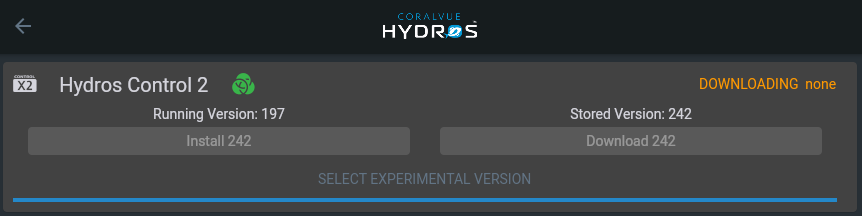
Having issues with the new Hydros firmware. Tried to use the web UI and it was not compatible with version 197 so I downloaded 242. However the install button is greyed out.

Android app was working with 197 until I updated that as well, now it also is not compatible with version 197.

The link to the previous version is not working. It's throwing a 404. However, this link from CoralVue Facebook page appears to be working: https://www.coralvuehydros.com/app-previous/#/status
1658953850281.png

1658953916309.png


n2585722

2500 Club Member
View Badges
Joined
Jun 17, 2013
Messages
4,814
Reaction score
2,775
Location
Cedar Park, Tx
Rating - 0%
0   0   0
So everything is ok?

FYI: to someone that reads this it might be a good idea to unplug any dosing pumps, AWC pump and ATO during the update. Check the outputs and make sure only the ones you have overridden are still correctly overridden and the ones that were in auto are still in auto. Then plug the pumps back in. There are a few that had then start running when theyupdated.
 

DHill6

2500 Club Member
View Badges
Joined
Dec 28, 2015
Messages
2,800
Reaction score
1,678
Rating - 100%
1   0   0
Third time trying to download 242 to XP8. The X4 took the update. In the process the ATO filled my sump, which I’m bailing out now, good thing I caught it before it was to the rim! Really… not good there. How many times should I try before I reach out to help?
 

DHill6

2500 Club Member
View Badges
Joined
Dec 28, 2015
Messages
2,800
Reaction score
1,678
Rating - 100%
1   0   0
Opened a ticket, reboot didn’t solve anything.
 

jhuntstl

Valuable Member
View Badges
Joined
Apr 21, 2021
Messages
2,257
Reaction score
4,090
Location
St. Louis
Rating - 0%
0   0   0
I was able to update my firmware on an X3 and WaveEngine, but web app is still showing out of date. I can only assume this is something they have to fix on their end, correct?
 

lvzx14

Community Member
View Badges
Joined
Nov 28, 2016
Messages
91
Reaction score
56
Location
Las Vegas
Rating - 0%
0   0   0
Unable to do the update on my xp8 as well, just reboots about half way during the install.

*Update* Was finally able to get it to complete the update after the 6th attempt:confused:
 
Last edited:

n2585722

2500 Club Member
View Badges
Joined
Jun 17, 2013
Messages
4,814
Reaction score
2,775
Location
Cedar Park, Tx
Rating - 0%
0   0   0
Opened a ticket, reboot didn’t solve anything.
For some reason it took several tries when others did this. I had no issue with the XP8, but when one does that when down loading I usually try a reboot from the app on the offending controller. Also I do not update any of them till I have the firmware downloaded on all of the comtrollers. Then I do them one at a time and let each one finish booting up. It is usually a good idea to check things after the first one to make sure none of the outputs have changed states. I continue with each one and leave the wifi master for last.
 

Thor2j

Valuable Member
View Badges
Joined
May 8, 2016
Messages
1,202
Reaction score
505
Location
Colorado
Rating - 0%
0   0   0
I did the update on my wave engine. Completely messed up my low power mode for my gyre. Had to delete profile.
 

n2585722

2500 Club Member
View Badges
Joined
Jun 17, 2013
Messages
4,814
Reaction score
2,775
Location
Cedar Park, Tx
Rating - 0%
0   0   0
I did the update on my wave engine. Completely messed up my low power mode for my gyre. Had to delete profile.
That is odd I had no issue with if affecting low power mode. I use MP0's though. Not sure it should matter.
 

DHill6

2500 Club Member
View Badges
Joined
Dec 28, 2015
Messages
2,800
Reaction score
1,678
Rating - 100%
1   0   0
Unable to do the update on my xp8 as well, just reboots about half way during the install.

*Update* Was finally able to get it to complete the update after the 6th attempt:confused:
I’m up to 8 attempts and it’s a no go on the XP8. I rebooted by modem and router also, didn’t make a difference.
 

DHill6

2500 Club Member
View Badges
Joined
Dec 28, 2015
Messages
2,800
Reaction score
1,678
Rating - 100%
1   0   0
For some reason it took several tries when others did this. I had no issue with the XP8, but when one does that when down loading I usually try a reboot from the app on the offending controller. Also I do not update any of them till I have the firmware downloaded on all of the comtrollers. Then I do them one at a time and let each one finish booting up. It is usually a good idea to check things after the first one to make sure none of the outputs have changed states. I continue with each one and leave the wifi master for last.
For some reason it took several tries when others did this. I had no issue with the XP8, but when one does that when down loading I usually try a reboot from the app on the offending controller. Also I do not update any of them till I have the firmware downloaded on all of the comtrollers. Then I do them one at a time and let each one finish booting up. It is usually a good idea to check things after the first one to make sure none of the outputs have changed states. I continue with each one and leave the wifi master for last
 

DHill6

2500 Club Member
View Badges
Joined
Dec 28, 2015
Messages
2,800
Reaction score
1,678
Rating - 100%
1   0   0
I can’t get around this message, if you go to the older web version it gives another message that it’s too old and won’t work. IDK…
FF100AB7-755A-4175-A941-6BFB958212D2.jpeg
 

DHill6

2500 Club Member
View Badges
Joined
Dec 28, 2015
Messages
2,800
Reaction score
1,678
Rating - 100%
1   0   0
I’m close to done with this XP8, 13 attempts, moved it into direct sight of router. No results.
 

n2585722

2500 Club Member
View Badges
Joined
Jun 17, 2013
Messages
4,814
Reaction score
2,775
Location
Cedar Park, Tx
Rating - 0%
0   0   0
Did you power it down, power down the router then power both up again and retry after you are able to access the internet? If so I would suggest submitting a ticket with support. One person said it worked for them on the 6th try. Here is a link to the support tickets https://support.coralvue.com/submit_ticket .
 

DHill6

2500 Club Member
View Badges
Joined
Dec 28, 2015
Messages
2,800
Reaction score
1,678
Rating - 100%
1   0   0
Did you power it down, power down the router then power both up again and retry after you are able to access the internet? If so I would suggest submitting a ticket with support. One person said it worked for them on the 6th try. Here is a link to the support tickets https://support.coralvue.com/submit_ticket .
Yes, I submitted a ticket. Carlos replied, all suggestions have failed. Restarted modem and router, powered down and up Hydros, moved Hydros in direct line with router. It’s a no go.
 

DHill6

2500 Club Member
View Badges
Joined
Dec 28, 2015
Messages
2,800
Reaction score
1,678
Rating - 100%
1   0   0
To add to this problem there is only one outlet in use on the left hand side, now it’s turning off and on, I can’t stop it. This outlet was used for a fan, which I have unplugged, using temperature to turn on and off. If I can’t get to it to turn it off… I’ll be hearing clicking constantly.
 

TOP 10 Trending Threads

HOW DO YOU ADJUST YOUR CUC AS ALGAE DISAPPEARS?

  • Capture and re-home CUC

    Votes: 10 8.3%
  • Increase white light/hours in tank to spur algae growth to feed CUC

    Votes: 8 6.7%
  • Feed nori to support CUC

    Votes: 39 32.5%
  • Feed herbivore pellets to support CUC

    Votes: 42 35.0%
  • Allow attrition to balance CUC and algae

    Votes: 52 43.3%
  • Provide macro algae to feed CUC

    Votes: 8 6.7%
  • Introduce CUC predators

    Votes: 1 0.8%
  • Other (please explain)

    Votes: 12 10.0%
Back
Top









