




- Joined
- Aug 15, 2022
- Messages
- 242
- Reaction score
- 205
- Location
- NY
- What state or country do you live in
- New York
Wanna make a set of copepod sieves but don't wanna buy 20 different nylon mesh? How about a Paul B style brine shrimp feeder? Worry not, here's a way to print your own custom mesh on a 3d printer.
What you need:
0.2 mm nozzle
Your filament of interest
A matching support filament for raft
A way to switch filament between layers (AMS, BMCU, dual extruder, manually stopping the print at layer x and swap filament, etc.)
Two vital settings are needed to print a decent mesh. Using Orcaslicer as an example:
1. Generating the mesh
- Under the strength tab, set top / bottom shell layers to 0.
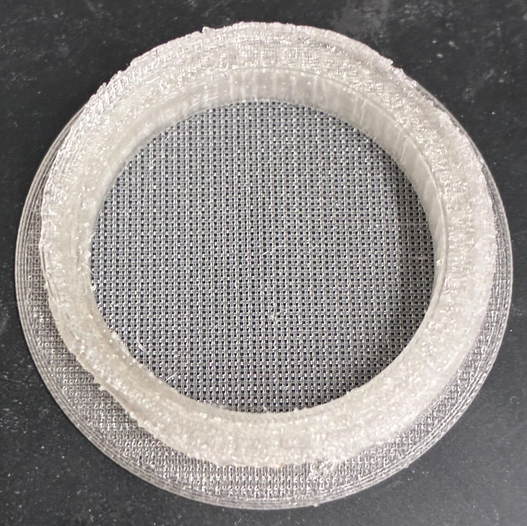
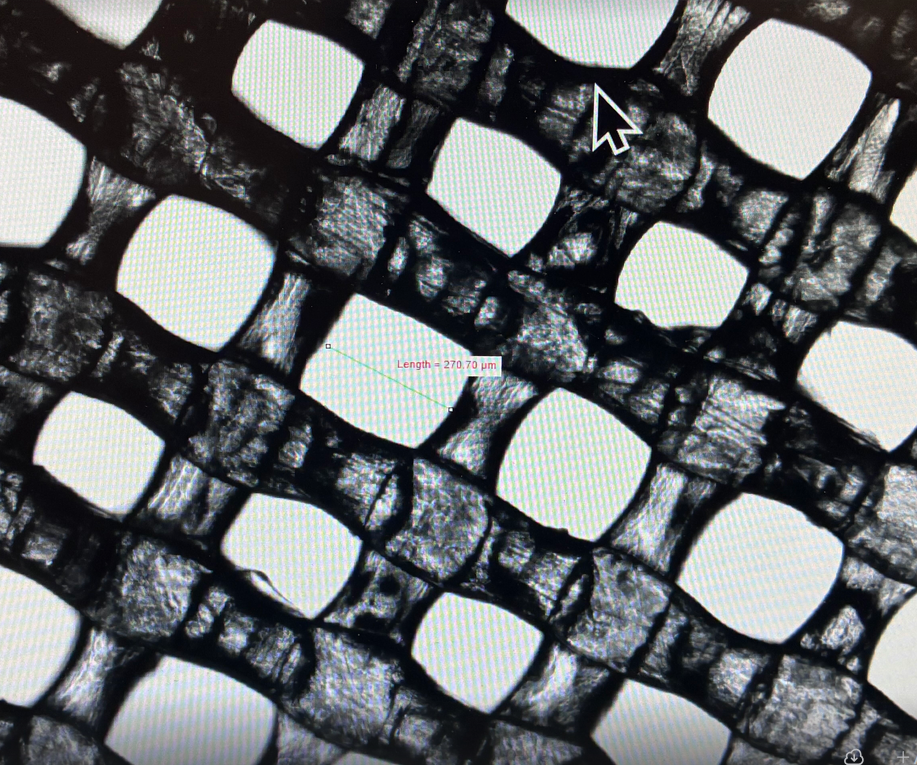
- Under "infill", set "Sparse infill density" to a desired amount. This will influence the hole size in your mesh. I'm still collecting data on this, but on my Bambu A1 mini, 50% sparse infill on an 1 inch circle prints 260-280 um square holes.
- Set "Sparse infill pattern" to "rectilinear".
2. Make a smooth base for the mesh quality
To print a secure first layer, the printer will "squish" the filament into the bed. This is undesirable since it would mess up the hole size.
- To avoid this, set "raft layer" to 1-3 layers, 0 mm raft contact Z distance. This will build a peelable base on which the mesh prints.
- Use a compatible material under "Support / raft base". Some combinations would be PETG / PLA, PVB/PLA, PC/HIPS, etc.
- Select "ironing support interface". This will ensure your mesh stays in place during printing.
Example (50% sparse infill, rectilinear, gray = PVB, black = PLA):

Happy printing!
What you need:
0.2 mm nozzle
Your filament of interest
A matching support filament for raft
A way to switch filament between layers (AMS, BMCU, dual extruder, manually stopping the print at layer x and swap filament, etc.)
Two vital settings are needed to print a decent mesh. Using Orcaslicer as an example:
1. Generating the mesh
- Under the strength tab, set top / bottom shell layers to 0.
- Under "infill", set "Sparse infill density" to a desired amount. This will influence the hole size in your mesh. I'm still collecting data on this, but on my Bambu A1 mini, 50% sparse infill on an 1 inch circle prints 260-280 um square holes.
- Set "Sparse infill pattern" to "rectilinear".
2. Make a smooth base for the mesh quality
To print a secure first layer, the printer will "squish" the filament into the bed. This is undesirable since it would mess up the hole size.
- To avoid this, set "raft layer" to 1-3 layers, 0 mm raft contact Z distance. This will build a peelable base on which the mesh prints.
- Use a compatible material under "Support / raft base". Some combinations would be PETG / PLA, PVB/PLA, PC/HIPS, etc.
- Select "ironing support interface". This will ensure your mesh stays in place during printing.
Example (50% sparse infill, rectilinear, gray = PVB, black = PLA):
Happy printing!












