reef-pi :: An opensource reef tank controller based on Raspberry Pi.

inktomi

ReefMan
View Badges
Joined
Feb 17, 2018
Messages
429
Reaction score
400
Location
Los Angeles, CA
Rating - 0%
0   0   0
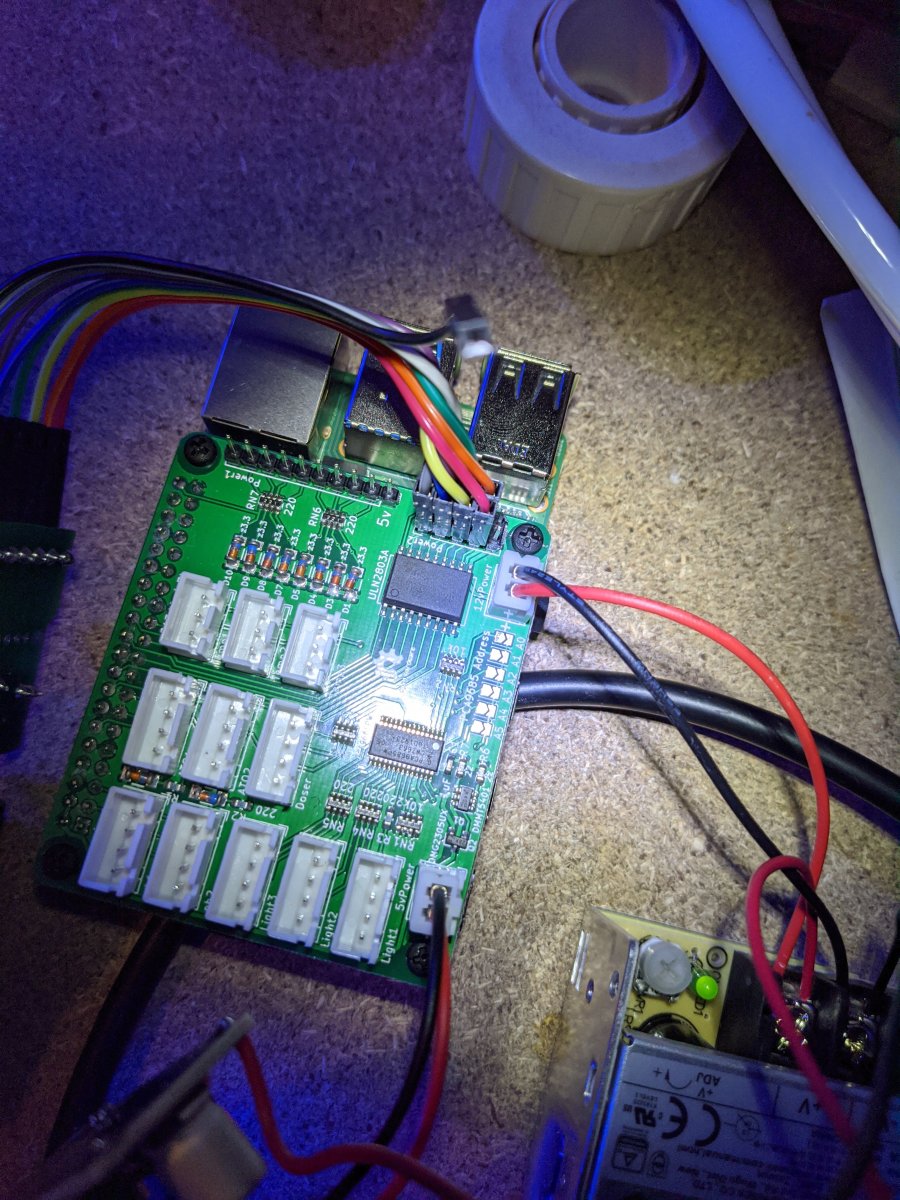
With the Reef Pi Goby hat... I can't seem to control my ADJ strip. I've connected wires from the pins near the ULN2803 to a serial breakout board (leaving pin 9 unconnected), and I've set up Connectors for each pin in the UI mapped to Raspberry Pi IO pins. I assigned mock outlets to each Connector, but they don't seem to work.

Any ideas what I've done wrong?
IMG_20200217_161744.jpg
 

Michael Lane

Well-Known Member
View Badges
Joined
Aug 11, 2018
Messages
677
Reaction score
1,121
Rating - 0%
0   0   0
With the Reef Pi Goby hat... I can't seem to control my ADJ strip. I've connected wires from the pins near the ULN2803 to a serial breakout board (leaving pin 9 unconnected), and I've set up Connectors for each pin in the UI mapped to Raspberry Pi IO pins. I assigned mock outlets to each Connector, but they don't seem to work.

Any ideas what I've done wrong?
IMG_20200217_161744.jpg
The ADJ power strip requires V+ to be connected as well. I notice that the pin for 12v to the ADJ strip isn't connected. I believe it should connect to pin 5 on the DB-9 port.

1581986295477.png
 

inktomi

ReefMan
View Badges
Joined
Feb 17, 2018
Messages
429
Reaction score
400
Location
Los Angeles, CA
Rating - 0%
0   0   0
The ADJ power strip requires V+ to be connected as well. I notice that the pin for 12v to the ADJ strip isn't connected. I believe it should connect to pin 5 on the DB-9 port.

That was it! I was wondering if it might be something like that. Eveything works perfectly now. Onto the next thing - hooking up a meanwell PWM dimmable power supply for the lights!

Thank you again!
 

Matevz Savarin

Active Member
View Badges
Joined
Dec 5, 2018
Messages
209
Reaction score
163
Rating - 0%
0   0   0
One question guys it was written before, but I have to ask.. I am running out of pins for pwm control so can I add some extension to existing mikes hat? When I will do leds I need 9channels and I have used 4 channels so far. So I am 2 channels short. Can I use gpio headers for pwm purpose? I just need to power them with 5v and it should work? Thank you!
Btw I just adeed feeder to my pi:)
 

Bigtrout

Valuable Member
View Badges
Joined
Dec 16, 2018
Messages
1,189
Reaction score
2,811
Rating - 0%
0   0   0
One question guys it was written before, but I have to ask.. I am running out of pins for pwm control so can I add some extension to existing mikes hat? When I will do leds I need 9channels and I have used 4 channels so far. So I am 2 channels short. Can I use gpio headers for pwm purpose? I just need to power them with 5v and it should work? Thank you!
Btw I just adeed feeder to my pi:)
Id just add a pca9685 pwm board to the existing hat.
 

robsworld78

Valuable Member
View Badges
Joined
Feb 14, 2020
Messages
1,029
Reaction score
1,293
Location
Edmonton, Canada
Rating - 0%
0   0   0
Ok I understand, how do you assign pin number to pi, so pin 8 cant be same as pin 8 on hat..?

4BDF8845-1EB8-4B9A-B48C-A409DE45374C.jpeg

After you install it go to configuration tab and then drivers.

Add a new driver, select the PCA9685 from the drop down menu and leave the address at 64, that's the default.

Now you can go to the connectors and setup the jacks. In the driver drop down select the PCA9685 driver you just added and enter the pins for the jack from 0 to 15.
 

Matevz Savarin

Active Member
View Badges
Joined
Dec 5, 2018
Messages
209
Reaction score
163
Rating - 0%
0   0   0
Ranjib tnx, but I allready use pca9685 driver on 64 adress for controlling 12 pwm connectors on my hat. But now, tnx to your answear I understand it, I will add new unasigned adress on witch this i2c expansion board will be and then same driver and pin number. I get it;) Thank you!
 

Alaa

Community Member
View Badges
Joined
Nov 28, 2018
Messages
74
Reaction score
80
Rating - 0%
0   0   0
Ok I understand, how do you assign pin number to pi, so pin 8 cant be same as pin 8 on hat..?

4BDF8845-1EB8-4B9A-B48C-A409DE45374C.jpeg
Hi
You need to solder the A0 connector on the second board (just make the 2 points connect) this will give the second board 65 address, then go to drivers and add it changing the default address to 65. now you have additional 16 pins to use. you may want to read the posts above on removing the pull up resistor on the second board.
 
Last edited:

Des Westcott

Well-Known Member
View Badges
Joined
May 29, 2018
Messages
646
Reaction score
1,025
Location
Durban - South Africa
Rating - 0%
0   0   0
I've recently been down the rabbithole of Macros and Timers and thought I'd share some of my findings.

So, reef-pi can do the following since 3.0 :
  • Run a series of commands called a Macro - (Old news, but one of the most amazing features I believe)
  • Use a Timer to trigger a Macro to run.
  • Use a Macro to run another Macro or series of Macro's
  • Run a Macro in reverse. This runs the Macro steps in the reverse order and also reverses the individual steps - so "turn Item X on" becomes "turn Item X off". So a Macro with 3 steps like below
    • 1 - Turn X on
    • 2 - Turn Y off
    • 3 - Turn Z off will run as follows when run in reverse
    • 1 - Turn Z on
    • 2 - Turn Y on
    • 3 - Turn X off
  • To use this reversible function, Macros must have "Make Reversible" - "Yes" selected.
  • Once this is selected, you can run the Macro in reverse and you can use Timers and other Macros totrigger that Macro, BUT IT WILL RUN IN REVERSE. You can still run the Macro manually in forward mode, but any attempt to automate it's running will trigger it in reverse.
So for my Auto Water Change (AWC) macro, as long as I triggered it manually, it ran fine. However the only way I could get it to run properly on a timer was to re-write the Macro in reverse. Reversing the series of steps and their actions. This achieved what I was wanting - an AWC done at a preset time with no interaction from me.

This reversing thing isn't a big deal on simple Macros like "Turn X off, wait 300 seconds, Turn X on". If you run that in reverse, its exactly the same as forward. More complex Macros are not the same.

Macro's to run Macro's
I've had a "Feed" macro that I've developed and updated over time to be about an hour long now. It's evolved to be pretty bulletproof. Turning return off, skimmer off, temperature control, plus the chiller / heater off to make sure they aren't running while return is off. Turns wavemaker off for a calm period ofr fish to eat, then sowly turning the various pumps on to distribute the uneaten food so that it doesn't just end up down the overflow.
Now I managed to get a dry pellet autofeeder to run from reef-pi, I would like to be able to have a new Macro that triggers "Feed", waits 3 minutes, then triggers the autofeeder as often as I want. In order to get this right, I either need to re-write the new "Feed with autofeed" Macro or write the old "Feed" macro in reverse.
Not a big deal either way, but if you're planning on trying something similar, these are teh ways I've discovered to get these things done.

What would be nice (I think)
  • To be able to have Timers and Macros trigger Macros forward.
  • to be able to choose whether the reversible Macro runs steps in reverse, states in reverse, or both. I think I can see uses for all three.
I've rambled a bit in this post, I know, but if my experience helps another user, I'll be a happy boy.
I personally think that this kind of functionality is what makes these controllers some of the most powerful innovations in the reefkeeping hobby in recent years. Well, this and automated testing :D

 
OP
OP
Ranjib

Ranjib

7500 Club Member
View Badges
Joined
Apr 16, 2016
Messages
9,876
Reaction score
16,680
Location
Pleasant Hill, Concord
Rating - 0%
0   0   0
I've recently been down the rabbithole of Macros and Timers and thought I'd share some of my findings.

So, reef-pi can do the following since 3.0 :
  • Run a series of commands called a Macro - (Old news, but one of the most amazing features I believe)
  • Use a Timer to trigger a Macro to run.
  • Use a Macro to run another Macro or series of Macro's
  • Run a Macro in reverse. This runs the Macro steps in the reverse order and also reverses the individual steps - so "turn Item X on" becomes "turn Item X off". So a Macro with 3 steps like below
    • 1 - Turn X on
    • 2 - Turn Y off
    • 3 - Turn Z off will run as follows when run in reverse
    • 1 - Turn Z on
    • 2 - Turn Y on
    • 3 - Turn X off
  • To use this reversible function, Macros must have "Make Reversible" - "Yes" selected.
  • Once this is selected, you can run the Macro in reverse and you can use Timers and other Macros totrigger that Macro, BUT IT WILL RUN IN REVERSE. You can still run the Macro manually in forward mode, but any attempt to automate it's running will trigger it in reverse.
So for my Auto Water Change (AWC) macro, as long as I triggered it manually, it ran fine. However the only way I could get it to run properly on a timer was to re-write the Macro in reverse. Reversing the series of steps and their actions. This achieved what I was wanting - an AWC done at a preset time with no interaction from me.

This reversing thing isn't a big deal on simple Macros like "Turn X off, wait 300 seconds, Turn X on". If you run that in reverse, its exactly the same as forward. More complex Macros are not the same.

Macro's to run Macro's
I've had a "Feed" macro that I've developed and updated over time to be about an hour long now. It's evolved to be pretty bulletproof. Turning return off, skimmer off, temperature control, plus the chiller / heater off to make sure they aren't running while return is off. Turns wavemaker off for a calm period ofr fish to eat, then sowly turning the various pumps on to distribute the uneaten food so that it doesn't just end up down the overflow.
Now I managed to get a dry pellet autofeeder to run from reef-pi, I would like to be able to have a new Macro that triggers "Feed", waits 3 minutes, then triggers the autofeeder as often as I want. In order to get this right, I either need to re-write the new "Feed with autofeed" Macro or write the old "Feed" macro in reverse.
Not a big deal either way, but if you're planning on trying something similar, these are teh ways I've discovered to get these things done.

What would be nice (I think)
  • To be able to have Timers and Macros trigger Macros forward.
  • to be able to choose whether the reversible Macro runs steps in reverse, states in reverse, or both. I think I can see uses for all three.
I've rambled a bit in this post, I know, but if my experience helps another user, I'll be a happy boy.
I personally think that this kind of functionality is what makes these controllers some of the most powerful innovations in the reefkeeping hobby in recent years. Well, this and automated testing :D
Thank you for the detailed post, we really appreciate you taking the time to document feedback. I’ll be going through this. Macros should run forward via timer or other macro, the reverse mode is only used for the automatic turn off feature in timer (or reverse mode in parent macro). If this is not the case, it’s a bug, and we’ll fix it.

For reversible macros to not trigger opposite action in reverse mode (your second ask) , I think it’s doable, but I would like to think through the use case, for some reason I feel it’s not intuitive and we might be able to adress this better in some different fashion, ... but we’ll see.

I’ve been busy with the new house move , my tanks are still not setup and everything is still in plastic containers. Thanks to reef-pi I don’t have coral mortality this time, temp, ato , everything is up even in plastic container. But I’ll need some more time to setup home, tanks and then resume back my reef-pi works.
 

loueradun

New Member
View Badges
Joined
Feb 19, 2020
Messages
1
Reaction score
1
Rating - 0%
0   0   0
New user here.

I'm considering setting up a Raspberry-Pi to control a Finnex Plated+ light, as the controller board recently died, and I am really missing the day/night cycles. My main question is whether reef-pi can be used to control a light like this? Does it do day/night cycles or use weather information? The Finnex light has a ground, +15V, and Red, Green, Blue, and White contacts on the edge of the LED board. I currently have it wired +15v to R,G,B,W so that it is 100% on with a timer at the wall. In order to do proper dimming I will need to pulse +15v to the R, G, B, W contacts. Is reef-pi for me, or should I get something like an Arduino or coding something for myself? I would like to expand it to do other things over time like adding sensors/cameras, so I think something like a Raspberry-Pi would be better in the long run, but trying to figure out exactly what I need (both software and hardware).
 
OP
OP
Ranjib

Ranjib

7500 Club Member
View Badges
Joined
Apr 16, 2016
Messages
9,876
Reaction score
16,680
Location
Pleasant Hill, Concord
Rating - 0%
0   0   0
New user here.

I'm considering setting up a Raspberry-Pi to control a Finnex Plated+ light, as the controller board recently died, and I am really missing the day/night cycles. My main question is whether reef-pi can be used to control a light like this? Does it do day/night cycles or use weather information? The Finnex light has a ground, +15V, and Red, Green, Blue, and White contacts on the edge of the LED board. I currently have it wired +15v to R,G,B,W so that it is 100% on with a timer at the wall. In order to do proper dimming I will need to pulse +15v to the R, G, B, W contacts. Is reef-pi for me, or should I get something like an Arduino or coding something for myself? I would like to expand it to do other things over time like adding sensors/cameras, so I think something like a Raspberry-Pi would be better in the long run, but trying to figure out exactly what I need (both software and hardware).
You'll need a meanwell driver or at least a mosfet to sit in between the pi/pca9685 pwm output and the light. If you want only two channel control then pi should be enough, for more than two channels you'll need a pca9685 ic.
 

bishoptf

Valuable Member
View Badges
Joined
Jan 1, 2019
Messages
1,409
Reaction score
1,726
Location
Missouri
Rating - 0%
0   0   0
Thank you for the detailed post, we really appreciate you taking the time to document feedback. I’ll be going through this. Macros should run forward via timer or other macro, the reverse mode is only used for the automatic turn off feature in timer (or reverse mode in parent macro). If this is not the case, it’s a bug, and we’ll fix it.

For reversible macros to not trigger opposite action in reverse mode (your second ask) , I think it’s doable, but I would like to think through the use case, for some reason I feel it’s not intuitive and we might be able to adress this better in some different fashion, ... but we’ll see.

I’ve been busy with the new house move , my tanks are still not setup and everything is still in plastic containers. Thanks to reef-pi I don’t have coral mortality this time, temp, ato , everything is up even in plastic container. But I’ll need some more time to setup home, tanks and then resume back my reef-pi works.

Congrats on the new house, hopefully comes with lots more space! :)
 

TOP 10 Trending Threads

Back
Top