reef-pi :: An opensource reef tank controller based on Raspberry Pi.

OP
OP
Ranjib

Ranjib

7500 Club Member
View Badges
Joined
Apr 16, 2016
Messages
9,876
Reaction score
16,680
Location
Pleasant Hill, Concord
Rating - 0%
0   0   0
I have this currently running on the Reef Angel - Arduino Mega. The Raspberry Pi zero should be much more capable, right?
Depends... running arduino does not mean the actual logic is also executed by arduino, it can be done by a dedicated IC. It is also possible that it used a more efficient method (like the mcp23017 based approach i just mentioned). I dont know if reefangel runs a website as well.. thats big part of reef-pi, that it runs a full blown http server and service a fullblown single page moder UI (built with react). It does not execute the UI code on the pi itself (unless you are running GUI mode and viewing the UI using a directly connected monitor), but it serves those file over network.

Arduino is no match for Pi. Arduino is backed by atmega microcontroller, very robust and good for embedded programming, while Pi is backed by arm based bcm* microprocessor, its a full blown computer, it unlocks the whole world of programming/software for you not just embedded programming. This allows us to integrate features faster, iterates faster, use tooling thats available for a much wider audience. With every new release of Pi, we are likely to get beefier processors, and the softwares are going to get more efficient, allowing us more thing to do
 
OP
OP
Ranjib

Ranjib

7500 Club Member
View Badges
Joined
Apr 16, 2016
Messages
9,876
Reaction score
16,680
Location
Pleasant Hill, Concord
Rating - 0%
0   0   0
Updates from one of the recent hardware experiment

I have mentioned this issue earlier, that I experience some led flickering issues while running then via rpi based pwm and powered by lm2696 modules. I was not sure if this is due to the power source itself or the way we wire then power connection to pi (gpio or microusb) .
Here is how it looks (notice the jitter)
244CFB8C-7C55-40A9-A03A-E6B0525E3307.jpeg


Here is how a good pwm signal looks (either from pca9685 or from pi powered by separate micro usb based powersource)
BD66A0CB-C96D-4238-906E-135E1979E20C.jpeg


So I decided to test it out with all possible combination and order few things. In particular the microusb breakout board from adafruit (2$)
https://www.adafruit.com/product/1833
I also created a male micro usb to female jumper wire connector
242A30E8-5CBC-466E-9D25-FEBF702A7892.jpeg
FBED3695-6D34-4013-A531-461BF9D060CA.jpeg

Next I run two types of tests , one with dedicated power source and using gpio connector
CA03F5D2-C578-4AEA-955F-27EEDA987738.jpeg


And another with lm2596 with microusb connector
CA4752CA-0399-48EA-960D-BD7B351D9776.jpeg

What I learned was irrespective of how I wire the power connections to pi, lm2596 always produce jitter in pwm signal and dedicated micro usb based power source (even if its connected via gpio) produces clean pwm signal from pi . There are articles in the internet around ripple generated by lm2596 , I ll read those next

838A8AE1-6C4A-4F54-9F00-D32CD45DAEAA.jpeg


54C39F51-A878-455C-9288-777ACA2F2E1E.jpeg
 

philshel

Active Member
View Badges
Joined
Jul 24, 2010
Messages
365
Reaction score
375
Rating - 0%
0   0   0
Updates from one of the recent hardware experiment

I have mentioned this issue earlier, that I experience some led flickering issues while running then via rpi based pwm and powered by lm2696 modules. I was not sure if this is due to the power source itself or the way we wire then power connection to pi (gpio or microusb) .
Here is how it looks (notice the jitter)
244CFB8C-7C55-40A9-A03A-E6B0525E3307.jpeg


Here is how a good pwm signal looks (either from pca9685 or from pi powered by separate micro usb based powersource)
BD66A0CB-C96D-4238-906E-135E1979E20C.jpeg


So I decided to test it out with all possible combination and order few things. In particular the microusb breakout board from adafruit (2$)
https://www.adafruit.com/product/1833
I also created a male micro usb to female jumper wire connector
242A30E8-5CBC-466E-9D25-FEBF702A7892.jpeg
FBED3695-6D34-4013-A531-461BF9D060CA.jpeg

Next I run two types of tests , one with dedicated power source and using gpio connector
CA03F5D2-C578-4AEA-955F-27EEDA987738.jpeg


And another with lm2596 with microusb connector
CA4752CA-0399-48EA-960D-BD7B351D9776.jpeg

What I learned was irrespective of how I wire the power connections to pi, lm2596 always produce jitter in pwm signal and dedicated micro usb based power source (even if its connected via gpio) produces clean pwm signal from pi . There are articles in the internet around ripple generated by lm2596 , I ll read those next

838A8AE1-6C4A-4F54-9F00-D32CD45DAEAA.jpeg


54C39F51-A878-455C-9288-777ACA2F2E1E.jpeg

I am absolutely no expert on this stuff, but my understanding is they need more capacitance particularly high frequency (i.e. ceramic capacitors) to calm the jitter a bit. Again no expert here, no guarantee stated or implied, no returns, sold "as is", and your millage may vary.
 
OP
OP
Ranjib

Ranjib

7500 Club Member
View Badges
Joined
Apr 16, 2016
Messages
9,876
Reaction score
16,680
Location
Pleasant Hill, Concord
Rating - 0%
0   0   0
Hows the pH probe going Ranjib?
In terms of working, its doing very well.. no hiccups. The only problem has been my tank pH is much lower than what is normal. My SPS are growing (i wont call them crazy growth), LPS ans zoas are thriving.. tank is almost grown out.. and the ph monitor shows stead ph trend of daily highs and peaks that range between 6.3-> 7.2 .. then I added kalkwasser (almost a month now) and itw hovers between 6.9 to 7.5 ... I have cross tested the readings with both API test kit as well as another test kit , and the results tally. I also re-checked the actual probe with calibration solution (4, 7 and 10) and cross checked with temperature compensation. At this point, the conculsion is my tank pH is low.. much lower than normal (in fact corals should melt in the lowest pH )... and thats simply not possible (according the Randy and few others who are more familiar with the subject). I have not lost my sleep over this, as my tank is stable and dont show much sign of stress and I have done pretty much evrerything I could easily do to validate the probe is calibrated and current readings are matching with titration based kits.

My next step will be to measure ph (with titration based kit and preferably something else other than API) at midnight / early morning when the ph records lowest.

From a controller build perspective I am confident. i.e. software and circuitry are all sound. The next step on this front is to incroporate it in the AIO build and see how the circuit works our while used in conjuction with all other things..but I do not expect a lot of surprise there. Its my tanks reading that I have to get to the bottom
 
OP
OP
Ranjib

Ranjib

7500 Club Member
View Badges
Joined
Apr 16, 2016
Messages
9,876
Reaction score
16,680
Location
Pleasant Hill, Concord
Rating - 0%
0   0   0
I am absolutely no expert on this stuff, but my understanding is they need more capacitance particularly high frequency (i.e. ceramic capacitors) to calm the jitter a bit. Again no expert here, no guarantee stated or implied, no returns, sold "as is", and your millage may vary.
I kinda agree, and suspected. The common cure for ripple current is to use an inductor or capacitor. I have to understand what value of ceramic capacitor I should use (in farads) and where in circuit (i am assuming this will be on the output side of the lm2596 thats doing 12 to 5v step down conversion).
 

LionHeart2017

Active Member
View Badges
Joined
Sep 13, 2017
Messages
185
Reaction score
321
Location
Lincolnshire
Rating - 0%
0   0   0
In terms of working, its doing very well.. no hiccups. The only problem has been my tank pH is much lower than what is normal. My SPS are growing (i wont call them crazy growth), LPS ans zoas are thriving.. tank is almost grown out.. and the ph monitor shows stead ph trend of daily highs and peaks that range between 6.3-> 7.2 .. then I added kalkwasser (almost a month now) and itw hovers between 6.9 to 7.5 ... I have cross tested the readings with both API test kit as well as another test kit , and the results tally. I also re-checked the actual probe with calibration solution (4, 7 and 10) and cross checked with temperature compensation. At this point, the conculsion is my tank pH is low.. much lower than normal (in fact corals should melt in the lowest pH )... and thats simply not possible (according the Randy and few others who are more familiar with the subject). I have not lost my sleep over this, as my tank is stable and dont show much sign of stress and I have done pretty much evrerything I could easily do to validate the probe is calibrated and current readings are matching with titration based kits.

My next step will be to measure ph (with titration based kit and preferably something else other than API) at midnight / early morning when the ph records lowest.

From a controller build perspective I am confident. i.e. software and circuitry are all sound. The next step on this front is to incroporate it in the AIO build and see how the circuit works our while used in conjuction with all other things..but I do not expect a lot of surprise there. Its my tanks reading that I have to get to the bottom
I'm wondering about this bit of info here about galvanic isolation, regarding the readings you are experiencing with pH and if you have considered if this applies to reef-pi
https://www.neptunesystems.com/products/apex-controllers/apex-controller-system/
About halfway down.
 

philshel

Active Member
View Badges
Joined
Jul 24, 2010
Messages
365
Reaction score
375
Rating - 0%
0   0   0
I kinda agree, and suspected. The common cure for ripple current is to use an inductor or capacitor. I have to understand what value of ceramic capacitor I should use (in farads) and where in circuit (i am assuming this will be on the output side of the lm2596 thats doing 12 to 5v step down conversion).

Again, no expert (can't stress this enough!) but what I have seen is a low esr ceramic of about 10- 30 nF across the output.
 
OP
OP
Ranjib

Ranjib

7500 Club Member
View Badges
Joined
Apr 16, 2016
Messages
9,876
Reaction score
16,680
Location
Pleasant Hill, Concord
Rating - 0%
0   0   0
I'm wondering about this bit of info here about galvanic isolation, regarding the readings you are experiencing with pH and if you have considered if this applies to reef-pi
https://www.neptunesystems.com/products/apex-controllers/apex-controller-system/
About halfway down.
I dont think its related to that. The ph monitor build does not have any other sensor etc, its just pi and ezo circuit. So I doubt this setup is prone to that kind of problem. This is (galvanic isolation) is pretty common requirement and atlas scientific/tentacle boards call it as voltage isolators. They are another 25$ extra circuit, https://www.atlas-scientific.com/_files/_datasheets/_circuit/basic-ezo-inline-voltage-isolator.pdf

My bigger concern is not the circuit, but the value itself. and the fact that it tallys with my test kits. My next plan is to get a red sea or some reputed ph test kit and cross check the results, i have to worry about the circuit only after i am sure that the readings are wrong..
 

Des Westcott

Well-Known Member
View Badges
Joined
May 29, 2018
Messages
646
Reaction score
1,025
Location
Durban - South Africa
Rating - 0%
0   0   0
You can use the official pi touchscreen (7"x4"), we have no support for textual summary in dashboard yet, but all these data is shown as chart instead.
For example here is the dashboard of one of my build showingh states of all equipment (green is on, red is off) and two temperature sensor trend
Screen Shot 2018-06-13 at 7.10.32 AM.png

Thanks. I was planning about setting that up with an outdated Android tablet I have lying around, but I just wondered about a simple text output as well.

No problem.
 

jcmental

Active Member
View Badges
Joined
Jan 25, 2018
Messages
114
Reaction score
137
Rating - 0%
0   0   0
2.0 release brings customizable dashboards. but some amount of support is there in 1.5 already (specifying width and height of each charts)
Thanks for the reply @Ranjib I dont know what version I'm running but I'm scared to update it because I dont think I can remember all the times and settings I have spent hours putting in. I like how my tank runs now I have a separate temp controller Running 2x300W, 2 large external filters and 2 joboe wave makers (now running separate) I have a 6 channel power bar and I've hooked up an auto feeder and all my lighting.
I think the only thing I would like in an update is a fully controllable PWM wave maker program so I can get rid of the controllers for the joboe control. Hence the reason I haven't bothered to risk updating the program, that and I wouldn't have a clue how to so would need to buy another micro SD card and start from scratch.
 

Des Westcott

Well-Known Member
View Badges
Joined
May 29, 2018
Messages
646
Reaction score
1,025
Location
Durban - South Africa
Rating - 0%
0   0   0
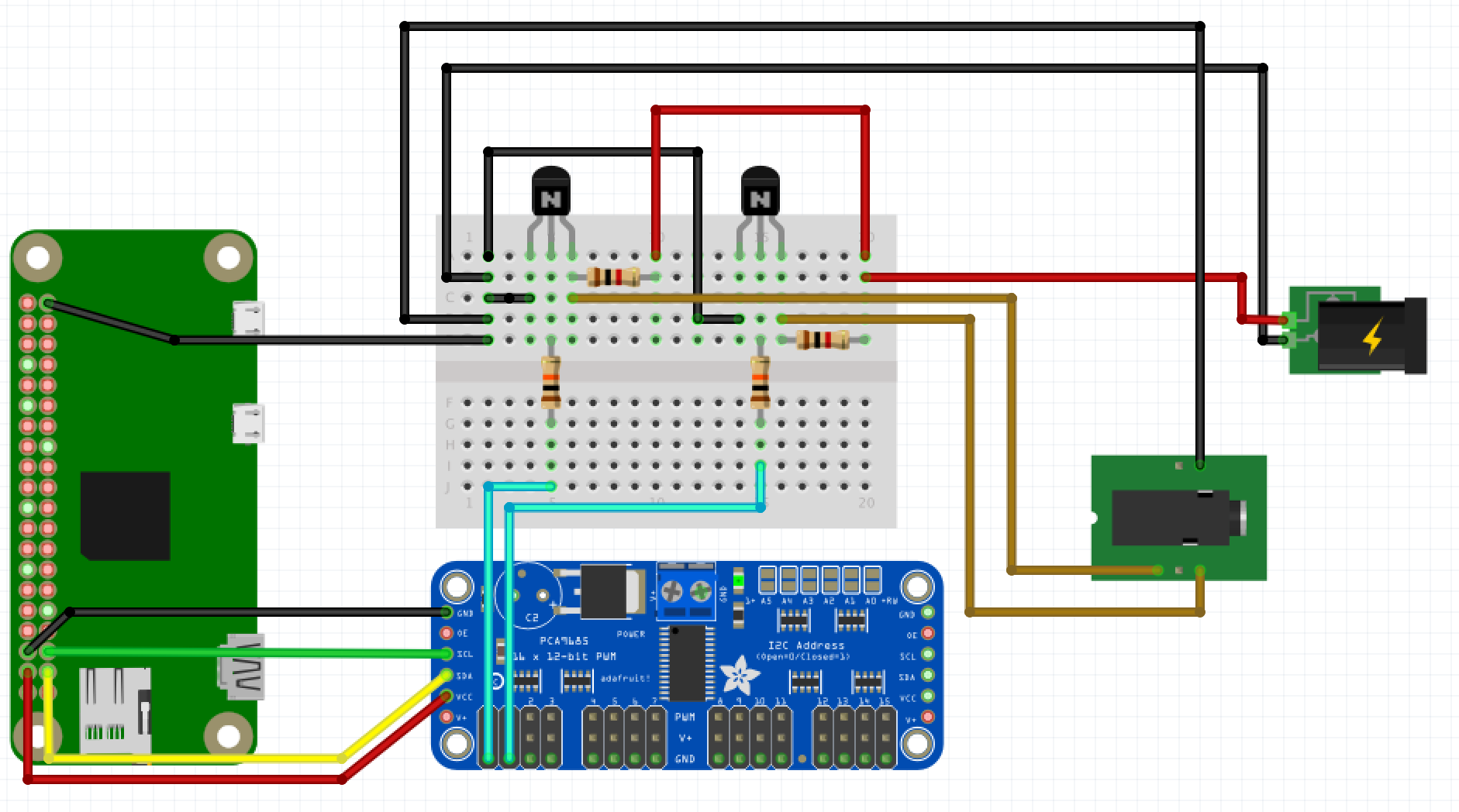
This is how pca9685 is wired to pi, the cyan wired are pwm output from pca9685. Here only two channels are used, for you this will be 5
https://reef-pi.github.io/build-guides/lighting/
breadboard.png


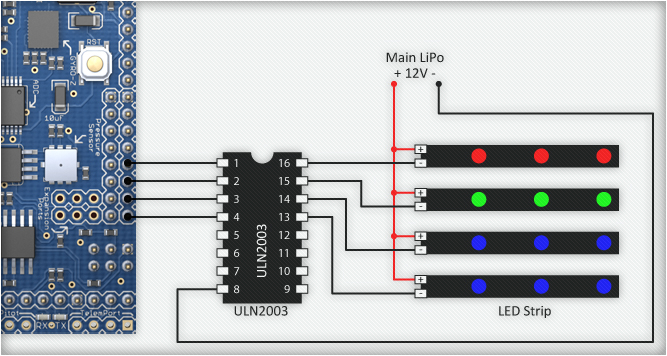
And this is how uln2803 is wired to LEDs, in short, the pca9685 pwm output will be its input , and the GND(or -ve) of each LED channel will be its output (because uln2803 is a sync type driver). All LED channels will share a common positive (12v)
LEDs.jpg

Awesome (I think :-) ). I'm a civil engineer, so a little bit slow with electrocity.

So from the first pic above, I don't need the breadboards with the resistors etc? That is specific to the (Kessil?) light build? If that's the case, then I've got it.
 

jcmental

Active Member
View Badges
Joined
Jan 25, 2018
Messages
114
Reaction score
137
Rating - 0%
0   0   0
Updates from one of the recent hardware experiment


What I learned was irrespective of how I wire the power connections to pi, lm2596 always produce jitter in pwm signal and dedicated micro usb based power source (even if its connected via gpio) produces clean pwm signal from pi . There are articles in the internet around ripple generated by lm2596 , I ll read those next

838A8AE1-6C4A-4F54-9F00-D32CD45DAEAA.jpeg


54C39F51-A878-455C-9288-777ACA2F2E1E.jpeg

Hey @Ranjib Just a quick question but looking back at my days years ago using RC boats, we used to get lots of "noise" that interfered with the radio signal at certain input voltages to the motor. we could solve this by fitting a smoothing capacitor across the motor terminals. Now I'm not trying to teach you to suck eggs and I know the lm2596 has build in capacitors but I'm not so sure they are the right spec for the voltage your asking for. would it help if you did a few tests with different value capacitors across the out put side of the lm2596? :-)
 

aquaalgae

Community Member
View Badges
Joined
Mar 22, 2017
Messages
48
Reaction score
30
Rating - 0%
0   0   0
Code:
import requests
import time

# This script shows how to update a light using the api
# Lets assume we have a light with ID 1 and that light has only one channel controlled by pin 1 (pca9685)

light_id = "1"
pin = "1"
ip = "127.0.0.1:8080" # IP
auth= ("reef-pi", "reef-pi") #  username and password
u = "http://" + ip + "/api/lights/" + light_id

resp = requests.get(u, auth=auth)
light = resp.json()

for x in range(10):
    light["channels"][pin]["auto"] = False # change the light to fixed mode
    light["channels"][pin]["fixed"] = x * 10   # PWM value in percentage
    resp = requests.post(u, auth=auth, json=light) # update light
    time.sleep(1) # wait for a second

keep hacking!

So I'm hoping to be able to try this out this weekend, but if you have a chance to glance at it, does this look like it might work?


Code:
import requests
import time
from datetime import datetime
from datetime import time
from datetime import date
import math


num_expansions=15
#0 = White East
#1 = White Center
#2 = White West
#3 = Blue East
#4 = Blue Center
#5 = Blue West
#6 = OCW East
#7 = OCW Center
#8 = OCW West
#9 = Violets East
#10 = Violets Center
#11 = Violets West
#12 = Moonlight East
#13 = Moonlight Center
#14 = Moonlight West
#15 = NOT USED 


#on time for channels 0-15  (15 is not used)
on_hour=[9,9,9,8,8,8,9,9,9,8,8,8,19,19,19,0]
on_minute=[0,15,30,0,15,30,15,30,45,15,30,45,0,15,30,0]

#off time for channels 0-15  (15 is not used)
off_hour=[18,18,18,20,20,20,17,18,18,19,20,20,9,9,9,0]
off_minute=[0,15,30,0,15,30,45,0,15,45,0,15,0,15,30,0]

#how long it takes for light to dim from min to max and max to min
slope_length=[100,100,100,100,100,100,100,100,100,100,100,100,100,100,100,0]
slope_length=[i*600 for i in slope_length]

#the minimum PWM value from 0-4095
startPWM=[0,0,0,0,0,0,0,0,0,0,0,0,0,0,0,0]

#the maximum PWM value from 0-4095
endPWM=[1433,1433,1433,3841,3841,3841,1638,1638,1638,3686,3686,3686,220,220,220,0]
pwmDelta=[y-x for x,y in zip(startPWM,endPWM)]

pwm_value=[0,0,0,0,0,0,0,0,0,0,0,0,0,0,0,0]
smoothPhase=[0,0,0,0,0,0,0,0,0,0,0,0,0,0,0,0]
lastsecond=0

while True:

    #to run the pwm function 1 time per second
    import time
    currentsecond=int(round(time.time()))
    currentsecond=int(currentsecond)
    if currentsecond>lastsecond:
        lastsecond=currentsecond+0 #add how many seconds delay over 1 to 0

        now=datetime.now()

        current_hour=now.hour

        current_minute=now.minute

        current_second=now.second
               
        for a in range(num_expansions):

                start=[i*60 for i in on_hour]
                start=[x+y for x,y in zip(start,on_minute)]
                start=[i*600 for i in start]
                end=[i*60 for i in off_hour]
                end=[x+y for x,y in zip(end,off_minute)]
                end=[i*600 for i in end]
                current=(current_hour*60)+current_minute
                current=(current*600)+(current_second*10)

                if current<=start[a]:
                        pwm_value[pwm_value[a]]=0
                if current>=end[a]:
                        pwm_value[pwm_value[a]]=0
                if current>start[a]:
                        if current<end[a]:
                                pwmDelta[a] = endPWM[a]-startPWM[a];
                                if current > (start[a] + slope_length[a]):
                                        if current < (end[a] - slope_length[a]):
                                                #we are at the maximum value
                                                pwm_value[a]=endPWM[a]
                                        else:
                                                #we are in the phase down
                                                smoothPhase[a]=(((end[a]-current)/slope_length[a])*180)+180
                                                pwm_value[a]=startPWM[a]+(pwmDelta[a]*((1+(math.cos(math.radians(smoothPhase[a]))))/2.0))
                                else:
                                        #we are in the phase up
                                        smoothPhase[a]=(((current-start[a])/slope_length[a])*180)+180
                                        pwm_value[a]=startPWM[a]+(pwmDelta[a]*((1+(math.cos(math.radians(smoothPhase[a]))))/2.0))
                        else:
                                #we are after the ramp down has finished
                                pwm_value[a]=0
                else:
                        #we are before the ramp up has started
                        pwm_value[a]=0


                #print('Press Ctrl-C to quit... PWM value for channel',a,'is',pwm_value[a])

                if (a==0) or (a==3) or (a==6) or (a==9) or (a==12):
                    light_id = "East"
                if (a==1) or (a==4) or (a==7) or (a==10) or (a==13):
                    light_id = "Center"
                if (a==2) or (a==5) or (a==8) or (a==11) or (a==14):
                    light_id = "West"
                pin = a #this needs to change to correct pin
                ip = "127.0.0.1:8080"
                auth = ("reef-pi", "reef-pi")
                u = "http://" + ip + "/api/lights/" + light_id

                resp = requests.get(u, auth=auth)
                light = resp.json()
                light["channels"][pin]["auto"] = False #change the light to fixed mode
                light["channels"][pin]["fixed"] = pwm_value/40.95 #PWM value in % - should be changed in future
                resp = requests.post(u, auth=auth, json=light) #update light
               

                #pwm.setPWM(a, 0, pwm_value[a])

 
OP
OP
Ranjib

Ranjib

7500 Club Member
View Badges
Joined
Apr 16, 2016
Messages
9,876
Reaction score
16,680
Location
Pleasant Hill, Concord
Rating - 0%
0   0   0
Thanks for the reply @Ranjib I dont know what version I'm running but I'm scared to update it because I dont think I can remember all the times and settings I have spent hours putting in. I like how my tank runs now I have a separate temp controller Running 2x300W, 2 large external filters and 2 joboe wave makers (now running separate) I have a 6 channel power bar and I've hooked up an auto feeder and all my lighting.

I think the only thing I would like in an update is a fully controllable PWM wave maker program so I can get rid of the controllers for the joboe control. Hence the reason I haven't bothered to risk updating the program, that and I wouldn't have a clue how to so would need to buy another micro SD card and start from scratch.
You can see the version you are running in the front page of then app , in footer. You can always copy your dB before upgrading, this making a backup, in case things go south and you have to revert back to the old version and settings.

You can take screen shot for individual tabs (configuration, equipment etc) and use that as a guide when setting up new version .
At the end, it’s your call and subject to your time availability. There’s definitely an element of risk in this
 
OP
OP
Ranjib

Ranjib

7500 Club Member
View Badges
Joined
Apr 16, 2016
Messages
9,876
Reaction score
16,680
Location
Pleasant Hill, Concord
Rating - 0%
0   0   0
Awesome (I think :) ). I'm a civil engineer, so a little bit slow with electrocity.

So from the first pic above, I don't need the breadboards with the resistors etc? That is specific to the (Kessil?) light build? If that's the case, then I've got it.
Yes. It’s simpler with uln2803.
I am a microbiologist :-). I am learning electronics for past three years
 
OP
OP
Ranjib

Ranjib

7500 Club Member
View Badges
Joined
Apr 16, 2016
Messages
9,876
Reaction score
16,680
Location
Pleasant Hill, Concord
Rating - 0%
0   0   0
Hey @Ranjib Just a quick question but looking back at my days years ago using RC boats, we used to get lots of "noise" that interfered with the radio signal at certain input voltages to the motor. we could solve this by fitting a smoothing capacitor across the motor terminals. Now I'm not trying to teach you to suck eggs and I know the lm2596 has build in capacitors but I'm not so sure they are the right spec for the voltage your asking for. would it help if you did a few tests with different value capacitors across the out put side of the lm2596? :)
I kinda suspect the same. In fact there’s bunch of other lm2596 board branded as low ripple output which is few extra component, including extra capacitors . We are definitely getting closer to the problem.

I think I have mentioned earlier, but I’ll repeat that even with this, the kessil controller works flawlessly if I use pca9685 and a dedicated build
 

Schreiber

Leviathan
View Badges
Joined
Jun 28, 2016
Messages
475
Reaction score
594
Location
Knoxville
Rating - 0%
0   0   0
So, I've updated to 1.5 & started fresh, deleting all my equipment & outlets.

However, when I go to add new outlets, I cannot input any text into the field. I've tried reloading, rebooting, downgrading to 1.4... Nothing will fix it. Any suggestions?
 

Erica-Renee

Valuable Member
View Badges
Joined
Oct 4, 2017
Messages
1,596
Reaction score
3,288
Location
lost
Rating - 0%
0   0   0
So, I've updated to 1.5 & started fresh, deleting all my equipment & outlets.

However, when I go to add new outlets, I cannot input any text into the field. I've tried reloading, rebooting, downgrading to 1.4... Nothing will fix it. Any suggestions?
Did you add them in settings -Connectors first assigning them a GPIO.... Then to the Outlets tap and assigning a Outlet to a Connector...
 

Schreiber

Leviathan
View Badges
Joined
Jun 28, 2016
Messages
475
Reaction score
594
Location
Knoxville
Rating - 0%
0   0   0
Did you add them in settings -Connectors first assigning them a GPIO.... Then to the Outlets tap and assigning a Outlet to a Connector...

That's where I'm trying to name & assign them, in the connectors settings.

I was able to bypass the problem by using my tablet connecting to the reef pi server instead. Now I'm just having issues getting the relays to respond.
 

TOP 10 Trending Threads

WHAT AMOUNT OF LIVE ROCK AND SAND SHOULD BE PRIORITIZED FOR OPTIMAL BIODIVERSITY/FILTRATION?

  • 100% live rock + bagged sand

    Votes: 38 27.1%
  • 100% dry rock + 100% live sand

    Votes: 47 33.6%
  • 50/50 live/dry rock, 50/50 live/bagged sand

    Votes: 31 22.1%
  • 75% live rock, 25% live sand

    Votes: 14 10.0%
  • 25% live rock, 75% live sand

    Votes: 10 7.1%
Back
Top