reef-pi :: An opensource reef tank controller based on Raspberry Pi.

I have pretty basic question.

I can access reef-pi from my laptop by typing hostname.local in a web browser. But how do I get the Raspberry pi to display the reef-pi UI through it's own HDMI? I can only seem to get a command line or Raspbian GUI to display through the HDMI.

Thanks,

 
There is always the Apex probe. More expensive ($30) but waterproof. Snip the connector end and you have access to the wires.

I was wondering if anyone has used the APEX temperature probe with a reef-pi? I have already had two of the $10 sensors fail, so a $30 aquarium grade sensor looks like a good deal if it works.
 
I was wondering if anyone has used the APEX temperature probe with a reef-pi? I have already had two of the $10 sensors fail, so a $30 aquarium grade sensor looks like a good deal if it works.

I believe they are a 10k NTC thermistor. Not directly going to work.
 
I have pretty basic question.

I can access reef-pi from my laptop by typing hostname.local in a web browser. But how do I get the Raspberry pi to display the reef-pi UI through it's own HDMI? I can only seem to get a command line or Raspbian GUI to display through the HDMI.

Thanks,
Open the browser in pi and type http://localhost
 
Regards to the virtual equipment, I set it up, didn't work how it should with the pca9685, I set up one virtual pump per pump head. Should I set up a second one and set the pin to a ground pin, so as per the tutorial I'll have one off and one on?

Screenshot_2019-01-17-21-49-14-592_com.android.chrome.png


IMG_20190117_173131.jpg


IMG_20190117_173104.jpg


IMG_20190117_173050.jpg
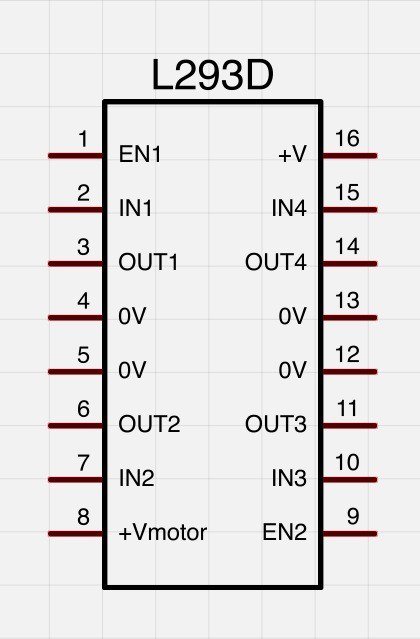
Are you using l293d? Do you have a build thread? I want to take a look at the physical circuit. If you are using l293d checkout this schematic
learn_arduino_L293D.jpg


You can verify with a multimeter that the circuit is doing what it supposed to do. You should observer the voltage in EN1 or EN2 to vary as you update the doser speed (this is the pin connected to pi or pca9685 pwm output) and among IN1, IN2 one of them should +ve (3.3v) and the other should be GND. and same for IN3/IN4. Finally check vmotor has some voltage, and then out1/out2 should vary as you vary the pwm. check all these pins voltage as you independently switch on/off equipment and change the speed, independently. If you are methodical and independently test the circuit connections, you will surely get to the bottom of this.
 
Got one of my old build hooked up in the garage. With power controller and couple of temperature sensors. Planning to hook up one by one all my workbench tools to it. I am also looking at this automatic door opening thing and getting lots of idea... may be next year :)
39AEE075-8EA3-47A2-91CC-55E03B96ABA8.jpeg


here is the dashboard. Temperature gets 62 F at night.. not too bad. also not a whole lot of temperature swing throughout the day
Screen Shot 2019-01-17 at 9.50.36 PM.png


Currently only a separate desktop system (pi+monitor) , oscilloscope and a fan (to get rid of soldering smoke) is hooked up to it. More to come.


Screen Shot 2019-01-17 at 9.50.18 PM.png


The pico tank is now solely powered by a pico base board based controller (thanks to @theatrus). I am very happy with the kessil control features, i have had hard time getting this working in AIO builds. This one is controlling light, power, temperature (ph will be added soon)

Screen Shot 2019-01-17 at 9.49.56 PM.png


The nano tank's controller. It has an extra temperature sensor to monitor ambient temperature (room temperature)
Screen Shot 2019-01-17 at 9.49.25 PM.png

Here is a temperature controller graph from the nano tank..
Screen Shot 2019-01-17 at 10.00.22 PM.png


Meanwhile, nano tank's ph (atlas scientific) is trending upword... will see how this unfolds
Screen Shot 2019-01-17 at 9.50.54 PM.png


I have total 5 reef-pi build in operation now. I'll be deploying another 4 over the course of next two months (for general room controls and as test builds). I think this will be sufficient to test out the clustering bits.
 
Got one of my old build hooked up in the garage. With power controller and couple of temperature sensors. Planning to hook up one by one all my workbench tools to it. I am also looking at this automatic door opening thing and getting lots of idea... may be next year :)
39AEE075-8EA3-47A2-91CC-55E03B96ABA8.jpeg


here is the dashboard. Temperature gets 62 F at night.. not too bad. also not a whole lot of temperature swing throughout the day
Screen Shot 2019-01-17 at 9.50.36 PM.png


Currently only a separate desktop system (pi+monitor) , oscilloscope and a fan (to get rid of soldering smoke) is hooked up to it. More to come.


Screen Shot 2019-01-17 at 9.50.18 PM.png


The pico tank is now solely powered by a pico base board based controller (thanks to @theatrus). I am very happy with the kessil control features, i have had hard time getting this working in AIO builds. This one is controlling light, power, temperature (ph will be added soon)

Screen Shot 2019-01-17 at 9.49.56 PM.png


The nano tank's controller. It has an extra temperature sensor to monitor ambient temperature (room temperature)
Screen Shot 2019-01-17 at 9.49.25 PM.png

Here is a temperature controller graph from the nano tank..
Screen Shot 2019-01-17 at 10.00.22 PM.png


Meanwhile, nano tank's ph (atlas scientific) is trending upword... will see how this unfolds
Screen Shot 2019-01-17 at 9.50.54 PM.png


I have total 5 reef-pi build in operation now. I'll be deploying another 4 over the course of next two months (for general room controls and as test builds). I think this will be sufficient to test out the clustering bits.

I get envious at clean workbenches [emoji2960]
 
When I found this thread 6 months ago I read it from the beginning. It took a quite a while. It seem the same questions that had been answered asked many times sorry if this has been ask already but it did a search and could not find it.

Has there been anyone using this to control dc powerheads?
 
When I found this thread 6 months ago I read it from the beginning. It took a quite a while. It seem the same questions that had been answered asked many times sorry if this has been ask already but it did a search and could not find it.

Has there been anyone using this to control dc powerheads?
It can't directly control powerheads yet. It can do on/off from an AC perspective, but that's it for powerheads right now.
 
When I found this thread 6 months ago I read it from the beginning. It took a quite a while. It seem the same questions that had been answered asked many times sorry if this has been ask already but it did a search and could not find it.

Has there been anyone using this to control dc powerheads?
Some folks are developing and testing, but I haven't seen anything working as of yet.
 
It can't directly control powerheads yet. It can do on/off from an AC perspective, but that's it for powerheads right now.
Thanks for the up date. That is the only reason I would go with a Neptune over the reefpi. I am not a developer but it seems like it would not be that difficult. Most pumps are 3 wires. A ground a 24dcv and a variable 0-10 or 0-5 brand dependent. I seen were some diy would make a wire so that one end has the 3 wire waterproof connector that hooks to the pump. The other end they connect a dc plug to the 24dcv and that connects to a power supply. They then use the same ground and the 0-10 to connect to a variable port. I seen were reefpi can control variable ports for lights. As someone who doesn't know what they are talking about it seams like everything is already there except a UI that can turn the variable port on and of at set intervals and making the connecting wire.

I am sure someone smarter than me will figure it out. Then I can benifet from their hard work.
 
Thanks for the up date. That is the only reason I would go with a Neptune over the reefpi. I am not a developer but it seems like it would not be that difficult. Most pumps are 3 wires. A ground a 24dcv and a variable 0-10 or 0-5 brand dependent. I seen were some diy would make a wire so that one end has the 3 wire waterproof connector that hooks to the pump. The other end they connect a dc plug to the 24dcv and found that connects to a power supply. They then use the same ground and the 0-10 to connect to a variable port. I seen were reefpi can control variable ports for lights. I someone who doesn't know what they are talking about it seams like everything is already there except a UI that can turn the variable port on and of at set intervals and making the connecting wire.

I am sure someone smarter than me will figure it out. Then I can benifet from their hard work.
There are quite a few threads on the reef-pi, and there may be one with an answer for you better than what I can provide.
 
If you can figure out out which wire is the PWM or 0-5/10v in your existing controller all you need to do is hijack that wire and run it from the rpi. Unless your pump runs from a 3.3v pwm signal (this is what the pi outputs by default) you would need to do some minimal circuitry to convert it. You can as a temporary solution use the light controller.
 
So the power head talk motivated me to start the research for the next part of my reef-pi build. I want to control my Maxspect Gyres. I know reefpi does not currently have a powerhead function but I am ok using the lights UI until or if power head control is added. So the biggest problem to tackle is the power head motor controller. you can buy icecap 0-10 volt controllers for the maxspect pumps that we could make work but at $125 each that seems a bit steep to me. So here is what I found, seems most of the DC powerheads are using brushless DC motors (BLDC) from 12-24 volts. After some digging I found this

https://www.ebay.com/itm/DC-12V-24V...615878&hash=item2819d4da8b:g:t5wAAOSwqBJXVVC~

Electronics gurus, is it really this simple? Provide the board with a 24v power (or whatever voltage you require for your pump), connect the power head motor to the 3 motor out pins, and give it a 5 volt PWM input? It even has a 5 volt output that could power an rpi.
 
As an eBay Associate we earn from qualifying purchases.
And thats fine...how did you integrate it with the reef pi api?
Sorry, I just saw this. I'm using the rest sensor in Home Assistant to post or get whatever I need. Currently I need to refresh the reef-pi cookie about once a week, but I think @Ranjib is working on that for future versions?

If you are familiar with Home Assistant you can see my config in my HA github, search for
Code:
#ReefControlPi Data
 
Apologies if this has been asked before, but is there a way to manually add measurements so they display on a dashboard? I don't have a fancy pH meter, etc but I do regular dropper tests, it would be great to be able to put those into the database along with everything else. Is it possible to add lo-fi data points that can be displayed in a dashboard so I can see the historical pH values?
 
Couple of us have already tried out with the tentacle board. Post 1.0 ph, salinity probe integration will be via these boards only. I have the prototype code sitting on my laptop . I am holding it off because I have to do considerable amount of work across ui and documentation to make it good enough for normal diy reefers.
Is the tentacle board a good idea then? Does it work well with the reef-pi software?
 
I have been driving my two jebao pp4 wave pumps with the 0-5vdc control signal from my reef-pi pwm board. No filters needed, just straight off the pwm. I use the lighting subsection of the program for now. My jebao return pump can not be controlled this way, even though they use the same interface plug.
 
I have been driving my two jebao pp4 wave pumps with the 0-5vdc control signal from my reef-pi pwm board. No filters needed, just straight off the pwm. I use the lighting subsection of the program for now. My jebao return pump can not be controlled this way, even though they use the same interface plug.
You can control speed, and direction
 

ARE YOU READY TO CONFESS TO CRAZIEST, DUMBEST, FUNNIEST THING YOU’VE EVER DONE IN REEFING?

  • Yeah, I'll confess! (Share your story in the comments!)

    Votes: 17 56.7%
  • Nah, I'll keep mine a secret...(Don't be like that, share with the class!)

    Votes: 13 43.3%
Back
Top
Home
Post thread…
Market
What's new