


- Joined
- Nov 19, 2020
- Messages
- 7
- Reaction score
- 4
- Location
- Lebanon
- What state or country do you live in
- Indiana
I had to change my network access point hardware , and used the unit suggested by Carlos (ac750-ex6100) , and am having trouble getting the power strips to work again.
I used the "replace button" and got the links successfully established again (according to the app anyway).
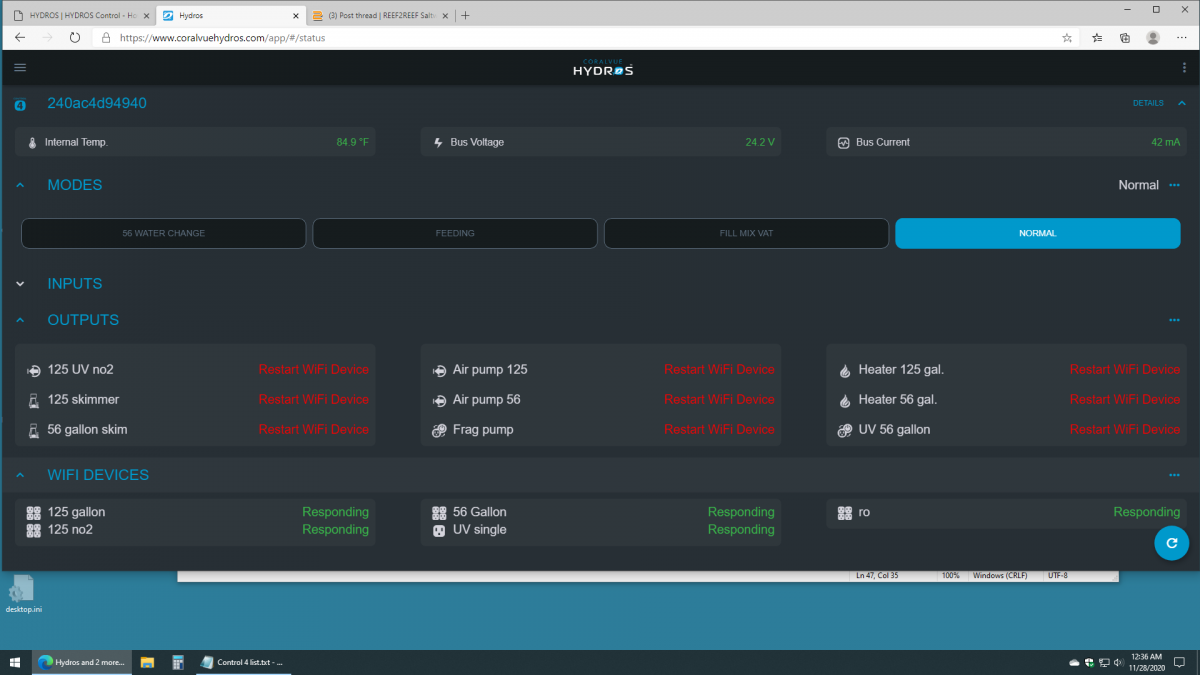
And under "wifi devices" they (power strips) all are listed as "responding" , but the corresponding outputs do not work and all say "restart wifi device".
Adding a new output and using a spare output on the strips result in the same thing (they show "restart wifi device".)
Restarting power strips , control, and access point have no affect.
They all perpetually show "restart wifi device", while under "wifi devices" they all are listed as "responding".
All LEDs show normal and connected.
Are there any settings in the AC750-EX6100 that have to be tweeked? It is using a different ssid and password than previous hardware. The control itself seems to have no trouble at all connecting, and logging into the cloud. Just power strips wont work.
I used the "replace button" and got the links successfully established again (according to the app anyway).
And under "wifi devices" they (power strips) all are listed as "responding" , but the corresponding outputs do not work and all say "restart wifi device".
Adding a new output and using a spare output on the strips result in the same thing (they show "restart wifi device".)
Restarting power strips , control, and access point have no affect.
They all perpetually show "restart wifi device", while under "wifi devices" they all are listed as "responding".
All LEDs show normal and connected.
Are there any settings in the AC750-EX6100 that have to be tweeked? It is using a different ssid and password than previous hardware. The control itself seems to have no trouble at all connecting, and logging into the cloud. Just power strips wont work.








