Basic Tunze ORCA Programming

rtparty

7500 Club Member
View Badges
Joined
Jan 19, 2010
Messages
8,666
Reaction score
14,872
Location
Utah
Rating - 100%
4   0   0
So you just got your new ORCA and need a quick guide to setup some basic flow patterns?

Maybe make it so when the ORCA is pointed at your glass it isn’t going full blast and blowing sand around?

Or you have a low flow coral closer to the pump and you don’t want it peeling the skin off?

Here are a couple basic tips to get you up and running!

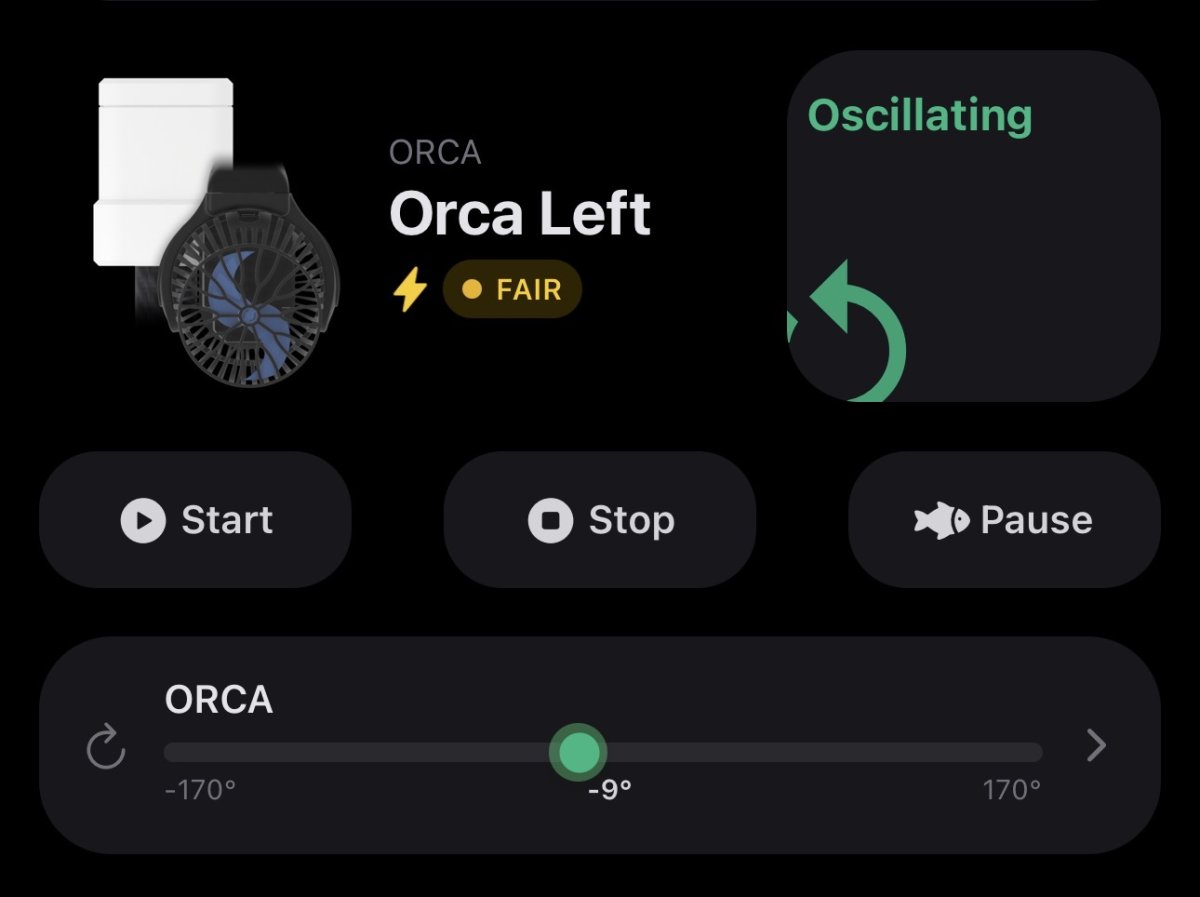
After you’ve paired your ORCA, head to Devices and select the ORCA you want to setup. Here you will find multiple options but select the ORCA box with the angles showing. This is a live view of what your device is doing.

Looks like this:
IMG_3149.jpeg


Select the little arrow > on the right hand side.

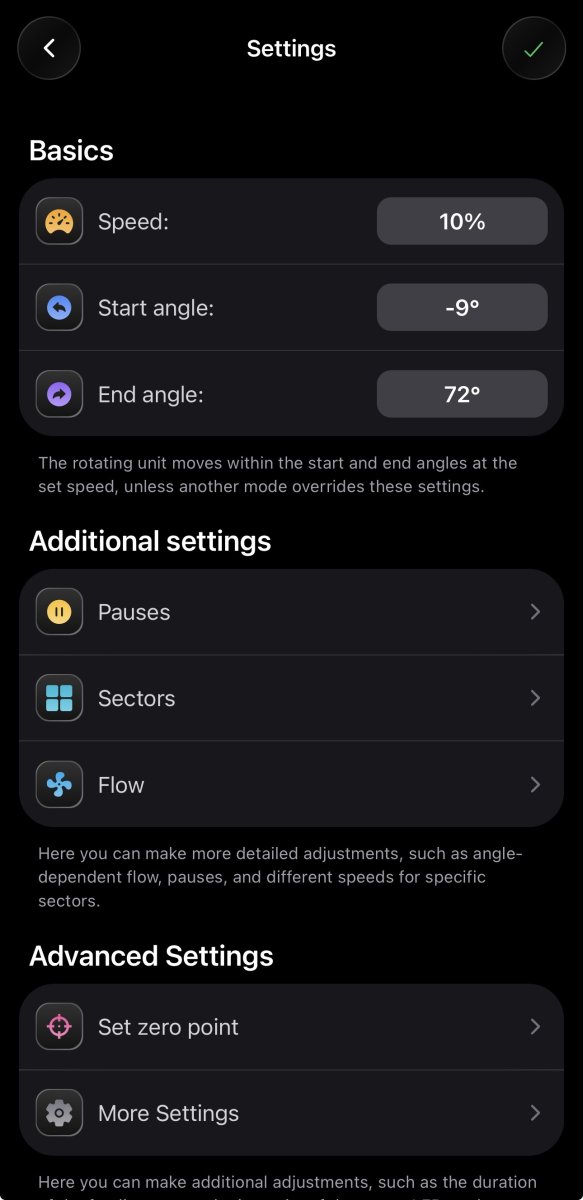
You will see this page next:
IMG_3150.jpeg


Couple notes for this page:

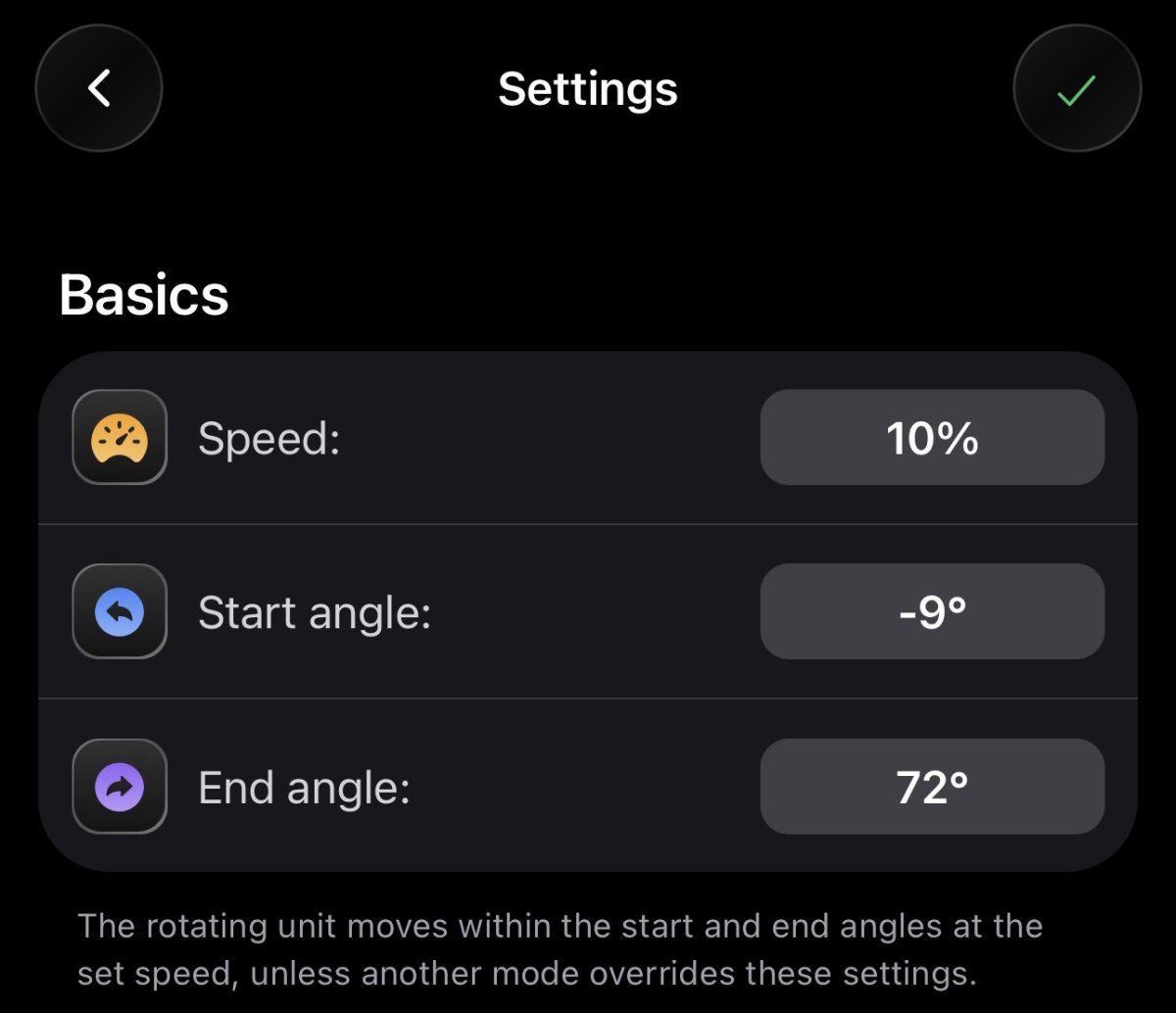
Basics: Super simple, very little control. Set the angles and the speed at which the ORCA OSCILLATES. No pump control here and I’m not sure what it even defaults at. I think you setup pump speed during the initial pairing phase.
IMG_3144.jpeg


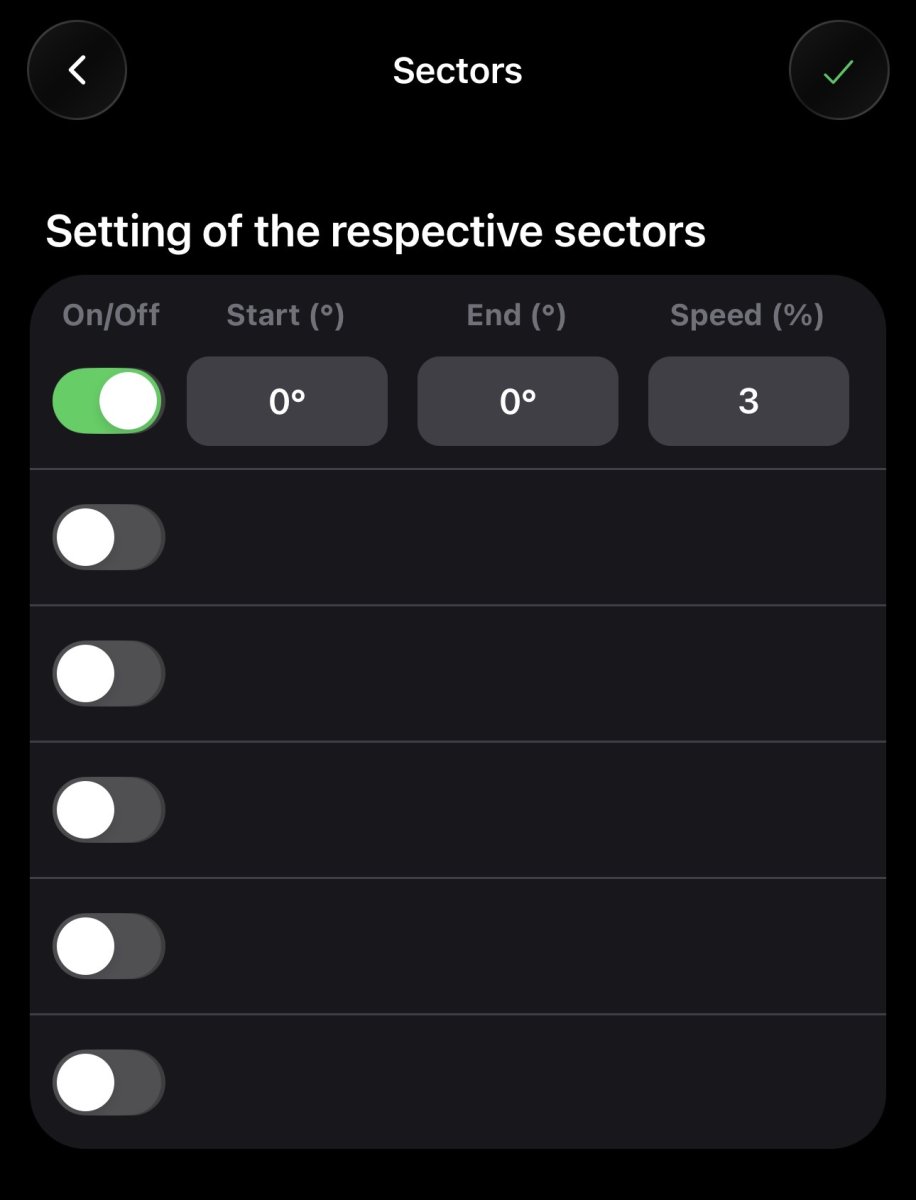
Sectors: This is where you pick specific sectors (angle X to angle Y) and the OSCILLATING speed of the ORCA. There is no pump control here. This will OVERRIDE your basics from above for that specific sector. (I don’t have any sectors setup. I just selected ON to show the boxes you’ll see)
IMG_3146.jpeg


Flow: This is where you get PUMP speed control. You can setup the pump speed for specific sectors. The OSCILLATING speed will be your speed found in the Basics section OR any programming you have in the Sector portion mentioned earlier. Remember, sectors override basics. Below is my programming as an example
IMG_3147.jpeg


That should get you started on some quick programming.

Hope it helps!
 
Last edited:
OP
OP
rtparty

rtparty

7500 Club Member
View Badges
Joined
Jan 19, 2010
Messages
8,666
Reaction score
14,872
Location
Utah
Rating - 100%
4   0   0
@rtparty do you have more than one? Wondering if I can sync/anti sync them.

I do have a 2nd Orca but not on the tank yet. I had to buy a new lid to fit the orca on the tank.

I do not know of a sync/anti sync option but maybe @rvitko can chime in

One thing I will say is the app developer is extremely open to ideas (maybe that changes if 100 people are suggesting stuff 😂) and there are quite a few things still being done with all of it


As soon as I get the second one installed, I have a really cool idea ready to program in and see how it does. I will update this thread with that information if it works as I think it should
 

Wonkabar

Well-Known Member
View Badges
Joined
Sep 19, 2024
Messages
541
Reaction score
643
Location
Long Island
Rating - 100%
7   0   0
@rtparty do you have more than one? Wondering if I can sync/anti sync them.

I do have a 2nd Orca but not on the tank yet. I had to buy a new lid to fit the orca on the tank.

I do not know of a sync/anti sync option but maybe @rvitko can chime in

One thing I will say is the app developer is extremely open to ideas (maybe that changes if 100 people are suggesting stuff 😂) and there are quite a few things still being done with all of it


As soon as I get the second one installed, I have a really cool idea ready to program in and see how it does. I will update this thread with that information if it works as I think it should
Yea I have some ideas as well. Planning to put one in each corner so it should be interesting if I can get it to do what I want. Just would be a pain if I have to manually time each one through their cycle by powering on to get exactly what I want. I have zero doubts that they will continue to iterate and make the tech better. Tunze is quickly becoming one of my favorite companies in the reef space.


 

exnisstech

Grumpy old man
View Badges
Joined
Feb 11, 2019
Messages
18,920
Reaction score
30,366
Location
Ashland Ohio
Rating - 0%
0   0   0
Hey @rtparty maybe you can assist? Getting familiar with the orca and trying to make some settings using different pump % at different angles. I'm able to do that in the settings but can not figure out how to apply those settings. I currently have it set to just occilate at a fixed % which works fine. I just need to know how to apply changes please.
This is my settings screen. After making the changes I select the check mark in the upper right which seems like a save function then exit using the arrow upper left but the pump is still is occilate at the fixed rate. I'm sure its a step I'm missing but I can't figure it out.
Screenshot_20260201-183750.png
 

t5Nitro

Valuable Member
View Badges
Joined
Feb 9, 2011
Messages
2,010
Reaction score
1,414
Location
WI
Rating - 0%
0   0   0
@rtparty What does your pump do from -9 to 0 and from 71 to 72 degrees? Will they default at 10% pump speed with what you have set in the basics page with these degrees outside the refined sectors in your later pics?
 
OP
OP
rtparty

rtparty

7500 Club Member
View Badges
Joined
Jan 19, 2010
Messages
8,666
Reaction score
14,872
Location
Utah
Rating - 100%
4   0   0
Hey @rtparty maybe you can assist? Getting familiar with the orca and trying to make some settings using different pump % at different angles. I'm able to do that in the settings but can not figure out how to apply those settings. I currently have it set to just occilate at a fixed % which works fine. I just need to know how to apply changes please.
This is my settings screen. After making the changes I select the check mark in the upper right which seems like a save function then exit using the arrow upper left but the pump is still is occilate at the fixed rate. I'm sure its a step I'm missing but I can't figure it out.
Screenshot_20260201-183750.png

Sectors is the oscillation speed, not the pump speed. Put those settings in the FLOW portion. Turn all those to OFF if you want the orca to oscillate at a set speed (the speed you set in the BASICS section)
 
OP
OP
rtparty

rtparty

7500 Club Member
View Badges
Joined
Jan 19, 2010
Messages
8,666
Reaction score
14,872
Location
Utah
Rating - 100%
4   0   0
@rtparty What does your pump do from -9 to 0 and from 71 to 72 degrees? Will they default at 10% pump speed with what you have set in the basics page with these degrees outside the refined sectors in your later pics?

The FLOW section over rides any settings from the BASCIS section.

I currently have it set like this until I get my second ORCA installed when my new lid comes in:
IMG_3176.jpeg


I have it providing flow over my one island to keep the corals happy
 

exnisstech

Grumpy old man
View Badges
Joined
Feb 11, 2019
Messages
18,920
Reaction score
30,366
Location
Ashland Ohio
Rating - 0%
0   0   0
Sectors is the oscillation speed, not the pump speed. Put those settings in the FLOW portion. Turn all those to OFF if you want the orca to oscillate at a set speed (the speed you set in the BASICS section)
I guess I'm misunderstanding. The settings below the degrees are position and the speed % is the speed of the pump no? How do I get those settings to take effect is what I'm not getting.

Screenshot_20260201-183750~2.jpg


This is what the pump is running at that I'm trying to change to the settings above
Screenshot_20260201-210111.png


I
 
OP
OP
rtparty

rtparty

7500 Club Member
View Badges
Joined
Jan 19, 2010
Messages
8,666
Reaction score
14,872
Location
Utah
Rating - 100%
4   0   0
I guess I'm misunderstanding. The settings below the degrees are position and the speed % is the speed of the pump no? How do I get those settings to take effect is what I'm not getting.

Screenshot_20260201-183750~2.jpg


This is what the pump is running at that I'm trying to change to the settings above
Screenshot_20260201-210111.png


I

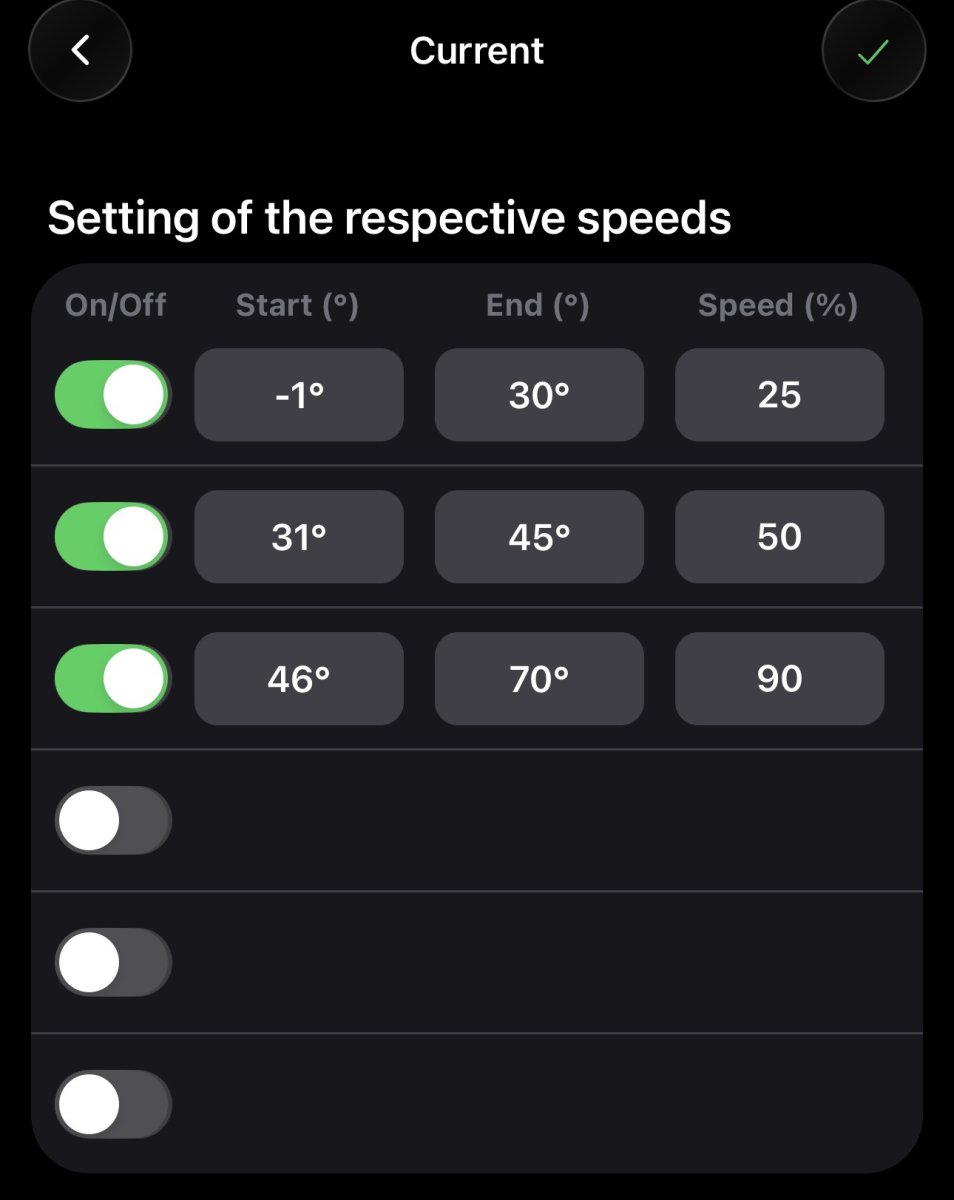
You are in the wrong section. See at the top where is says Sectors? It needs to say Current like my pic above.

1769998743070.png
 

exnisstech

Grumpy old man
View Badges
Joined
Feb 11, 2019
Messages
18,920
Reaction score
30,366
Location
Ashland Ohio
Rating - 0%
0   0   0
You are in the wrong section. See at the top where is says Sectors? It needs to say Current like my pic above.

1769998743070.png
Thanks that seemed to work when I went back to live view but then when I exit the app and come back it returns to occilate at a fixed 20% so the settings are not being stored. I appreciate your efforts but I really wish tunze had spent a little more time testing the app in the US market before releasing these units.
 
OP
OP
rtparty

rtparty

7500 Club Member
View Badges
Joined
Jan 19, 2010
Messages
8,666
Reaction score
14,872
Location
Utah
Rating - 100%
4   0   0
Thanks that seemed to work when I went back to live view but then when I exit the app and come back it returns to occilate at a fixed 20% so the settings are not being stored. I appreciate your efforts but I really wish tunze had spent a little more time testing the app in the US market before releasing these units.

Are you trying to set the oscillation speed or pump speed? Or both?
 

exnisstech

Grumpy old man
View Badges
Joined
Feb 11, 2019
Messages
18,920
Reaction score
30,366
Location
Ashland Ohio
Rating - 0%
0   0   0
Are you trying to set the oscillation speed or pump speed? Or both?

I'm setting the start and end angle and the speed of the pump during that sweep. It works fine when i set it but when I leave the app and return the settings have reverted back to the previous.

This is the settings I applied earlier that shows it changing speed as it moves when I go back to live view.
Screenshot_20260202-130346.png


If I back out of the app it freezes when I return and has to be forced closed each time or its unresponsive.

When I go back the settings applied above are gone and it's back to occilate at at a fixed 20% again and doesn't change speed any longer.

Screenshot_20260202-130717.png
 

exnisstech

Grumpy old man
View Badges
Joined
Feb 11, 2019
Messages
18,920
Reaction score
30,366
Location
Ashland Ohio
Rating - 0%
0   0   0
Getting it figured out. In addition to the info here there a good video tutorial below.


exnisstech

Grumpy old man
View Badges
Joined
Feb 11, 2019
Messages
18,920
Reaction score
30,366
Location
Ashland Ohio
Rating - 0%
0   0   0
Does anyone know of a reset or have any suggestions. I have one if two that appears bricked after a hiccup during the latest update. One went smooth but the second no so much. I left the room after starting it and when I came back there was lost communication message. I can no longer see the orca and have no red or white LED. I've power cycled it but that did nothing. It's like it's just dead. I did try adding a new device but it isn't found.
@rvitko ?
 

TOP 10 Trending Threads

WHAT AMOUNT OF LIVE ROCK AND SAND SHOULD BE PRIORITIZED FOR OPTIMAL BIODIVERSITY/FILTRATION?

  • 100% live rock + bagged sand

    Votes: 34 27.6%
  • 100% dry rock + 100% live sand

    Votes: 43 35.0%
  • 50/50 live/dry rock, 50/50 live/bagged sand

    Votes: 27 22.0%
  • 75% live rock, 25% live sand

    Votes: 11 8.9%
  • 25% live rock, 75% live sand

    Votes: 8 6.5%
Back
Top