I am controlling my Reef Tank using an APEX and often have to turn off something when working on the tank.
This can be a pain as wet hands and touch screen phones don't work well together. I thought. Wouldn't it be awesome if you could use google home to control your tank? For example, when you start doing a water change and the ATO starts screaming you could say "OK Google.. Turn off tank ATO".
I searched around and there didn't seem to be a way to do it. Then, I realised the APEX Android app uses HTTP to communicate with your local APEX Web Server.
After firing up Wire shark I found that you can control your apex by sending simple HTTP POST commands to the APEX. For example to turn off your ATO you can issue the following command on your local network:
Code:
curl -X POST --user admin:PASSWORD http://APEX_LOCAL_IP:APEX_PORT/status.sht?ATO_state=1&Update=Update
The state is a enumeration where 0 = AUTO, 1 = OFF and 2 = ON.
Now I can issue commands to the APEX. But how do you hook it up with Google Home? This is where the following combination of tools does the magic:
Google Home + IFTTT + Home Assistant + Command Line Curl
Here is a demo with my Neptune Apex Controlled Reef Tank:
Step 1: Install Home Assistant
Home Assistant (
https://home-assistant.io) is a home automation server that you run on your local network. Home Assistant allows you to centralise command and control of multiple home automation devices in one location. Once a device is connected to home assistant you can control those devices remotely via a REST web API.
Install Home Assistant by following the guides on the website and ensure you enable port forwarding to your home assistant server.
Important: Ensure you setup home assistant with a password, dynamic dns and enable SSL by following the guides. You are about to open a public interface to your Reef Tank!
Step 2: Add a command line switch for each Apex Connected Device
Home automation has many modules (platforms) to control devices. An extremely useful and flexible platform is the "command_line" platform (
https://home-assistant.io/components/switch.command_line/). Using the command_line platform we can program a switch that runs a curl command to interact with your APEX as described above.
Add the following to your configuration.yaml file:
Code:
switch:
  - platform: command_line
    switches:
      fish_tank_ato:
        command_on: curl -X POST --user admin:PASSWORD http://APEX_LOCAL_IP:APEX_PORT/status.sht?ATO_state=0&Update=Update
        command_off: curl -X POST --user admin:PASSWORD http://APEX_LOCAL_IP:APEX_PORT/status.sht?ATO_state=1&Update=Update
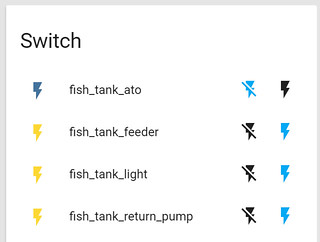
Restart your home assistant and you should now see a switch on the Home assistant UI:
Step 3: Test the Home Assistant Switch
Switches in home assistant can be called via a REST API (
https://home-assistant.io/developers/rest_api/). The REST API requires you to POST the name of the switch in JSON and your home assistant password in the url request.
Here is an example in curl:
Code:
curl -X POST -H "Content-Type: application/json" -d '{"entity_id" : "switch.fish_tank_ato"}' https://YOUR_DYNAMIC_DNS_HOSTNAME:HOME_ASSISTANT_PORT_ON_ROUTER/api/services/script/turn_on?api_password=HOME_ASSISTANT_PASSWORD
Step 4: Connect everything using IFTTT (If This Than That)
IFFT (
https://ifttt.com/discover) allows you to connect input from one device (If This) to an action (Than That). We will be using IFTTT to make Google Assistant (This) perform web request to home assistant (Than That).
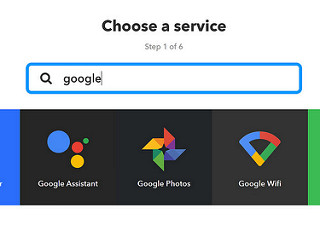
Sign up to IFTTT and setup a new Applet. For the (This) select Google Assistant
Select the "Say a simple phrase" option and enter in the phrase to activate the command. For example "turn off tank ato".
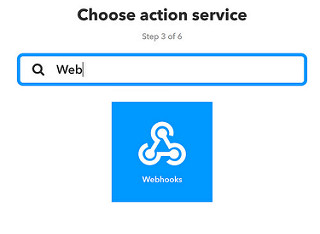
For the "That" select the "Web Hooks" service.
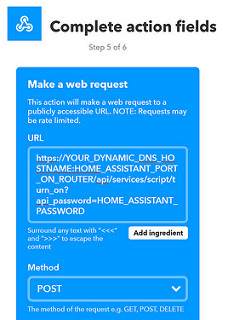
Enter the URL to trigger the home assistant switch and set the action to POST.
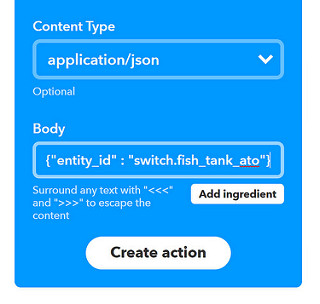
Set the content type to "application/json " and paste in the JSON that specifies the home assistant switch to trigger.
Step 5: Test it out
Say "OK Google.." and your phrase and enjoy your new Reef Tank Assistant!