

Help - Stuck on Old Trident Firmware

  • Thread starter Thread starter rebels23
  • Start date Start date
  • Tagged users Tagged users None

rebels23

Active Member
View Badges
Joined
Sep 2, 2020
Messages
151
Reaction score
43
Location
NYC
What state or country do you live in
New York
Rating - 0%
0   0   0
Hi Folks,

I have been having a heck of a time trying to update my firmware on my Trident. I wont even let me change out my reagents because of it. I always kick off the firmware update via the app, it tells me it I updating, and then finishes, re-starts the Trident and I am always still at Old version 20. Anyone have any idea how I can fix this? Thanks.
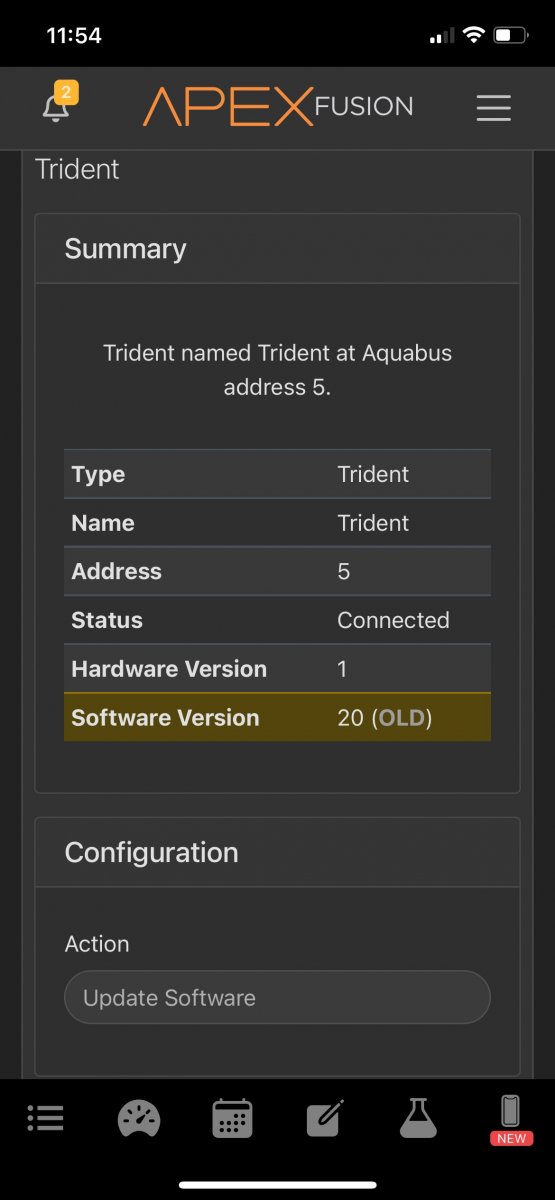
IMG_2412.jpeg
 
I recommend rebooting the Apex, then disconnecting and reconnecting the Trident. Once it finishes the initialization after reconnecting and its logo light turns orange, then try the software update again.

 
That is weird, because I am on the same version and it tells me it is OK

399DDECF-155D-4FB4-A30D-D8431F8B3E03.png
 
I recommend rebooting the Apex, then disconnecting and reconnecting the Trident. Once it finishes the initialization after reconnecting and its logo light turns orange, then try the software update again.
Thank you that worked!!!
 
That is weird, because I am on the same version and it tells me it is OK

399DDECF-155D-4FB4-A30D-D8431F8B3E03.png
Which AOS version are you on? I am on the latest 5.06 2B22
 

TOP 10 Trending Threads

WHICH AREA OF REEFKEEPING MOST NEEDS A GENUINE BREAKTHROUGH?

  • Lighting

    Votes: 2 3.3%
  • Pumps and water flow

    Votes: 2 3.3%
  • Water testing and monitoring

    Votes: 19 31.7%
  • Controllers, apps, and device compatibility

    Votes: 8 13.3%
  • Filtration and nutrient export

    Votes: 1 1.7%
  • Automatic feeding

    Votes: 6 10.0%
  • Leak prevention and tank safety

    Votes: 7 11.7%
  • Equipment reliability and repairability

    Votes: 11 18.3%
  • Other (leave a comment in the thread)

    Votes: 4 6.7%
Back
Top
Home
Post thread…
Market
What's new




