



MultiBoard - Tutorial / Tips & Tricks

bsdubois00

Active Member
View Badges
Joined
Jan 6, 2025
Messages
201
Reaction score
217
Location
Houston, TX
Rating - 0%
0   0   0
MultiBoard - 3D Printing Wall Organization
Multiboard - https://www.multiboard.io/

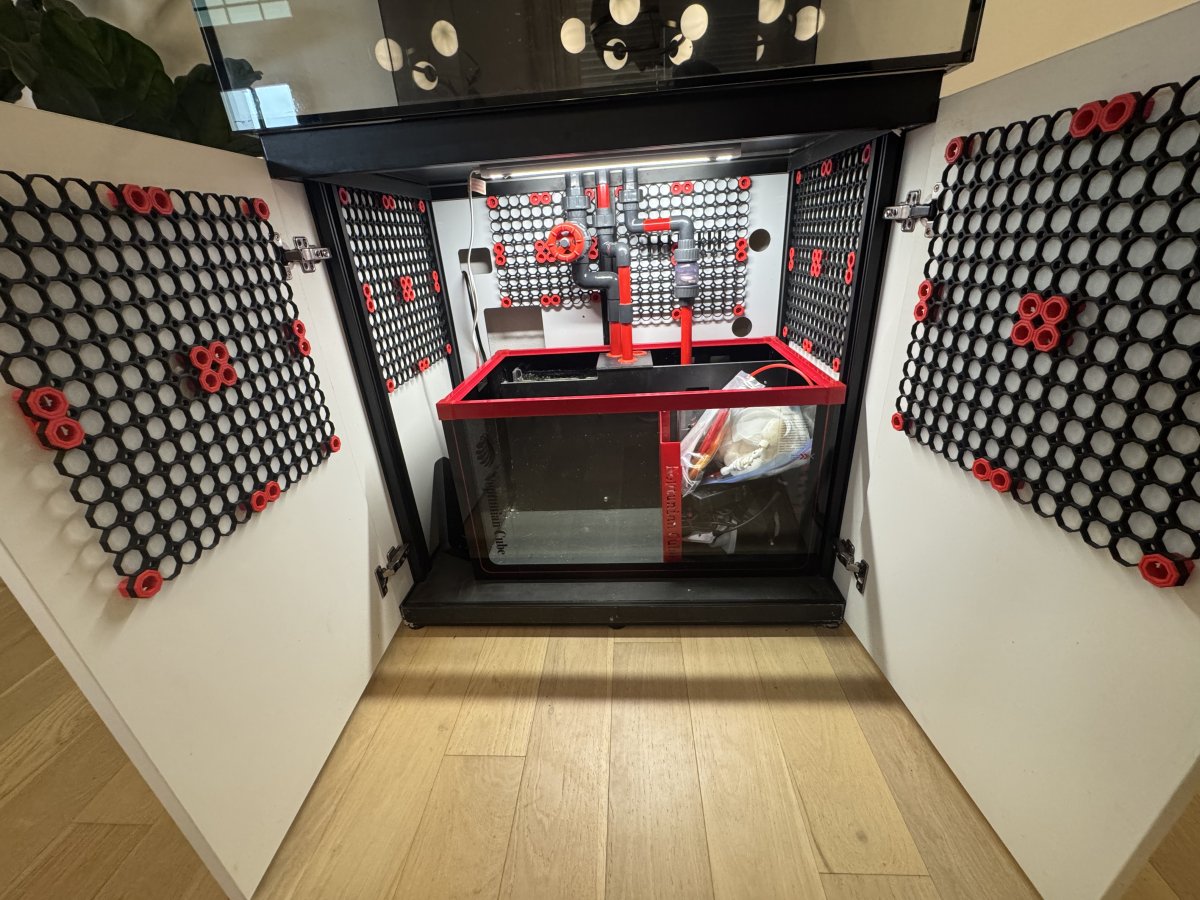
I've been getting a lot of questions regarding my MultiBoard setup in my tank cabinet and figured I would make a quick post with some tips & tricks / resources. Enjoy - hope this is helpful!
2.jpeg

1.jpg


Creating your MultiBoard Wall Sheets:
  • First thing you will want to do is measure the space that you have / are looking to fill with MultiBoard​
  • Once you have the measurements go to the MultiBoard Planner - https://www.multiboard.io/planner - and enter your area


    3.png

  • You'll notice the option to adjust the "Tile Size" - I prefer trying to get as close to perfect squares as possible so you'll want to play around with this. For reference each tile is about 1" so a 7x7 Board is appx 7" x 7" (so for this size the best option is 7x7 tiles)

    1738677876182.png


  • Once you have a layout you like - all of the files that you'll need to print are located on the right along with the quantity needed

    1738677919726.png


  • Now print away and assemble your MultiBoard / attach it to the wall - easy enough.

Creating your MultiBoard Holders:
  • For creating custom wall holders I've found the best thing is to use this customizable holder generator - https://makerworld.com/en/@BlackjackDuck/upload
  • You'll want to start by measuring your item and then converting Inches to MM (or use a pair of calipers that you can set to MM) - it's good practice to round up / add 1 mm just as a buffer for tolerances.

    1738678175701.png


  • One thing that you'll want to make sure you do is customize the 'lip' that's holding the piece in - this can be found on the Front Cutout Customizations section

    Parametric Model Maker 2025-02-04 08-10-36.png


  • There are other option you can use to create cutouts for cords in the bottom or on the sides - play around with the settings to see how they change the model.
  • Once you have your item printed you'll need adapters to connect them to the MultiBoard - I found these are the best ones to use - https://makerworld.com/en/models/790825#profileId-735507
  • There are different types depending on where you plan to screw them into so just pay attention. I prefer the SCREW in options vs the snap in options

    1738678406610.png


  • Now attach your holder and you're off to the races!!

Misc Files:
Zip Tie Holder - https://makerworld.com/en/models/754342?from=search#profileId-688372
Helios Heater Controller Holder - https://makerworld.com/en/models/1058049#profileId-1045831
 
Last edited:

TheCuriousReefer

New Member
View Badges
Joined
Jan 12, 2025
Messages
6
Reaction score
0
Location
Usa
Rating - 0%
0   0   0
Thanks for the overview! I have been struggling to unravel the multiboard process so I could do something similar for under my tank. How have you handled cables and the like?
 

Gumbies R Us

God, Bouldering, and Reefing
View Badges
Joined
Nov 10, 2022
Messages
28,985
Reaction score
51,406
Location
North Georgia
Rating - 0%
0   0   0
Thank you for sharing this! I will be sure to save this whenever I get around to printing mine!
 
OP
OP
bsdubois00

bsdubois00

Active Member
View Badges
Joined
Jan 6, 2025
Messages
201
Reaction score
217
Location
Houston, TX
Rating - 0%
0   0   0
Thanks for the overview! I have been struggling to unravel the multiboard process so I could do something similar for under my tank. How have you handled cables and the like?
I use the Zip Tie file above and just zip tie / clean up the cables that way
 

TheCuriousReefer

New Member
View Badges
Joined
Jan 12, 2025
Messages
6
Reaction score
0
Location
Usa
Rating - 0%
0   0   0
I have seen that the HSW boards have a small cable clip. I will have to see if I can adapt it to the multi board.
 

TheCuriousReefer

New Member
View Badges
Joined
Jan 12, 2025
Messages
6
Reaction score
0
Location
Usa
Rating - 0%
0   0   0
@bsdubois90 - The link you posted for the custom part holders doesn't go to a specific model, is that intentional? or did you copy and paste the link to the creator's profile on purpose?
 

cilyjr

Valuable Member
View Badges
Joined
Sep 28, 2011
Messages
1,958
Reaction score
2,159
Location
Arroyo Grande
Rating - 100%
2   0   0
MultiBoard - 3D Printing Wall Organization
Multiboard - https://www.multiboard.io/

I've been getting a lot of questions regarding my MultiBoard setup in my tank cabinet and figured I would make a quick post with some tips & tricks / resources. Enjoy - hope this is helpful!

2.jpeg

1.jpg


Creating your MultiBoard Wall Sheets:
  • First thing you will want to do is measure the space that you have / are looking to fill with MultiBoard​
  • Once you have the measurements go to the MultiBoard Planner - https://www.multiboard.io/planner - and enter your area


    3.png

  • You'll notice the option to adjust the "Tile Size" - I prefer trying to get as close to perfect squares as possible so you'll want to play around with this. For reference each tile is about 1" so a 7x7 Board is appx 7" x 7" (so for this size the best option is 7x7 tiles)

    1738677876182.png


  • Once you have a layout you like - all of the files that you'll need to print are located on the right along with the quantity needed

    1738677919726.png


  • Now print away and assemble your MultiBoard / attach it to the wall - easy enough.

Creating your MultiBoard Holders:
  • For creating custom wall holders I've found the best thing is to use this customizable holder generator - https://makerworld.com/en/@BlackjackDuck/upload
  • You'll want to start by measuring your item and then converting Inches to MM (or use a pair of calipers that you can set to MM) - it's good practice to round up / add 1 mm just as a buffer for tolerances.

    1738678175701.png


  • One thing that you'll want to make sure you do is customize the 'lip' that's holding the piece in - this can be found on the Front Cutout Customizations section

    Parametric Model Maker 2025-02-04 08-10-36.png


  • There are other option you can use to create cutouts for cords in the bottom or on the sides - play around with the settings to see how they change the model.
  • Once you have your item printed you'll need adapters to connect them to the MultiBoard - I found these are the best ones to use - https://makerworld.com/en/models/790825#profileId-735507
  • There are different types depending on where you plan to screw them into so just pay attention. I prefer the SCREW in options vs the snap in options

    1738678406610.png


  • Now attach your holder and you're off to the races!!

Misc Files:
Zip Tie Holder - https://makerworld.com/en/models/754342?from=search#profileId-688372
Helios Heater Controller Holder - https://makerworld.com/en/models/1058049#profileId-1045831
Thank you for this, I was completely unaware of its existence. Going to do a print to get my printing area a little more organized first.
 

TheReefLoader

New Member
View Badges
Joined
Aug 14, 2025
Messages
1
Reaction score
0
Location
United States
Rating - 0%
0   0   0
I am not sure about multiboard. Any chance, someone can message me the password for the Advanced editor? The "free" nickel and diming drives one mad.
 

jgadbois

New Member
View Badges
Joined
Aug 26, 2019
Messages
7
Reaction score
3
Rating - 0%
0   0   0
It looks like a good mounting system but I think you sacrificed visual clarity for "pretty". I think if you had used white tiles and tile connectors you could have reduced the visual clutter and made the actual plumbing and control components stand out. Personally I alway liked the piping color coded to function. It is is at heart an engineering system first. It does look very organized though so thanks for the inspiration.
 

TOP 10 Trending Threads

WHAT AMOUNT OF LIVE ROCK AND SAND SHOULD BE PRIORITIZED FOR OPTIMAL BIODIVERSITY/FILTRATION?

  • 100% live rock + bagged sand

    Votes: 41 25.0%
  • 100% dry rock + 100% live sand

    Votes: 53 32.3%
  • 50/50 live/dry rock, 50/50 live/bagged sand

    Votes: 38 23.2%
  • 75% live rock, 25% live sand

    Votes: 17 10.4%
  • 25% live rock, 75% live sand

    Votes: 15 9.1%
Back
Top





