reef-pi :: An opensource reef tank controller based on Raspberry Pi.

Yes, I did the 10 volt thing :) Using a LM2596 to power it. It's working!!! Not sure what you mean about the flicker and adjusting the pwm frequency???

I'm searching for a lighting profile now. I thought I saw your posted before, but it's escaping me right now.

Got my light today from @philshel Thanks buddy! Looks great!

upload_2018-7-19_19-33-16.png

I would think about lowering the light. Most info I've seen suggests them to be around 8" off the water surface.
 
Dang! thats a bug: https://github.com/reef-pi/reef-pi/blob/master/controller/connectors/jack.go#L35
should be > 15 instead of >14. I'll fix it tonight. By mistake i have added the validation logic to check the pin number is equal or below 14, which is wrong, it should equal or below 15 (since pca9685 has 16 channel, 0 ->15).

I'll fix it tonight, and release a build later this weekend
thanks again for testing @Erica-Renee and sorry for the trouble

Nothing to be sorry about . I Got the other issue fixed . the pin 4, 8 and 12 ... It actually was a bent pin in my DB 9 Connector..

Thanks for confirming on the 15 pin... I am actually not using them all was just checking to see if its working..
Dosing pump system is working now... its pre wired for 8 pumps but i only have 4... 6 is what i think i need. with two spare .

Thanks again..
 
Nothing to be sorry about . I Got the other issue fixed . the pin 4, 8 and 12 ... It actually was a bent pin in my DB 9 Connector..

Thanks for confirming on the 15 pin... I am actually not using them all was just checking to see if its working..
Dosing pump system is working now... its pre wired for 8 pumps but i only have 4... 6 is what i think i need. with two spare .

Thanks again..
those are 5v pumps ?
 
Light profile is just landed in master, its not released yet, wait till the weekend, then i'll cut a release.

On the flickering thing, what I meant was, I have seen sometime kessil will flicker at low pwm value (try setting the intensity below 13, and you should notice flickering), as welll as certain pwm frequency (like if you set the rpi pwm frequency to 1500). I shipped the pi pwm based builds with a known working frequency of 100Hz, which worked for me. If its working for you, then you are all set. Just cross check the lowest pwm you can do , and set that in the ui.

What's is min and start?

Thanks
 
no 12v using uln2308 between gpio pins and ground pins on pumps .12v power supply to power pumps all connected together .shared ground from uln ,ps and pi . not using servo board for power
basically like on relay to isolate the 12v
got it. those uln2xxx are very handy.
In case you ever want to try anything else, the l293ds are also good, they'll let you control the direction of pumps as well,
 
What's is min and start?

Thanks
Min stands for minimum dimness that is allowed, when the computed value (from automatic cycle) is below the min (aka min) reef-pi will set the value to 0 (or start if set). This is to safeguard lights from flickering at low voltage. For example you cant dim kessil to very low, (13% is lowest that i have experienced), below this (that is 1.3V) kessil lights will start flickering. The same thing exist for several other LED lights as well. So, I recommend using the "min" (aka minimum) threshold to use in such cases.

The "start" configuration is set the origin or start of the dimming range. Normally it 0-99, if you set start to 1 then it will be 1-99. Reason start exist is, in some wiring scenarios you may see 0% pwm leading to 100% brightness (the underlying reason being some chips implement the variation as a cycle).

To summarize: When you make a lighting controller test it with 0-100% variation using the reef-pi slider, if you see your light is full bright at 0%, use the "start" configuration (set it to 1) to ensure the light is indeed off when you set 0% in slider (since reef-pi will now set 1 instead of 0)
If you see the light is flickering at low %, then increase the dimming % till you see its not flickering anymore, and thats your "min" configuration.

Does this make sense?

 
Min stands for minimum dimness that is allowed, when the computed value (from automatic cycle) is below the min (aka min) reef-pi will set the value to 0 (or start if set). This is to safeguard lights from flickering at low voltage. For example you cant dim kessil to very low, (13% is lowest that i have experienced), below this (that is 1.3V) kessil lights will start flickering. The same thing exist for several other LED lights as well. So, I recommend using the "min" (aka minimum) threshold to use in such cases.

The "start" configuration is set the origin or start of the dimming range. Normally it 0-99, if you set start to 1 then it will be 1-99. Reason start exist is, in some wiring scenarios you may see 0% pwm leading to 100% brightness (the underlying reason being some chips implement the variation as a cycle).

To summarize: When you make a lighting controller test it with 0-100% variation using the reef-pi slider, if you see your light is full bright at 0%, use the "start" configuration (set it to 1) to ensure the light is indeed off when you set 0% in slider (since reef-pi will now set 1 instead of 0)
If you see the light is flickering at low %, then increase the dimming % till you see its not flickering anymore, and thats your "min" configuration.

Does this make sense?

Thanks @Ranjib

That is very helpful!!!
 
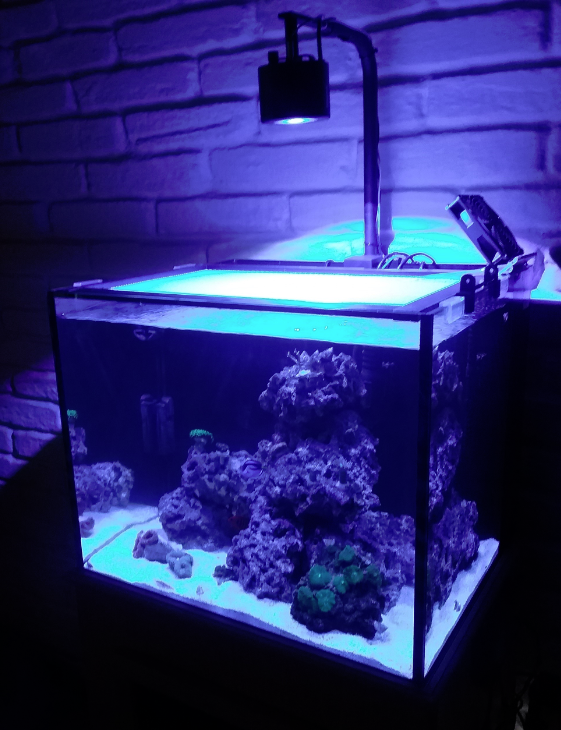
Got my first project printed. A fan bracket for my rimless tank. I found the drawing on Thingivese and tweaked it a little. WOW, learned so much about 3D printing just from this. I had several fails on this, but with some help of a FB group dedicated to my brand of printer I was able to figure it out this morning. This looks much better than my hack job I did last weekend!!!


upload_2018-7-20_9-46-29.png
 
Got my first project printed. A fan bracket for my rimless tank. I found the drawing on Thingivese and tweaked it a little. WOW, learned so much about 3D printing just from this. I had several fails on this, but with some help of a FB group dedicated to my brand of printer I was able to figure it out this morning. This looks much better than my hack job I did last weekend!!!


upload_2018-7-20_9-46-29.png
It will be awesome if you can publish the build files and bom :-) I would love to build one ... once I have the space
 
It will be awesome if you can publish the build files and bom :) I would love to build one ... once I have the space


Here's the link to Thingiverse: https://www.thingiverse.com/thing:2333947

If you let me know how think your glass is and how thick/wide your fans are I would be more than happy to print you up as many as you need. I have some more colors of both PLA and ABS coming today and I think some Red PETG.

upload_2018-7-20_11-1-29.png
 
Here's the link to Thingiverse: https://www.thingiverse.com/thing:2333947

If you let me know how think your glass is and how thick/wide your fans are I would be more than happy to print you up as many as you need. I have some more colors of both PLA and ABS coming today and I think some Red PETG.

upload_2018-7-20_11-1-29.png
can you print me a new,Garage Please
 
Here's the link to Thingiverse: https://www.thingiverse.com/thing:2333947

If you let me know how think your glass is and how thick/wide your fans are I would be more than happy to print you up as many as you need. I have some more colors of both PLA and ABS coming today and I think some Red PETG.

upload_2018-7-20_11-1-29.png


I suspect you're already aware, but just in case. PLA will break down in saltwater but is safe otherwise, and ABS is consider "reef safe'ish", though there are some question regarding the pigments. I personally believe that natural PET should be safe as well. And everything but ASA will suffer to various degrees under the our lights.
 
I suspect you're already aware, but just in case. PLA will break down in saltwater but is safe otherwise, and ABS is consider "reef safe'ish", though there are some question regarding the pigments. I personally believe that natural PET should be safe as well. And everything but ASA will suffer to various degrees under the our lights.
Have you experienced plastics suffering under aquarium lights?
I would expect most of the photo degradation should be limited by LEDs. Generally any UV LEDs that are used are barely below 400nm.
Where as halides would have some emission below 350, which even still is not out of the UV-A range.
 
Have you experienced plastics suffering under aquarium lights?
I would expect most of the photo degradation should be limited by LEDs. Generally any UV LEDs that are used are barely below 400nm.
Where as halides would have some emission below 350, which even still is not out of the UV-A range.

I've had "browning" and an item becoming brittle under a mix of MH and T5. I couldn't say if it was from UV only or if the heat contributed. My direct experience was only with was some white ABS, but I have read reports of other materials degrading, and since it was on the internet it has to be true. I would suspect that splash guard(s) material and presence would have an effect as well. Even sun lite in the room may have a contributing factor. Right now, I have an ABS adapter to allow my Kessils to fit into the center of a T5 fixture and approximately 3 mo in, they are showing no discoloring but slight curling at some of the edges. I am just determined to watch the stuff around the tank pretty carefully. I am using ASA outside in direct sun lite with no discoloration going on 4 mo now, but don't know if it's reef safe or not.
 
I've had "browning" and an item becoming brittle under a mix of MH and T5. I couldn't say if it was from UV only or if the heat contributed. My direct experience was only with was some white ABS, but I have read reports of other materials degrading, and since it was on the internet it has to be true. I would suspect that splash guard(s) material and presence would have an effect as well. Even sun lite in the room may have a contributing factor. Right now, I have an ABS adapter to allow my Kessils to fit into the center of a T5 fixture and approximately 3 mo in, they are showing no discoloring but slight curling at some of the edges. I am just determined to watch the stuff around the tank pretty carefully. I am using ASA outside in direct sun lite with no discoloration going on 4 mo now, but don't know if it's reef safe or not.
I haven't printed anything for the tank yet, but I have an adapter for my flag holder outside that was printed in white ABS. No discoloration yet, but I couldn't tell you if it is brittle or not as I never mess with it.
I have a spool of ASA that I have not even opened yet. How was it to print with?
 

TOP 10 Trending Threads

ARE YOU READY TO CONFESS TO CRAZIEST, DUMBEST, FUNNIEST THING YOU’VE EVER DONE IN REEFING?

  • Yeah, I'll confess! (Share your story in the comments!)

    Votes: 19 57.6%
  • Nah, I'll keep mine a secret...(Don't be like that, share with the class!)

    Votes: 14 42.4%
Back
Top
Home
Post thread…
Market
What's new