reef-pi :: An opensource reef tank controller based on Raspberry Pi.

Yes, though it's very much V1. I can already see some thing that should be changed, but I can put it on thingiverse tomorrow for anyone who wants to make their own version.
please do . i will look for it as it might help me with creating what i have in my mind . I am VERY NEW to 3d modeling . and i learn by example .. on there i am erica renee as as well ..
 
I just created a account on there. Will soon start working on designs for my reef-pi project.. @Ranjib once i get this 3d modeling thing all worked out . Or a logo you want .. we can work to get them in your hands.. I now have the 3d printer and for your maker fairs.. I can print and send you any Vinyl cut lettering or decals you need ( i have a vinyl cutter/ plotter machine) . If you are still doing those. It cost nothing to print the product as the equipment was bought and paid for to do other projects.. ..
Totally. I am definitely planning for next year's MakerFaire as well. We have a tiny local reef-pi community here that convenes around reef-pi MakerFaire stall :-) . I think with 3d printer, we should be able to make the housing lot more compact and get rid of standoffs (like the monting holes can be raised by design, all we'll need is M2.5 screws/nuts. There are other contraption I would like to print, like probe holder, mounting braces for dosing system etc. Totally looking forward to this. I'll be changing my apartment next month, hopefully the next place will have a place for a printer.
 
Totally. I am definitely planning for next year's MakerFaire as well. We have a tiny local reef-pi community here that convenes around reef-pi MakerFaire stall :) . I think with 3d printer, we should be able to make the housing lot more compact and get rid of standoffs (like the monting holes can be raised by design, all we'll need is M2.5 screws/nuts. There are other contraption I would like to print, like probe holder, mounting braces for dosing system etc. Totally looking forward to this. I'll be changing my apartment next month, hopefully the next place will have a place for a printer.

If you have not already . From my experience . (being a 2d cad user) setup a account with autocad fusion 360 and start learning the modeling program.. If you do not get a 3d printer by then we can all work on printing your desired designs for you and ship them. It would be a honor to do so.. AS FAR as like Advertisement and billboards for your booth . I can cut vinyl lettering or vector graphics for you on the vinyl cutter ( I bought this because i did not want to pay 2 grand per van to have my vans done) Its actually not complicated . We can help you shine and gain more support for this project.

its the least we can do .. THanks

i am off to bed Bonnie is yelling Erica come to bed NOW.. Happy Wife happy life apples to us all .. hehe
 
Ok posted earlier that I was having some trouble getting started. I have a Raspberry Pi 3 model (and an Arduino Uno). I’ve been thru the documentation on git hub and Adafruit. I desperately want to get the easy stuff out of the way so I can order some more parts, as I’m unsure exactly what I need at this point. For sure I would like to start with temp and ph and a camera. The camera I’ve been playing with to try and get working with ReefPi, but just get errors when going trying to install. That’s not my main problem. My main issue is not making progress past a certain point. My last post I was having issues but figured out it was probably because I checked the dev_mode button or whatever it’s called. I know that has to do with interfacing with other shells. Hopefully you guys can get me past this next problem.
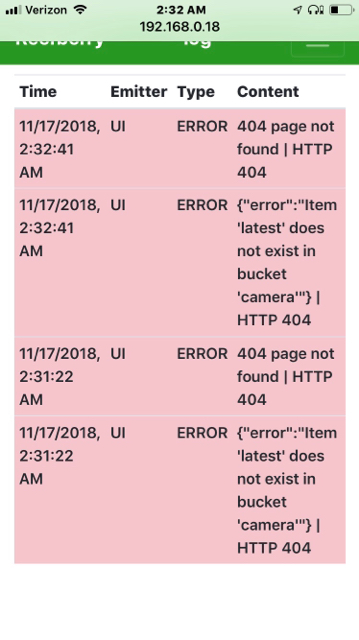
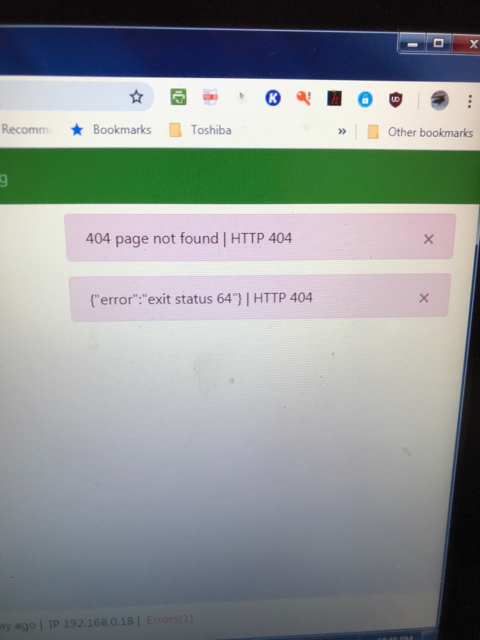
So here’s where I’m at. I got past a few hurdles. One was that I couldn’t get ssh to work with putty. I still can’t. So I used VNC. Was this the right thing to do? I figured it was because it gave me outside network access as well as solved connection issue. So then after many attempts and mistakes, I was able to go thru Ranjibs walk thru nicely to the point of the second test. I was so happy to get the first one working, but second test not so much. I set up everything as per instruction and double triple checked the basic wiring. Nothing happens when I use the slider control. Also, the camera wont work as well. When I setup and test I get these error messages. I’ve checked to make sure the camera was enabled in my raspi config file.
ee78e87b936dad16e89c646c43795c27.jpg


I will try to just move past that and learn about other features and progress you’ve all made. I think this is great. I want to order more supplies and some of the sensors. Other than temp I would be able to have more than just one probe. Besides getting resistor set from the awesome link above and some temp probes, what else should I start with? I think right now I’m too new to decide on an inexpensive way I can use the outlets. I’ll probably add a set of really to the list for sure. Is there anything else you guys recommend that is not on the Adafruit list?

 
Ok posted earlier that I was having some trouble getting started. I have a Raspberry Pi 3 model (and an Arduino Uno). I’ve been thru the documentation on git hub and Adafruit. I desperately want to get the easy stuff out of the way so I can order some more parts, as I’m unsure exactly what I need at this point. For sure I would like to start with temp and ph and a camera. The camera I’ve been playing with to try and get working with ReefPi, but just get errors when going trying to install. That’s not my main problem. My main issue is not making progress past a certain point. My last post I was having issues but figured out it was probably because I checked the dev_mode button or whatever it’s called. I know that has to do with interfacing with other shells. Hopefully you guys can get me past this next problem.
So here’s where I’m at. I got past a few hurdles. One was that I couldn’t get ssh to work with putty. I still can’t. So I used VNC. Was this the right thing to do? I figured it was because it gave me outside network access as well as solved connection issue. So then after many attempts and mistakes, I was able to go thru Ranjibs walk thru nicely to the point of the second test. I was so happy to get the first one working, but second test not so much. I set up everything as per instruction and double triple checked the basic wiring. Nothing happens when I use the slider control. Also, the camera wont work as well. When I setup and test I get these error messages. I’ve checked to make sure the camera was enabled in my raspi config file.
ee78e87b936dad16e89c646c43795c27.jpg


I will try to just move past that and learn about other features and progress you’ve all made. I think this is great. I want to order more supplies and some of the sensors. Other than temp I would be able to have more than just one probe. Besides getting resistor set from the awesome link above and some temp probes, what else should I start with? I think right now I’m too new to decide on an inexpensive way I can use the outlets. I’ll probably add a set of really to the list for sure. Is there anything else you guys recommend that is not on the Adafruit list?

@pdisner hang in there. :-)
When you say slider control, you mean equipment? Can you share full screenshot of your screen? What version you are running? I know some of these messages are expected in 2.0.0-rc2 or below, they are benign, they occur during reload. I am not able to understand which circuit yo are trying to get working right now, temperature? or just camera? Can you provide details of your camera setup ? like are you using official pi camera? does raspi-still works?
Share the full screenshot of your configuration/settings tab.
 
@pdisner hang in there. :)
When you say slider control, you mean equipment? Can you share full screenshot of your screen? What version you are running? I know some of these messages are expected in 2.0.0-rc2 or below, they are benign, they occur during reload. I am not able to understand which circuit yo are trying to get working right now, temperature? or just camera? Can you provide details of your camera setup ? like are you using official pi camera? does raspi-still works?
Share the full screenshot of your configuration/settings tab.
I will not recommend starting with camera since its not yet documented and some of the features (google drive upload) requires manual installation of ancillary software (motion). But if thats all the circuit yo have, we should use it to test.
It will be easier to track this if you start a build thread. I'll note down the issues for my reference.
 
@pdisner hang in there. :-)
When you say slider control, you mean equipment? Can you share full screenshot of your screen? What version you are running? I know some of these messages are expected in 2.0.0-rc2 or below, they are benign, they occur during reload. I am not able to understand which circuit yo are trying to get working right now, temperature? or just camera? Can you provide details of your camera setup ? like are you using official pi camera? does raspi-still works?
Share the full screenshot of your configuration/settings tab.

I’ll attempt to get a screen schot for you. I’m sorry for my ignorance, but where do I post my own build? Currently, on hand, I have a single relay, and misc sensors that come with a basic stater pack. I need to buy the temp probes you recommend, possibly the new Raspberry Pi you’ve mentioned, resistor pack and the rest I need I figure out. The pH and temp probes I’ll check out.
 
So Ranjib,
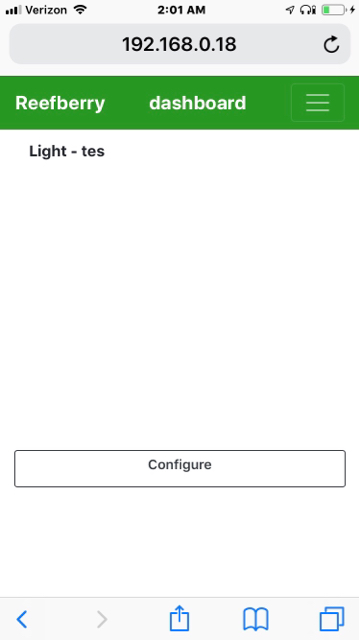
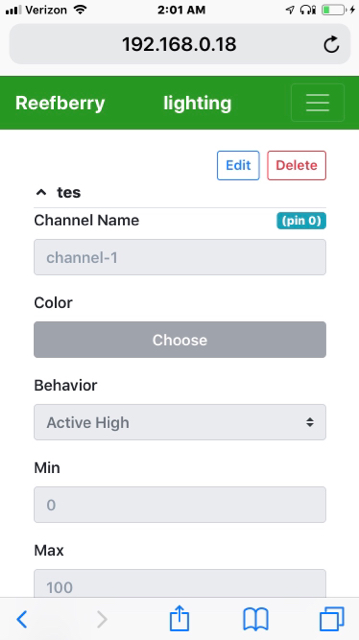
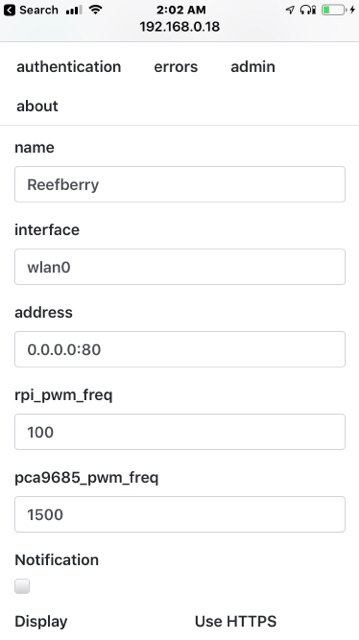
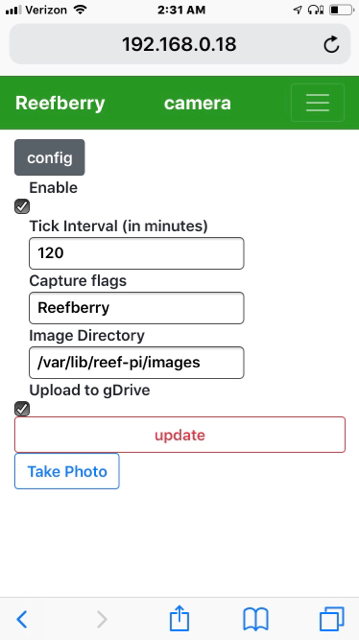
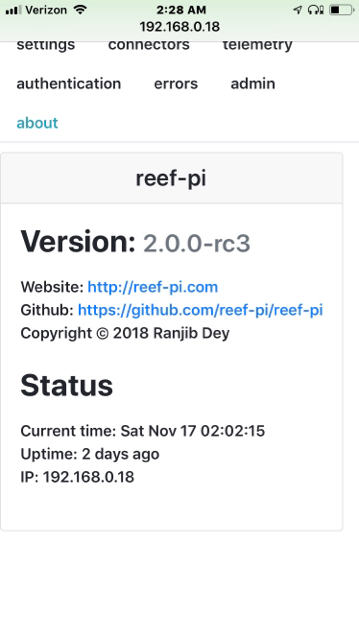
Here’s the pics you asked for. I used my iPhone for easier screen capture. I’m still unsure of all the settings in this page and will look thru your docs. I would like to use one sensor that I do actually have on hand so I can at least start recording data. It’s one of those common ambient temp and humidity sensor (dht11). I would even like to incorporate into my final idea. As far as the camera, it’s a the 5mp Pi cam. That would be an awesome feature. When you mentioned motion, were you talking about motion iOS?anyhow let me know how to proceed and where I Post the build.
 
I’ll attempt to get a screen schot for you. I’m sorry for my ignorance, but where do I post my own build? Currently, on hand, I have a single relay, and misc sensors that come with a basic stater pack. I need to buy the temp probes you recommend, possibly the new Raspberry Pi you’ve mentioned, resistor pack and the rest I need I figure out. The pH and temp probes I’ll check out.
To start a build thread in r2r, you have to go to DIY forum and create a new post. I would say state yor aim, detail your setup and call out your specific issues, then it will be easier for me to track it.
 
I’ll attempt to get a screen schot for you. I’m sorry for my ignorance, but where do I post my own build? Currently, on hand, I have a single relay, and misc sensors that come with a basic stater pack. I need to buy the temp probes you recommend, possibly the new Raspberry Pi you’ve mentioned, resistor pack and the rest I need I figure out. The pH and temp probes I’ll check out.
Did the relay worked? or working ? if not, we should start from here. Solve this first.
 
So Ranjib,
Here’s the pics you asked for. I used my iPhone for easier screen capture. I’m still unsure of all the settings in this page and will look thru your docs. I would like to use one sensor that I do actually have on hand so I can at least start recording data. It’s one of those common ambient temp and humidity sensor (dht11). I would even like to incorporate into my final idea. As far as the camera, it’s a the 5mp Pi cam. That would be an awesome feature. When you mentioned motion, were you talking about motion iOS?anyhow let me know how to proceed and where I Post the build.
reef-pi currently does not support humidity sensor, you wont be able to send data from that sensor anytime soon. We can get the camera sorted. Let us know your camera related settings (UI screen shot). Tell us if you have install raspistill, if not install it and motion. Here are some documentation:
https://thepihut.com/blogs/raspberr...20-how-to-install-use-the-raspberry-pi-camera
and
https://motion-project.github.io/motion_build.html#BUILD_DEBIAN
 
Ok I’ve already installed my camera and have been using with an so called motion eyeos and then a sample instruction program I found and it works. What settings are you referring to. Here’s a couple more screen shots. Raspistill is just the command which I’m super familiar with how it all works with Reef Pi.
What should I purchase to get started besides a temp probe? I can’t really afford the whole ph setup yet as it’s looking like that will be very expensive. Is there a more extensive shopping list than what I’ve seen in Adafruit?
 
Ok I’ve already installed my camera and have been using with an so called motion eyeos and then a sample instruction program I found and it works. What settings are you referring to. Here’s a couple more screen shots. Raspistill is just the command which I’m super familiar with how it all works with Reef Pi.
What should I purchase to get started besides a temp probe? I can’t really afford the whole ph setup yet as it’s looking like that will be very expensive. Is there a more extensive shopping list than what I’ve seen in Adafruit?

c203d9d73602f9820e2d2d6e4dc28e4d.jpg
ee5d3557f6e79908014bf34662bcaae6.jpg
fea1526ce5d3f83d1649687e64372f72.jpg
 
Totally. I am definitely planning for next year's MakerFaire as well. We have a tiny local reef-pi community here that convenes around reef-pi MakerFaire stall :) . I think with 3d printer, we should be able to make the housing lot more compact and get rid of standoffs (like the monting holes can be raised by design, all we'll need is M2.5 screws/nuts. There are other contraption I would like to print, like probe holder, mounting braces for dosing system etc. Totally looking forward to this. I'll be changing my apartment next month, hopefully the next place will have a place for a printer.

@Ranjib @Erica-Renee

Here's a site that might help with gleaning some ideas...

https://printedreefingsolutions.com
 

TOP 10 Trending Threads

ARE YOU READY TO CONFESS TO CRAZIEST, DUMBEST, FUNNIEST THING YOU’VE EVER DONE IN REEFING?

  • Yeah, I'll confess! (Share your story in the comments!)

    Votes: 30 55.6%
  • Nah, I'll keep mine a secret...(Don't be like that, share with the class!)

    Votes: 24 44.4%
Back
Top
Home
Post thread…
Market
What's new