I have notice this and am going to have to figure out how to set up a web server and all that.
No need to, it’s already running.
Just point your browser at http://[ip of Pi] or http://[ip of pi]:8080 depending on what you’ve configured.
Follow along with the video below to see how to install our site as a web app on your home screen.
Note: This feature may not be available in some browsers.
I have notice this and am going to have to figure out how to set up a web server and all that.
What way do you find it slow? During my tests it was just as fast as using reef-pi on my home network as it was to remote-in.VNC IS PAINFULLY Slow and not a Good option since reef-pi runs on a web server ..
What way do you find it slow? During my tests it was just as fast as using reef-pi on my home network as it was to remote-in.
I am new to all raspberry pi stuff, so I was just following these instructions on the reef-pi website on remote access, but it would be nice not to have the extra step of using VNC.
Thanks for the explanation. I have no idea what a web server is but I will try and figure out how to make it work. Maybe @Ranjib you could update that info on your webpage on how to do this?
So you run the VNC Server in the background on the r-pie 24-7 , You run the Client software on your Computer . You have to log into the VNC On your Computer with the Client and connect to the R-PI Only to Launch a web browser in the VNC Client to run pi locally on the R-PI...
Why not just launch a web browser on your computer and log directly into the REEF-PI Web server ... The whole VNC Thing seems Counter productive and Twice as many steps and things that can go wrong .. Also VNC Outside your home network is dependent on many Network Factors. Running it on a Mobile network is far from a smooth experience in my Opinion...
My Thinking Running a piece of software to run a piece of software that will run without running a piece of software to run the piece of software makes me head spin....
I am not to familiar with server and IP stuff. I will play with it when I get home and educate myself. I remember that night per a tutorial I was inputting http://ip of pi.local and that wasn’t working. Whole reason i set up VNC
Thanks for the explanation. I have no idea what a web server is but I will try and figure out how to make it work. Maybe @Ranjib you could update that info on your webpage on how to do this?
Its here
https://learn.adafruit.com/reef-pi-installation-and-configuration/raspberry-pi-configuration
By default, once you instal reef-pi and "if" your raspberry is connected to your home network, it is already set up as a web server. All you have to do is use your "wi-fi" connected phone or your home computer, open a web browser and type in the name http://whateveryounamedit.local
Update Hostname
You can use the raspi-config tool to rename Raspberry Pi to something else. For example, I named one of my reef-pi controllers as biocub29 (the name of the tank). Doing so allows accessing the reef-pi web UI as http://biocube29.local from other devices in the same network.
Led experts, I have 100 standard 3v 20mA Blue 450nm LED’s from another project that are not being used. I’m thinking about making moon lights with them to control with reef-pi. How do moon lights affect algae and corals at night? How many would be good for a 4 foot tank? Maybe 2?
So I spend more time on reef-pi at my desk in my office than I do at home (dont judge I am a government worker) I know my router ip address is 69.137.x.x. So if I want to get to reef-pi that is forwarded at home, set up static, reserved, and all that I go to https://69.137.x.x. This works perfect with no issues. However, if for some reason xfinity pushes a new ip address to my router I dont know what it is anymore and I will not be able to access reef-pi until I get home, log into my router, and find out what my new IP address is. With Dynamic DNS installed on Raspian, if xfinity changes my router ip the dynamic DNS app reports that back to the NO-IP service which then updates. So no matter where I am at or what xfinity changes my IP to my reefpi is always https://myreefpi.ddns.net

Led experts, I have 100 standard 3v 20mA Blue 450nm LED’s from another project that are not being used. I’m thinking about making moon lights with them to control with reef-pi. How do moon lights affect algae and corals at night? How many would be good for a 4 foot tank? Maybe 2?
Yes it's all set up as standard.Check some of the basics. I’m assuming you can remote in so it should have internet connection.
if you are trying to connect on your phone make sure your phone is joined to your home WiFi. It won’t work otherwise.
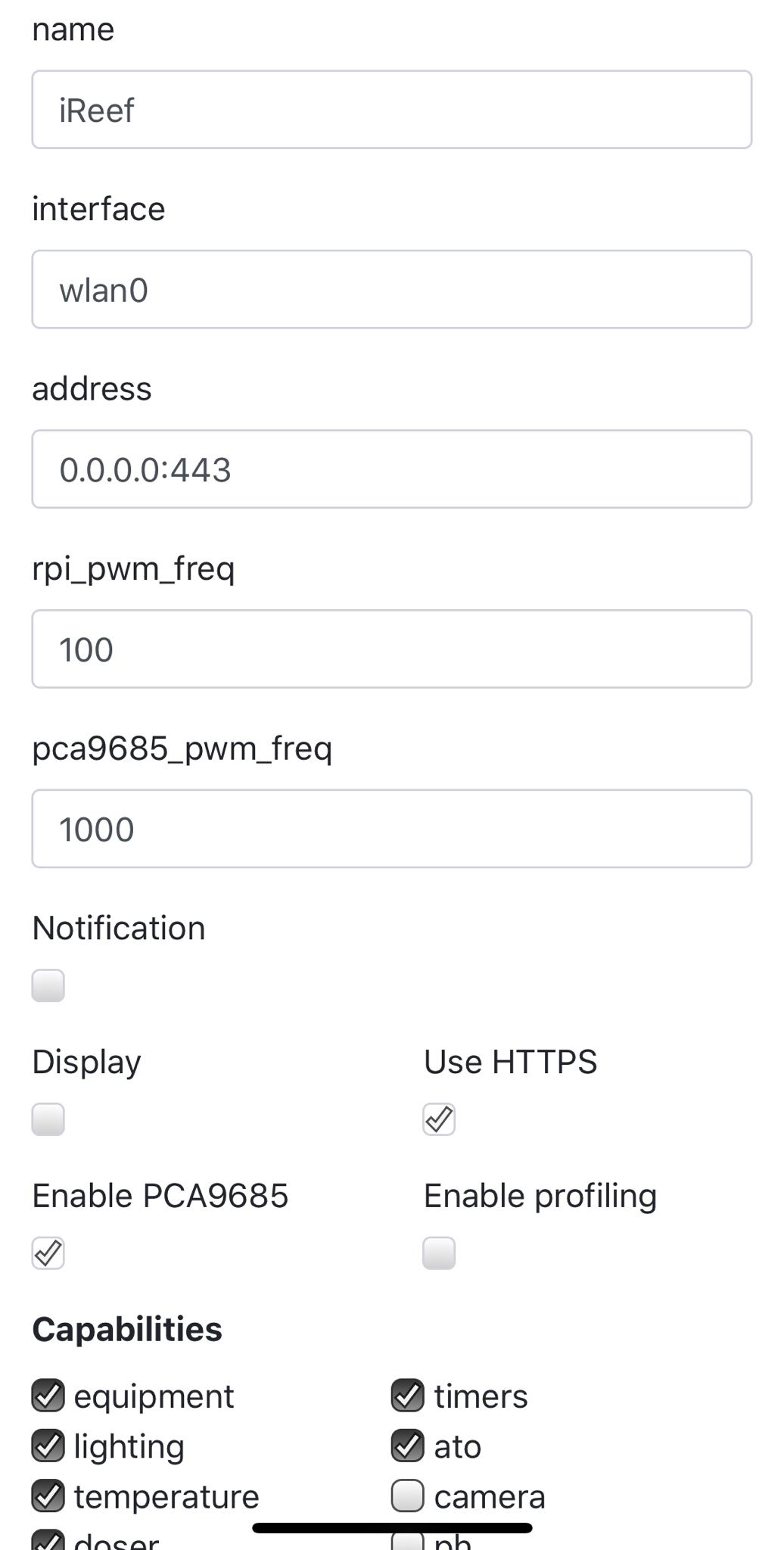
Check your configure screen. Below mine is set for ssl. You want to make sure yours says 0.0.0.0:80 and https is unchecked. Reload and try again. If it still does not work try http://lightpi.local:80
![]()
It's an association between the IP address and the hostname you set. It announces itself on the network by hostname or IP address. Terrible analogy but, think of your network as an apartment building. Bob is in 3C, Sally is in 2D, so on. If everybody knows each other by name, you don't have to clarify the apartment number.Yes it's all set up as standard.
But what I'm failing to understand is how does renaming the raspberry pi hostname to something else, equate to opening up a web page on my phone and getting to reef-pi?
Does not work for me, vnc still connects to raspberry pi using it's ip address![]()
Well I've done both, changed in reef-pi config and changed the hostname of the raspberry pi, only way I can access reef-pi is ip addressWhat @ScottBrew said. But I just checked with mine. Updating the host name in the config screen of the web UI does not update the DNS table. I’m not sure if it’s supoosed to @Ranjib ? To change my .local name I had to do it in Raspi-config.
Have you rebooted?Well I've done both, changed in reef-pi config and changed the hostname of the raspberry pi, only way I can access reef-pi is ip address
Yes rebooted, the light-pi name I changed in reef-pi has been like that over a month or more, I cannot access it with that nameHave you rebooted?