reef-pi :: An opensource reef tank controller based on Raspberry Pi.

Alaa

Community Member
View Badges
Joined
Nov 28, 2018
Messages
74
Reaction score
80
Rating - 0%
0   0   0
You have the Pca9685 board connected to the pi?
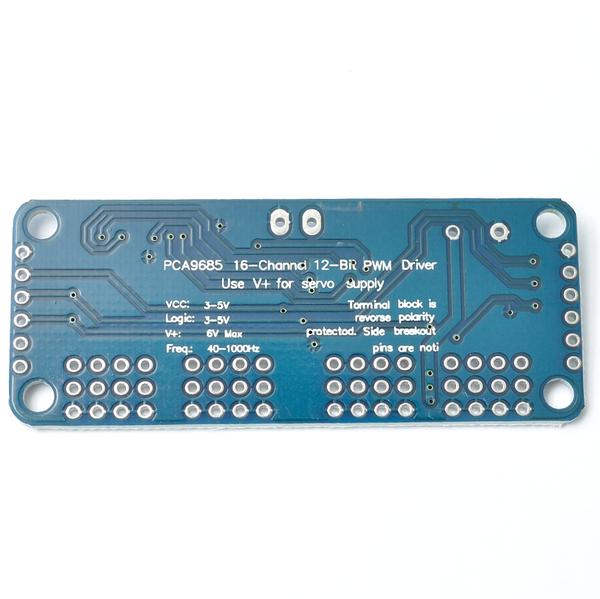
I think Max frequency for pca9685 is 1000, see backside of the board
Will check ASAP
Having the default at 1500 and the same in previous versions didn't make me think about it
Thanks

 
OP
OP
Ranjib

Ranjib

7500 Club Member
View Badges
Joined
Apr 16, 2016
Messages
9,876
Reaction score
16,680
Location
Pleasant Hill, Concord
Rating - 0%
0   0   0

BenB

Active Member
View Badges
Joined
Jun 11, 2019
Messages
118
Reaction score
152
Rating - 0%
0   0   0
1500 if i recall correctly

PCA9685_16_channel_12_bit_PWM_driver_servos_back_1000_grande.JPG

Freq: 40-1000Hz
 

Alaa

Community Member
View Badges
Joined
Nov 28, 2018
Messages
74
Reaction score
80
Rating - 0%
0   0   0
Hi
thanks for the feed back
still no progress
i reinstalled raspberry pi from scratch, followed all the steps in the guides to update and installed reef-pi 2.4 pi3
i got the three GPIO working as equipment to test connections and were all (Pic attached)
i removed outlets 18 and 19 and tried to add Jack at channel 0 or 1 but both give me error
i added lights but are not working
i attached the log running (sudo journalctl -fu reef-pi.service)

1- GPIO 18-19-24 working as outlets.jpg


2- GPIO 18-19-24 LED on.jpg


3- adding Jack failed at 0 channel.jpg


4- adding Jack failed at 1 channel.jpg


5- blue light added but not working.jpg


6- journal output.jpg
 
OP
OP
Ranjib

Ranjib

7500 Club Member
View Badges
Joined
Apr 16, 2016
Messages
9,876
Reaction score
16,680
Location
Pleasant Hill, Concord
Rating - 0%
0   0   0
Hi
thanks for the feed back
still no progress
i reinstalled raspberry pi from scratch, followed all the steps in the guides to update and installed reef-pi 2.4 pi3
i got the three GPIO working as equipment to test connections and were all (Pic attached)
i removed outlets 18 and 19 and tried to add Jack at channel 0 or 1 but both give me error
i added lights but are not working
i attached the log running (sudo journalctl -fu reef-pi.service)

1- GPIO 18-19-24 working as outlets.jpg


2- GPIO 18-19-24 LED on.jpg


3- adding Jack failed at 0 channel.jpg


4- adding Jack failed at 1 channel.jpg


5- blue light added but not working.jpg


6- journal output.jpg
Don’t reset reef-pi or raspbian, that will only make it harder for me to diagnose the exact issue. Let’s take a methodical approach ,
1) can you change the rpi pwm frequency in configuration page , say 1000 and reboot
2) share the log if you see error after that . Run this two commands and share the output
Code:
cat /says/class/pwm/pwmchip0/pwm1/duty_cycle

cat /says/class/pwm/pwmchip0/pwm1/period
 

ummwhy

New Member
View Badges
Joined
Feb 18, 2019
Messages
15
Reaction score
9
Rating - 0%
0   0   0
Anyone having issues with AIO telemetry? I keep getting this error "Please set a valid adafruit.io key" after coping and pasting directly what's on the webpage with tc- prefix
 
OP
OP
Ranjib

Ranjib

7500 Club Member
View Badges
Joined
Apr 16, 2016
Messages
9,876
Reaction score
16,680
Location
Pleasant Hill, Concord
Rating - 0%
0   0   0
Anyone having issues with AIO telemetry? I keep getting this error "Please set a valid adafruit.io key" after coping and pasting directly what's on the webpage with tc- prefix
You should not use any prefix (tc- for example) in the key. The key should be used as it is
 

MichaelA18454

Community Member
View Badges
Joined
Jun 22, 2019
Messages
50
Reaction score
37
Rating - 0%
0   0   0
Can someone help me troubleshoot a Temp Sensor Probe DS18b20. It was working fine, I rebooted the pi and it went missing.
Red - GPIO 1, Yellow - GPIO 4, Black - Ground GPIO 6 4.7ohm resistor. I tried resetting the database using
sudo systemctl stop reef-pi.service
sudo rm -f /var/lib/reef-pi/reef-pi.db
sudo systemctl start reef-pi.service
with no luck

I have found the same thing many times, I leave the "Reboot" well alone. Every time I implement this, I also have to reset "service" and some how delete and reinstall the device.
 

Alaa

Community Member
View Badges
Joined
Nov 28, 2018
Messages
74
Reaction score
80
Rating - 0%
0   0   0
Hi, you are not the only one with this issue, see page 529, maybe go true the tread and you find the solution.
upload_2019-7-9_10-38-58.png
Hi,
I knew that others are having the same issue, i did search the thread and came with no clear solution but rather workaround

the Fix.jpg
 

Alaa

Community Member
View Badges
Joined
Nov 28, 2018
Messages
74
Reaction score
80
Rating - 0%
0   0   0
Don’t reset reef-pi or raspbian, that will only make it harder for me to diagnose the exact issue. Let’s take a methodical approach ,
1) can you change the rpi pwm frequency in configuration page , say 1000 and reboot
2) share the log if you see error after that . Run this two commands and share the output
Code:
cat /says/class/pwm/pwmchip0/pwm1/duty_cycle

cat /says/class/pwm/pwmchip0/pwm1/period
Hi
Your continuous advise and help to others in getting reef-pi running is highly appreciated
I changed rpi frequency to 1000 and rebooted with no trouble
still got the same error when i tried to add jack with rpi as driver, log attached with the output from the 2 commands

I'll be using pca9685 to control lights, so I'm fine with rpi not working for reef-pi 2.4, but if you want to solve the issue fro others and need me to do modifications or run other diagnostics, I'm happy to follow.
 
OP
OP
Ranjib

Ranjib

7500 Club Member
View Badges
Joined
Apr 16, 2016
Messages
9,876
Reaction score
16,680
Location
Pleasant Hill, Concord
Rating - 0%
0   0   0
Hi
Your continuous advise and help to others in getting reef-pi running is highly appreciated
I changed rpi frequency to 1000 and rebooted with no trouble
still got the same error when i tried to add jack with rpi as driver, log attached with the output from the 2 commands

I'll be using pca9685 to control lights, so I'm fine with rpi not working for reef-pi 2.4, but if you want to solve the issue fro others and need me to do modifications or run other diagnostics, I'm happy to follow.
I’ll definitely verify this in next week and report back
 

MichaelA18454

Community Member
View Badges
Joined
Jun 22, 2019
Messages
50
Reaction score
37
Rating - 0%
0   0   0
I have been running Reef-Pi for almost a week with a heater and ATO running on a Pi-Zero. Now after going through installing the Lighting and Doser modules as per the Adafruit instructions, I decided to delete the Lighting modules and then I lost WiFi comms. Looking for a reason, I found the controller had stopped with nothing working on the Pi-Zero. I then reset "Service" and then after being able to reconnect to theReef-Pi, I found all the modules had been deleted, now showing a blank setup. So, I obviously haven't grasped the setup, and now I need to figure out what I am doing wrong. My first thought was towards overloading the Pi-Zero with too many modules. Maybe the Pi-Zero is only capable of just heater and ATO. I did read somewhere the intent is to minimised the number of modules and adopt multiple Pi's to achieve the total control. Would it be fair to say this is true and that I need to be more aware of CPU/Memory. If so where can I read about health check? Any other thought on what I may have not considered?
Cheers
 
OP
OP
Ranjib

Ranjib

7500 Club Member
View Badges
Joined
Apr 16, 2016
Messages
9,876
Reaction score
16,680
Location
Pleasant Hill, Concord
Rating - 0%
0   0   0
I have been running Reef-Pi for almost a week with a heater and ATO running on a Pi-Zero. Now after going through installing the Lighting and Doser modules as per the Adafruit instructions, I decided to delete the Lighting modules and then I lost WiFi comms. Looking for a reason, I found the controller had stopped with nothing working on the Pi-Zero. I then reset "Service" and then after being able to reconnect to theReef-Pi, I found all the modules had been deleted, now showing a blank setup. So, I obviously haven't grasped the setup, and now I need to figure out what I am doing wrong. My first thought was towards overloading the Pi-Zero with too many modules. Maybe the Pi-Zero is only capable of just heater and ATO. I did read somewhere the intent is to minimised the number of modules and adopt multiple Pi's to achieve the total control. Would it be fair to say this is true and that I need to be more aware of CPU/Memory. If so where can I read about health check? Any other thought on what I may have not considered?
Cheers
I think this is something related to sdcard corruption. You won’t be able to overload the pi zero even with all modules enabled (unless you are also using the GUI/desktop). And even if it’s overloaded that won’t cause the database to be wiped out, that’s only possible if you delete the database or sd card corruption.
 

MichaelA18454

Community Member
View Badges
Joined
Jun 22, 2019
Messages
50
Reaction score
37
Rating - 0%
0   0   0
Thanks Ranjib for your response, the controller was running as expected.
Your comment towards SDcard corruption, specifically pointing to the database and yet Reef-Pi was unaffected, as the controller is up and running in blank form after a "Service" reset??
Only the database and nothing else for SDcard corruption?
In a previous post I said I don't implement "RELOAD" because every time I do, I have to reset "Service" Could this be another reason for loosing the database?
Hugh thanks for your effort and time in sharing such a great opportunity for DIY Reefers.

 

janos

Active Member
View Badges
Joined
Jun 4, 2017
Messages
267
Reaction score
259
Location
Toronto,Canada
Rating - 0%
0   0   0
Hi to all,am running my reef-pi almost 2 year long from USB and never ever had any problem.Before i run from sd card and problem come every day from wrong shut down and all kind of (my mistake) USB is the safest to me.RPI 3 B+
 

TOP 10 Trending Threads

WHAT AMOUNT OF LIVE ROCK AND SAND SHOULD BE PRIORITIZED FOR OPTIMAL BIODIVERSITY/FILTRATION?

  • 100% live rock + bagged sand

    Votes: 38 26.6%
  • 100% dry rock + 100% live sand

    Votes: 48 33.6%
  • 50/50 live/dry rock, 50/50 live/bagged sand

    Votes: 32 22.4%
  • 75% live rock, 25% live sand

    Votes: 15 10.5%
  • 25% live rock, 75% live sand

    Votes: 10 7.0%
Back
Top