reef-pi :: An opensource reef tank controller based on Raspberry Pi.

Michael Lane

Well-Known Member
View Badges
Joined
Aug 11, 2018
Messages
677
Reaction score
1,121
Rating - 0%
0   0   0
@Michael Lane im not following. I am trying to set up two pumps to be on for one hour and off for one hour but opposite each other ie when one is on the other is off and vice versa. I’m not sure what you mean with the */2 in the hour area. Right now 30 is in the minute section and the off or on depending on the pump is 3600.
@b4tn Your schedule is set to run every hour at minute 30, so it will turn on the pump every hour. It runs for 3600 seconds, then turns off, but the macro is also set to turn it back on at that same time.

Example
1:30 - Turn on, then turn off (after 3600 seconds) at 2:30
2:30 - Turn on, then turn off at 3:30
3:30 - Turn on, then turn off at 4:30
... etc

If you set Hour to */2, then it will run every other hour (here's a cheatsheet https://healthchecks.io/docs/cron/)

Example
2:30 - Turn on, then turn off (after 3600 seconds) at 3:30
4:30 - Turn on, then turn off at 5:30
6:30 - Turn on, then turn off at 7:30
...etc

 

b4tn

Valuable Member
View Badges
Joined
Jun 17, 2015
Messages
1,679
Reaction score
2,227
Location
Columbia MD
Rating - 0%
0   0   0
@b4tn Your schedule is set to run every hour at minute 30, so it will turn on the pump every hour. It runs for 3600 seconds, then turns off, but the macro is also set to turn it back on at that same time.

Example
1:30 - Turn on, then turn off (after 3600 seconds) at 2:30
2:30 - Turn on, then turn off at 3:30
3:30 - Turn on, then turn off at 4:30
... etc

If you set Hour to */2, then it will run every other hour (here's a cheatsheet https://healthchecks.io/docs/cron/)

Example
2:30 - Turn on, then turn off (after 3600 seconds) at 3:30
4:30 - Turn on, then turn off at 5:30
6:30 - Turn on, then turn off at 7:30
...etc

Got it!! Thanks so much that cheat sheet is perfect for explaining it!!
 
OP
OP
Ranjib

Ranjib

7500 Club Member
View Badges
Joined
Apr 16, 2016
Messages
9,876
Reaction score
16,680
Location
Pleasant Hill, Concord
Rating - 0%
0   0   0
OP
OP
Ranjib

Ranjib

7500 Club Member
View Badges
Joined
Apr 16, 2016
Messages
9,876
Reaction score
16,680
Location
Pleasant Hill, Concord
Rating - 0%
0   0   0
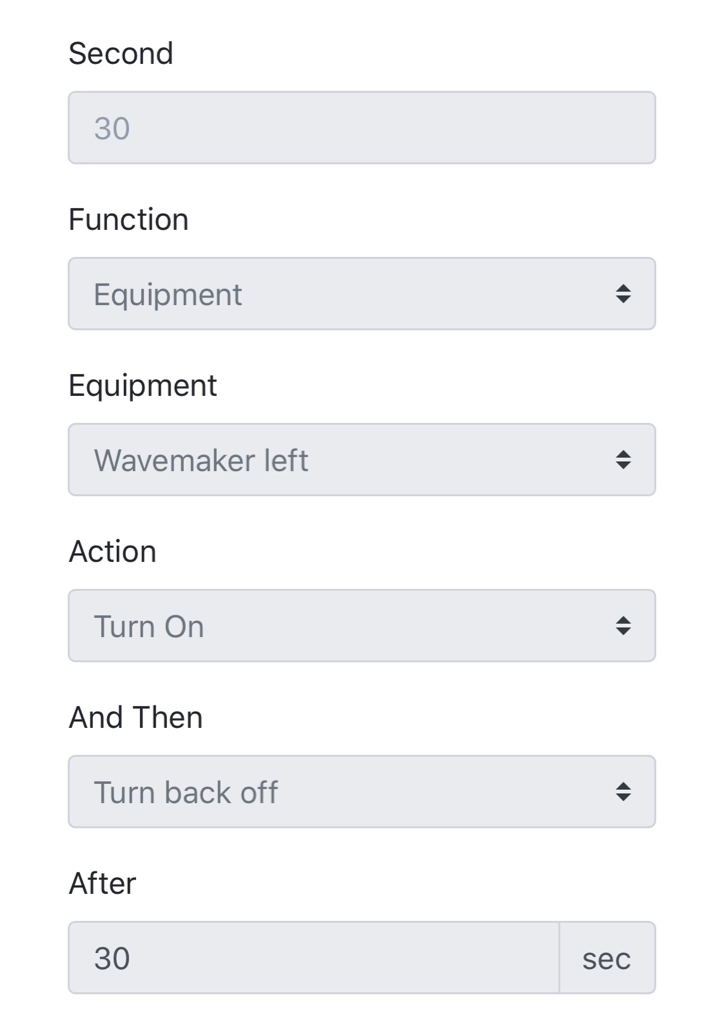
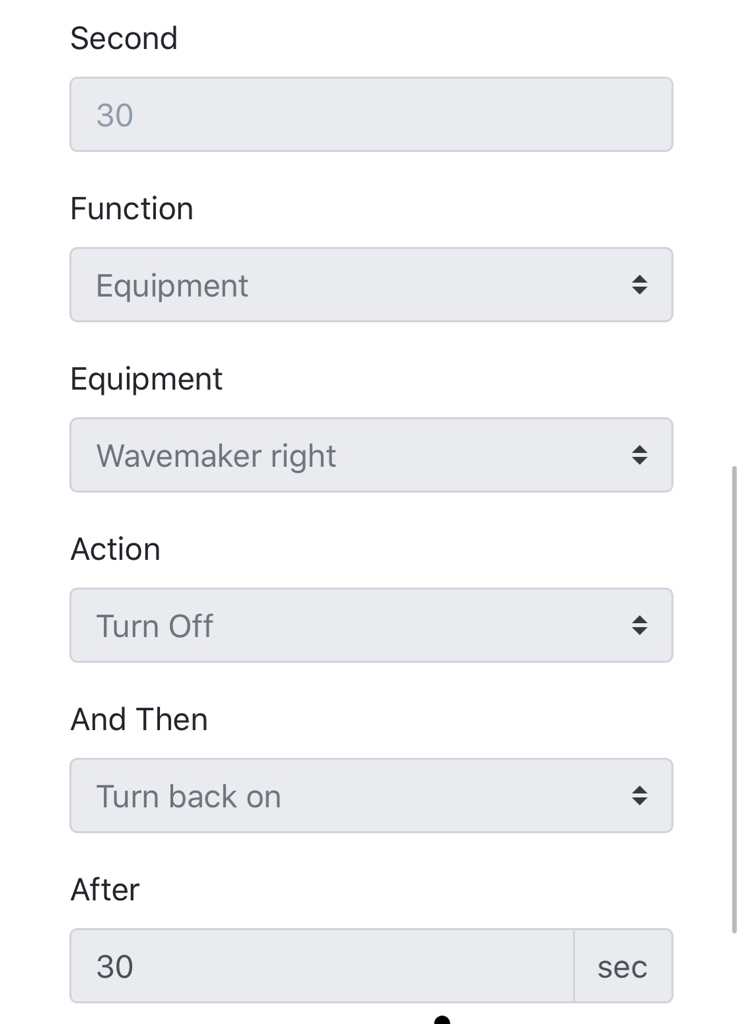
I think I found another bug unless I am misunderstanding something with rules. I have two pumps set up to alternate each hour. I have them set up like below

b235563bf86fdc54734b6a38cd5abc49.jpg
fe22ac3b4ebb4f040de43ed499eb4757.jpg


Set up as pictured it works flawlessly. Every 30 seconds one pump is turned off and the other turns on back and forth. It will do this all day and night no issues. The problem comes when I try and do this hourly. The setup is the same except I moved the action to apply on the 30-minute mark of each hour then to either turn off or turn on at 3600 seconds (1 hour). It works for exactly 3 hours going back and forth then on the fourth hour the pump that is supposed to turn off does not turn off at the 30-minute mark and the other one does not turn on. It stays in that state until I reset the rules either to a different value and back or delete and rebuild the rule. I have tracked this 3 times now and all three times it fails on the 4th hour
Can you share the screenshot of your hourly setup? I'll try to reproduce it. Here is what I am using:

Screen Shot 2018-10-28 at 11.58.23 AM.png
 
OP
OP
Ranjib

Ranjib

7500 Club Member
View Badges
Joined
Apr 16, 2016
Messages
9,876
Reaction score
16,680
Location
Pleasant Hill, Concord
Rating - 0%
0   0   0
@b4tn Your schedule is set to run every hour at minute 30, so it will turn on the pump every hour. It runs for 3600 seconds, then turns off, but the macro is also set to turn it back on at that same time.

Example
1:30 - Turn on, then turn off (after 3600 seconds) at 2:30
2:30 - Turn on, then turn off at 3:30
3:30 - Turn on, then turn off at 4:30
... etc

If you set Hour to */2, then it will run every other hour (here's a cheatsheet https://healthchecks.io/docs/cron/)

Example
2:30 - Turn on, then turn off (after 3600 seconds) at 3:30
4:30 - Turn on, then turn off at 5:30
6:30 - Turn on, then turn off at 7:30
...etc
I'll add the cheatsheet link in power guide :-) . Thank you for sharing.
 
OP
OP
Ranjib

Ranjib

7500 Club Member
View Badges
Joined
Apr 16, 2016
Messages
9,876
Reaction score
16,680
Location
Pleasant Hill, Concord
Rating - 0%
0   0   0
@sector9 your post also reminded me that I've been meaning to actually print the logo in colour rather than just have it as an outline on the boxes :) my first time swapping filaments mid print but it came out pretty good if you ask me :p
20181029_024421.jpg
This is looking very nice :-0) . You mind if I use the photo in the website, under housing docs?
 

Des Westcott

Well-Known Member
View Badges
Joined
May 29, 2018
Messages
646
Reaction score
1,025
Location
Durban - South Africa
Rating - 0%
0   0   0
sometime when you access website that has https configured in non-https mode, browser does not understand that data and instead of showing the UI it just download the content (because it expects plain text data, while that actual data is encrypted). The reverse has same issue as well, when you access an http (non encrypted) website in https mode then also the brower downloads the data instead of showing the UI, since it expects encrypted data, but website is returning plain text,.

Explicitly type your website url including the scheme (http/https) and port to fix this. This bypass browser's auto detection (its based on port, http uses port 80, while https uses port 443) and instead user overrides all those details. A typical website address (also called as URL) takes this form:
Code:
scheme://Host or IP: Port
example:
Code:
http://foobar.com:80
#or
https://10.0.0.1:443
When default port is used (80 for http and 443 for https) it can be omitted
Code:
http://foobar.com
#or
https://10.0.0.1
Since reef-pi allows user to specify both the details (port and https) it is possible mess things up, i.e. use port 443 with http or port 80 with https. Both of them is legal (i.e. reef-pi will work fine and site can be accessed if all the details in address are provided explicitly) but its highly un-conventional and create problem for users (like the download thing) when they try to access website using just IP or hostname. To examplify, if you enable https and not updated the address to use port 443, then if you just type IP or hostname as address in browser without specifying port, it will download the page (since it cant understand) instead of rendering it.

I dont know for sure if this is your problem, but just to be safe, use full http://IP:port or https://IP:port format to access reef-pi to avoid any confusion.


Wow. Thanks for that detailed response Ranjib. Makes more sense to a plodder like me.

The IP of my reef-pi that I always used to log in with is 192.168.10.97. So I tried to log into it now using http://192.168.10.97:80 as well as https://192.168.10.97:443 and had no joy with either.

Strangely, I logged into the Reef-Pi via VNC and tried to open 192.168.10.97 directly there as I used to do on occasion. Still nothing. If I use the http://192.168.10.97:80 I get the same thing where it downloads the file. If I use https://192.168.10.97:443 it tells me "This site can't be reached 192.068.10.97 refused to connect" Is there no other way to run it on it's own machine via VNC?
 
OP
OP
Ranjib

Ranjib

7500 Club Member
View Badges
Joined
Apr 16, 2016
Messages
9,876
Reaction score
16,680
Location
Pleasant Hill, Concord
Rating - 0%
0   0   0
Wow. Thanks for that detailed response Ranjib. Makes more sense to a plodder like me.

The IP of my reef-pi that I always used to log in with is 192.168.10.97. So I tried to log into it now using http://192.168.10.97:80 as well as https://192.168.10.97:443 and had no joy with either.

Strangely, I logged into the Reef-Pi via VNC and tried to open 192.168.10.97 directly there as I used to do on occasion. Still nothing. If I use the http://192.168.10.97:80 I get the same thing where it downloads the file. If I use https://192.168.10.97:443 it tells me "This site can't be reached 192.068.10.97 refused to connect" Is there no other way to run it on it's own machine via VNC?
What if you try this: https://192.168.10.97:80
 
OP
OP
Ranjib

Ranjib

7500 Club Member
View Badges
Joined
Apr 16, 2016
Messages
9,876
Reaction score
16,680
Location
Pleasant Hill, Concord
Rating - 0%
0   0   0
All Hail Ranjib!!

I got the "this is not safe" warnings from all seeing and knowing Google, which I ignored, and I'm in! Thanks so much Ranjib. Really appreciate it.

Des
You understood what went wrong right? When you enabled https, you did not updated the address from "0.0.0.0:80" to "0.0.0.0:443", so you run an https server on default http port (80).
 

Des Westcott

Well-Known Member
View Badges
Joined
May 29, 2018
Messages
646
Reaction score
1,025
Location
Durban - South Africa
Rating - 0%
0   0   0
You understood what went wrong right? When you enabled https, you did not updated the address from "0.0.0.0:80" to "0.0.0.0:443", so you run an https server on default http port (80).

Now that you mention it, I see that, but I didn't think it worked like that ;Facepalm

On the upside, I have upgraded to RC2 and all is well.
 

Diamond1

Valuable Member
View Badges
Joined
Oct 17, 2013
Messages
1,368
Reaction score
1,914
Location
Cleveland Ohio
Rating - 0%
0   0   0
Once again, I am considering reefpi. My need is to control my power heads. I have four in the tank. I'd like to have the run two at time on 6 hours shifts to minic (somewhat) tidal flow while also periods of all pumps on to create some turbulance. I think this will be scheduling on/off over a 24 hour day. For feeding, until the macro is ready, I assume I can run a simple on/off manual switch to cut the power supply to the outlets without affecting with the reefpi. My lights are Rapid LED Coronas, so they program right from my phone so no need to have that module. My ATO has it's own relay, so gain, no need at this time to add that module and I do have my heaters run through a WillHi controller, but this may be such a simple module I may tackle it.

I do have lights over my HOB fuge and my sump. These are simple on/off schedules so makes sense to turn these over to the reefpi and thus I can get rid of the bulky timer included power strip.

so my outlets would be

controlled by reef pi
4 power heads (manual on/off bypass)
2 heaters
2 fuge lights

Simple outlets
2 sump pumps
1 DT light
2 ATO
1 Sump float switch
1 reactor


any thoughts on my basic plan?

Sounds like a plan. I was in the same boat as you, I've been on the fence about building one for over a year. I finally pulled the trigger and started my build.
 

Erica-Renee

Valuable Member
View Badges
Joined
Oct 4, 2017
Messages
1,596
Reaction score
3,288
Location
lost
Rating - 0%
0   0   0
OK ..
I need help.. Pweese..
So Here is my configuration.
Connectors ..
Outlet 1 .. Return pump..
Inlets .. Each controlling a Float switch
Inlet 1 Return pump off LOW . (Reversed )
Inlet 2 Return pump off High

In equipment Outlet one controls Return pump on relay 1
In ATO.. Switch 1 controls return pump low.
in ato.. switch 2 controls return pump High

My Question . Is there a Way to make the two float switches work together Right now they are Fighting over Return pump . I know the Return pump off HIGH Switch is REALLY Not needed but Well i have it and have 4 of them in my Circuit board .

Similar Temp Question to come Later ..

Thank you all in Advance
 
Last edited:

ScottBrew

Active Member
View Badges
Joined
Oct 17, 2018
Messages
385
Reaction score
865
Location
Dunedin Florida
Rating - 0%
0   0   0
OK ..
I need help.. Pweese..
So Here is my configuration.
Connectors ..
Outlet 1 .. Return pump..
Inlets .. Each controlling a Float switch
Inlet 1 Return pump off LOW . (Reversed )
Inlet 2 Return pump off High

In equipment Outlet one controls Return pump on relay 1
In ATO.. Switch 1 controls return pump low.
in ato.. switch 2 controls return pump High

My Question . Is there a Way to make the two float switches work together Right now they are Fighting over Return pump . I know the Return pump off HIGH Switch is REALLY Not needed but Well i have it and have 4 of them in my Circuit board .

Similar Temp Question to come Later ..

Thank you all in Advance
How about hooking them up in series? Only requires 2 connections from controller. 1 wire goes to switch 1 input, switch 1 output goes to switch 2 input, switch 2 output goes back to controller. If both switches are in the correct position, it runs but if either goes out of tolerance, it breaks the circuit. The controller only thinks there is 1 switch.
 

ScottBrew

Active Member
View Badges
Joined
Oct 17, 2018
Messages
385
Reaction score
865
Location
Dunedin Florida
Rating - 0%
0   0   0
@Ranjib That didn't take long... 2 hours after turning it on, I broke my reef-pi :D. Where are the config files for column width, height, etc? I changed to a single column from 2 column and changed the width from 500 to 800 (assumed that was the width of each column). I now just get a blank white screen. When I refresh the page I see the green header momentarily but then goes back to blank.
 

Erica-Renee

Valuable Member
View Badges
Joined
Oct 4, 2017
Messages
1,596
Reaction score
3,288
Location
lost
Rating - 0%
0   0   0
How about hooking them up in series? Only requires 2 connections from controller. 1 wire goes to switch 1 input, switch 1 output goes to switch 2 input, switch 2 output goes back to controller. If both switches are in the correct position, it runs but if either goes out of tolerance, it breaks the circuit. The controller only thinks there is 1 switch.
Genius.. Not sure why i did not think of this.. I just tested with two switches and my Continuity check on multi-meter it appears to work ..
Will go change wiring on the ones in the sump
 

ScottBrew

Active Member
View Badges
Joined
Oct 17, 2018
Messages
385
Reaction score
865
Location
Dunedin Florida
Rating - 0%
0   0   0
@Michael Lane im not following. I am trying to set up two pumps to be on for one hour and off for one hour but opposite each other ie when one is on the other is off and vice versa. I’m not sure what you mean with the */2 in the hour area. Right now 30 is in the minute section and the off or on depending on the pump is 3600.
Are you using mechanical relays or solid state? With mechanical relays, you could wire 1 pump to the normally closed relay lug and the other pump to the same relay's normally open lug. This would work fine if you are only cycling the pumps back and forth without any time they are both on or both off. Frees up a relay and a gpio pin.
 

MaccaPopEye

Well-Known Member
View Badges
Joined
Jan 5, 2016
Messages
697
Reaction score
1,224
Rating - 0%
0   0   0
Yes that turned out great! Your printer is dialed in well. This is a little different outline than the one posted earlier on thingiverse?
It's the original DVG file I made, but the one on thingiverse is a little different. I used the same original file for the enclosures but I deleted a bunch of the detail and just made it an outline. I can upload this one too if you want :)

This is looking very nice :-0) . You mind if I use the photo in the website, under housing docs?
Of course mate! You are welcome to use absolutely anything I post for Reef-Pi :)
 

TOP 10 Trending Threads

WHAT AMOUNT OF LIVE ROCK AND SAND SHOULD BE PRIORITIZED FOR OPTIMAL BIODIVERSITY/FILTRATION?

  • 100% live rock + bagged sand

    Votes: 37 27.6%
  • 100% dry rock + 100% live sand

    Votes: 45 33.6%
  • 50/50 live/dry rock, 50/50 live/bagged sand

    Votes: 30 22.4%
  • 75% live rock, 25% live sand

    Votes: 12 9.0%
  • 25% live rock, 75% live sand

    Votes: 10 7.5%
Back
Top