Can you post a screen shot? The UI should show the feedname.Thanks for the answer.
These errors are from UI (configuration --> Errors).
I know that feed names can't contain space... I have named them without any space.
Follow along with the video below to see how to install our site as a web app on your home screen.
Note: This feature may not be available in some browsers.
Can you post a screen shot? The UI should show the feedname.Thanks for the answer.
These errors are from UI (configuration --> Errors).
I know that feed names can't contain space... I have named them without any space.
How do I setup Automatic Water Changes to use ATO Sensors?
I have 2 Optical Sensors, one as high water level, and one as low water level. (The low water level sensor is only used for water changes).
I have 2 pumps, one drain pump, and one fill pump. (Both are listed under the "Equipment Tab")
I want to trigger the water change from a "timer", and I want the process to be as follows:
1. Turn on the "Drain Pump" to drain the water until water level triggers the "low water level" sensor.
2. Then turn on the "Fill Pump" until the water level triggers the "high water level" sensor.
How do I go about doing this?
That looks really good, especially if you'll be able to use that drawer.Well I figured out the ribbon cable, helps to send the #9 pin (v+) to #5 on the connector end, once you do that it all works, such a Doh! moment. Sorry to clutter up the forum for real issues, now to go figure out what to do about ATO and all my other pressing issues.
@Michael Lane I am looking at the Mars aqua for lighting, I know I saw some posts that detailed the connector piece in the lights but unable to find it. If you have that handy I would appreciate it, I think you also used mini xlr connectors for the light portion also, is that correct?
Hope everyone is staying safe and doing well!
:)
I think I need to go start my build thread, here is close to a latest picture, I have the back painted black now but close to where I am at the moment.
![]()
There are also 2 kinds of DB9 adapters and they have different pin-outs on the female side. This is the kind that I've used.Well I figured out the ribbon cable, helps to send the #9 pin (v+) to #5 on the connector end, once you do that it all works, such a Doh! moment. Sorry to clutter up the forum for real issues, now to go figure out what to do about ATO and all my other pressing issues.
@Michael Lane I am looking at the Mars aqua for lighting, I know I saw some posts that detailed the connector piece in the lights but unable to find it. If you have that handy I would appreciate it, I think you also used mini xlr connectors for the light portion also, is that correct?
Hope everyone is staying safe and doing well!
:)
I think I need to go start my build thread, here is close to a latest picture, I have the back painted black now but close to where I am at the moment.
![]()
That looks really good, especially if you'll be able to use that drawer.
I've used a bunch of the mini-xlr connectors. I like them, but they are a bit expensive. I'm not sure I understand what yo mean about the Mars Aqua light connectors, but the images in this post might show what you are looking for.
There are also 2 kinds of DB9 adapters and they have different pin-outs on the female side. This is the kind that I've used.
![]()
The smaller connectors doesn't work unless you pop out some pins and reconnect them differently. I can't remember which it was, but I can try to dig it back out if you need.
![]()
How do I setup Automatic Water Changes to use ATO Sensors?
I have 2 Optical Sensors, one as high water level, and one as low water level. (The low water level sensor is only used for water changes).
I have 2 pumps, one drain pump, and one fill pump. (Both are listed under the "Equipment Tab")
I want to trigger the water change from a "timer", and I want the process to be as follows:
1. Turn on the "Drain Pump" to drain the water until water level triggers the "low water level" sensor.
2. Then turn on the "Fill Pump" until the water level triggers the "high water level" sensor.
How do I go about doing this?
Here's an example I was shown from @Des Westcott, he's the macro specialist and teaching me. :)
I'll try and explain as I understand it. This example uses a low/high level sensor to control separate pumps just like you're after. It also has an ATO sensor that gets disabled but you can ignore that.
I assume you setup your two sensors in the ATO tab, in this example that is 'AWC Out' (low level) and 'AWC in' (high level). When you setup these 'ATO' sensors have the low level set to control the drain pump and the high level should control the fill pump.
Sounds like you have your pumps setup correctly.
Now you need to create a 'Macro' to control everything. You might want to create two, call one 'Manual AWC' and the other 'Auto AWC'. There's a slight "glitch" with macros, if you want to use a timer to trigger the macro you need to setup the 'Steps' in reverse and set the 'Reversible' drop down box to 'Yes'. This is why you need 2 macros so you can better test it and run the AWC manually.
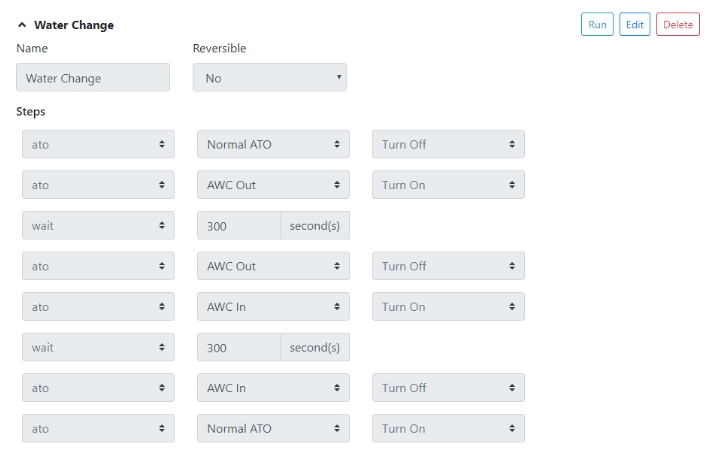
Let's go through each 'Steps' in the macro.
- The first step is optional and sounds like it doesn't apply to you but if you did have an ATO sensor you would first need to disable this sensor while the AWC runs.
- Now you want to enable the low level sensor (AWC Out) which will be sensing water. As soon as you 'Turn On' this sensor the pump it's controlling should turn on and water will start draining. If your sensor turns the pump on when no water is sensed, aka backwards, you need to go to the sensors 'Connector' and change the 'Reverse' option.
- Now you add a 'Wait' period to your macro, this is the longest you want you drain pump to run and should turn off your pump even if the lower sensor fails. The idea is the macro allows the drain system to run for a maximum of 300 seconds or whatever you choose. The next step won't run until this 'Wait' period expires.
- Now you 'Turn Off' the AWC Out sensor as it's no longer needed as your water has been drained. You could insert an extra step after this to turn off the actual drain pump, basically a make sure its off kind of thing.
- Now you 'Turn On' the AWC In sensor which is the high level sensor. Once this turns on it will startup the refill pump as it's not sensing any water. If your sensor turns the pump on when water is sensed, aka backwards, you need to go to the sensors 'Connector' and change the 'Reverse' option.
- Now you add another 'Wait' period, again this is the maximum you want the refill pump to run and should be set longer than it typically takes to refill your tank as you want the sensor to turn the pump off but obviously not long enough to cause a flood if the high level sensor failed. The next step won't run until this 'Wait' period expires.
- Now you can add a 'Step' to 'Turn Off' the high level sensor as the water change is complete. You could insert an extra step after this step to turn off the actual refill pump, basically a make sure its off kind of thing.
- And finally if you do have an ATO sensor setup as well you can turn this back on so your ATO will run as normal again.
![]()
Hope this helps, you might have to read it a few times as I typically need to rewrite things about 3 times before others can understand my gibberish. :)
The important thing to remember is the above represents running the macro manually. To run this macro via a timer you need to create the 'Steps' in reverse and set 'Reversible' to 'Yes', don't forget this or you will be chasing your tail.

Hey @robsworld78 . I think you've summed it up very well there. Thank you. @drbogger I somehow missed your original post as well, otherwise would have responded. TBH, I haven't looked at the forum this whole weekend. But what you'r trying to accomplish sounds like exactly what I have running.
Helps to have a good teacher. ;) When I first played with Reef-pi I was impressed with the macros, then I tried setting them up in real life and was not so impressed as I couldn't get anything I wanted to work, then you came along and now I'm very impressed with macros. I'm going to write a mini manual only on macros as I'm certain many are struggling with them. Only thing really missing from macros is being able to trigger a dosing pump, hint hint...
This should go in the docs :-)Here's an example I was shown from @Des Westcott, he's the macro specialist and teaching me. :)
I'll try and explain as I understand it. This example uses a low/high level sensor to control separate pumps just like you're after. It also has an ATO sensor that gets disabled but you can ignore that.
I assume you setup your two sensors in the ATO tab, in this example that is 'AWC Out' (low level) and 'AWC in' (high level). When you setup these 'ATO' sensors have the low level set to control the drain pump and the high level should control the fill pump.
Sounds like you have your pumps setup correctly.
Now you need to create a 'Macro' to control everything. You might want to create two, call one 'Manual AWC' and the other 'Auto AWC'. There's a slight "glitch" with macros, if you want to use a timer to trigger the macro you need to setup the 'Steps' in reverse and set the 'Reversible' drop down box to 'Yes'. This is why you need 2 macros so you can better test it and run the AWC manually.
Let's go through each 'Steps' in the macro.
- The first step is optional and sounds like it doesn't apply to you but if you did have an ATO sensor you would first need to disable this sensor while the AWC runs.
- Now you want to enable the low level sensor (AWC Out) which will be sensing water. As soon as you 'Turn On' this sensor the pump it's controlling should turn on and water will start draining. If your sensor turns the pump on when no water is sensed, aka backwards, you need to go to the sensors 'Connector' and change the 'Reverse' option.
- Now you add a 'Wait' period to your macro, this is the longest you want you drain pump to run and should turn off your pump even if the lower sensor fails. The idea is the macro allows the drain system to run for a maximum of 300 seconds or whatever you choose. The next step won't run until this 'Wait' period expires.
- Now you 'Turn Off' the AWC Out sensor as it's no longer needed as your water has been drained. You could insert an extra step after this to turn off the actual drain pump, basically a make sure its off kind of thing.
- Now you 'Turn On' the AWC In sensor which is the high level sensor. Once this turns on it will startup the refill pump as it's not sensing any water. If your sensor turns the pump on when water is sensed, aka backwards, you need to go to the sensors 'Connector' and change the 'Reverse' option.
- Now you add another 'Wait' period, again this is the maximum you want the refill pump to run and should be set longer than it typically takes to refill your tank as you want the sensor to turn the pump off but obviously not long enough to cause a flood if the high level sensor failed. The next step won't run until this 'Wait' period expires.
- Now you can add a 'Step' to 'Turn Off' the high level sensor as the water change is complete. You could insert an extra step after this step to turn off the actual refill pump, basically a make sure its off kind of thing.
- And finally if you do have an ATO sensor setup as well you can turn this back on so your ATO will run as normal again.
![]()
Hope this helps, you might have to read it a few times as I typically need to rewrite things about 3 times before others can understand my gibberish. :)
The important thing to remember is the above represents running the macro manually. To run this macro via a timer you need to create the 'Steps' in reverse and set 'Reversible' to 'Yes', don't forget this or you will be chasing your tail.

You;re too kind :eek:
But you could have a "minor macro" that administers your dose and then any Macro / Timer can trigger that.
This should go in the docs :)
DHT22 is in my plan as well. I prefer i2c because it requires no additional circuit and software logic beyond the sensor's protocol. The price is generally not an issue if its only 5-10$ difference. If its more precise, its better (within 5-10$ margin). When I integrate a new thing my general goal is to get an end to end flow going first. In this case getting to see humidity trend, correlating it with other signals to make sure this makes sense.,. check general stability (software wise) etc. I find i2c based sensor pretty handy. They are generally better quality and software, electronics requirements are lesser. i have my eyes on the platinum temp probe as well.That sensor is pretty expensive, have you thought about the DHT22?


Also the less I2C devices the better everyone will be. ;)
I can't get it to work. I setup a doser, go to calibrate, hit run and it does what it should.
If I create a macro and select that doser it only enable/disables it, doesn't actually make it run like a calibration.
Yeah it will, @Des Westcott and @cnidus have been helping me out which is great.
DHT22 is in my plan as well. I prefer i2c because it requires no additional circuit and software logic beyond the sensor's protocol. The price is generally not an issue if its only 5-10$ difference. If its more precise, its better (within 5-10$ margin). When I integrate a new thing my general goal is to get an end to end flow going first. In this case getting to see humidity trend, correlating it with other signals to make sure this makes sense.,. check general stability (software wise) etc. I find i2c based sensor pretty handy. They are generally better quality and software, electronics requirements are lesser. i have my eyes on the platinum temp probe as well.
I cant thank you all enough for this effort. Documentation is probably the biggest hurdle for new reef-pi usersI can't get it to work. I setup a doser, go to calibrate, hit run and it does what it should.
If I create a macro and select that doser it only enable/disables it, doesn't actually make it run like a calibration.
Yeah it will, @Des Westcott and @cnidus have been helping me out which is great.
OK. I haven't played with the dosing function at all so it was just a guess. But if you just controlled a dosing pump like a piece of equipment it would work. But then you lose the additional dosing functionality. I might be speaking out of turn here, but what you describe sounds like a glitch not unlike the macros only running in reverse when triggered by a timer or macro. Just a guess though, but sounds solveable. Or maybe a "manual dose" feature needs to be introduced........ somehow.
It's easy to have ideas when you're not the one that actually has to make them work :) :) :)
If you spot bugs in behavior do let me know. Due to time constrain i may not be able to read all posts, but all bugs that you encounter in macro path (reef-pi in general), do tag me. I'll track that at very least, but definitely work on those as priority. Macro will become a big deal as we go in 4.0.OK. I haven't played with the dosing function at all so it was just a guess. But if you just controlled a dosing pump like a piece of equipment it would work. But then you lose the additional dosing functionality. I might be speaking out of turn here, but what you describe sounds like a glitch not unlike the macros only running in reverse when triggered by a timer or macro. Just a guess though, but sounds solveable. Or maybe a "manual dose" feature needs to be introduced........ somehow.
It's easy to have ideas when you're not the one that actually has to make them work :) :) :)







