In app temp probe reading. Reading fine why red?

Michael Gray

Valuable Member
View Badges
Joined
Apr 18, 2019
Messages
1,988
Reaction score
1,214
Location
Bay Area, Brentwood CA
What state or country do you live in
California
Rating - 0%
0   0   0
Trying to explain. Logging into the app I see that everything looks normal.

If I click on the probe section to see all the probes by itself. Why is my temp showing red?????
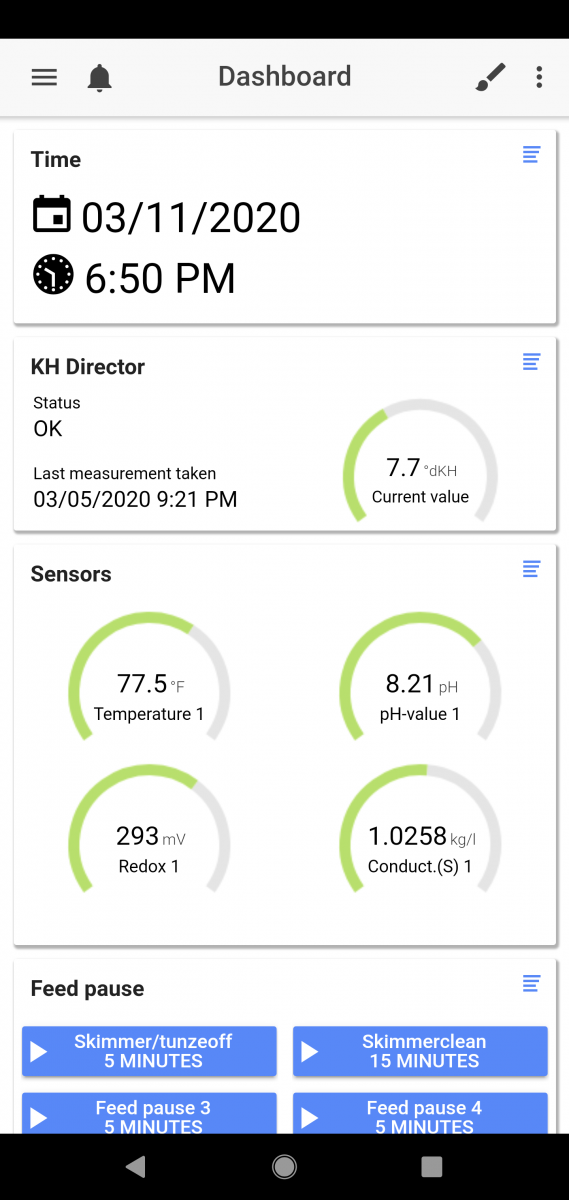
Screenshot_20200311-185036.png
Screenshot_20200311-185047.png
 
Haha, I just looked at my page, and it’s red too. If I think about it it’s been this way but I never worried about it.
My Firmware is 7.23
42C8882A-DAFD-4F5A-A000-F0930C889D51.png


Here’s my temp settings page for reference.
143D4803-9C57-4BBF-B348-3260F74D1D58.png
 
Last edited:
Haha, I just looked at my page, and it’s red too. If I think about it it’s been this way but I never worried about it.
My Firmware is 7.23
42C8882A-DAFD-4F5A-A000-F0930C889D51.png


Here’s my temp settings page for reference.
143D4803-9C57-4BBF-B348-3260F74D1D58.png
well i put a ticket in.. so ill let you know what i hear back
 
I can only recreate this on mobile FYI - on the full browser from a laptop this doesn't happen for me.

It does on mobile just as described above
 

IF YOU HAD TO OPERATE EVERYTHING ELSE MANUALLY, WHICH AUTOMATED SYSTEM WOULD YOU KEEP?

  • Auto top-off

    Votes: 37 57.8%
  • Automated dosing

    Votes: 4 6.3%
  • Mechanical filtration / roller filter

    Votes: 4 6.3%
  • Automated water testing

    Votes: 3 4.7%
  • Automatic feeding

    Votes: 0 0.0%
  • Lighting schedule

    Votes: 9 14.1%
  • Controller and remote monitoring

    Votes: 3 4.7%
  • Leak detection and emergency shutoff

    Votes: 1 1.6%
  • Automatic water changes

    Votes: 2 3.1%
  • None. I prefer to operate everything manually

    Votes: 0 0.0%
  • Something else (explain in the comments)

    Votes: 1 1.6%
Back
Top
Home
Post thread…
Market
What's new