reef-pi :: An opensource reef tank controller based on Raspberry Pi.

Erica-Renee

Valuable Member
View Badges
Joined
Oct 4, 2017
Messages
1,596
Reaction score
3,288
Location
lost
Rating - 0%
0   0   0
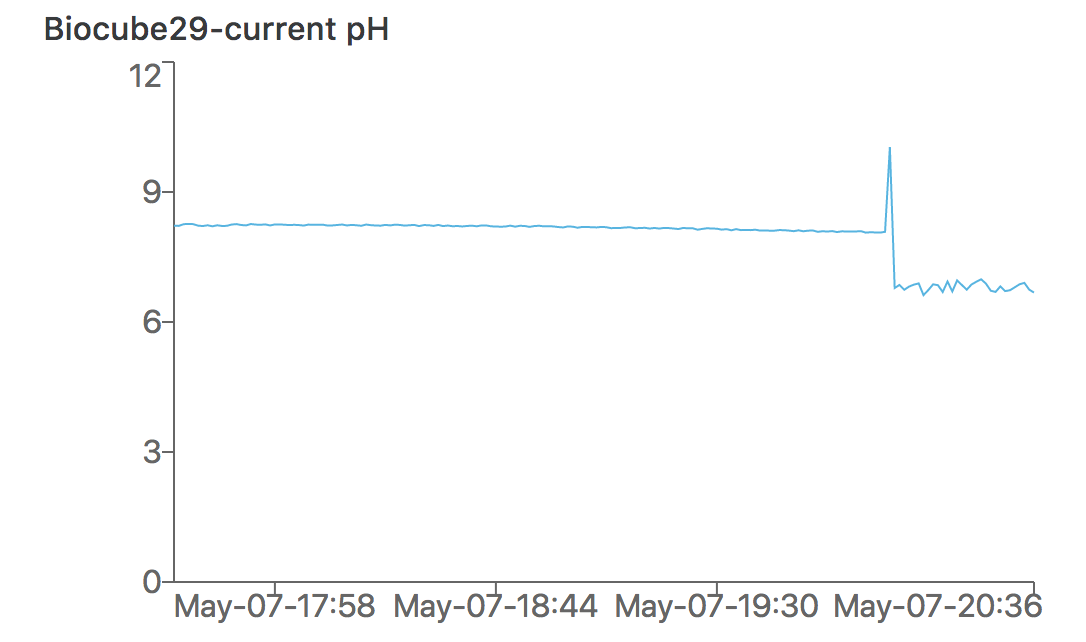
Noticing the effect of two part dosing (manually) on pH .
Screen Shot 2018-05-07 at 8.36.25 PM.png
This looks like you should space your dosing out to a few times a week.. Dosing pump time.
I use Kent 2 part

Question .. Your ph probe and circuit.. did you get them both from atlas or other source , Is the atlas the only one that will work... ??
 
OP
OP
Ranjib

Ranjib

7500 Club Member
View Badges
Joined
Apr 16, 2016
Messages
9,876
Reaction score
16,680
Location
Pleasant Hill, Concord
Rating - 0%
0   0   0
This looks like you should space your dosing out to a few times a week.. Dosing pump time.
I use Kent 2 part

Question .. Your ph probe and circuit.. did you get them both from atlas or other source , Is the atlas the only one that will work... ??
Yeah, thats exactly the next step. Instead of dosing one cap of each parts (5ml i guess) in 10 mins interval, i'll be slowly spacing it out with the in-progress doser build. I just wanted the ph monitor to be up first, to see how the whole dosing automation impacts (in term of ph). I might also switch to brightwell or esv b-ionic or something else that does not impact ph so much, but this will be only after i deploy the dosing bits.
I got the whole ph kit from atlas scientific (ezo circuit+ bnc connector+ ph probe + 3 calibration solution + 1 storage solution) for 180$. The software (reef-pi) only assumes a ezo i2c interface. I do not know if it (ezo) circuit will work with other probes. I personally definitiely test out couple of other, cheaper ph probes (i think they 'll work as well, as long as they are built for salt water aquarium and continuous monitoring). I definitely dont think everyone needs the whole set like me, i went with it to minimize risk of failure and to get as accurate as possible data. Since, I'll be using this as a control to check other probes, circuits etc

@theatrus has suggested hand rolling his own ph circuit (apparently this is not very complicated, according to him) using a PIC controller and few ancillary components. I have no idea about his time availability and priorities, but I can tell you that the reef-pi 1.0 board he had designed has all the things for ph, but not ezo based. I am very excited about this, as it will significantly bring down the price of the ph monitoring gears. If he does finish this work, I will do whatever it's required to support it in reef-pi code
 
OP
OP
Ranjib

Ranjib

7500 Club Member
View Badges
Joined
Apr 16, 2016
Messages
9,876
Reaction score
16,680
Location
Pleasant Hill, Concord
Rating - 0%
0   0   0
In case its not very clear from my response, the answer is reef-pi's current ph monitoring will only work with ezo circuit. It may work with other ph probe, but I have not tested it.
 

Erica-Renee

Valuable Member
View Badges
Joined
Oct 4, 2017
Messages
1,596
Reaction score
3,288
Location
lost
Rating - 0%
0   0   0
In case its not very clear from my response, the answer is reef-pi's current ph monitoring will only work with ezo circuit. It may work with other ph probe, but I have not tested it.
Thanks.. I seen the ezo salinity and orp (less important to me) but i can see how this could be easiest way to do them. The expense as much as it is still makes this much cheaper then the alternative... I was not asking just about keeping price down but best solution.

I have started soldering circuit boards over the weekend some. I am trying to keep things as modular as possible.With the added issue of having things spaced out . My sump room has things spaced out . So my Outlets need to be along a way in different areas .

I Am running 12/3 wire from each double gang outlet into a metal enclosure where my relays will be . Then the low voltage will go from there to the pi . ATO and Float sensors will connect to another box just above the area where my skimmer and heaters are located. Doser pumps same as ato /float switches. and controllable led lights over the fuge and scrubber ..
Here is a pic of the sump before the repainting and so on to get a idea
fhsUsofCjgDr9BW5A
IMG_20160307_174643.jpg


at the bottom left of the image is the corner of one of the Fuge tanks... its basically a 55 gal drum split in half connected with bulkheads ...

I tore it all down and set it up temp... ( its a big mess) to repaint and tidy it all up since i have it working as i want....

so bits of the controller will be distributed in different areas of this 13x15 ft room
 

binay

Community Member
View Badges
Joined
Feb 9, 2018
Messages
31
Reaction score
16
Rating - 0%
0   0   0
Hello fellow reefers,
I have just cut 2.0.0-beta release of reef-pi. I'll be improving this release going forward for all new features, while the 1.x series will be supported (security and bug fixes mostly), but without any new features till Christmas, this year.

This is a beta release, and likely container some rough edges, although I have run extensive set of physical and automated tests against this build. The reason for an early beta build is due to the incorporation of several API breaking features (including multiple temperature and ato support). There are still a handful of 2.0 features that needs to be implemented (e.g. programmability), but this release contains several of the 2.0 features and should make users experience lot better. I am making this release also to make the upcoming MakerFaire (19-21st May) exhibit code publicly available. Following are the summary of changes:
New features:
- Support for multiple ato sensors
- Support for multiple temperature sensors
- Enhanced dashboard customization (users can specify grid, types and height/width of individual charts)
- Temperature sub system now supports per sensor celsius of fahrenheit metric
- All metrics (ph, temperature, health, ato etc) are now periodically stored on sd card. This helps avoiding accidental loss of metrics due to un-controlled shutdown of the controller

There were several minor bug fixes and technical chores that were addressed as well, some of the highlights:
- Fixed height/width of temperature charts
- All metrics will have two decimal precision
- Consistent titles across all charts
- Extended UI tests for timer, ph, ato control sub-system


Release builds can be found in usual place: https://github.com/reef-pi/reef-pi/releases/tag/2.0.0-beta

Note: You have to remove old reef-pi installation and redo everything (sudo rm -rf /var/lib/reef-pi). This is a 2.0 series builds and it is not compatible with older releases.

I'll be working on documentation and any bugs encountered during their operation for next few weeks. If you need any help with 2.0 beta installation, feel free to seek help in this thread

 

binay

Community Member
View Badges
Joined

Feb 9, 2018
Messages
31
Reaction score
16
Rating - 0%
0   0   0
Dear Ranjib just setup reef-pi beta, could you tell me how to get the sensor for temperature in the temperature section
 

Greg456

New Member
View Badges
Joined
May 9, 2018
Messages
20
Reaction score
20
Rating - 0%
0   0   0
Does anyone have a setup guide for using Doser sub system. I'm currently using the PCA9685 and TIP120 to control 12v Peristaltic Pump. Under v1.4 i can set, control, and schedule the pumps, but fields are empty after returning to doser tab. v1.5 I can set and calibrate, but i can not schedule pumps. Any help would be greatly appreciated
 
OP
OP
Ranjib

Ranjib

7500 Club Member
View Badges
Joined
Apr 16, 2016
Messages
9,876
Reaction score
16,680
Location
Pleasant Hill, Concord
Rating - 0%
0   0   0
When you click on the sensor drop down , does it show you a list of sensors? If not, you have to enable one wire protocol in raspberry pi.
Code:
sudo raspi-config
Interfacing option -> one wire -> Enable, reboot.
After this you should see a sensor or more (depening upon how many sensors you have connected), specify the details (name, check frequency etc) and you should be good.

If you dont see any sensor in the list (they should all have a name like 28-xxxxxxxxx ) share a photo of your wiring/cicuit. Something is wrong on the wiring side then,
 
OP
OP
Ranjib

Ranjib

7500 Club Member
View Badges
Joined
Apr 16, 2016
Messages
9,876
Reaction score
16,680
Location
Pleasant Hill, Concord
Rating - 0%
0   0   0
Does anyone have a setup guide for using Doser sub system. I'm currently using the PCA9685 and TIP120 to control 12v Peristaltic Pump. Under v1.4 i can set, control, and schedule the pumps, but fields are empty after returning to doser tab. v1.5 I can set and calibrate, but i can not schedule pumps. Any help would be greatly appreciated
I am sorry about your trouble. I'll look into this shortly,
Doser tab was developed post 1.0, and we dont have documentation yet. But I am happy to walk you through the steps. Let me first cross check it on 1.5. Do you think it is feasible for you to update to 2.0 beta (you have to redo all the configuration) ?
 

Greg456

New Member
View Badges
Joined
May 9, 2018
Messages
20
Reaction score
20
Rating - 0%
0   0   0
I am sorry about your trouble. I'll look into this shortly,
Doser tab was developed post 1.0, and we dont have documentation yet. But I am happy to walk you through the steps. Let me first cross check it on 1.5. Do you think it is feasible for you to update to 2.0 beta (you have to redo all the configuration) ?
I can, I'm still testing before implementing this system. I'll try it again tonight. First try with v2.0 gave an error like jack not in bucket during schedule.
 
OP
OP
Ranjib

Ranjib

7500 Club Member
View Badges
Joined
Apr 16, 2016
Messages
9,876
Reaction score
16,680
Location
Pleasant Hill, Concord
Rating - 0%
0   0   0
I can, I'm still testing before implementing this system. I'll try it again tonight. First try with v2.0 gave an error like jack not in bucket during schedule.
You should delete the old installation before updating to 2.0
Code:
sudo apt-get remove -y --purge reef-pi
sudo rm -rf /var/lib/reef-pi
 

binay

Community Member
View Badges
Joined
Feb 9, 2018
Messages
31
Reaction score
16
Rating - 0%
0   0   0
Thanks Ranjib, it's working now but the max temperature in the control cannot do anything to it.

When you click on the sensor drop down , does it show you a list of sensors? If not, you have to enable one wire protocol in raspberry pi.
Code:
sudo raspi-config
Interfacing option -> one wire -> Enable, reboot.
After this you should see a sensor or more (depening upon how many sensors you have connected), specify the details (name, check frequency etc) and you should be good.

If you dont see any sensor in the list (they should all have a name like 28-xxxxxxxxx ) share a photo of your wiring/cicuit. Something is wrong on
 

Greg456

New Member
View Badges
Joined
May 9, 2018
Messages
20
Reaction score
20
Rating - 0%
0   0   0
New install on Pi Zero v2.0. I'm able to calibrate doser pumps and run, but during schedule i'm getting error
May 09 17:44:04 pi reef-pi[213]: 2018/05/09 17:44:04 doser sub system: setting pwm pin: 8 at speed 42
May 09 17:44:04 pi reef-pi[213]: 2018/05/09 17:44:04 ERROR: dosing sub-system. Failed to control jack. Error: Item '' does not exist in bucket 'jacks'
 
OP
OP
Ranjib

Ranjib

7500 Club Member
View Badges
Joined
Apr 16, 2016
Messages
9,876
Reaction score
16,680
Location
Pleasant Hill, Concord
Rating - 0%
0   0   0
New install on Pi Zero v2.0. I'm able to calibrate doser pumps and run, but during schedule i'm getting error
May 09 17:44:04 pi reef-pi[213]: 2018/05/09 17:44:04 doser sub system: setting pwm pin: 8 at speed 42
May 09 17:44:04 pi reef-pi[213]: 2018/05/09 17:44:04 ERROR: dosing sub-system. Failed to control jack. Error: Item '' does not exist in bucket 'jacks'
This is a software bug. I’ll take a look at it tonight
 

Greg456

New Member
View Badges
Joined
May 9, 2018
Messages
20
Reaction score
20
Rating - 0%
0   0   0
would using certain gpio pins have anything to do with the doser issue.
 
OP
OP
Ranjib

Ranjib

7500 Club Member
View Badges
Joined
Apr 16, 2016
Messages
9,876
Reaction score
16,680
Location
Pleasant Hill, Concord
Rating - 0%
0   0   0
Current layout

rpiZ-GPIO.jpg
Doser sub system does not use GPIO operations. Its pwm based (jacks) which are either pca9685 based or raspi GPIO 19 or 18 based
 

Greg456

New Member
View Badges
Joined
May 9, 2018
Messages
20
Reaction score
20
Rating - 0%
0   0   0
Doser sub system does not use GPIO operations. Its pwm based (jacks) which are either pca9685 based or raspi GPIO 19 or 18 based
using the pca9685 on pins 8,9,10,11 just making sure my choice of gpio pins wasn't the issues.

on another note is the any sort of donation or something setup to further this project
 

TOP 10 Trending Threads

WHAT AMOUNT OF LIVE ROCK AND SAND SHOULD BE PRIORITIZED FOR OPTIMAL BIODIVERSITY/FILTRATION?

  • 100% live rock + bagged sand

    Votes: 37 27.4%
  • 100% dry rock + 100% live sand

    Votes: 46 34.1%
  • 50/50 live/dry rock, 50/50 live/bagged sand

    Votes: 30 22.2%
  • 75% live rock, 25% live sand

    Votes: 12 8.9%
  • 25% live rock, 75% live sand

    Votes: 10 7.4%
Back
Top