reef-pi :: An opensource reef tank controller based on Raspberry Pi.

sfgabe

Active Member
View Badges
Joined
Sep 7, 2018
Messages
178
Reaction score
258
Rating - 0%
0   0   0
This means reef-pi is reading it always on... I think its highly unlikely that we have a driver bug in reef-pi, and we are missing something else here, likely configuration related. Did you already shared your configuration screenshot? If not please do, connectors (inlet GPIO 8 ?? ) and ato details (check interval, control pump etc). I just tested ATO again with master (rc-2) release, and I could not find a bug. I am doing a whole lot of field testing now, and will hate to ship reef-pi with bugs like this (if it turns out) :-( . If your issue does not resolve, then I'll create a dedicated issue on this in github and I'll try to reproduce this with actual circuit. I have spare float switches, so no issue on getting this physically verified.

Just wanted to follow up on this. I got the 2 wire / pullup float switch working on GPIO 18 (which is the pin used in the latest diagram). I'm not sure why it wasn't working on GPIO 7 or 8 through reef-pi - they both worked through the python script so the pins weren't dead. In case anyone else is head-scratching about a float not working, try switching pins.
 

Des Westcott

Well-Known Member
View Badges
Joined
May 29, 2018
Messages
646
Reaction score
1,025
Location
Durban - South Africa
Rating - 0%
0   0   0
Ok. On with my lighting saga. I thought I had this figured out.

I got the Meanwell LDD700H driver connected up and the light works.

Next step is to configure the dimming....... Connected the "dim" pin on the driver to GPIO18 on the Pi.
Went to Configuration > Settings.
Enabled "Lighting"
Reboot for good measure
Went to Configuration > Connectors > Jacks and tried to declare a jack on GPIO18 using rpi as the driver

Here's where it goes south - I get the pink Box in the top right corner of the screen with "error failed to create : error invalid pin 18 http 500

Obviously I missed something basic again. Appreciate anyone putting me on the right path.

Des
 

Kampo

Active Member
View Badges
Joined
Dec 19, 2017
Messages
349
Reaction score
329
Location
South West Michigan
Rating - 0%
0   0   0
Ok. On with my lighting saga. I thought I had this figured out.

I got the Meanwell LDD700H driver connected up and the light works.

Next step is to configure the dimming....... Connected the "dim" pin on the driver to GPIO18 on the Pi.
Went to Configuration > Settings.
Enabled "Lighting"
Reboot for good measure
Went to Configuration > Connectors > Jacks and tried to declare a jack on GPIO18 using rpi as the driver

Here's where it goes south - I get the pink Box in the top right corner of the screen with "error failed to create : error invalid pin 18 http 500

Obviously I missed something basic again. Appreciate anyone putting me on the right path.

Des

Don't have the info in front of me but go back into the setup guide. Need to enable the pwm on thr gpio.
 
OP
OP
Ranjib

Ranjib

7500 Club Member
View Badges
Joined
Apr 16, 2016
Messages
9,876
Reaction score
16,680
Location
Pleasant Hill, Concord
Rating - 0%
0   0   0
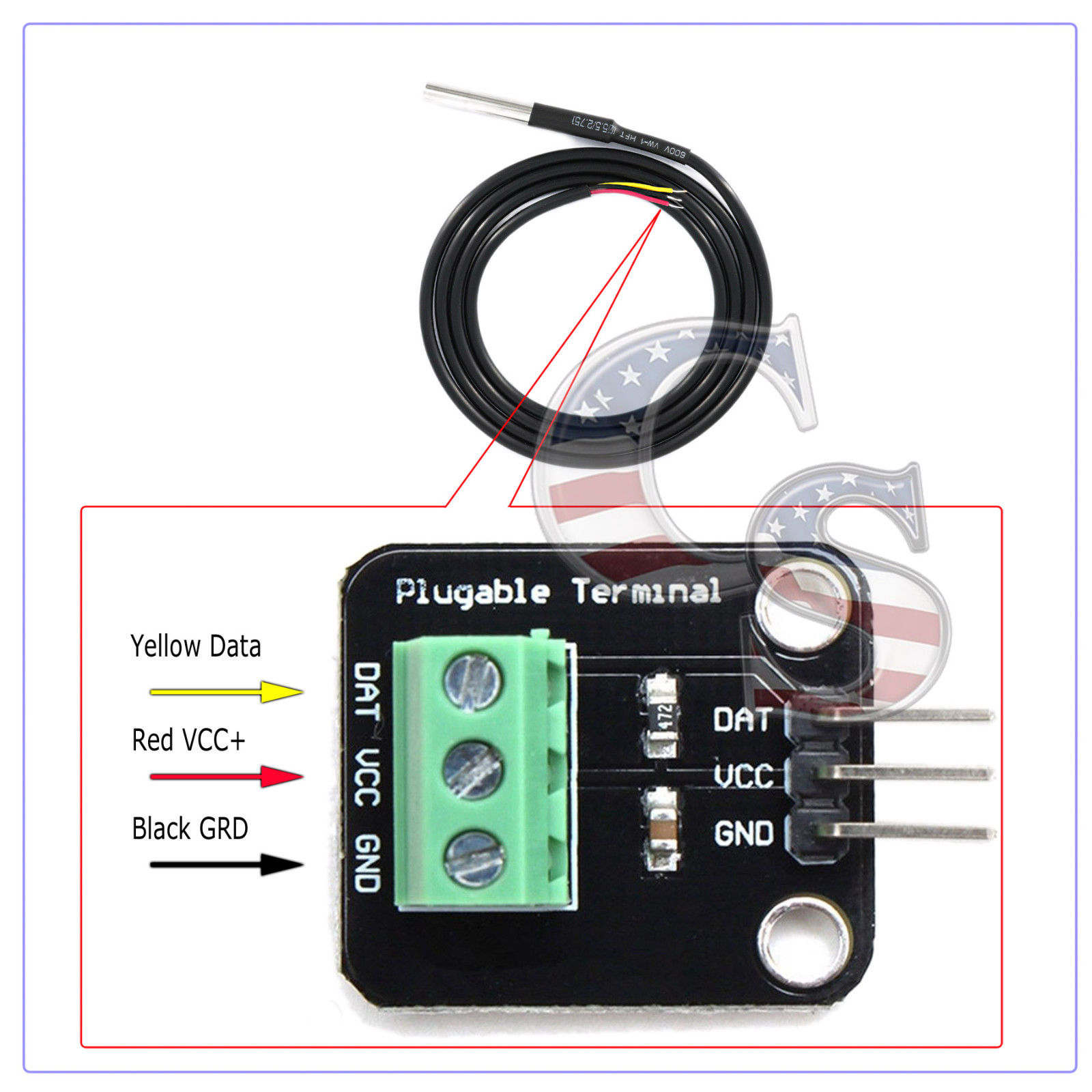
can you use a temp probe like this with reefpi? saves me the hassel of messing with the resistors from the guide.
s-l1600.jpg
I think so, is it ds18b20 ?
 
OP
OP
Ranjib

Ranjib

7500 Club Member
View Badges
Joined
Apr 16, 2016
Messages
9,876
Reaction score
16,680
Location
Pleasant Hill, Concord
Rating - 0%
0   0   0
Well guys I may have cooked my Pi. I was adding another 2 channels to control more outlets and my have shorted 12v to the output gpio pin and after a few attempts I was able to get the Pi to reboot and I had to reinstall Reef-pi to get it to load and now not I/O work at all. I have another Pi on the way tomorrow (Thanks Amazon Prime) I am just wanting to know if that was actually my issue and should i replace everything to be safe I have two PCA9685, also the parts to build another outlet controller and lighting controller.

Thank you
PS. I know I should have shut it down but the IP seems to change every time I do and I was being lazy and didnt want to look it up again
Access your pi using hostname.local instead of IP, that way you don’t have to remember the ip , and you won’t care if it changes or not
 
OP
OP
Ranjib

Ranjib

7500 Club Member
View Badges
Joined
Apr 16, 2016
Messages
9,876
Reaction score
16,680
Location
Pleasant Hill, Concord
Rating - 0%
0   0   0
Well guys I may have cooked my Pi. I was adding another 2 channels to control more outlets and my have shorted 12v to the output gpio pin and after a few attempts I was able to get the Pi to reboot and I had to reinstall Reef-pi to get it to load and now not I/O work at all. I have another Pi on the way tomorrow (Thanks Amazon Prime) I am just wanting to know if that was actually my issue and should i replace everything to be safe I have two PCA9685, also the parts to build another outlet controller and lighting controller.

Thank you
PS. I know I should have shut it down but the IP seems to change every time I do and I was being lazy and didnt want to look it up again
You have to test individual component to check if they are fine or not . Without those details it will be hard to recommend what to test
 
OP
OP
Ranjib

Ranjib

7500 Club Member
View Badges
Joined
Apr 16, 2016
Messages
9,876
Reaction score
16,680
Location
Pleasant Hill, Concord
Rating - 0%
0   0   0
Ok. On with my lighting saga. I thought I had this figured out.

I got the Meanwell LDD700H driver connected up and the light works.

Next step is to configure the dimming....... Connected the "dim" pin on the driver to GPIO18 on the Pi.
Went to Configuration > Settings.
Enabled "Lighting"
Reboot for good measure
Went to Configuration > Connectors > Jacks and tried to declare a jack on GPIO18 using rpi as the driver

Here's where it goes south - I get the pink Box in the top right corner of the screen with "error failed to create : error invalid pin 18 http 500

Obviously I missed something basic again. Appreciate anyone putting me on the right path.

Des
Gpio pin 18 is pin 0 in reef-pi , and gpio pin 19 is pin 1 . So use 0 in your case , since it’s gpio 18. This is something to do with Linux , I’ll explain later.
And sorry for the trouble , I thought I called this out in the guide
 

Des Westcott

Well-Known Member
View Badges
Joined
May 29, 2018
Messages
646
Reaction score
1,025
Location
Durban - South Africa
Rating - 0%
0   0   0
Gpio pin 18 is pin 0 in reef-pi , and gpio pin 19 is pin 1 . So use 0 in your case , since it’s gpio 18. This is something to do with Linux , I’ll explain later.
And sorry for the trouble , I thought I called this out in the guide

I created the jack on pin0 and I got the following error in the dreaded pink box LOL

{"error":"Failed to create. Error: open /sys/class/pwm/pwmchip0/export: no such file or directory"} | HTTP 500

It still created the jack, and I could use it to create a light, but dimming didn't work.

I did try change the Pi PWM frequency as Ranjib suggested a few posts up, but nothing.
 

Mandelstam

Well-Known Member
View Badges
Joined
Oct 29, 2017
Messages
688
Reaction score
1,066
Location
Malmö, Sweden
Rating - 0%
0   0   0
Question about Adafruit IO. Can you have feeds from multiple devices on the same dashboard? Maybe a stupid question but I couldn't see a definite answer while browsing through the documentation on their website.
 
OP
OP
Ranjib

Ranjib

7500 Club Member
View Badges
Joined
Apr 16, 2016
Messages
9,876
Reaction score
16,680
Location
Pleasant Hill, Concord
Rating - 0%
0   0   0
I created the jack on pin0 and I got the following error in the dreaded pink box LOL

{"error":"Failed to create. Error: open /sys/class/pwm/pwmchip0/export: no such file or directory"} | HTTP 500

It still created the jack, and I could use it to create a light, but dimming didn't work.

I did try change the Pi PWM frequency as Ranjib suggested a few posts up, but nothing.
do you have pwm module enabled? you have to reboot once you enable pwm module. https://learn.adafruit.com/reef-pi-installation-and-configuration/raspberry-pi-configuration
 
OP
OP
Ranjib

Ranjib

7500 Club Member
View Badges
Joined
Apr 16, 2016
Messages
9,876
Reaction score
16,680
Location
Pleasant Hill, Concord
Rating - 0%
0   0   0
Question about Adafruit IO. Can you have feeds from multiple devices on the same dashboard? Maybe a stupid question but I couldn't see a definite answer while browsing through the documentation on their website.
Yes. A feed is associated with a single data source, such as an individual pH sensor, water level sensor, temperature etc, hence they'll always be associated with one originating Pi. A dashboard can be composed from many feeds that belong to a single or multiple Pis. But remember the free account has a limit of 10 feed i think.
 

Mandelstam

Well-Known Member
View Badges
Joined
Oct 29, 2017
Messages
688
Reaction score
1,066
Location
Malmö, Sweden
Rating - 0%
0   0   0
Yes. A feed is associated with a single data source, such as an individual pH sensor, water level sensor, temperature etc, hence they'll always be associated with one originating Pi. A dashboard can be composed from many feeds that belong to a single or multiple Pis. But remember the free account has a limit of 10 feed i think.

That's awesome. I just found my way around the fact that Reef-Pi don't support humidity monitoring yet. I'll just set up an arduino or Pi0 with a sensor that'll send a feed to Adafruit IO. That way I can still monitor everything and see correlations between different data streams. Might not be able to have Reef-Pi react to humidity input but for now I don't feel the need to. :)
 
OP
OP
Ranjib

Ranjib

7500 Club Member
View Badges
Joined
Apr 16, 2016
Messages
9,876
Reaction score
16,680
Location
Pleasant Hill, Concord
Rating - 0%
0   0   0
That's awesome. I just found my way around the fact that Reef-Pi don't support humidity monitoring yet. I'll just set up an arduino or Pi0 with a sensor that'll send a feed to Adafruit IO. That way I can still monitor everything and see correlations between different data streams. Might not be able to have Reef-Pi react to humidity input but for now I don't feel the need to. :)
:-)
 

Cookiethief1983

New Member
View Badges
Joined
Sep 6, 2018
Messages
4
Reaction score
5
Rating - 0%
0   0   0
Confused.....


Have been logging into reef-pi for weeks. Password was saved by windows and used this to login.


Today it says my login credentials are incorrect..... and I never changed the password.


Please advise how I may access reef-pi without starting over :(
 

Des Westcott

Well-Known Member
View Badges
Joined
May 29, 2018
Messages
646
Reaction score
1,025
Location
Durban - South Africa
Rating - 0%
0   0   0
OP
OP
Ranjib

Ranjib

7500 Club Member
View Badges
Joined
Apr 16, 2016
Messages
9,876
Reaction score
16,680
Location
Pleasant Hill, Concord
Rating - 0%
0   0   0
Confused.....


Have been logging into reef-pi for weeks. Password was saved by windows and used this to login.


Today it says my login credentials are incorrect..... and I never changed the password.


Please advise how I may access reef-pi without starting over :(
Did you made any changes in credential section earlier, and not reloaded? double check your username and password, they are case sensitive. Does it work if you access them in private/incognito mode from your browser
 

Dave's Reef

Active Member
View Badges
Joined
Nov 4, 2018
Messages
102
Reaction score
148
Rating - 0%
0   0   0
Access your pi using hostname.local instead of IP, that way you don’t have to remember the ip , and you won’t care if it changes or not
Sorry for my ignorance I have no idea how to do that. Also my new Pi arrived today and confirmed I cooked the old one so moving on with the new one everything is back working and I will be ordering a spare and keep it loaded with a copy of the SD card ready to go.
 

TOP 10 Trending Threads

WHAT AMOUNT OF LIVE ROCK AND SAND SHOULD BE PRIORITIZED FOR OPTIMAL BIODIVERSITY/FILTRATION?

  • 100% live rock + bagged sand

    Votes: 38 26.6%
  • 100% dry rock + 100% live sand

    Votes: 48 33.6%
  • 50/50 live/dry rock, 50/50 live/bagged sand

    Votes: 32 22.4%
  • 75% live rock, 25% live sand

    Votes: 15 10.5%
  • 25% live rock, 75% live sand

    Votes: 10 7.0%
Back
Top