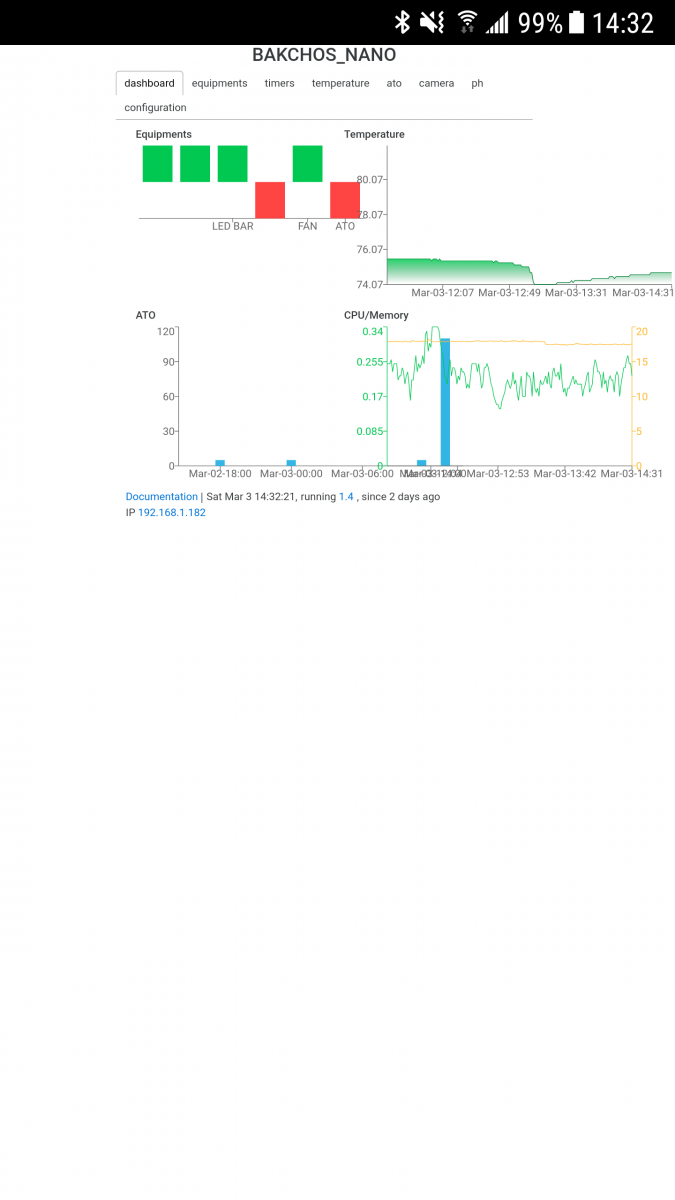
Any way to make the layout not overlap like that on mobile ?
Follow along with the video below to see how to install our site as a web app on your home screen.
Note: This feature may not be available in some browsers.
What is planned for version 1.5? I would really like programming..like i want to set up a feed mode that disables this and that.
Altso the UI may need some development. Are there any good ui/ux developers involved in this?
Not currently. They are hardcoded to have 500px width and 300px height. One of the 2.0 goal is to make the customizable (both grid and resolution)Any way to make the layout not overlap like that on mobile ?
![]()
I dont have any specific plans for minor releases, milestones are all clubbed for 2.0 release, https://github.com/reef-pi/reef-pi/issues , and i work on them , as and when individual features are done minor releases are cut accordingly. you can see past releases here: https://github.com/reef-pi/reef-pi/releasesWhat is planned for version 1.5? I would really like programming..like i want to set up a feed mode that disables this and that.
Altso the UI may need some development. Are there any good ui/ux developers involved in this?
definitely not :0-) . I can attest.As far as I know I will be helping with the UI/UX. it would be nice to have someone to partner up with but UX design is not simple as people think.
if you ssh into it, you can run this to check reef-pi running or notIs there a way to restart or check and see if the reef-pi webserver is running on my RPI? Can't connect to the reef-pi site, but can SSH and ping it fine and reef-pi is running (lights are on, timers working, etc.)
sudo systemctl status reef-pi.service
if you ssh into it, you can run this to check reef-pi running or not
Code:sudo systemctl status reef-pi.service
More : https://reef-pi.github.io/additional-documentation/troubleshooting/
btw, there were several others who expressed similar interest, and I had created reef-pi slack channel for developer specific conversation (all the tech rants and jurgons) . its not super active, but i do share things time to time. slack is also integrated with github webhooks, so if nothing you'll get to know changeset as they are raised or merged
definitely not :0-) . I can attest.
Not offended at all. I know what my code quality is :-)sorry I did not want to sound offending . I was just looking at slack. If you will have me onboard i will help with the ux/ui design just give me a direction and your ideas.
https://join.slack.com/t/reef-pi/sh...NiNTQ0ZTJiODQ1YThiYTExYTUyZDNkZjNmYWFlMTJkMGQHave an invite system for this Slack setup? Would love to hop on :)

Yes, rpi based pwm is working. I have tested it and everything was fine. the pwm output is 0-3.3v. the doser system currently defaults to rpi pwm. I am working on a changeset to get it working across the board https://github.com/reef-pi/reef-pi/tree/i2c . But this will incur significant changes for existing users. I think I'll break the api (i.e. this will be on 2.0 release train). Following are few key changes:@Ranjib I saw a few pages back, you was looking at integrating with the RPI's own PWM output instead of requiring the separate board. Was you able to get this feature working?
I've got the hardware side of things done, i've also been able to to test using the RPI's PWM output through terminal which is working perfectly. The last piece to the puzzle is making this working through ReefPI.
@ThorEp @Ranjib I'm going to look at getting a local dev environment setup today, with the intension of updating the GUI with something like Google's "Material Design" which would give ReefPi a similar UI to Google products. Something like the screenshot below. Please let me know your thoughts. If there are any other devs who would like to get involved please let me know, maybe we could get a Slack channel setup.
![]()
Yes, rpi based pwm is working. I have tested it and everything was fine. the pwm output is 0-3.3v. the doser system currently defaults to rpi pwm. I am working on a changeset to get it working across the board https://github.com/reef-pi/reef-pi/tree/i2c . But this will incur significant changes for existing users. I think I'll break the api (i.e. this will be on 2.0 release train). Following are few key changes:
- Jacks will have an extra attribute called driver. Users can select from either pca9685 or rpi based driver. reef-pi will use the appropirate hardware accordingly
- Jacks will be used across lighting, doser and wave makers. So user's get to decide which ones to use where.
- I am also taking this opportunity to remove i2c dependency on embd. That library is not actively maintained, from now this changeset on, reef-pi will use in-house i2c/pwm (https://github.com/reef-pi/rpi) driver to minimize dependency (i might consider periph.io in future for this)
Let me know if you want to try it out, do you have a reef-pi build working?
I just shared the slack invite link couple of posts earlier (reef-pi.slack.com), you can pm me your email id and I'd be happy to send an invite