


reef-pi :: An opensource reef tank controller based on Raspberry Pi.

OP
OP
Ranjib

Ranjib

7500 Club Member
View Badges
Joined
Apr 16, 2016
Messages
9,876
Reaction score
16,680
Location
Pleasant Hill, Concord
Rating - 0%
0   0   0
@Ranjib I've now got the i2c branch built and running on a PiZero. I've configured a jack using the RPI driver, however when setting up a light i'm receiving the following error in the console and i'm not sure how to resolve it. Any ideas?

Screen Shot 2018-03-04 at 09.26.49.png


I've checked and it appears that the device does however exist.
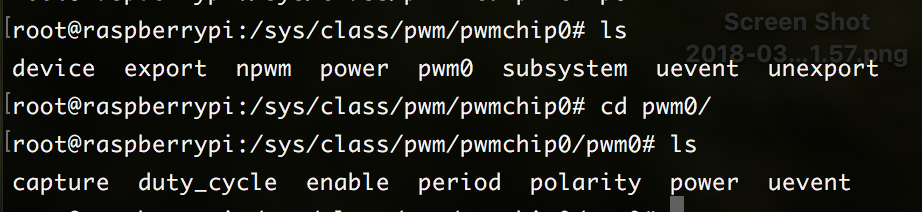
Screen Shot 2018-03-04 at 09.29.29.png
Can you try with the doser sub system, that also uses jack/rpi pwm and I have tested that one. The one you encountered is a bug . I'll fix it it today. Lighting sub-system was updated to use the rpi pwm just day before yesterday :-)

I'll push an update soon , today
 
OP
OP
Ranjib

Ranjib

7500 Club Member
View Badges
Joined
Apr 16, 2016
Messages
9,876
Reaction score
16,680
Location
Pleasant Hill, Concord
Rating - 0%
0   0   0
I just spotted the post with the Slack invite, i've got myself added. :)

I have Reef PI installed, however I cannot get the lighting tab to appear as I believe it's having an issues with me not using a pca9685 board.
The branch you are using (i2c) will have a setting (Configuration-> settings) to disable pca9685 (should be unchecked by default). This is something that I am introducing in the i2c branch
 

Gary G

Active Member
View Badges
Joined
Nov 8, 2016
Messages
128
Reaction score
66
Rating - 0%
0   0   0
Hey guys do you think could be used I'm building a new light setup using the original setup it came with a t-5 . do you think these can mimic the light setting and stuff.
 
OP
OP
Ranjib

Ranjib

7500 Club Member
View Badges
Joined
Apr 16, 2016
Messages
9,876
Reaction score
16,680
Location
Pleasant Hill, Concord
Rating - 0%
0   0   0
Hey guys do you think could be used I'm building a new light setup using the original setup it came with a t-5 . do you think these can mimic the light setting and stuff.

I think you can mod it to work with reef-pi. Are you planning to use this for your reef tank?
 

lazybones51

New Member
View Badges
Joined
Feb 13, 2018
Messages
13
Reaction score
10
Rating - 0%
0   0   0
Can you try with the doser sub system, that also uses jack/rpi pwm and I have tested that one. The one you encountered is a bug . I'll fix it it today. Lighting sub-system was updated to use the rpi pwm just day before yesterday :)

I'll push an update soon , today

Unfortunately during testing i'm seeing the same error for the dosing sub system.

Screen Shot 2018-03-04 at 18.28.04.png


I can confirm PWM is loaded.

Screen Shot 2018-03-04 at 18.29.12.png
 

Gareth elliott

Read, Tinker, Fail, Learn
View Badges
Joined
May 7, 2017
Messages
5,470
Reaction score
6,903
Location
NJ
Rating - 0%
0   0   0
Hey guys do you think could be used I'm building a new light setup using the original setup it came with a t-5 . do you think these can mimic the light setting and stuff.


If going to be a reef, can run a simple lux phone app To get a par ball park. Going to need to know the number of blue:white diodes to get close.
But just to see if even useable to grow anything. Take your lux divide by 65. This will be open air so expect a lower par than you would underwater, so then take your par number x 1.33(refractive index of water).
 

Gary G

Active Member
View Badges
Joined
Nov 8, 2016
Messages
128
Reaction score
66
Rating - 0%
0   0   0
I don't think I will be putting coral in the tank at this point in time. this is for my 125 eel tank. I am wanting to upgrade the lights since this is an older set I bought so just reuse the housing
 
OP
OP
Ranjib

Ranjib

7500 Club Member
View Badges
Joined
Apr 16, 2016
Messages
9,876
Reaction score
16,680
Location
Pleasant Hill, Concord
Rating - 0%
0   0   0
Unfortunately during testing i'm seeing the same error for the dosing sub system.

Screen Shot 2018-03-04 at 18.28.04.png


I can confirm PWM is loaded.

Screen Shot 2018-03-04 at 18.29.12.png
Can you share the version , should be present in the dashboard (bottom), or get it via CLI
Code:
reef-pi -version

I am not encountering this issue, i just tested with lighting sub-system as well, it worked fine. Let me run through couple of more tests and I'll update you
 

lazybones51

New Member
View Badges
Joined
Feb 13, 2018
Messages
13
Reaction score
10
Rating - 0%
0   0   0
@Ranjib I'm running version"1.4-14-gc324826"

Would you be able to share you "/boot/config.txt" file, as i'm wondering if it's a configuration issue?
 
OP
OP
Ranjib

Ranjib

7500 Club Member
View Badges
Joined
Apr 16, 2016
Messages
9,876
Reaction score
16,680
Location
Pleasant Hill, Concord
Rating - 0%
0   0   0
@Ranjib I'm running version"1.4-14-gc324826"

Would you be able to share you "/boot/config.txt" file, as i'm wondering if it's a configuration issue?
Its not a a configuration issue. Has to be a software bug or something else. I just tested everything, here are the details, cross check this with your setup
1. Update reef-pi
2. Create a jack (Configuration -> Connectors), with channel 0 and driver rpi
3. Create a light and associated the jack with it.
4. Set manual mode on the light and check if the log shows its enforcing the value. also check if the same translates to the pwm sysfs target.
5. Set automatic mode (day light cycle ), check if the values are set properly.

Everything worked as expected. here are the screen shots
- version and daylight cycle
Screen Shot 2018-03-04 at 11.53.58 AM.png


Jack setting
Screen Shot 2018-03-04 at 11.54.13 AM.png


Light setting
Screen Shot 2018-03-04 at 11.54.24 AM.png


Log and corresponding pwm sysfs entries
Screen Shot 2018-03-04 at 11.54.39 AM.png
 
OP
OP
Ranjib

Ranjib

7500 Club Member
View Badges
Joined
Apr 16, 2016
Messages
9,876
Reaction score
16,680
Location
Pleasant Hill, Concord
Rating - 0%
0   0   0
Unfortunately during testing i'm seeing the same error for the dosing sub system.

Screen Shot 2018-03-04 at 18.28.04.png


I can confirm PWM is loaded.

Screen Shot 2018-03-04 at 18.29.12.png
Oh.. i got it

Valid pwm pins can be only 0 or 1 for rpi driver. PWM sub system does not uses GPIO pin number, so change 18 to 0, gpio 19 is pwm pin 1,
 
OP
OP
Ranjib

Ranjib

7500 Club Member
View Badges
Joined
Apr 16, 2016
Messages
9,876
Reaction score
16,680
Location
Pleasant Hill, Concord
Rating - 0%
0   0   0
@Ranjib Fantastic, it's now working :)

The issue was the pin I was using. I'm guessing the 0 you set correlates to the "pwm0"
yup, thats what i figured. I should paid more attention to the log you shared in very first post. Idiot me.
Sorry for the trouble,
keep us posted on your build :-) . I love to see reef-pi powered tanks :-)
 

theatrus

Valuable Member
View Badges
Joined
Mar 26, 2016
Messages
2,253
Reaction score
3,603
Location
Sacramento, CA area
Rating - 0%
0   0   0
But this will incur significant changes for existing users. I think I'll break the api (i.e. this will be on 2.0 release train). Following are few key changes:
- Jacks will have an extra attribute called driver. Users can select from either pca9685 or rpi based driver. reef-pi will use the appropirate hardware accordingly
- Jacks will be used across lighting, doser and wave makers. So user's get to decide which ones to use where.
- I am also taking this opportunity to remove i2c dependency on embd. That library is not actively maintained, from now this changeset on, reef-pi will use in-house i2c/pwm (https://github.com/reef-pi/rpi) driver to minimize dependency (i might consider periph.io in future for this)

Excellent - I saw this branch being worked on - great idea to split out the driver components where possible.

I'm looking at making a base-board that you can drop an RPI Zero on it with many of the sensors and associated circuits already present, but was going to swap out some of the core drivers used (using a single slave MCU), and this change makes things a lot easier to make that leap. I haven't had a chance to fully set up a test system using this, but hope to get to that this week. Will drop some design notes here and in Slack.
 

lazybones51

New Member
View Badges
Joined
Feb 13, 2018
Messages
13
Reaction score
10
Rating - 0%
0   0   0
@Ranjib After we resolved the issue with my pin choice, I went ahead and setup automatic lighting. As the lighting was beginning to dim for the evening I noticed an issue. Every time the cron runs, my light would go to 100% output for a split second before adjusting to the correct value. I then went ahead and turned off automatic lighting, setting the value to 0. The lights correctly went off, however every time the cron ran they would go to full power for a split second before going off again.

So it seems every time the cron runs, it's resetting the PWM value to 100% for a split second, before setting the correct value.
 
OP
OP
Ranjib

Ranjib

7500 Club Member
View Badges
Joined
Apr 16, 2016
Messages
9,876
Reaction score
16,680
Location
Pleasant Hill, Concord
Rating - 0%
0   0   0
@Ranjib After we resolved the issue with my pin choice, I went ahead and setup automatic lighting. As the lighting was beginning to dim for the evening I noticed an issue. Every time the cron runs, my light would go to 100% output for a split second before adjusting to the correct value. I then went ahead and turned off automatic lighting, setting the value to 0. The lights correctly went off, however every time the cron ran they would go to full power for a split second before going off again.

So it seems every time the cron runs, it's resetting the PWM value to 100% for a split second, before setting the correct value.
Set the start value for that channel to 1
 

TOP 10 Trending Threads

Back
Top








