reef-pi :: An opensource reef tank controller based on Raspberry Pi.

trackerit

Community Member
View Badges
Joined
Apr 11, 2019
Messages
71
Reaction score
137
Rating - 0%
0   0   0
you forgot me, my little contribution
Good morning from California,
I just release an early release of reef-pi 3.0.0. This release aimed to onboard ph sensors for ph board and pico board users. This is a very early beta release, and not as rigorously field tested as the other public releases, but I have been running it for a week at least without any issues across light, power, temperature and ph modules. Its in 3.x series and wont be compatible to 2.x database, users have to recreate their setup. This release brings a host of new things, notably HAL (hardware abstraction layer) , internationalization, ph/pico board drivers, calibration support etc. The newly introduced HAL layer means users have to create a driver first (under Configuration -> Drivers) which is then associated with connectors. On the plus side, this mean users can now add multiple pca9685 , ph sensor board etc. The new HAL layer also allows using pca9685 as standard outlet control, this enables user to overcome the Pi GPIO limits in terms of outlet control :0-). Release builds can be found in usual place: https://github.com/reef-pi/reef-pi/releases/tag/3.0.0-pre-alpha-1

I am jotting down the ph board setup, to give you a glimpse of how this works. The calibration part is not yet supported via UI, we'll have to do it using the API.

  1. Wire up your ph board and power up your raspberry pi. Once up,you should see the ph board regisetered as i2c addres 0x40 (64 in decimal)
    Screen Shot 2019-05-26 at 9.37.13 AM.png
  2. Next download and install the 3.0 pre-alpha release. Make sure to delete the old database. Details can be found in the troubleshooting guide
  3. Once running , go ahead and create a new driver from the Configuration -> Drivers section, select phboard as type (pico board for pico base board users). Make sure to click on the drop down and select the type, even if the one shown in the UI by default is the one you are using (i.e. do an explicit selection). Set 64 as the driver address (for pico base board users, it will be 72, @theatrus can you verify this is uniform across all pico base board users?). Specify a name, keep it unique across different drivers.
    Screen Shot 2019-05-26 at 9.32.44 AM.png
  4. Next, create a connector under analog input section and associate it with the new driver, specify channel as "0" and give it a name.
    Screen Shot 2019-05-26 at 9.36.13 AM.png
  5. Next, create a pH monitor (if you dont see ph tab, then probably its not enabled, enable this module under Configuration -> Settings, and reload reef-pi). Associate the ph monitor with the newly created analog input. And thats it, you should see your ph sensors reading. Note, without calibration it will emit sensor values in raw milivolts, which for me is around -8K.
    Screen Shot 2019-05-26 at 9.36.45 AM.png
  6. Next, perform calibration. reef-pi allows one or two point calibration. Each calibration point is indicated by an expected and an observed value. If you are using reference solution (like ph 7 and 10), keep them in tank temperature and immerse probe in them and note down the reading from the dashboard. It will take a few minute to stabilize the reading. We'll be applying the calibration via API (due to UI still being worked on). Create a json file (calibration.json) containing the calibration data in this format. The example shows my two point calibration again my own tank water with reference reading taken from hanna ph checker.
    Code:
    [/LIST]
    [
     {"expected":8.21, "observed": -8768},
     {"expected":8.12, "observed": -8189}
    ]

    reef-pi requires authentication for api, we'll use one curl command to get the authentication token, and another to use the token to apply our calibration data. Remember to disable the ph monitor before applying calibration.
    Code:
    curl -d @creds.json -X POST http://<IP>/auth/signin -c cookie.txt
    curl -X POST -d @calibration.json -b cookie.txt  http://<IP>/api/phprobes/1/calibrate


    Note, the last command assumes the ph monitor id is 1, which will be the case if you create a ph monitor first. If you delete and create another one it will be 2 and so on.. so if you are making a re-attempt then update the command accrodingly. Calibration details are specific to individual probes/ph monitors. You can always checkout your existing ph probes and their ids using this command

    Code:
    curl  -b cookie.txt  http://<IP>/api/phprobes/
    And it will return all the ph probe and their id, name etc. You can use the id returned by this command to calibrate,

    let me know how it goes,
    thank you for testing out this early build, we are very excited to ship this :) . Thanks to @Roberto_b @theatrus @Michael Lane @Zekth for all the awesome work they did.

    p.s. we are still looking for help with translations, so if you want to see your favorite language supported in reef-pi or improve the existing translations, please get in touch with us

 
OP
OP
Ranjib

Ranjib

7500 Club Member
View Badges
Joined
Apr 16, 2016
Messages
9,876
Reaction score
16,680
Location
Pleasant Hill, Concord
Rating - 0%
0   0   0
@Ranjib , what am I missing here?
Nothing i can spot, let me try it out on my end, your signin is working, the data looks corret (it will be easier if you can cat the file and share the screenshot, instead), calibration should work
 
OP
OP
Ranjib

Ranjib

7500 Club Member
View Badges
Joined
Apr 16, 2016
Messages
9,876
Reaction score
16,680
Location
Pleasant Hill, Concord
Rating - 0%
0   0   0
Nothing i can spot, let me try it out on my end, your signin is working, the data looks corret (it will be easier if you can cat the file and share the screenshot, instead), calibration should work
I just ran this same data with my development setup and it worked just fine.

Code:
curl -c cookie.txt -X POST -d  '{"user":"reef-pi", "password":"reef-pi"}' http://127.0.0.1/auth/signin
# returns null
 curl -b cookie.txt  http://127.0.0.1/api/phprobes
# returns the probes, notice my test probe id is 1: [{"id":"1","name":"Foo","enable":false,"period":60,"analog_input":"1","control":false,"notify":{"enable":false,"min":0,"max":0}}]
curl -b cookie.txt  -X POST -d @calibration.json http://127.0.0.1/api/phprobes/1/calibrate
 
OP
OP
Ranjib

Ranjib

7500 Club Member
View Badges
Joined
Apr 16, 2016
Messages
9,876
Reaction score
16,680
Location
Pleasant Hill, Concord
Rating - 0%
0   0   0
I just ran this same data with my development setup and it worked just fine.

Code:
curl -c cookie.txt -X POST -d  '{"user":"reef-pi", "password":"reef-pi"}' http://127.0.0.1/auth/signin
# returns null
 curl -b cookie.txt  http://127.0.0.1/api/phprobes
# returns the probes, notice my test probe id is 1: [{"id":"1","name":"Foo","enable":false,"period":60,"analog_input":"1","control":false,"notify":{"enable":false,"min":0,"max":0}}]
curl -b cookie.txt  -X POST -d @calibration.json http://127.0.0.1/api/phprobes/1/calibrate
BTW @DirtDiggler2823 your second calibration point is way off i think :-/ , we'll see
 

trackerit

Community Member
View Badges
Joined
Apr 11, 2019
Messages
71
Reaction score
137
Rating - 0%
0   0   0
BTW @DirtDiggler2823 your second calibration point is way off i think :-/ , we'll see
@ranjib the [ \list] is an error? I calibrate my pico board but i was delete [\list] of my json file
I follow the instruccion: curl -d to get the cookie. Txt, an later curl - X Post, its work fine for my
1559425959150.jpeg
 

DirtDiggler2823

If I can't break it, it doesn't exist
View Badges
Joined
Jul 31, 2018
Messages
1,667
Reaction score
2,075
Location
Gambrills
Rating - 0%
0   0   0
BTW @DirtDiggler2823 your second calibration point is way off i think :-/ , we'll see
That's what I got after sitting in the calibration fluid for about 20 minutes. I have more fluid to test with, but I need to get this process down first.
 

DirtDiggler2823

If I can't break it, it doesn't exist
View Badges
Joined
Jul 31, 2018
Messages
1,667
Reaction score
2,075
Location
Gambrills
Rating - 0%
0   0   0
@ranjib the [ \list] is an error? I calibrate my pico board but i was delete [\list] of my json file
I follow the instruccion: curl -d to get the cookie. Txt, an later curl - X Post, its work fine for my
1559425959150.jpeg
Going to give that a shot tomorrow
 
OP
OP
Ranjib

Ranjib

7500 Club Member
View Badges
Joined
Apr 16, 2016
Messages
9,876
Reaction score
16,680
Location
Pleasant Hill, Concord
Rating - 0%
0   0   0
@ranjib the [ \list] is an error? I calibrate my pico board but i was delete [\list] of my json file
I follow the instruccion: curl -d to get the cookie. Txt, an later curl - X Post, its work fine for my
1559425959150.jpeg
I think so, I am not sure if this is just formatting or typo issue with posting it in reef2reef thread or its actual file content. Hence I suggested cat and screenshot . Whatever it is, if we persevere we’ll pin it down
 
OP
OP
Ranjib

Ranjib

7500 Club Member
View Badges
Joined
Apr 16, 2016
Messages
9,876
Reaction score
16,680
Location
Pleasant Hill, Concord
Rating - 0%
0   0   0
@ranjib the [ \list] is an error? I calibrate my pico board but i was delete [\list] of my json file
I follow the instruccion: curl -d to get the cookie. Txt, an later curl - X Post, its work fine for my
1559425959150.jpeg
Awesome . So you got your ph setup calibrated ?
 
OP
OP
Ranjib

Ranjib

7500 Club Member
View Badges
Joined
Apr 16, 2016
Messages
9,876
Reaction score
16,680
Location
Pleasant Hill, Concord
Rating - 0%
0   0   0
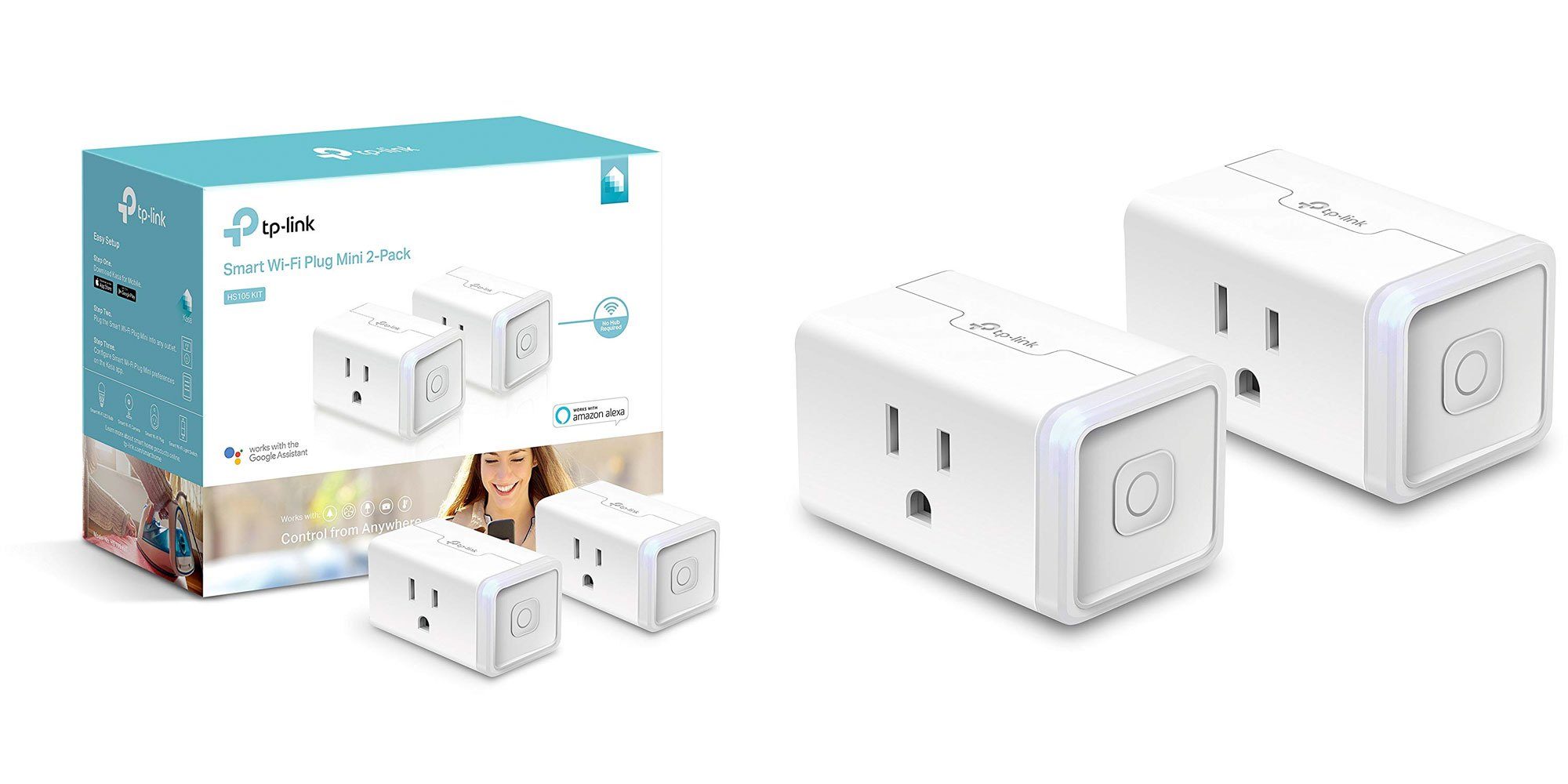
Just got my tp-link smart plug working with some prototype code :) . Its been a much desired thing that i want to support, and a couple of other folks were trying to get it done as well. So if you are want to try it out, with next version of reef-pi 3.x release you should be able to use these

Kasa-Smart-Plug-2-pack.jpg
 

Ryan115

Well-Known Member
View Badges
Joined
Dec 28, 2010
Messages
586
Reaction score
1,085
Location
Mississippi
Rating - 0%
0   0   0
Just got my tp-link smart plug working with some prototype code :) . Its been a much desired thing that i want to support, and a couple of other folks were trying to get it done as well. So if you are want to try it out, with next version of reef-pi 3.x release you should be able to use these

Kasa-Smart-Plug-2-pack.jpg
That will be awesome!
Will this be restricted to just the TPLink smart plugs, or will it work with other brands?
 

gminton86

New Member
View Badges
Joined
Jun 2, 2019
Messages
17
Reaction score
17
Rating - 0%
0   0   0
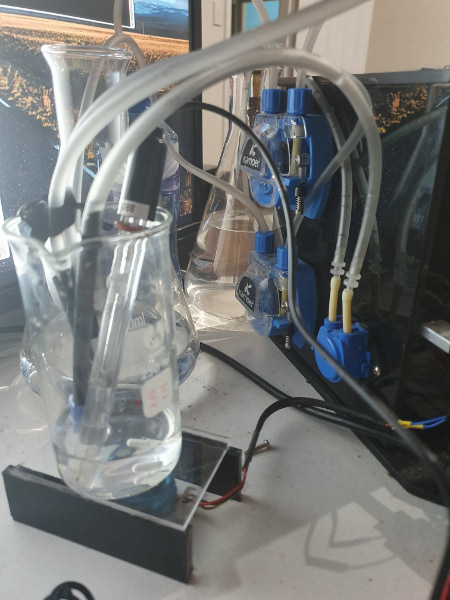
Got around to doing some tests. Here is the test setup.
2 x stepper pumps for fill and reagent, 1 x std dosing pump for drain. pH probe with atlas pH circuit, diy stirrer.
alk_test.jpg


Set it to do 7 test over 5 hours. Testing natural seawater. Results in dKH:
6.991
6.949
6.894
6.910
6.891
6.883
6.889
Not to bad.
There is trend that when the test isn't run for 12 hours or more the first couple tests seem to read a little higher. Need to look into that a little further.
Very small sample size but looks promising.

Chris

As for the higher PH trend ive noticed that the KH guardian that is based off this same type of test states in there manual. That the machine must be 3 feet or less from the water and to not cut the tubing. So maybe it has something to do with the amount of tubing you have. Just a guess though. Im going to be following this I would love to build it. and try it out.
 

gminton86

New Member
View Badges
Joined
Jun 2, 2019
Messages
17
Reaction score
17
Rating - 0%
0   0   0
ranjib have you put any thought into the sonar sensors for water height detection in sump? imo would be pretty nice because there are no parts in the saltwater to get salt creep on.
 

TOP 10 Trending Threads

WHAT AMOUNT OF LIVE ROCK AND SAND SHOULD BE PRIORITIZED FOR OPTIMAL BIODIVERSITY/FILTRATION?

  • 100% live rock + bagged sand

    Votes: 38 27.3%
  • 100% dry rock + 100% live sand

    Votes: 47 33.8%
  • 50/50 live/dry rock, 50/50 live/bagged sand

    Votes: 30 21.6%
  • 75% live rock, 25% live sand

    Votes: 14 10.1%
  • 25% live rock, 75% live sand

    Votes: 10 7.2%
Back
Top