


reef-pi :: An opensource reef tank controller based on Raspberry Pi.

Des Westcott

Well-Known Member
View Badges
Joined
May 29, 2018
Messages
646
Reaction score
1,025
Location
Durban - South Africa
Rating - 0%
0   0   0
@Ranjib I have a strange problem with the Macro's.
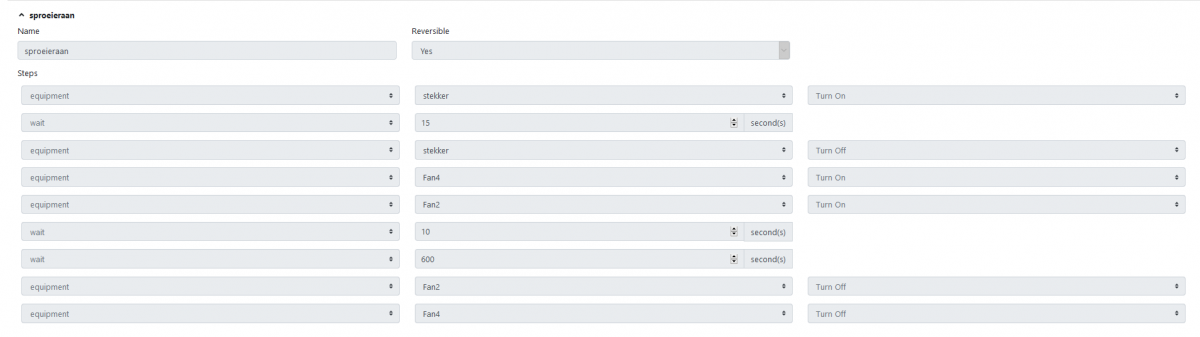
i made a macro :
1603697065569.png

-Spray system Wifi on
-wait 15sec
-Spray system Wifi off
-Fan4 relais on
-Fan 2 relais on
-wait 10sec
-Spray system Wifi off (second time! i wil explane/ not in picture i wil also explane)
-wait 600sec
-Fan4 relais off
-Fan 2 relais off

So , i first made this macro without the extra spray system off, This worked problem i notioced whas that sometimes i got a communication error and the spray system kept on going. So for this i made an extra "spray system off"

first problem i came up to: when the macro is reversible 'yes' wel then it takes the "off" comand as "on".
Second problem, suddenly my macro was "reversed" (not visual) but i heart my fans go "off" (on) first then wait 610sec then go off and spray then go off after 15sec...

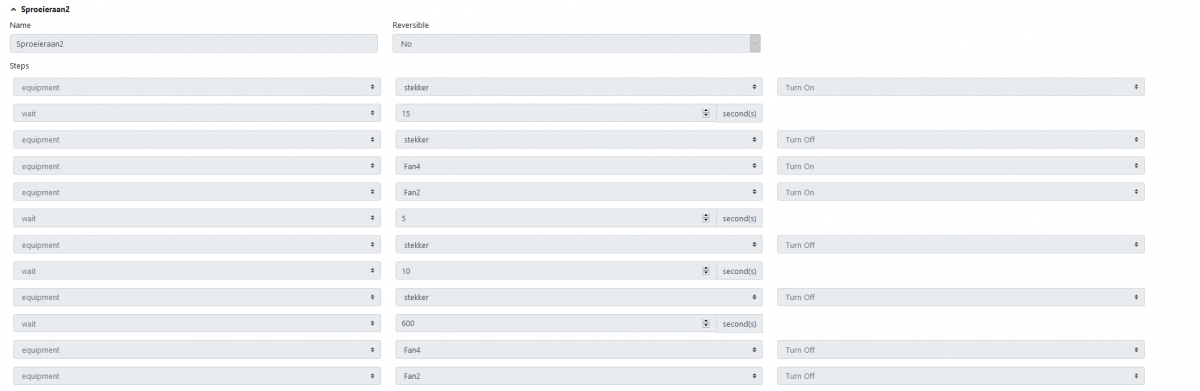
very confusing.... So what i did, i just made another macro in exactly the same way, this time i did reversible "off" press run and yes this works perfect! but as soon as i add this to a timer.... nothing happens?
1603698440338.png


i put reversible "on" and exactly the same thing as the old macro happens, it works the outher way around and it turns my spray system "on" when i ask "off". Also it added up this time to the time i already had (reversed) from the old macro?"

1603698400330.png


timer at 8Pm + 610 sec : spray. (old wrong reversed way)
Now, Timer on at 8Pm +610 +610 (sprayers on at 8:20) ....

i cant get my head around this ?! is there something wrong with the macro's/timers? Strange that when i hit RUN everything works like normal, but with the timers it just goes south!


Here's my original post


drm2215

New Member
View Badges
Joined
Sep 14, 2020
Messages
23
Reaction score
9
Location
Chicago
Rating - 0%
0   0   0
@Ranjib

Hello,
I am new to Reef-Pi and relatively unexperienced when it comes to Linux and Raspberry Pi. I am excited to get Reef-Pi up and running on my Nano Tank. I have made it through the power management section successfully and would like to focus on lighting control, but I have a question about the guide you made on Adafruit for lighting. I understand the construction and design intent but what I can't seem to figure out is how does the new Pi Zero interact with the original Reef-Pi setup? Is it completely separate and needs a separate IP address/web browser to control or does it interact with the base system?
 

Mikeneedsahobby

Well-Known Member
View Badges
Joined
Sep 16, 2018
Messages
516
Reaction score
916

Rating - 0%
0   0   0
@Ranjib

Hello,
I am new to Reef-Pi and relatively unexperienced when it comes to Linux and Raspberry Pi. I am excited to get Reef-Pi up and running on my Nano Tank. I have made it through the power management section successfully and would like to focus on lighting control, but I have a question about the guide you made on Adafruit for lighting. I understand the construction and design intent but what I can't seem to figure out is how does the new Pi Zero interact with the original Reef-Pi setup? Is it completely separate and needs a separate IP address/web browser to control or does it interact with the base system?
Normally you can add the new module with the existing module. Ie only one pi zero.

Check out this build. https://www.reef2reef.com/threads/reef-pi-build.482170/
 

drm2215

New Member
View Badges
Joined
Sep 14, 2020
Messages
23
Reaction score
9
Location
Chicago
Rating - 0%
0   0   0

Mikeneedsahobby

Well-Known Member
View Badges
Joined
Sep 16, 2018
Messages
516
Reaction score
916
Rating - 0%
0   0   0
Thanks for the build thread. I will read through it but the build guide explains the lighting module as a separate build with a different pi? Can you give me an idea where in your build thread you talk about the lighting build?
That isn’t my build thread. It is a build thread of a guy who built from scratch. He integrated several modules including lights I think. Think of the guides as written as stand alone but they all can be combined together with one pi.

For my builds I bought pre-made hats. This saves a ton of soldering and board layout headaches.
On my fresh water tank I used the pwm outputs on the hat to control mosfets that then send power to my lights. On my salt tank I built a 2nd box that contains the pwm circuits and other bits for lights and dosing. This is tied back to the main hat through i2c.

you can put your lighting module on the same board or a new board but this should be wired back to a single raspberry pi. Wire board 1 to board 2.

here is another build thread from scratch with lights. https://www.reef2reef.com/threads/another-reef-pi-build.506894/
His lights are now on my tank. I purchased them from him. I believe he builds the lighting circuit around page 6. Keep in mind that the way to control lights is different between the light manufacturers. My circuit for the beamswork light is different than my circuit for the ocean revive lights. And neither would work with kessil.
 

92Miata

Valuable Member
View Badges
Joined
Feb 26, 2020
Messages
1,523
Reaction score
2,358
Location
Richmond, VA
Rating - 0%
0   0   0
Having some temperature alerting issues - it's possible it could be some queueing going on in my email/text or one of the subsystems - but it's tough to tell with no timestamps on the actual message.

Temp.is 77.1 on the temp probe page, system is alerting that it's below 77

Screenshot_20201027-100227.png


Edit:
5 minutes later - temp probe page is now reading 77, but alerting has stopped. Strange.
 
Last edited:

Mandelstam

Well-Known Member
View Badges
Joined
Oct 29, 2017
Messages
688
Reaction score
1,066
Location
Malmö, Sweden
Rating - 0%
0   0   0
Thanks for the build thread. I will read through it but the build guide explains the lighting module as a separate build with a different pi? Can you give me an idea where in your build thread you talk about the lighting build?

No need for separate Pis for each module you can run everything from just one. The guides only show one module per pi because (my guess) it would be complicated to have guides for every possible combination. Some people have more modules running than others etc. And at the moment I don't think it's possible to connect up more than one pi to a single Reef-Pi system, ie having slave boards for different modules. I remember Ranjib talking about it though and maybe it's in the pipeline.
 

drm2215

New Member
View Badges
Joined
Sep 14, 2020
Messages
23
Reaction score
9
Location
Chicago
Rating - 0%
0   0   0
That isn’t my build thread. It is a build thread of a guy who built from scratch. He integrated several modules including lights I think. Think of the guides as written as stand alone but they all can be combined together with one pi.

For my builds I bought pre-made hats. This saves a ton of soldering and board layout headaches.
On my fresh water tank I used the pwm outputs on the hat to control mosfets that then send power to my lights. On my salt tank I built a 2nd box that contains the pwm circuits and other bits for lights and dosing. This is tied back to the main hat through i2c.

you can put your lighting module on the same board or a new board but this should be wired back to a single raspberry pi. Wire board 1 to board 2.

here is another build thread from scratch with lights. https://www.reef2reef.com/threads/another-reef-pi-build.506894/
His lights are now on my tank. I purchased them from him. I believe he builds the lighting circuit around page 6. Keep in mind that the way to control lights is different between the light manufacturers. My circuit for the beamswork light is different than my circuit for the ocean revive lights. And neither would work with kessil.
Thank you very much for your help. Do you know of a build thread using Kessil lights? Of course that is what i have.
 

drm2215

New Member
View Badges
Joined
Sep 14, 2020
Messages
23
Reaction score
9
Location
Chicago
Rating - 0%
0   0   0
I have a Kessil A160WE and it will be the only light for my Fluval Evo 13.5. I read that if you only need two channels of lighting control you can use the GPIO 18 & 19 as lighting channels, does anyone have a wiring diagram/build thread on doing this specifically?
 

Martin Lowry

Community Member
View Badges
Joined
Sep 19, 2017
Messages
60
Reaction score
65
Location
Dover, NH
Rating - 0%
0   0   0
Anyone had any experience hooking up Current Orbit Marine Pro light fixtures to Reef-Pi? I have two of them and was hoping to get them hooked up to my Reef-Pi at some point. The lights come with a programmable timer that allows LED intensity/brightness and various other settings so I'm assuming they are PWM driven.
 

Mikeneedsahobby

Well-Known Member
View Badges
Joined
Sep 16, 2018
Messages
516
Reaction score
916
Rating - 0%
0   0   0
I have a Kessil A160WE and it will be the only light for my Fluval Evo 13.5. I read that if you only need two channels of lighting control you can use the GPIO 18 & 19 as lighting channels, does anyone have a wiring diagram/build thread on doing this specifically?
I don’t have kessil myself, so I’m not sure what they need for an input. The module build from @Ranjib is for a kessil though.
“For one part of the build, we'll extend our previous reef-pi build to control Kessil lights (A360, A80 or A160), Kessil allows controlling the spectrum and intensity of the light using 10V pulse width modulation (PWM).”
So from his guide he is using 10v pwm signals. I would follow his guide from there.

Gpio are just on and off signals. They can be inputs or outputs. This would only be good for turning the lights on and off, but not for intensity. Pwm is for programming intensity changes. The pi has 2 3.3v pwm signals. You can get 16 more with a pca9685 chip. Then ranjib used an npn transistor to convert the 3.3v pwm to 10v pwm.
 

Mikeneedsahobby

Well-Known Member
View Badges
Joined
Sep 16, 2018
Messages
516
Reaction score
916
Rating - 0%
0   0   0
Anyone had any experience hooking up Current Orbit Marine Pro light fixtures to Reef-Pi? I have two of them and was hoping to get them hooked up to my Reef-Pi at some point. The lights come with a programmable timer that allows LED intensity/brightness and various other settings so I'm assuming they are PWM driven.
I personally haven’t seen anyone do that yet. I have an orbit marine fixture but it’s gathering dust now. The controller that came with it quit. These lights have individually addressed leds. The feed to the lights is 3 channel and the current flows through. Gnd, power, signal? So does that mean the signal is digital to control the many channels? You might need to open up the lights and share pictures of the circuit to get help from people smarter than me.
 
Last edited:

Martin Lowry

Community Member
View Badges
Joined
Sep 19, 2017
Messages
60
Reaction score
65
Location
Dover, NH
Rating - 0%
0   0   0
I personally haven’t seen anyone do that yet. I have an orbit marine fixture but it’s gathering dust now. The controller that came with it quit. The feed to the lights is 3 channel and the current flows through. Gnd, power, signal? So does that mean the signal is digital to control two channels. Or is it gnd, pwm power, pwm power to control 2 channels? You might need to open up the lights and share pictures of the circuit to get help from people smarter than me.
Yeah! My controller quit as well, luckily it was still in warranty so Current USA replaced it. It just occurred to me that I have the old one. I pulled it apart and it looks like there's C1, C2, V, and GD connections on the PCB. I have the two light setup so I guess it's C1, C2 V, Gnd going to each light. I think those 78M06's may be MOSFET's. Maybe there are some "Smarter than me" people out there who know more.....
ramp timer.jpg
 

drm2215

New Member
View Badges
Joined
Sep 14, 2020
Messages
23
Reaction score
9
Location
Chicago
Rating - 0%
0   0   0
I don’t have kessil myself, so I’m not sure what they need for an input. The module build from @Ranjib is for a kessil though.
“For one part of the build, we'll extend our previous reef-pi build to control Kessil lights (A360, A80 or A160), Kessil allows controlling the spectrum and intensity of the light using 10V pulse width modulation (PWM).”
So from his guide he is using 10v pwm signals. I would follow his guide from there.

Gpio are just on and off signals. They can be inputs or outputs. This would only be good for turning the lights on and off, but not for intensity. Pwm is for programming intensity changes. The pi has 2 3.3v pwm signals. You can get 16 more with a pca9685 chip. Then ranjib used an npn transistor to convert the 3.3v pwm to 10v pwm.
ok that makes sense. Do you know of a build thread that has used the 2 onboard pwm channels to control a single Kessil A160WE? The guide you quoted is awesome but it for 7 channels of lighting and I really only need 2 so the onboard channels are perfect and saves me the trouble of adding the PCA9685 chip. I'm hoping it simplifies the process significantly. Thanks for your help.
 

NeonRabbit221B

2500 Club Member
View Badges
Joined
Jun 21, 2019
Messages
3,037
Reaction score
5,408
Location
Richmond, Va
Rating - 0%
0   0   0
So I was moving apartments when I stumbled upon an old project I did several years ago called MagicMirror which essentially uses a screen behind a 1-way mirror/reflective plastic. After updating a module it broke so it kinda just sat in the corner but I am interested in restarting the project as a display for my reef-pi data. I have limited to no experience with the development side of using APIs but I can learn fairly quickly when it comes to programming. Before I get ahead of myself I was wondering if any of you brilliant developers/coders can answer a surface level question. Is this feasible for a newbie? Is the communication protocol fairly straight forward between reef-pi and MM? Here is the github link for the MM project. It has grown quite a bit over the last 3 years and definitely worth checking out if you have an unused monitor and some DIY ingenuity.


Mikeneedsahobby

Well-Known Member
View Badges
Joined
Sep 16, 2018
Messages
516
Reaction score
916
Rating - 0%
0   0   0
ok that makes sense. Do you know of a build thread that has used the 2 onboard pwm channels to control a single Kessil A160WE? The guide you quoted is awesome but it for 7 channels of lighting and I really only need 2 so the onboard channels are perfect and saves me the trouble of adding the PCA9685 chip. I'm hoping it simplifies the process significantly. Thanks for your help.
Yes you should be able to use the pi pwm to the npn transistors and not install the pca9685.
 

Mikeneedsahobby

Well-Known Member
View Badges
Joined
Sep 16, 2018
Messages
516
Reaction score
916
Rating - 0%
0   0   0
Yeah! My controller quit as well, luckily it was still in warranty so Current USA replaced it. It just occurred to me that I have the old one. I pulled it apart and it looks like there's C1, C2, V, and GD connections on the PCB. I have the two light setup so I guess it's C1, C2 V, Gnd going to each light. I think those 78M06's may be MOSFET's. Maybe there are some "Smarter than me" people out there who know more.....
ramp timer.jpg
I googled 78m06 and it appears to be a voltage regulator. The rest is to electrical for me to understand. I would love for you to solve it though so I can copy.
 

Mikeneedsahobby

Well-Known Member
View Badges
Joined
Sep 16, 2018
Messages
516
Reaction score
916
Rating - 0%
0   0   0
So I was moving apartments when I stumbled upon an old project I did several years ago called MagicMirror which essentially uses a screen behind a 1-way mirror/reflective plastic. After updating a module it broke so it kinda just sat in the corner but I am interested in restarting the project as a display for my reef-pi data. I have limited to no experience with the development side of using APIs but I can learn fairly quickly when it comes to programming. Before I get ahead of myself I was wondering if any of you brilliant developers/coders can answer a surface level question. Is this feasible for a newbie? Is the communication protocol fairly straight forward between reef-pi and MM? Here is the github link for the MM project. It has grown quite a bit over the last 3 years and definitely worth checking out if you have an unused monitor and some DIY ingenuity.

Reef pi displays through a web page. If you have an internet browser on MM and WiFi connection you should be able to display reef pi from your Lan.
If you are talking about capturing and displaying data from reef pi but not the reef pi web page then most people are using Prometheus. Reef pi will send data to Prometheus for storage and for custom graphs. You can display this on a webpage from the web.
 

NeonRabbit221B

2500 Club Member
View Badges
Joined
Jun 21, 2019
Messages
3,037
Reaction score
5,408
Location
Richmond, Va
Rating - 0%
0   0   0
Reef pi displays through a web page. If you have an internet browser on MM and WiFi connection you should be able to display reef pi from your Lan.
If you are talking about capturing and displaying data from reef pi but not the reef pi web page then most people are using Prometheus. Reef pi will send data to Prometheus for storage and for custom graphs. You can display this on a webpage from the web.
Thank you! My original thought was just to have a quick glance of tank temperatures, ph, ect that pops up as I approach the mirror. I think it would be much easier going the prometheus route and use an existing module iFrame is display the webpage. I appreciate the reply!
 

Mikeneedsahobby

Well-Known Member
View Badges
Joined
Sep 16, 2018
Messages
516
Reaction score
916
Rating - 0%
0   0   0
Thank you! My original thought was just to have a quick glance of tank temperatures, ph, ect that pops up as I approach the mirror. I think it would be much easier going the prometheus route and use an existing module iFrame is display the webpage. I appreciate the reply!
Yes. Is mm touch screen? If it is then displaying reef pi would be better so you can make changes.
 

TOP 10 Trending Threads

WHAT AMOUNT OF LIVE ROCK AND SAND SHOULD BE PRIORITIZED FOR OPTIMAL BIODIVERSITY/FILTRATION?

  • 100% live rock + bagged sand

    Votes: 37 27.2%
  • 100% dry rock + 100% live sand

    Votes: 46 33.8%
  • 50/50 live/dry rock, 50/50 live/bagged sand

    Votes: 30 22.1%
  • 75% live rock, 25% live sand

    Votes: 13 9.6%
  • 25% live rock, 75% live sand

    Votes: 10 7.4%

New Posts

Back
Top








