



- Joined
- Oct 12, 2015
- Messages
- 1,375
- Reaction score
- 933
- Location
- Cincinnati
- What state or country do you live in
- Ohio
So after much consideration I decided to venture into the world of dosing. I eventually decided that I was going to purchase the GHL doser 2. I did so for a couple reasons: 1) I have heard that there customer service is out of this world 2) construction quality/ascetic 3) WiFi capability. So here we go...


Setup - Was super easy! You have to have a computer for initial setup. You download something called GHL Control Center from the GHL website, then plug your doser in via USB cable. You can manipulate settings in the program, or do it via the smartphone app once WiFi settings are setup. The program was slightly cumbersome at first, but easy enough to figure out with the instructions.
App - So far the myGHL app is great. I can connect to the doser through my phone/tablet with no problem. You just have to enter the ip address that you set for the doser in the initial setup on the computer. It has force closed on me once or twice while using it, so I would assign it 4 out of 5 stars just for that. Here are some screen shots of the app.
Main screen

Pumps 1-4

Pump dosing settings


I ended up finding some blue Mason jars at Target that ended up being perfect for dosing containers. I am using Aquaforest 1+2+3+. They say to dose 50ml per 27 gallons all equal parts. So I started with 50ml over a 24 hour period of each. Currently my water parameters are: CAL - 380, ALK - 7.7, MAG - 1350. I will test again in the morning and see where we sit. Here are some pictures of it all set up.
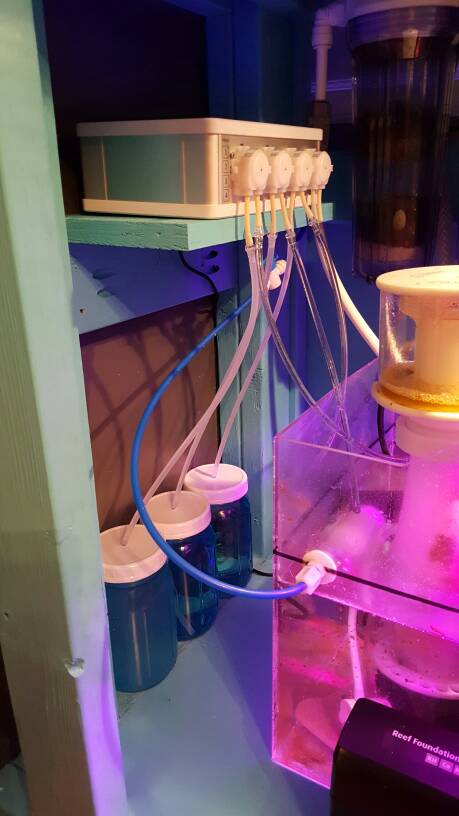


One cool part about the doser is that I set the amount I want to dose and how often, and it will break it down into a schedule for me. Currently I am dosing everything 2 ml over 24 hours, 15 minutes apart from each other. It's pretty simple and you can see it in one of the app screen shots above.
I will keep you updated, but I think I covered the most of it. So far I love it and it was super simple to set up. Thanks GHL for an awesome product!
@Matthias Gross
@Aquaforest
Setup - Was super easy! You have to have a computer for initial setup. You download something called GHL Control Center from the GHL website, then plug your doser in via USB cable. You can manipulate settings in the program, or do it via the smartphone app once WiFi settings are setup. The program was slightly cumbersome at first, but easy enough to figure out with the instructions.
App - So far the myGHL app is great. I can connect to the doser through my phone/tablet with no problem. You just have to enter the ip address that you set for the doser in the initial setup on the computer. It has force closed on me once or twice while using it, so I would assign it 4 out of 5 stars just for that. Here are some screen shots of the app.
Main screen
Pumps 1-4
Pump dosing settings
I ended up finding some blue Mason jars at Target that ended up being perfect for dosing containers. I am using Aquaforest 1+2+3+. They say to dose 50ml per 27 gallons all equal parts. So I started with 50ml over a 24 hour period of each. Currently my water parameters are: CAL - 380, ALK - 7.7, MAG - 1350. I will test again in the morning and see where we sit. Here are some pictures of it all set up.
One cool part about the doser is that I set the amount I want to dose and how often, and it will break it down into a schedule for me. Currently I am dosing everything 2 ml over 24 hours, 15 minutes apart from each other. It's pretty simple and you can see it in one of the app screen shots above.
I will keep you updated, but I think I covered the most of it. So far I love it and it was super simple to set up. Thanks GHL for an awesome product!
@Matthias Gross
@Aquaforest
Last edited:












