

Randy's Tank and Learn Thread

I love white especially fish coloring. But let’s be real…the ocean at even 35’ is pretty blue.
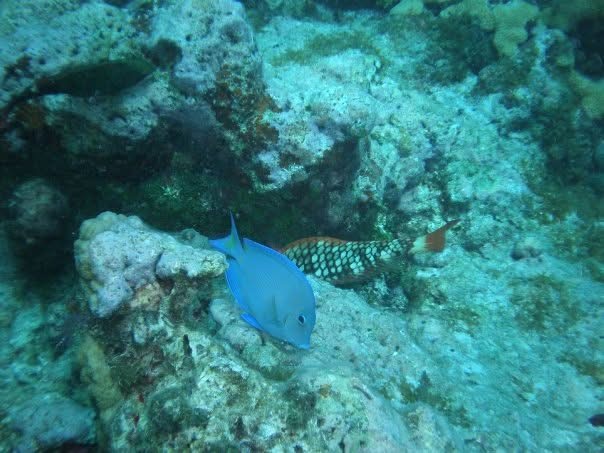
IMG_7875.jpeg

Latest dive in key west, FL

It is. At 2 feet it’s like a yellow sunny day.. :)

 
It is. At 2 feet it’s like a yellow sunny day.. :)
So it’s dependent on what we’re growing. But we mix deeper water and even tidal corals. On that same note I’ve never seen corals pop with neon coloring in the wild. But yet we have them. I’m just saying it’s impossible to replicate nature here. It’s whatever pleases each individuals eye 😀 Only thing close I’ve seen is that millionaire with the huge outdoor tank here 🤣. Which I’m jealous of!

But on that same note…I’ve hardly ever seen corals above 10’ at least
 
I’ll check it out tomorrow to see if I can see such settings. I don’t remember them, but since the tank is full dark now I don’t want to suddenly blast light. :)
Totally valid. Garf hit the nail on the coffin, but you can always take screenshots and post them here. We’ll try our best to help you find the wheel.

It’s a super helpful feature when someone’s learning about the impact each kelvin creates.

You’ll see different visual cues: corals get brighter or change entirely, algae gets hidden, coralline color shifts, ambient hue changes. Even the fish look different under different Kelvin temps.

When it’s too yellow, the water can look very “tanniny.” You might get an ozone look once you go a little higher K. It’s pretty fascinating actually. 🙂
 
It is. At 2 feet it’s like a yellow sunny day.. :)
Don’t panic. That photo color is full of cyan and green. We aren’t telling you to go that blue. I hate that spectrum for tanks.

We will keep the sunny look as top priority. Don’t get cold feet!
 
Dunno if it works the same as mine but if you click "Edit" then press the circular icon on the top right, that gives you K options.

Where exactly is the edit button?
 
Don’t panic. That photo color is full of cyan and green. We aren’t telling you to go that blue. I hate that spectrum for tanks.

We will keep the sunny look as top priority. Don’t get cold feet!

I’m not. :)
 
I remember seeing a video from Australia where there were Duncan corals exposed at low tide. So your Duncan might like your yellow sunny day even if it doesn’t show off its fancy colors :)
 
Just because a coral is exposed to low tide doesn’t necessary means it likes or needs it. 🙂
 
Thanks, I think so too. :)

FWIW, the tang and foxface seem to have settled their issues and the isopod is no longer on the tang. Not sure why, but both times they attached to a fin, and dropped off again within hours.
That happened to my anthias - it dropped off within a few hours.
 

Attachments

  • IMG_5608.jpeg
    IMG_5608.jpeg
    137 KB · Views: 42
These pictures are all I see on the app:

Start page:

IMG_3628.png


Pressing Randy’s Reef:


IMG_3629.png


Pressing enable schedule and then lighting


IMG_3630.png

Pressing easy setup


IMG_3631.png
 
These pictures are all I see on the app:

Start page:

IMG_3628.png


Pressing Randy’s Reef:


IMG_3629.png


Pressing enable schedule and then lighting


IMG_3630.png

Pressing easy setup


IMG_3631.png
I could be totally wrong because I never had the hydra edge.

I would press “lights on” in the Randy Reef section. There should be a ring on the top right corner.

If there’s a color wheel, you can see what percentage that kelvin uses, so you’d replicate the same percentages in the easy setup.

Again, I could be wrong, but I’m hopeful about my hunch.
 
I could be totally wrong because I never had the hydra edge.

I would press “lights on” in the Randy Reef section. There should be a ring on the top right corner.

If there’s a color wheel, you can see what percentage that kelvin uses, so you’d replicate the same percentages in the easy setup.

Again, I could be wrong, but I’m hopeful about my hunch.

Lights on and lights on 50% instantly change the lights, but the app screen stays unchanged.
 
Lights on and lights on 50% instantly change the lights, but the app screen stays unchanged.
Darn it.

I had the old hydra 52s. The Home Screen was different. There was a manual mode and the slider was there.

In any case, I’d try putting the blue sliders at 50, and moving the cool white to 30 or 35. I’m interested in your opinion on that look.

Are your lights the freshwater version?
 
Darn it.

I had the old hydra 52s. The Home Screen was different. There was a manual mode and the slider was there.

In any case, I’d try putting the blue sliders at 50, and moving the cool white to 30 or 35. I’m interested in your opinion on that look.

Are your lights the freshwater version?

The lights are three freshwater and one coral glow AI blades. Like a clam, angle of viewing and taking the pictures matters. From above it is far more green than straight on from the side.

I can also make it super blue: lol


IMG_3651.jpeg
IMG_3649.jpeg


IMG_3650.jpeg


And just for fun, the Mandarin is doing great:


IMG_3643.jpeg
 
Also, try clicking on this dot, then click on "edit", rather than "easy setup". Then share screen shot.
 

TOP 10 Trending Threads

ARE YOU READY TO CONFESS TO CRAZIEST, DUMBEST, FUNNIEST THING YOU’VE EVER DONE IN REEFING?

  • Yeah, I'll confess! (Share your story in the comments!)

    Votes: 25 64.1%
  • Nah, I'll keep mine a secret...(Don't be like that, share with the class!)

    Votes: 14 35.9%

New Posts

Back
Top
Home
Post thread…
Market
What's new







