reef-pi :: An opensource reef tank controller based on Raspberry Pi.

OP
OP
Ranjib

Ranjib

7500 Club Member
View Badges
Joined
Apr 16, 2016
Messages
9,876
Reaction score
16,680
Location
Pleasant Hill, Concord
Rating - 0%
0   0   0
ok , what page are the dosing pump threads on?
It will be some work to search for that post, so here the steps:
- Use l293d chipset to drive persitaltic pumps. Pumps, l293d chip and wiring instructions are all available on adafruit (till I document things). Each l293d chip can control two pump.
- Use either Pi pwm pin (18 & 19) or PCA9685 pwm pins to control the speed of individual pumps (wired to EN1 , EN2 of l293d)
- IN1/2/3/4 pins in l293d is used for turning the pumps on/off or changing their direction. If you want you can connect them to GPIO and create virtual equipment , turning them on/off will in turn control the pump direction and on/off. If you dont want these things, just connect them to 3.3v and GND depending upon your desired direction (you can also put a mechanical switch or jumper to control the direction/on/off)
- The pumps I used are 12v, 600ma. So I powered my build with a 12v 2A power supply, and used an lm2596 board to generate 5v from it to power the Pi.


https://learn.adafruit.com/adafruit-raspberry-pi-lesson-9-controlling-a-dc-motor?view=all
 
OP
OP
Ranjib

Ranjib

7500 Club Member
View Badges
Joined
Apr 16, 2016
Messages
9,876
Reaction score
16,680
Location
Pleasant Hill, Concord
Rating - 0%
0   0   0
Lol. Ok. Poor #26. That board limits us from a channel sadly. May be a good starter hat but down the road or larger gpio needs will need to be addressed
Yup. I am very much interested in making something similar for reef-pi (like permaproto board). Something that eliminates the need of jumper wires, but preserve the ability to solder through hole components (no SMDs)...I'll see what I can do
 
OP
OP
Ranjib

Ranjib

7500 Club Member
View Badges
Joined
Apr 16, 2016
Messages
9,876
Reaction score
16,680
Location
Pleasant Hill, Concord
Rating - 0%
0   0   0
ok , what page are the dosing pump threads on?
Here is the fritzing schematic
Screen Shot 2018-08-29 at 3.45.09 PM.png
 

wykat

Active Member
View Badges
Joined
May 23, 2018
Messages
182
Reaction score
421
Rating - 0%
0   0   0
Glad to hear you got it sorted but I completely agree, you really shouldn't need to get the bank/credit card company involved in these kinds of things at all.

I ordered all of my parts through mouser and the shipping was very good and all the parts arrived and are ready to go :)

Will people have to use a hot air gun to solder the PCB or can they use other methods? I couldn't find an affordable one in Australia
My first order was also via Mouser and went ok as well.

The Reef-PI HAT you can solder with a normal solder iron for electronic components. For the PWM (my boards are in Austria since Tuesday but have not arrived yet) is a little more difficult to say. I think most people will be able to use a good solder iron as well, but my hands are too shaky for that. What worked for me was to use a normal solder iron to position the PCA9685 chip by 2 opposite pins. Then when positioned, place solder paste over the other pins and use a hot air rework station, this worked very well for me.

I've bought a cheap <different brands> 858D hot air rework station for this. They can be purchased between 25-30 USD, however do see the safety check !:


With respect to the solder paste it's better to use lead based solder paste. Presently I only have Leadfree and it's more difficult to handle (have ordered different material, Mechanic Sn63/Pb37 25-45um, I believe this was recommended by SparkFun on youtube) Simplest way to add is simply via a syringe:
https://www.aliexpress.com/store/pr...828b6e6&transAbTest=ae803_2&priceBeautifyAB=0
It doesn't show the plunger however, so you may need this as well:
https://www.aliexpress.com/store/pr...828b6e6&transAbTest=ae803_2&priceBeautifyAB=0

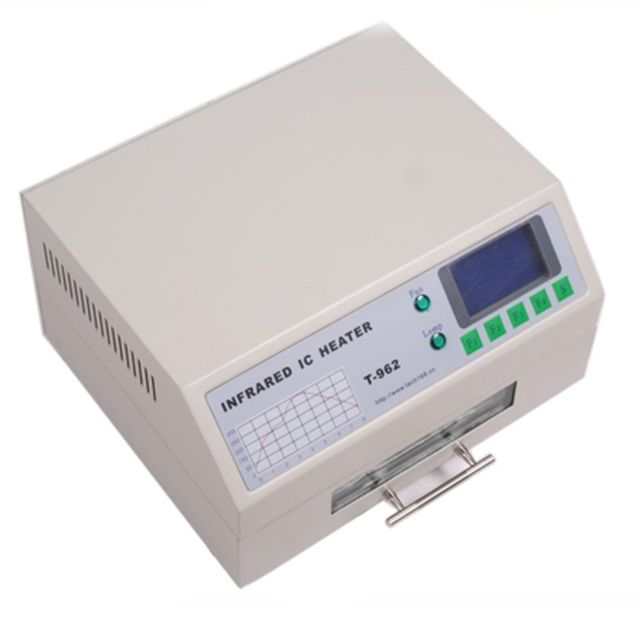
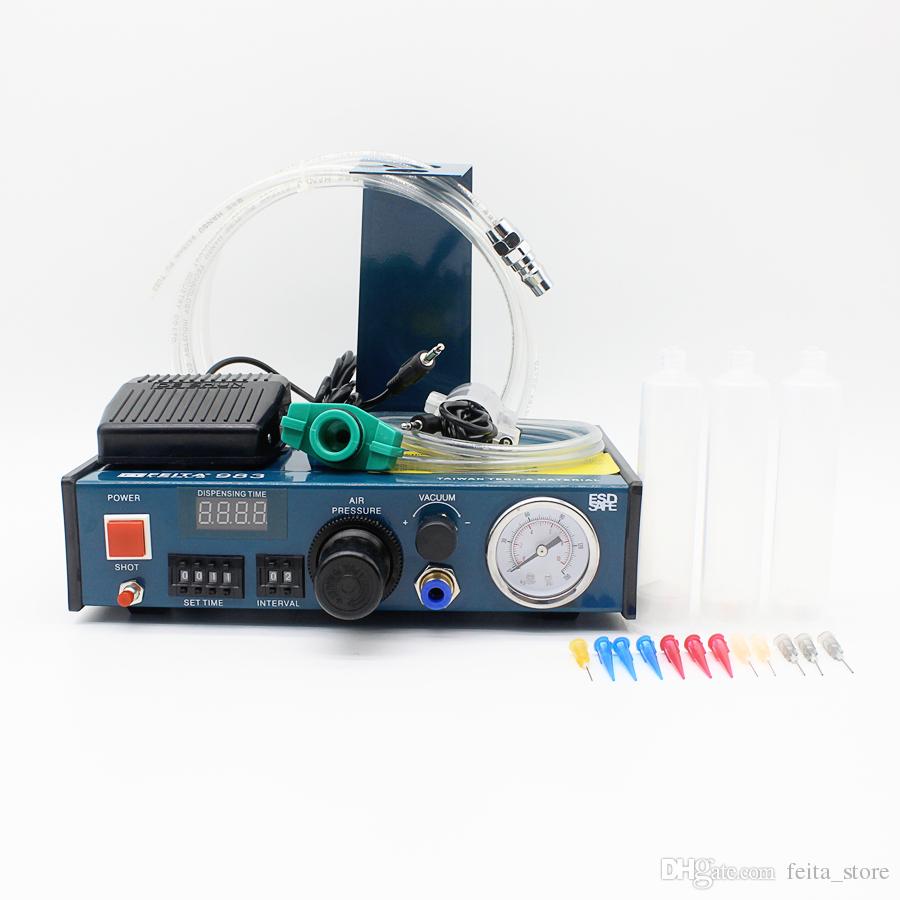
I also a bought a solder paste dispenser and reflow oven, as it makes fun making these boards and if possible I would like to go to 0603 (not for Reef-PI) :p
s-l640.jpg
epoxy-resin-dispensing-machine-automatic.jpg

The dispenser arrived yesterday and I only tested with water so far. The syringe with leadfree solder paste I have is too small for the supplied green adapter. I'm thinking of placing the solder paste in the larger syringe supplied with the dispenser. Do note that the solder/glue dispenser also needs a compressor, but first impression is very good.
The oven should arrive today and also requires some modifications but they are well described in the internet (including firmware update, grounding/security fix and replacement of some material).

However as said I think most people will be able to use a good solder iron for the PCA9685, best alternative is positioning via 2 pins and then lead solder paste and an hot air rework station. This is what I will do first when the new PWM boards arrive. Here a stacked picture of my first trial this way. You can clearly see it's a little offset (overlooked that), but all connections are ok. You also can see the bottom left and upper right pin's to have been soldered first. Just take your time on the alignment, then it's easy.
upload_2018-8-30_8-57-18.png

Will keep you posted...
 

wykat

Active Member
View Badges
Joined
May 23, 2018
Messages
182
Reaction score
421
Rating - 0%
0   0   0
is easy with clothing iron. if only for small size like pi Zero
Links https://frgmnt.org/advanced-smd-soldering/
Thanks for the link. Basically this is "hot plating" but with limited control over the temperature, that's why I purchased the oven. Hot plate however is preferred by others as they can make corrections while the components start to move as you can look at it which is not possible in an oven. Nevertheless I hope that most people are able to just solder the PCA9685 with a good solder iron. Since the PCB has the size of a normal PI it would be too big for the clothing iron, however there is only 1 SMD component on the middle of the board, so maybe it could work.

In my 2nd trial with the PCA9685 I hadn't positioned it with the 2 outer corner pins and it was interesting to see how the chip started to move. It did however move wrongly (due to air flow from the gun?) which could have been prevented with this method, meaning raise the temperature to where the chip moves, control it, and then raise the temperature for soldering.
 
Last edited:

pickupman66

5000 Club Member
View Badges
Joined
Aug 10, 2010
Messages
6,032
Reaction score
1,165
Location
Winchester, TN
Rating - 0%
0   0   0
@Ranjib I have been playing a bit more in Fritzing. I found this SLICK board from ADAfruit on AMAZON. I might order this but I really want to build this weekend. Maybe it is ordered down the road LOL. It should have the capacity for most all in one build. Here it is added to my current sketch(cropped).

When I add the 2nd power bar, I plan to use this instead of the small Hat so it is all contained. this would be Phase 2. LOL.


controller 8 channel power.JPG
 
Last edited:
OP
OP
Ranjib

Ranjib

7500 Club Member
View Badges
Joined
Apr 16, 2016
Messages
9,876
Reaction score
16,680
Location
Pleasant Hill, Concord
Rating - 0%
0   0   0
@Ranjib I have been playing a bit more in Fritzing. I found this SLICK board from ADAfruit on AMAZON. I might order this but I really want to build this weekend. Maybe it is ordered down the road LOL. It should have the capacity for most all in one build. Here it is added to my current sketch(cropped).

When I add the 2nd power bar, I plan to use this instead of the small Hat so it is all contained. this would be Phase 2. LOL.


controller 8 channel power.JPG
I love the perma proto boards. Go with this one: https://www.amazon.com//dp/B00SK8KIGA/ it does not have the headers
I have used these as well: https://www.amazon.com//dp/B071WC2BCF/
 

DaveMorris

MACNA2016 Co-Chair
View Badges
Joined
May 9, 2009
Messages
786
Reaction score
495
Location
San Diego, CA
Rating - 0%
0   0   0
I have been struggling to just get my Pi board to boot up. I want to learn more about the Raspberry Pi and some rudimentary programming before I start in on my reefPi build. I don't know if I just have a bad board or what the deal is. I formatted a SD card and installed all of the files from the Noobs download on it, connected it to a monitor, keyboard, and mouse, powered it up and get nothing. The LED lights on the board so I know it is getting power, but nothing on the screen. I tried it by connecting up the 7" touchscreen as well and also nothing. Very frustrating. Is it possible that the Pi board itself is DOA? How should the SD card be formatted? Is a 64g card to big? Sorry for all of the very beginner level generic to the Pi questions, but I am extremely confused.
 

pickupman66

5000 Club Member
View Badges
Joined
Aug 10, 2010
Messages
6,032
Reaction score
1,165
Location
Winchester, TN
Rating - 0%
0   0   0
Dave. I did noobs too. Formatted the card and then unzipped noobs and copied files. Lights come on. Did you hdmi to a monitor? One light comes on and other flickers like a drive read light I believe.


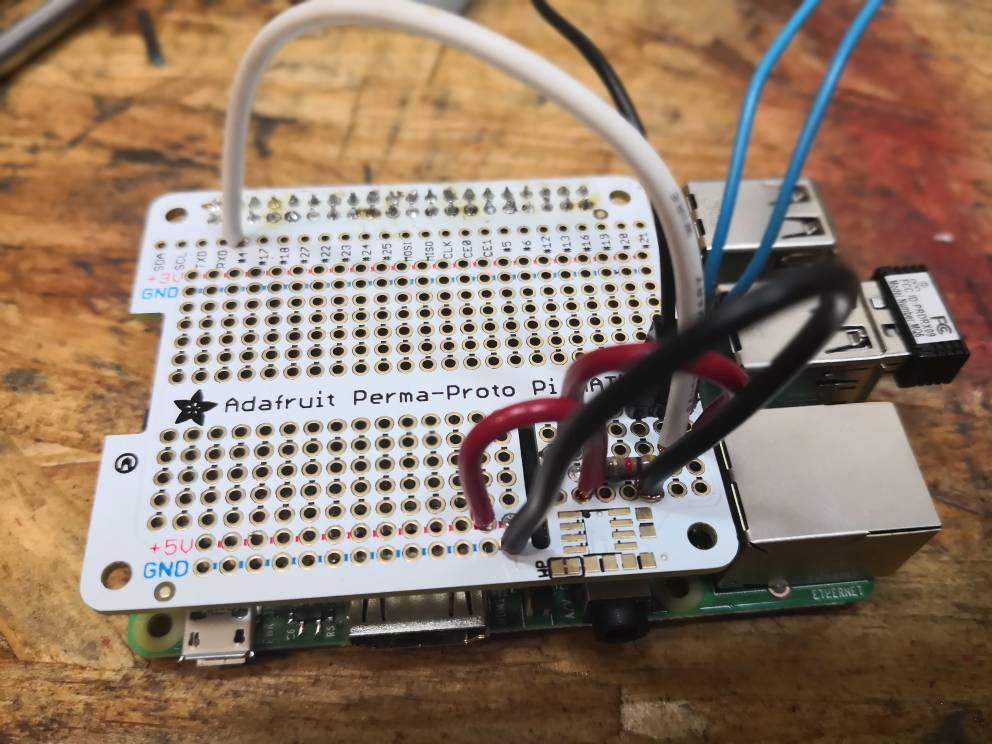
Btw, check out what I made. It's ugly. But I have NEVER soldered before. Ever. This is my temperature circuit. And it freaking works! I need to buy some smaller wires. My old auto wire is quite large and I had to cut in half to get in the holes. Took me about an hour. I need to work on joining two wires and tinning.


d4a7802213cd3fbb55e3cee441b71938.jpg
 
OP
OP
Ranjib

Ranjib

7500 Club Member
View Badges
Joined
Apr 16, 2016
Messages
9,876
Reaction score
16,680
Location
Pleasant Hill, Concord
Rating - 0%
0   0   0
Dave. I did noobs too. Formatted the card and then unzipped noobs and copied files. Lights come on. Did you hdmi to a monitor? One light comes on and other flickers like a drive read light I believe.


Btw, check out what I made. It's ugly. But I have NEVER soldered before. Ever. This is my temperature circuit. And it freaking works! I need to buy some smaller wires. My old auto wire is quite large and I had to cut in half to get in the holes. Took me about an hour. I need to work on joining two wires and tinning.


d4a7802213cd3fbb55e3cee441b71938.jpg
This is that feeling of first tank... Its just the beginning, but still its so exciting. I'm glad you took the plunge. I myself get excited looking at other users builds (like yours) that run my software, its very fulfilling :-)


 
OP
OP
Ranjib

Ranjib

7500 Club Member
View Badges
Joined
Apr 16, 2016
Messages
9,876
Reaction score
16,680
Location
Pleasant Hill, Concord
Rating - 0%
0   0   0
I have been struggling to just get my Pi board to boot up. I want to learn more about the Raspberry Pi and some rudimentary programming before I start in on my reefPi build. I don't know if I just have a bad board or what the deal is. I formatted a SD card and installed all of the files from the Noobs download on it, connected it to a monitor, keyboard, and mouse, powered it up and get nothing. The LED lights on the board so I know it is getting power, but nothing on the screen. I tried it by connecting up the 7" touchscreen as well and also nothing. Very frustrating. Is it possible that the Pi board itself is DOA? How should the SD card be formatted? Is a 64g card to big? Sorry for all of the very beginner level generic to the Pi questions, but I am extremely confused.
Sorry for your troubles, lets go through each step and ensure we are doing the right set of things
- Which guide/documentation you are following?
- What software you are using to write the image to SD card?
- I'll strongly recommend using Raspbian and following this guide: https://learn.adafruit.com/adafruit...ng-and-sd-card-for-your-raspberry-pi?view=all (you can skip the last step of creating backup, thats not necessary in the beginning)
 
OP
OP
Ranjib

Ranjib

7500 Club Member
View Badges
Joined
Apr 16, 2016
Messages
9,876
Reaction score
16,680
Location
Pleasant Hill, Concord
Rating - 0%
0   0   0
Dave. I did noobs too. Formatted the card and then unzipped noobs and copied files. Lights come on. Did you hdmi to a monitor? One light comes on and other flickers like a drive read light I believe.


Btw, check out what I made. It's ugly. But I have NEVER soldered before. Ever. This is my temperature circuit. And it freaking works! I need to buy some smaller wires. My old auto wire is quite large and I had to cut in half to get in the holes. Took me about an hour. I need to work on joining two wires and tinning.


d4a7802213cd3fbb55e3cee441b71938.jpg
By the way, I use this solid core colored hookup wires to create jumpers (connect two different points in the perma proto board):

https://www.amazon.com/dp/B00B4ZRPEY
highly recommended. They are also part of the standard bill of materials: http://a.co/j8Iv8M0
 

Zekth

Community Member
View Badges
Joined
Mar 18, 2016
Messages
57
Reaction score
92
Location
France
Rating - 0%
0   0   0
Just some questions about the repository. I've read the development documentation and check the files in the repo but some stuff seem strange to me. Why using "dependencies" with the package.json if you use ES6 and you compile it throught React? Everything will be bundled and you'll not have to rely on node_modules. Addition to this, the setup of all the procedure of all the installation can be done throught scripts trigger by "npm install" for example. It would be an improvement.

About Ui and React App i can help too if needed.


"Load test for reef-pi"
=> We can use Gherkin syntax and make a script to handle the scenarios you wanna try with a parallel context of multiples threads. The problem is i don't know how to get significant metrics on the raspberry for the load. I mean, i know how to do it on servers with watchers and storing data in Prometheus for example but in our case it will slow down the Pi too. Any idea? Or we just try the CRUD untill we get errors from the API ?
 
OP
OP
Ranjib

Ranjib

7500 Club Member
View Badges
Joined
Apr 16, 2016
Messages
9,876
Reaction score
16,680
Location
Pleasant Hill, Concord
Rating - 0%
0   0   0
Just some questions about the repository. I've read the development documentation and check the files in the repo but some stuff seem strange to me. Why using "dependencies" with the package.json if you use ES6 and you compile it throught React? Everything will be bundled and you'll not have to rely on node_modules. Addition to this, the setup of all the procedure of all the installation can be done throught scripts trigger by "npm install" for example. It would be an improvement.

About Ui and React App i can help too if needed.


"Load test for reef-pi"
=> We can use Gherkin syntax and make a script to handle the scenarios you wanna try with a parallel context of multiples threads. The problem is i don't know how to get significant metrics on the raspberry for the load. I mean, i know how to do it on servers with watchers and storing data in Prometheus for example but in our case it will slow down the Pi too. Any idea? Or we just try the CRUD untill we get errors from the API ?

ES6 compiled single js file is used for packaging, thats the stuff that gets shipped to build or served by browser. dependencies and package.json is used to ensure reproducible developer environments. this is same as gemfile.lock or requirement.txt (ruby & python), they are checked in the repo so that we can always recreate the builds, test against a known versions of packages. reef-pi builds (debian packages) dont have all this. it has only the binary (go), ui.js (UI), some css, a systemd unit file for service.
 
OP
OP
Ranjib

Ranjib

7500 Club Member
View Badges
Joined
Apr 16, 2016
Messages
9,876
Reaction score
16,680
Location
Pleasant Hill, Concord
Rating - 0%
0   0   0
Just some questions about the repository. I've read the development documentation and check the files in the repo but some stuff seem strange to me. Why using "dependencies" with the package.json if you use ES6 and you compile it throught React? Everything will be bundled and you'll not have to rely on node_modules. Addition to this, the setup of all the procedure of all the installation can be done throught scripts trigger by "npm install" for example. It would be an improvement.

About Ui and React App i can help too if needed.


"Load test for reef-pi"
=> We can use Gherkin syntax and make a script to handle the scenarios you wanna try with a parallel context of multiples threads. The problem is i don't know how to get significant metrics on the raspberry for the load. I mean, i know how to do it on servers with watchers and storing data in Prometheus for example but in our case it will slow down the Pi too. Any idea? Or we just try the CRUD untill we get errors from the API ?
We would love to get any and all help on the development front. I am already getting some major help from @Michael Lane around form validation and making things nicer, responsive etc.

The goal of load test was to come up with a tentative set of numbers where reef-pi will break. I'll start with 16 outlets, 5 inlets, 18 jacks, and aggressively configure /run them (shorter interval in temperature/ato etc) till the response times starts deteriorating (say p50 latency is deteriorated by 30%).

I have run telegraf (on pi) and grafana+influxdb(on a different pi) for gathering telemetry in past. If I do it now, probably go with Prometheus, but if its too heavy I may just right my own with gopsutil.
we can use pprofile as well. reef-pi is already integrated with go-pprofile, so you can extensive backend telemetry via /profile endpoint. You have to enable it from Configuration -> Settings-> Profile
I think a python client for the 2.0 API would be handy as well (or nodejs client).
Let me know if you need any help.
We use slack for developer chats, if you want to hop in, just PM me your email and I'll send you an invite for reef-pi.slack.com (its a slack verification thing)
 

Zekth

Community Member
View Badges
Joined
Mar 18, 2016
Messages
57
Reaction score
92
Location
France
Rating - 0%
0   0   0
ES6 compiled single js file is used for packaging, thats the stuff that gets shipped to build or served by browser. dependencies and package.json is used to ensure reproducible developer environments. this is same as gemfile.lock or requirement.txt (ruby & python)

I totally agree with this. But you don't need any node_modules in a "production" environment because you previously build it with webpack. That's the point and the differences between npm and pip for example. npm has the separated dependencies and pip not.

I have run telegraf (on pi) and grafana+influxdb(on a different pi) for gathering telemetry in past. If I do it now, probably go with Prometheus, but if its too heavy I may just right my own with gopsutil.
we can use pprofile as well. reef-pi is already integrated with go-pprofile, so you can extensive backend telemetry via /profile endpoint. You have to enable it from Configuration -> Settings-> Profile
I think a python client for the 2.0 API would be handy as well (or nodejs client).
Let me know if you need any help.

I think it's better to rely on what's mandatory on the target device unless our metrics will be corrupted.

I'll mp you for slack.
 

TOP 10 Trending Threads

WHAT AMOUNT OF LIVE ROCK AND SAND SHOULD BE PRIORITIZED FOR OPTIMAL BIODIVERSITY/FILTRATION?

  • 100% live rock + bagged sand

    Votes: 38 27.3%
  • 100% dry rock + 100% live sand

    Votes: 47 33.8%
  • 50/50 live/dry rock, 50/50 live/bagged sand

    Votes: 30 21.6%
  • 75% live rock, 25% live sand

    Votes: 14 10.1%
  • 25% live rock, 75% live sand

    Votes: 10 7.2%
Back
Top