reef-pi :: An opensource reef tank controller based on Raspberry Pi.

OP
OP
Ranjib

Ranjib

7500 Club Member
View Badges
Joined
Apr 16, 2016
Messages
9,876
Reaction score
16,680
Location
Pleasant Hill, Concord
Rating - 0%
0   0   0
That's really smart, I'll be using them type boards in my build(eventually), do you know if anyone cracked controlling mars aqua 165w reef leds, I want to control them if I can ever find the correct way to do them.
I think it has been done. I vaguely remember mars aqua as well as viperspectra was tried out to get working with reef-pi. These involve the common black box style control circuit
 

sector9

Active Member
View Badges
Joined
Jun 26, 2017
Messages
129
Reaction score
189
Rating - 0%
0   0   0
That's a very clean looking setup. what are the outside dimensions of the box? I want to build my box along those same lines but out of wood.
Thank you! It is approximately 11.4cm (length) x 15.1cm (width) x 26cm (height). I made it a little taller than I needed to so you could probably decrease that dimension
 

Joseph Lim

New Member
View Badges
Joined
Oct 6, 2018
Messages
21
Reaction score
23
Rating - 0%
0   0   0
Hello! I was able to setup the temp. probe during the weekend. I am using celcius for my temp. 2 questions:

1. Can the graduation of the graph be changed? currently it shows 90 as the highest...i would like to be 30
2. When will alerts be triggered? The graph is showing that temp is above my "alert above" value, but i have not received any email. Sending test email via telemetry works fine.
 
OP
OP
Ranjib

Ranjib

7500 Club Member
View Badges
Joined
Apr 16, 2016
Messages
9,876
Reaction score
16,680
Location
Pleasant Hill, Concord
Rating - 0%
0   0   0
Hello! I was able to setup the temp. probe during the weekend. I am using celcius for my temp. 2 questions:

1. Can the graduation of the graph be changed? currently it shows 90 as the highest...i would like to be 30
2. When will alerts be triggered? The graph is showing that temp is above my "alert above" value, but i have not received any email. Sending test email via telemetry works fine.
Which version of reef-pi you are using? You should be able to change the chart minimum and maximum in the corresponding temperature probe configuration under temperature tab. If the alert is not firing, its a bug. Let me cross check that, it may be possible we overlook the unit conversion during the alert check logic.
 

Joseph Lim

New Member
View Badges
Joined
Oct 6, 2018
Messages
21
Reaction score
23
Rating - 0%
0   0   0
Which version of reef-pi you are using? You should be able to change the chart minimum and maximum in the corresponding temperature probe configuration under temperature tab. If the alert is not firing, its a bug. Let me cross check that, it may be possible we overlook the unit conversion during the alert check logic.

@Ranjib I am currently using 2.0.0-rc1.
 
OP
OP
Ranjib

Ranjib

7500 Club Member
View Badges
Joined
Apr 16, 2016
Messages
9,876
Reaction score
16,680
Location
Pleasant Hill, Concord
Rating - 0%
0   0   0
@Ranjib I am currently using 2.0.0-rc1.
Can you share your temperature controller configuration? I just cross checked the code paths and things look ok to me. Also, let us know if you are not able to reconfigure the charts.
 
OP
OP
Ranjib

Ranjib

7500 Club Member
View Badges
Joined
Apr 16, 2016
Messages
9,876
Reaction score
16,680
Location
Pleasant Hill, Concord
Rating - 0%
0   0   0
I just realized that the temperature chart minimum & maximum settings are not configurable via UI. Its available over API, but I think during UI refactoring we missed this, I have created an issue to track this, and will fix it before the next release of final public release: https://github.com/reef-pi/reef-pi/issues/612
 

Joseph Lim

New Member
View Badges
Joined
Oct 6, 2018
Messages
21
Reaction score
23
Rating - 0%
0   0   0
I just realized that the temperature chart minimum & maximum settings are not configurable via UI. Its available over API, but I think during UI refactoring we missed this, I have created an issue to track this, and will fix it before the next release of final public release: https://github.com/reef-pi/reef-pi/issues/612

@Ranjib Got it. So this leaves the alert bug. I also noticed that the changing the width size in the dashboard is not working. Height works fine.
 
Last edited:

brycebba

New Member
View Badges
Joined
Sep 20, 2018
Messages
3
Reaction score
3
Rating - 0%
0   0   0
Hey guys, working on my build for my brother which is fun since I know nothing about tanks and he knows nothing about pi stuff and electronics but together we might figure it all out haha. It'll have cleaner wiring but everything is mounted using standoffs. Forgive the plastic covering the black plexi

20181021_211157.jpeg


I'm using RC1 release btw

So I just finished up my initial wiring for outlet controls. Now I added the camera which is the newest pi camera version. I enabled the module in raspi-config and then turned on the feature in reef-pi but I get the following set of errors when I try to take a picture. My end goal for the camera is actually a live video feed within the reef-pi application if this is possible. Any suggestions after the errors are fixed?

Screenshot_2018-10-21-21-07-31.jpeg


Thanks!
 
OP
OP
Ranjib

Ranjib

7500 Club Member
View Badges
Joined
Apr 16, 2016
Messages
9,876
Reaction score
16,680
Location
Pleasant Hill, Concord
Rating - 0%
0   0   0
Hey guys, working on my build for my brother which is fun since I know nothing about tanks and he knows nothing about pi stuff and electronics but together we might figure it all out haha. It'll have cleaner wiring but everything is mounted using standoffs. Forgive the plastic covering the black plexi

20181021_211157.jpeg


I'm using RC1 release btw

So I just finished up my initial wiring for outlet controls. Now I added the camera which is the newest pi camera version. I enabled the module in raspi-config and then turned on the feature in reef-pi but I get the following set of errors when I try to take a picture. My end goal for the camera is actually a live video feed within the reef-pi application if this is possible. Any suggestions after the errors are fixed?

Screenshot_2018-10-21-21-07-31.jpeg


Thanks!

Great build, and welcome to reef2reef.

Live video feed within reef-pi application is possible, but I will discourage it. Camera and image processing in general is very computing intensive and can significantly reduce the reliability of reef-pi.
That being said, lets troubleshoot this issue. Can you click on the "Take photo" button and see whats in the log. This guide shows how to check reef-pi log.

https://reef-pi.github.io/additional-documentation/troubleshooting/

you'll need raspistill installed in Raspberry Pi for camera to work and motion installed for live streaming to work. Camera module is not very widely used (due to perf issues and the fact that its not very specific to reef keeping) in reef-pi and I have been lazy to not document it very well :-/ . Sorry for your trouble, but it should not be hard to get it working if you are comfortable with linux
 

speedstar

Well-Known Member
View Badges
Joined
Sep 18, 2018
Messages
704
Reaction score
1,029
Location
Grand Rapids
Rating - 0%
0   0   0
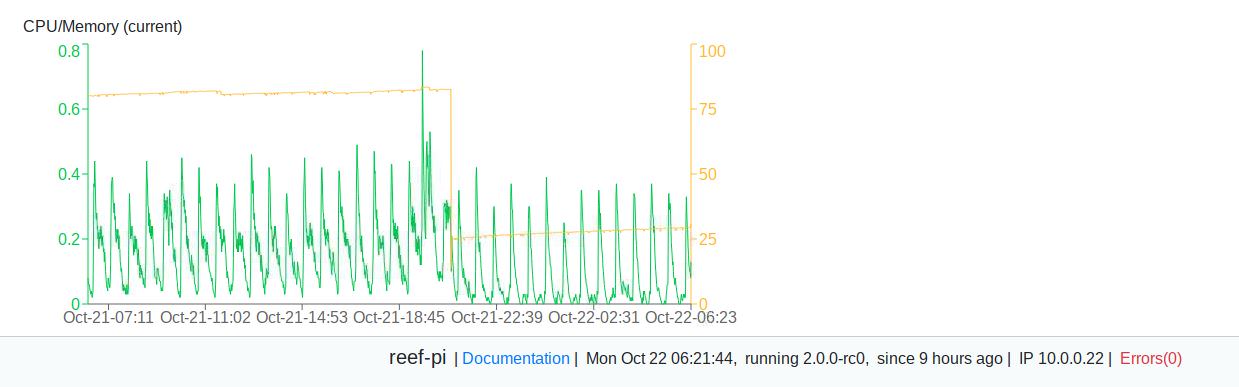
Any idea why I seem to be getting a memory runaway? or am I just not understanding how to read this chart. I run this headless but sometime over the past week it more than doubled the memory use. I rebooted it last night and it returned to what I thought was more normal. Thoughts?

Pgqj1r7.jpg
 

DirtDiggler2823

If I can't break it, it doesn't exist
View Badges
Joined
Jul 31, 2018
Messages
1,667
Reaction score
2,075
Location
Gambrills
Rating - 0%
0   0   0
Great build, and welcome to reef2reef.

Live video feed within reef-pi application is possible, but I will discourage it. Camera and image processing in general is very computing intensive and can significantly reduce the reliability of reef-pi.
That being said, lets troubleshoot this issue. Can you click on the "Take photo" button and see whats in the log. This guide shows how to check reef-pi log.

https://reef-pi.github.io/additional-documentation/troubleshooting/

you'll need raspistill installed in Raspberry Pi for camera to work and motion installed for live streaming to work. Camera module is not very widely used (due to perf issues and the fact that its not very specific to reef keeping) in reef-pi and I have been lazy to not document it very well :-/ . Sorry for your trouble, but it should not be hard to get it working if you are comfortable with linux
So, run a separate machine for camera functionality since it can cause stability issues?
 

b4tn

Valuable Member
View Badges
Joined
Jun 17, 2015
Messages
1,679
Reaction score
2,227
Location
Columbia MD
Rating - 0%
0   0   0
Finished up a lot this weekend but had some strange issues that had me second guessing myself and chasing problems that where not there lol. I have had reef-pi installed for some time now just playing around with the console. One thing I noticed but didnt think much about was that under the temperature settings there where 3 phantom addresses for sensors. The sensors where listed before I had even opened up my sensor package or connected anything at all. Everything powered up, I could SSH and web in but my temp probe did nothing. I tried all 3 addresses and nothing worked. It was late and I was frustrated so I moved to test power. I dont have a ULN2803A yet so I just used some LED's and nothing... I took everything apart and double and triple checked all my connections, tried again, and nothing so I started to quit for the night. Just because I am the type that cant sleep if I dont make at least one breakthrough I went ahead and re installed the OS and software fresh and low and behold everything worked except for the temp probe...... The phantom probes where gone but the plugged in one was not showing so I switched in a new temp probe and now its working. :) I was surprised that the temp exactly matches my house thermostat! I am ranting to you all because I was explaining this all to my wife and got a deer in the headlights look lol. but I have a couple questions since I am not strong with linux.

I wiped the flash drive and started fresh because I could not get reef-pi to uninstall. I ran (sudo apt-get –purge remove reef-pi) it went though and uninstalled the app. I reinstalled it and all my settings (including the phantom sensors) where still there. I am guessing the database did not get removed? Whats the command to completely remove everything for doing updates or starting over?

 

sector9

Active Member
View Badges
Joined
Jun 26, 2017
Messages
129
Reaction score
189
Rating - 0%
0   0   0
Finished up a lot this weekend but had some strange issues that had me second guessing myself and chasing problems that where not there lol. I have had reef-pi installed for some time now just playing around with the console. One thing I noticed but didnt think much about was that under the temperature settings there where 3 phantom addresses for sensors. The sensors where listed before I had even opened up my sensor package or connected anything at all. Everything powered up, I could SSH and web in but my temp probe did nothing. I tried all 3 addresses and nothing worked. It was late and I was frustrated so I moved to test power. I dont have a ULN2803A yet so I just used some LED's and nothing... I took everything apart and double and triple checked all my connections, tried again, and nothing so I started to quit for the night. Just because I am the type that cant sleep if I dont make at least one breakthrough I went ahead and re installed the OS and software fresh and low and behold everything worked except for the temp probe...... The phantom probes where gone but the plugged in one was not showing so I switched in a new temp probe and now its working. :) I was surprised that the temp exactly matches my house thermostat! I am ranting to you all because I was explaining this all to my wife and got a deer in the headlights look lol. but I have a couple questions since I am not strong with linux.

I wiped the flash drive and started fresh because I could not get reef-pi to uninstall. I ran (sudo apt-get –purge remove reef-pi) it went though and uninstalled the app. I reinstalled it and all my settings (including the phantom sensors) where still there. I am guessing the database did not get removed? Whats the command to completely remove everything for doing updates or starting over?
Out of curiosity, what happens when you do
ls /sys/bus/w1/devices

Do you see the phantom sensors? If so, it isn't a reef-pi issue but somehow you have multiple 1-wire sensors that the raspberry pi is seeing. If you only have one sensor listed on the command line output, then you can reset the database with the info here https://reef-pi.github.io/additional-documentation/troubleshooting/

 

LionHeart2017

Active Member
View Badges
Joined
Sep 13, 2017
Messages
185
Reaction score
321
Location
Lincolnshire
Rating - 0%
0   0   0
Lights are back on, had to be quick as no other lighting for the tank.

Its all a bit temporary and not final, the legs are being removed once support on the ceiling is sorted, still have another four power supplies to play with as I can just run blue channel.

Plan to replace the small fans with some 140mm fans, 1 for each light and mount them above the aluminium plate in a housing, also 2 fans for the power supplies as they will be covered in an enclosure to match the colour of the veneer and move the power input to a more hidden area.

Hope to get these controlled by reef-pi once I'm into building it up.

A few pics
20181022_145530.jpeg
20181022_145616.jpeg
20181022_145518.jpeg
20181022_145549.jpeg
 

b4tn

Valuable Member
View Badges
Joined
Jun 17, 2015
Messages
1,679
Reaction score
2,227
Location
Columbia MD
Rating - 0%
0   0   0
Out of curiosity, what happens when you do
ls /sys/bus/w1/devices

Do you see the phantom sensors? If so, it isn't a reef-pi issue but somehow you have multiple 1-wire sensors that the raspberry pi is seeing. If you only have one sensor listed on the command line output, then you can reset the database with the info here https://reef-pi.github.io/additional-documentation/troubleshooting/

All the phantom sensors are gone after a fresh install and the only one that shows up is the one thats working now. Whats strange is they where all 28-xxxxxx and I had never connected anything to the GPIO pins prior, not even the HAT.

Work blocks all access to my little home network so I will have to run the command when I get home. Github randomly works from work but I saved the link for viewing when I get home thanks.
 
OP
OP
Ranjib

Ranjib

7500 Club Member
View Badges
Joined
Apr 16, 2016
Messages
9,876
Reaction score
16,680
Location
Pleasant Hill, Concord
Rating - 0%
0   0   0
OP
OP
Ranjib

Ranjib

7500 Club Member
View Badges
Joined
Apr 16, 2016
Messages
9,876
Reaction score
16,680
Location
Pleasant Hill, Concord
Rating - 0%
0   0   0
Any idea why I seem to be getting a memory runaway? or am I just not understanding how to read this chart. I run this headless but sometime over the past week it more than doubled the memory use. I rebooted it last night and it returned to what I thought was more normal. Thoughts?

Pgqj1r7.jpg
Its not that bad, something is taking some memory, as long as you have pi running for long time, you'll see some pattern like this. Rememer Pi has around 1Gb memory, i.e. 1024, and you have only used 100, so its not at all risky. Secondly, just from that its not clear whats taking that memory, you have to run top/htop to find out the culprit. But from the current state,, i wont be worried at all.. i'll let it run for month or more and then see if it persists. Most often there will be weekly patterns of memory climbing up and then subsiding. I can explain why that happens.. but I think that will be too technical for this thread :-) .
 

TOP 10 Trending Threads

WHAT AMOUNT OF LIVE ROCK AND SAND SHOULD BE PRIORITIZED FOR OPTIMAL BIODIVERSITY/FILTRATION?

  • 100% live rock + bagged sand

    Votes: 37 27.6%
  • 100% dry rock + 100% live sand

    Votes: 45 33.6%
  • 50/50 live/dry rock, 50/50 live/bagged sand

    Votes: 30 22.4%
  • 75% live rock, 25% live sand

    Votes: 12 9.0%
  • 25% live rock, 75% live sand

    Votes: 10 7.5%
Back
Top