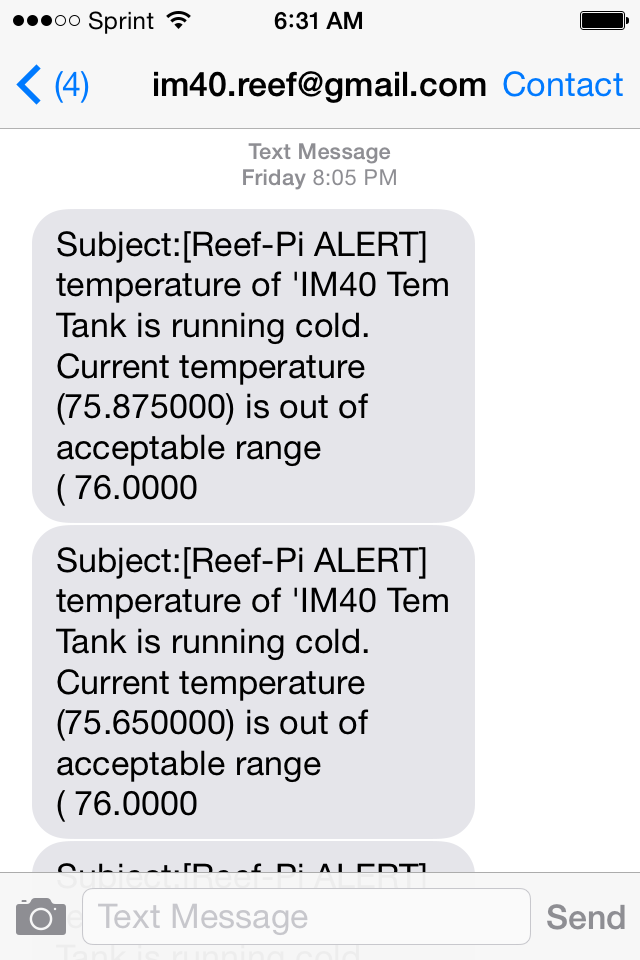
I have not able to spot any bad logic in rc-1 as well,, we'll keep testing. I have to test the setup with Celsius unitthe Alert bug is not present in rc0. Water change triggered these, as the change takes place in the sump area.
![]()
Follow along with the video below to see how to install our site as a web app on your home screen.
Note: This feature may not be available in some browsers.
I have not able to spot any bad logic in rc-1 as well,, we'll keep testing. I have to test the setup with Celsius unitthe Alert bug is not present in rc0. Water change triggered these, as the change takes place in the sump area.
![]()
Yeah. At least for me, the camera build is rarely used. I use it with NoIR camera as baby monitor, to monitor my 2.5 year old son, particularly when he is sick or monitor my tanks when I am on vacation. Both are kinda temporary setup.. :-/So, run a separate machine for camera functionality since it can cause stability issues?
you have to manually delete the database, usingFinished up a lot this weekend but had some strange issues that had me second guessing myself and chasing problems that where not there lol. I have had reef-pi installed for some time now just playing around with the console. One thing I noticed but didnt think much about was that under the temperature settings there where 3 phantom addresses for sensors. The sensors where listed before I had even opened up my sensor package or connected anything at all. Everything powered up, I could SSH and web in but my temp probe did nothing. I tried all 3 addresses and nothing worked. It was late and I was frustrated so I moved to test power. I dont have a ULN2803A yet so I just used some LED's and nothing... I took everything apart and double and triple checked all my connections, tried again, and nothing so I started to quit for the night. Just because I am the type that cant sleep if I dont make at least one breakthrough I went ahead and re installed the OS and software fresh and low and behold everything worked except for the temp probe...... The phantom probes where gone but the plugged in one was not showing so I switched in a new temp probe and now its working. :) I was surprised that the temp exactly matches my house thermostat! I am ranting to you all because I was explaining this all to my wife and got a deer in the headlights look lol. but I have a couple questions since I am not strong with linux.
I wiped the flash drive and started fresh because I could not get reef-pi to uninstall. I ran (sudo apt-get –purge remove reef-pi) it went though and uninstalled the app. I reinstalled it and all my settings (including the phantom sensors) where still there. I am guessing the database did not get removed? Whats the command to completely remove everything for doing updates or starting over?

sudo rm -rf /var/lib/reef-pi
you know your experience is very similar to mine :0) . I have seen many such similar issues, and here is a brief rundown why they happen and what to expect:All the phantom sensors are gone after a fresh install and the only one that shows up is the one thats working now. Whats strange is they where all 28-xxxxxx and I had never connected anything to the GPIO pins prior, not even the HAT.
Work blocks all access to my little home network so I will have to run the command when I get home. Github randomly works from work but I saved the link for viewing when I get home thanks.
Very nice :-)Lights are back on, had to be quick as no other lighting for the tank.
Its all a bit temporary and not final, the legs are being removed once support on the ceiling is sorted, still have another four power supplies to play with as I can just run blue channel.
Plan to replace the small fans with some 140mm fans, 1 for each light and mount them above the aluminium plate in a housing, also 2 fans for the power supplies as they will be covered in an enclosure to match the colour of the veneer and move the power input to a more hidden area.
Hope to get these controlled by reef-pi once I'm into building it up.
A few pics
![]()
![]()
![]()
![]()
Thanks so much, I was thinking the scale was 0~100% and i was using 80%Its not that bad, something is taking some memory, as long as you have pi running for long time, you'll see some pattern like this. Rememer Pi has around 1Gb memory, i.e. 1024, and you have only used 100, so its not at all risky. Secondly, just from that its not clear whats taking that memory, you have to run top/htop to find out the culprit. But from the current state,, i wont be worried at all.. i'll let it run for month or more and then see if it persists. Most often there will be weekly patterns of memory climbing up and then subsiding. I can explain why that happens.. but I think that will be too technical for this thread :) .
Sorry about that, we should update docs with this information, I bet others will stumble across this as wellThanks so much, I was thinking the scale was 0~100% and i was using 80%
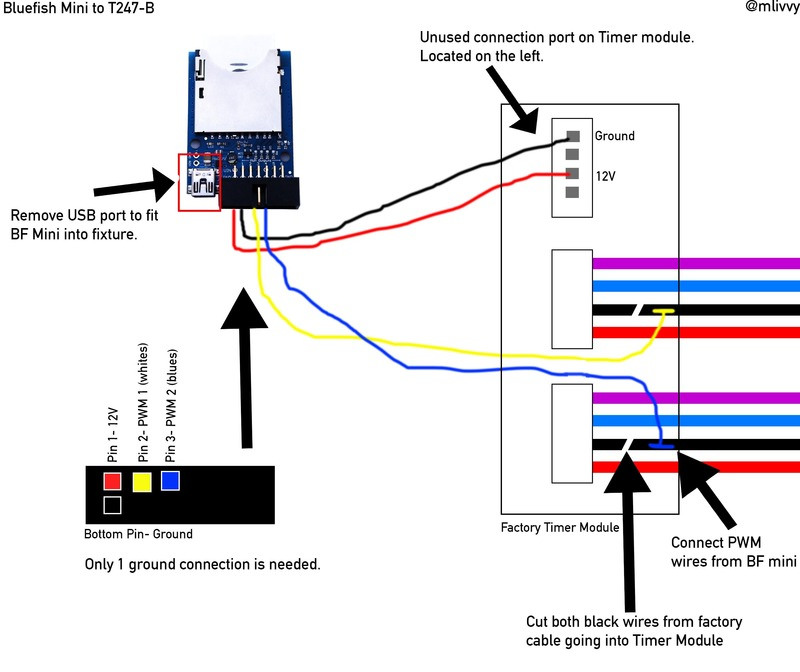
Let us know how it works out :-)I wasnt planning on doing this but I changed my mind :) I accidentally stumbled on some info about the Ocean Revive lights that I run. The PWM wire is overly simple to access. I was thinking it would be a difficult process and didnt want to hack up my lights. Looks like the OR T247 lights use a 3.3v PWM control wire thats right on top when you open the case. The purple and blue wires turn the lights on and off when jumped together.
![]()
I wasnt planning on doing this but I changed my mind :) I accidentally stumbled on some info about the Ocean Revive lights that I run. The PWM wire is overly simple to access. I was thinking it would be a difficult process and didnt want to hack up my lights. Looks like the OR T247 lights use a 3.3v PWM control wire thats right on top when you open the case. The purple and blue wires turn the lights on and off when jumped together.
![]()
That is very cool I have one of these fixtures too and couldn't find any info on wiring the to a pi.
All the websites I was trying to look at today where blocked at work so I have to do some research tonight. Looks like you might need separate relays for 12 volt power and I think the pi uses 5 volts for the PWM so I need to see how I can drop it to 3.3 volts. I’m not sure if they can be turned off with the pwm at 0 volts or not. The blue fish controller can only drop it to 10%.
I'm not an expert but quick Google reveals you need resistors.Yes, that’s where I got the diagram and the idea. I’m not sure about the buck converter. I am not super smart beyond the basics with electronics. I do know that a pwm signal is similar to ac so I’m not sure if it needs a special converter but I would think so. I know you can make a voltage splitter with resistors but I have to read up on it.
there are 5.5v to 3.3v bidirectional converter, that may do this? https://www.adafruit.com/product/1875All the websites I was trying to look at today where blocked at work so I have to do some research tonight. Looks like you might need separate relays for 12 volt power and I think the pi uses 5 volts for the PWM so I need to see how I can drop it to 3.3 volts. I’m not sure if they can be turned off with the pwm at 0 volts or not. The blue fish controller can only drop it to 10%.
The Pi based PWM (two channels only) are infact 3.3V. PCA9685 based PWM (16 channels) are 5VAll the websites I was trying to look at today where blocked at work so I have to do some research tonight. Looks like you might need separate relays for 12 volt power and I think the pi uses 5 volts for the PWM so I need to see how I can drop it to 3.3 volts. I’m not sure if they can be turned off with the pwm at 0 volts or not. The blue fish controller can only drop it to 10%.
Probably, but I am not sure. They have a voltage drop (this is why 12V input maps to 11.6V output), but I think it may work. I can check it. But why you need this? Pi itself provides 3.3V railWould one of these work for dropping the power from 5 to 3.3 volts?
A step down converter.
![]()