



250g Cube Tank Build

lsageser

Community Member
View Badges
Joined
Aug 28, 2023
Messages
56
Reaction score
18
Location
Newport Beach CA
Rating - 100%
1   0   0
Hello fellow reefers- I wanted to share a new project that I’ve finally completed after about ten months of planning, building and (of course!) spending.

The inspiration for this project came from Shadows Reef’s build thread: https://www.reef2reef.com/threads/my-80-20-build-w-cabinetry-leveling-casters.981343/ . Many thanks to Shadows Reef for sharing so many fantastic tips from his build - I copied many of his ideas, suggestions and part numbers!

This is a pretty lengthy build so I’ll divide the story up into a few different sections to hopefully make it digestible.

Part 1: Stand, tank and plumbing
Part 2: Aquascape
Part 3: Control panel and cabinet

Backstory: My first tank was a ~4 foot high vertical tank with artificial coral, purchased from a neighbor in 2021. I would guess it was ~200g. It was visually impressive but tough to maintain (hard to reach into the tank, clean etc). I wanted my next tank to be a bit shorter and wider, but still vertical enough to make an impression. I also wanted a live rock aquascape. I have a 90g lagoon tank that I have been attempting to grow corals in, so my plan was for the new tank to be kind of a FOWLR type setup with maybe some easy corals at some point.

Part One: Stand/Tank/Plumbing

After some thought I decided to go with a cube shape, 42” inches on each side, LxWxH.

TankCADDrawing.jpg


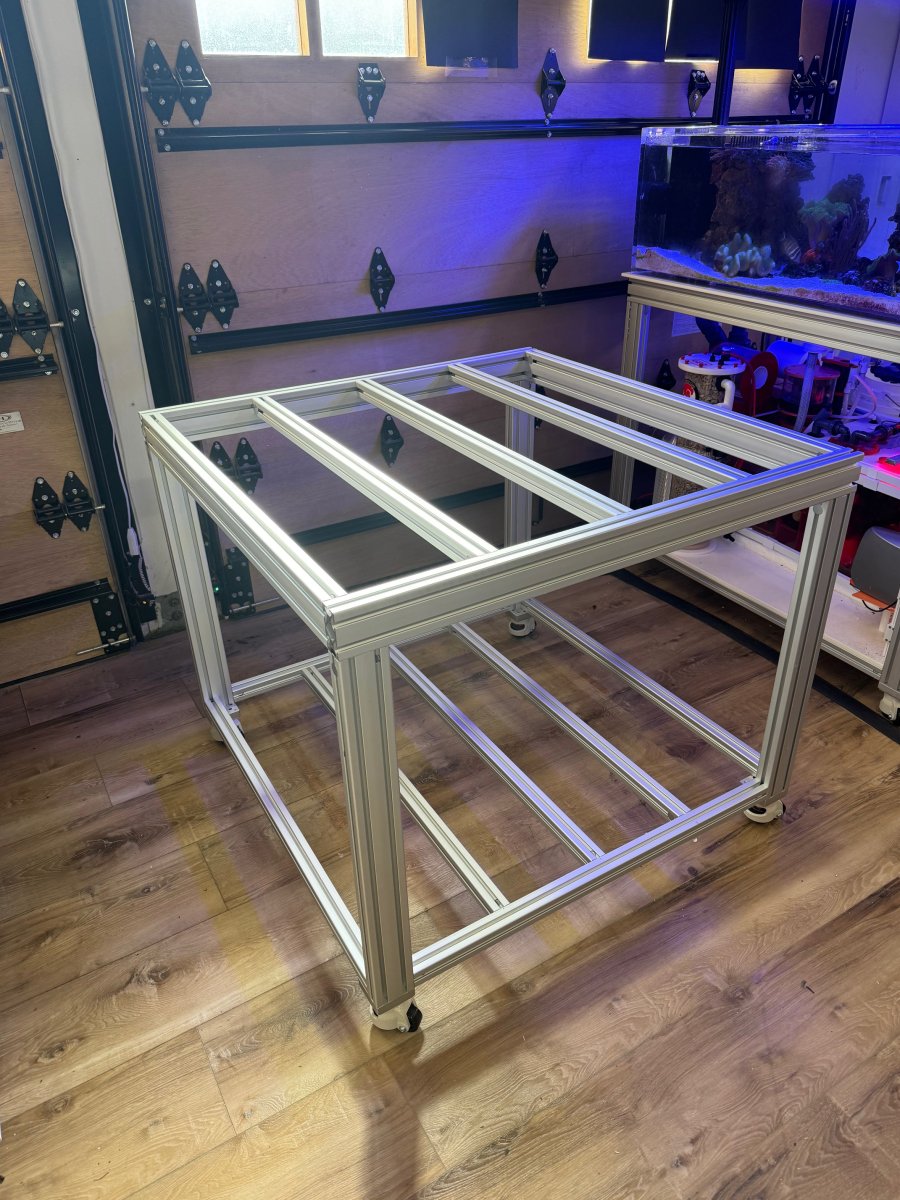
My lagoon tank has a stand made out of aluminum extrusions, designed and purchased from Alufab. It’s a fantastic stand, so I wanted to take the same approach with the Cube. Michael at Alufab was super helpful as always and provided a design beefy enough to support the massive weight of ~250g of water (plus rock, sump etc). I also wanted it to be on casters- my tank is in my garage on vinyl wood floor, but I liked the idea of being able to re-position the tank if needed in the future (without water of course).
StandAssembled.jpg


Assembly of the stand was easy and fun, like working with big legos.

I wanted to go with acrylic, partly for safety - I live in Southern California where we get occasional tremors, and I don’t want to deal with potential cracks - and partly for weight considerations. I reached out to a local acrylic fabricator, John at Advanced Acrylics, who does great work at very competitive prices. John recommended 1” thick acrylic.

I put a lot of thought into plumbing this beast. I wanted a super clean setup (minimal head pressure) with two return pumps and two inline closed loop pumps. I didn’t want any power heads in the tank. Of course this meant a lot of bulkheads at the bottom of the tank and in the overflow, plus a lot of pondering on how to fit it all together.

This was a fun part of the project, but also a little stressful because I’m still a bit of an aquarium newbie and was paranoid about making a design mistake (eg a return hole cut too close for the bulkhead to fit, etc). In addition to using design sketches and CAD software, I also built a full size mock up using wood and pvc pipe to get an idea of how everything would fit together.
Sump Mockup.jpg


I was simultaneously figuring out what sump to use. I have a Geo sump on my lagoon tank, and it’s fantastic - a real work of art. I decided to go with a new Geo sump - the SU40R-PRO-AFR - designed for peninsula tanks, customized for my setup with slightly different dimensions, color etc. This model has a filter roller, two return pump lines, a refugium, a UV and a media reactor. When the sump arrived it exceeded all expectations. Geo is fantastic to work with and put up with all my newbie questions, providing me with precise dimensions for my tank/plumbing design process, as well as great advice.

Sump.jpg


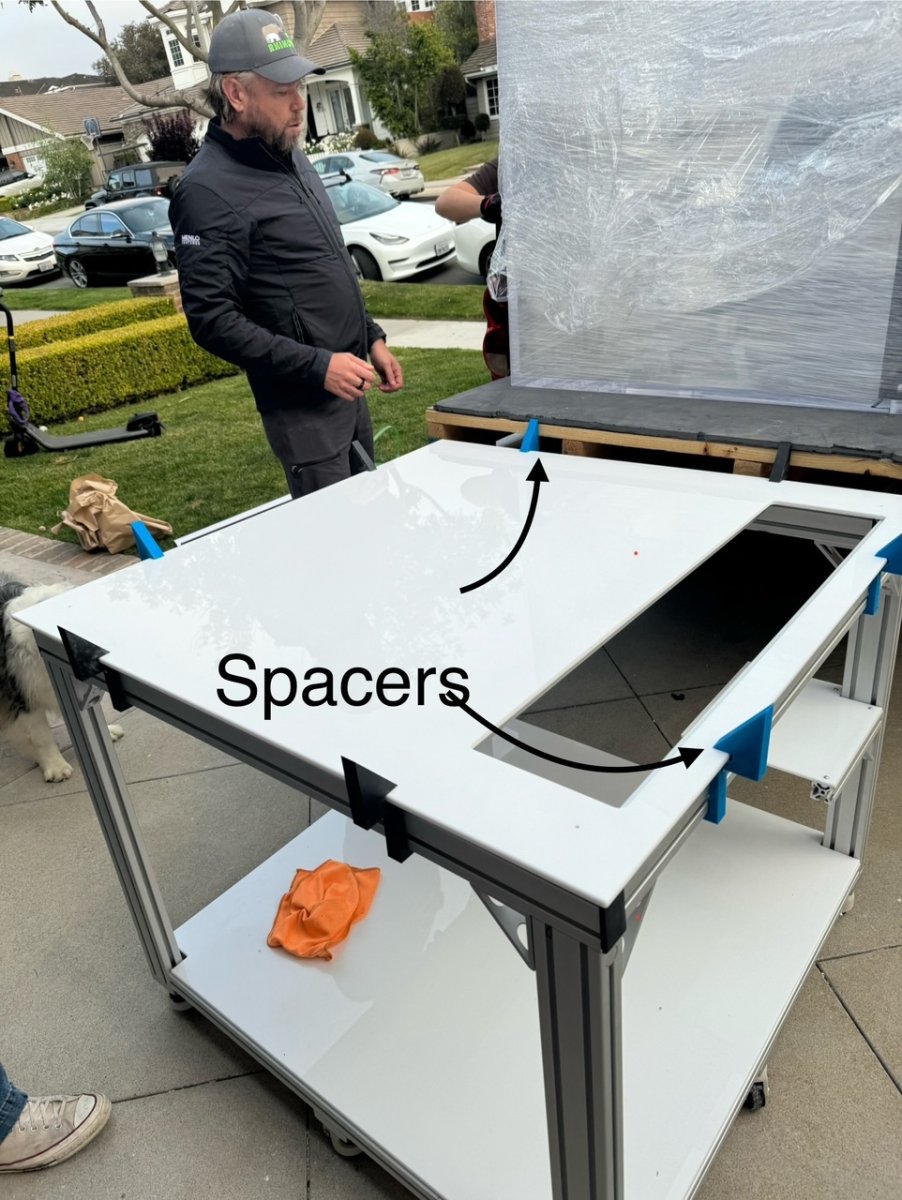
Advanced Acrylics cut the holes in my tank to spec (14 in all!) and delivered the tank safely on the back of a flatbed pickup truck. I also asked John to make a 1/2” acrylic sheet to go under the tank, and another to go under the sump. I had a group of friends and my sons help move the tank off the flatbed, this ended up being easier than expected since the stand backed up to the truck easily with the casters, and ended up being the perfect height. It was tempting to tell everyone that I’d planned this all along but it was just a stroke of luck! I wanted to make sure the tank, acrylic sheet, and stand were all perfectly centered and aligned, which required using special angled spacers that I made with my 3D printer.
StandSpacers.jpg


The sump arrived shortly thereafter and the fun and exciting process of plumbing began. I opted to go with schedule 80 for cosmetic reasons, although of course this meant multiple orders from BRS and other providers. So many orders! Schedule 80 is a PITA to cut and work with - everything needs to be perfectly cut and sanded. I didn’t use any flex tubing, I wanted a clean look but this meant every pipeline to the return pumps etc needed to be perfectly aligned.

Even after all of my paranoia-driven design work, I still made some mistakes, the biggest one was probably when I discovered that my sump drain holes couldn’t be positioned directly under the three drain holes in the tank. This was due to the plumbing for the closed loop pumps, which were a b-tch to integrate into the system. I addressed this by 3D printing three 1.5” Z-bend fixtures to connect the drains together (it was too tight to use two standard 45 degree connections at each drain). I was worried this wouldn’t work but it all came together perfectly, probably because the three drains aren’t under a lot of pressure. If anything, the Z bends seem to muffle the sound of water falling into the sump a bit, although maybe this is just wishful thinking…

I spent a week just chasing leaks in the system, performing various leakdown tests, etc. Ultimately I got things where I wanted, with no leaks or drips, but it was a learning process for me.

Thanks for reading. Hopefully people find this entertaining! Please share any suggestions and feel free to ask questions. I’ll post part two shortly.

 
OP
OP
lsageser

lsageser

Community Member
View Badges
Joined
Aug 28, 2023
Messages
56
Reaction score
18
Location
Newport Beach CA
Rating - 100%
1   0   0
Part Two: The Aquascape

So while I was waiting for the various custom orders to arrive (tank, sump etc), I busied myself with the aquascape. I used Marco rock natural rocks, using a method I saw on YouTube (BRS Tv etc) which basically involves smashing the larger rocks apart and then supergluing them back together. Very messy and fun, producing tons of dust and toxic glue fumes. I made sure to wear a mask, surgical gloves etc. As with the plumbing, multiple orders of rock as I slowly came to realize how much I would need. I probably ordered 300 lbs in all.

I wanted the Aquascape to be modular so I could build it outside the tank, then install it piece by piece. I also wanted the back of the tank to appear natural and rocky, but also be compatible with magnetic algae cleaners. So the back part of the aquascape had to be flat, plus I also wanted this rock work to come right up to the edge of the glass/acrylic. That required using a chop saw with a rock cutting blade. It definitely took some practice to get the hang of this.

I built the rock work in sections, with back wall pieces and bottom/base pieces mounted on clear acrylic sheet 1/8” thick with thick CA. The sections had to be small enough to be moveable - the rock gets heavy- and I was paranoid about getting it into the tank with zero scratches on the acrylic.

It also had to be structurally solid. The rear rock work pieces were attached to the overflow with nylon bolts (yes- I now have a slightly leaky overflow - lesson learned!). I also used a lot (a LOT) of epoxy putty and thick CA sprinkled with fine sand. My garage was literally covered in this stuff.

I had a lot of fun building all of the tiny tunnels and caves, referencing other tanks and actual reefs for inspiration. Some of the tunnels/caves are in the rock work at the back of the tank, so you could look in from behind the tank and see fish hiding inside. The various coral towers are built in sections, with PVC pipe at the core. I also 3D printed bases for these pipes at the bottom of the tank, thick CA’d to the acrylic sheets to ensure that they would not tip.

I wanted a cave/platform effect near the top of the aquascape, so I built a lattice of acrylic rods and 3D printed supports, then built up the rock around this with glue, putty etc.

The nozzles/vents for the closed loop returns/intakes were 3D printed, then covered with CA and dusted with fine sand.

I experimented with a few different rock configurations before finally deciding on what you see in the pictures. I may still make changes in time but this should be reasonably easy since the reefscape comes apart in sections.
 

Attachments

  • Part2Bases.jpg
    Part2Bases.jpg
    288.6 KB · Views: 96
  • Part2Caves.jpg
    Part2Caves.jpg
    271.7 KB · Views: 100
  • Part2Done.jpg
    Part2Done.jpg
    214 KB · Views: 102
  • Part2DoneDone.jpg
    Part2DoneDone.jpg
    211.5 KB · Views: 106
  • Part2Inlet.jpg
    Part2Inlet.jpg
    304.8 KB · Views: 96
  • Part2Layout.jpg
    Part2Layout.jpg
    184.4 KB · Views: 105
  • Part2Massive.jpg
    Part2Massive.jpg
    273.1 KB · Views: 112
  • Part2Nozzle.jpg
    Part2Nozzle.jpg
    186.1 KB · Views: 105
  • Part2Sidepanel.jpg
    Part2Sidepanel.jpg
    150.3 KB · Views: 106
OP
OP
lsageser

lsageser

Community Member
View Badges
Joined
Aug 28, 2023
Messages
56
Reaction score
18
Location
Newport Beach CA
Rating - 100%
1   0   0
Part Three: The control panel and cabinet

I wanted to separate all of the electronics from the sump area and the damp parts as much as possible, so I built a cabinet in the corner of the stand using 1/2" acrylic sheet. The sheet was cut to shape using a track saw (definitely a good idea to a wear a mask for this), and fused together with acrylic glue. There was a lot of re-measuring and re-trimming to ensure this fit perfectly under the stand.

For the various control modules, I 3D printed holders and used double sided tape to attach these holders to a removable panel held in place with magnets. This way I could remove the panel in the future if I wanted to change up some of the electronics.

All of the powerbricks were mounted to the bottom of the tank using 3D printed holders. The cables all come into the cabinet where they are zip tied and labelled. It is still a bit of a rat's nest so I'm thinking of maybe shortening a few of the power cords.

In addition to the Apex and a power strip, I also have a Kasa Home power strip which is programmable with Google Home. I use this to power the under cabinet lights, the refugium light, and the UV light - basically stuff that doesn't need a lot of Apex-driven automation. The cool thing about the Kasa is that you can make it voice activated if you have Alexa or Google Home - super to easy to say "turn on the cube stand lights" whenever I want to work on the stand. I'm also thinking of maybe plugging the Apex head unit into the Kasa - this way if my Apex ever needs a restart and I'm not at home, I can reset it using the Kasa app on my phone. Still debating whether to go this route.

I wanted a control panel to have a number of push buttons so I could do things like feed cycles, full shutdowns, brief pauses, skimmer pauses, and water changes at the touch of a button. Along with all the requisite Apex gear, I bought custom buttons from billetautomotivebuttons.com, an Australian company which custom etches buttons for a very slick look. These arrived relatively quickly and at a reasonable price. I 3D printed two side panels at the top of the control board for the buttons (three on each side), then a center panel with an ipad mini to control the Apex. The ipad is kind of redundant because I use my phone or computer to control the Apex 99.9% of the time. It looks cool though. The 3D printed panels for the buttons and screen are held in place with magnets so they can be easily removed if I want to rewire anything.

For the cabinet doors on the front of the stand, I had originally planned to use baltic plywood or painted MDF until I discovered this stuff called Azek at my local lumber yard. It is like a cross between PVC and acrylic, only lighter, apparently used for home siding. A half-inch thick, 4X8' sheet of this stuff was expensive - $285 - but it worked great for the cabinet doors, very light and requires no painting. I had to be very careful when drilling out the euro hinge cups because the material is so thin, 3/4" probably would have been better but I was too cheap to pay $380 for the 3/4" sheet! For the side panels, I cut the Azek to shape, then 3D printed some slide mounts to hold the side panels at the bottom of the stand. There is a push magnet latch at the top of the stand, so when I want to remove a side panel I just push it lightly at the top to pop the magnet latch and then lift the panel out of the mounts. Slightly awkward but effective. I also used the push magnet latches for the front cabinet doors.

I should mention lighting as well. I am just using a Kessil A500 for now, mounted using some aluminum extrusions. I also ordered two Blade 30 inch strip lights which I plan to use on the sides of the tank which are currently a bit shadowed. I don't want to over-do the lights since there's no real coral in the tank as yet, so no point in needlessly growing algae. I am considering building a very minimalist canopy using white acrylic sheet to hide the Blades once they arrive, but I'm enjoying the rimless look for the time being.

I'll keep people posted as I make further updates, but it's pretty close to done at this point.
 

Attachments

  • Part3-3Dprintedsidepanels.jpg
    Part3-3Dprintedsidepanels.jpg
    93.3 KB · Views: 103
  • Part3Cabinet.jpg
    Part3Cabinet.jpg
    144.6 KB · Views: 115
  • Part3CabinetinPlace.jpg
    Part3CabinetinPlace.jpg
    232 KB · Views: 110
  • Part3Cabinetry.jpg
    Part3Cabinetry.jpg
    197.6 KB · Views: 113
  • Part3CableTangle.jpg
    Part3CableTangle.jpg
    197.1 KB · Views: 100
  • Part3Controlboard.jpg
    Part3Controlboard.jpg
    101.7 KB · Views: 103
  • Part3ControlCabinetFinished.jpg
    Part3ControlCabinetFinished.jpg
    247.6 KB · Views: 113
  • Part3MoreCabinetry.jpg
    Part3MoreCabinetry.jpg
    216.5 KB · Views: 101
  • Part3Screen.jpg
    Part3Screen.jpg
    206.9 KB · Views: 117
  • Part3SidePanel.jpg
    Part3SidePanel.jpg
    220.4 KB · Views: 107

Gumbies R Us

God, Bouldering, and Reefing
View Badges
Joined
Nov 10, 2022
Messages
29,691
Reaction score
52,498
Location
North Georgia
Rating - 0%
0   0   0
Following! That stand and controller mount look incredible!
 

Daniel@R2R

Living the Reef Life
View Badges
Joined
Nov 18, 2012
Messages
40,424
Reaction score
67,527
Location
Fontana, California
Rating - 100%
1   0   0
Part Three: The control panel and cabinet

I wanted to separate all of the electronics from the sump area and the damp parts as much as possible, so I built a cabinet in the corner of the stand using 1/2" acrylic sheet. The sheet was cut to shape using a track saw (definitely a good idea to a wear a mask for this), and fused together with acrylic glue. There was a lot of re-measuring and re-trimming to ensure this fit perfectly under the stand.

For the various control modules, I 3D printed holders and used double sided tape to attach these holders to a removable panel held in place with magnets. This way I could remove the panel in the future if I wanted to change up some of the electronics.

All of the powerbricks were mounted to the bottom of the tank using 3D printed holders. The cables all come into the cabinet where they are zip tied and labelled. It is still a bit of a rat's nest so I'm thinking of maybe shortening a few of the power cords.

In addition to the Apex and a power strip, I also have a Kasa Home power strip which is programmable with Google Home. I use this to power the under cabinet lights, the refugium light, and the UV light - basically stuff that doesn't need a lot of Apex-driven automation. The cool thing about the Kasa is that you can make it voice activated if you have Alexa or Google Home - super to easy to say "turn on the cube stand lights" whenever I want to work on the stand. I'm also thinking of maybe plugging the Apex head unit into the Kasa - this way if my Apex ever needs a restart and I'm not at home, I can reset it using the Kasa app on my phone. Still debating whether to go this route.

I wanted a control panel to have a number of push buttons so I could do things like feed cycles, full shutdowns, brief pauses, skimmer pauses, and water changes at the touch of a button. Along with all the requisite Apex gear, I bought custom buttons from billetautomotivebuttons.com, an Australian company which custom etches buttons for a very slick look. These arrived relatively quickly and at a reasonable price. I 3D printed two side panels at the top of the control board for the buttons (three on each side), then a center panel with an ipad mini to control the Apex. The ipad is kind of redundant because I use my phone or computer to control the Apex 99.9% of the time. It looks cool though. The 3D printed panels for the buttons and screen are held in place with magnets so they can be easily removed if I want to rewire anything.

For the cabinet doors on the front of the stand, I had originally planned to use baltic plywood or painted MDF until I discovered this stuff called Azek at my local lumber yard. It is like a cross between PVC and acrylic, only lighter, apparently used for home siding. A half-inch thick, 4X8' sheet of this stuff was expensive - $285 - but it worked great for the cabinet doors, very light and requires no painting. I had to be very careful when drilling out the euro hinge cups because the material is so thin, 3/4" probably would have been better but I was too cheap to pay $380 for the 3/4" sheet! For the side panels, I cut the Azek to shape, then 3D printed some slide mounts to hold the side panels at the bottom of the stand. There is a push magnet latch at the top of the stand, so when I want to remove a side panel I just push it lightly at the top to pop the magnet latch and then lift the panel out of the mounts. Slightly awkward but effective. I also used the push magnet latches for the front cabinet doors.

I should mention lighting as well. I am just using a Kessil A500 for now, mounted using some aluminum extrusions. I also ordered two Blade 30 inch strip lights which I plan to use on the sides of the tank which are currently a bit shadowed. I don't want to over-do the lights since there's no real coral in the tank as yet, so no point in needlessly growing algae. I am considering building a very minimalist canopy using white acrylic sheet to hide the Blades once they arrive, but I'm enjoying the rimless look for the time being.

I'll keep people posted as I make further updates, but it's pretty close to done at this point.
Very very cool setup!! I'm envious!
 

riley.jones01

Community Member
View Badges
Joined
Jan 9, 2021
Messages
36
Reaction score
50
Location
DFW
Rating - 0%
0   0   0
Hello fellow reefers- I wanted to share a new project that I’ve finally completed after about ten months of planning, building and (of course!) spending.

The inspiration for this project came from Shadows Reef’s build thread: https://www.reef2reef.com/threads/my-80-20-build-w-cabinetry-leveling-casters.981343/ . Many thanks to Shadows Reef for sharing so many fantastic tips from his build - I copied many of his ideas, suggestions and part numbers!

This is a pretty lengthy build so I’ll divide the story up into a few different sections to hopefully make it digestible.

Part 1: Stand, tank and plumbing
Part 2: Aquascape
Part 3: Control panel and cabinet

Backstory: My first tank was a ~4 foot high vertical tank with artificial coral, purchased from a neighbor in 2021. I would guess it was ~200g. It was visually impressive but tough to maintain (hard to reach into the tank, clean etc). I wanted my next tank to be a bit shorter and wider, but still vertical enough to make an impression. I also wanted a live rock aquascape. I have a 90g lagoon tank that I have been attempting to grow corals in, so my plan was for the new tank to be kind of a FOWLR type setup with maybe some easy corals at some point.

Part One: Stand/Tank/Plumbing

After some thought I decided to go with a cube shape, 42” inches on each side, LxWxH.

TankCADDrawing.jpg


My lagoon tank has a stand made out of aluminum extrusions, designed and purchased from Alufab. It’s a fantastic stand, so I wanted to take the same approach with the Cube. Michael at Alufab was super helpful as always and provided a design beefy enough to support the massive weight of ~250g of water (plus rock, sump etc). I also wanted it to be on casters- my tank is in my garage on vinyl wood floor, but I liked the idea of being able to re-position the tank if needed in the future (without water of course).

StandAssembled.jpg


Assembly of the stand was easy and fun, like working with big legos.

I wanted to go with acrylic, partly for safety - I live in Southern California where we get occasional tremors, and I don’t want to deal with potential cracks - and partly for weight considerations. I reached out to a local acrylic fabricator, John at Advanced Acrylics, who does great work at very competitive prices. John recommended 1” thick acrylic.

I put a lot of thought into plumbing this beast. I wanted a super clean setup (minimal head pressure) with two return pumps and two inline closed loop pumps. I didn’t want any power heads in the tank. Of course this meant a lot of bulkheads at the bottom of the tank and in the overflow, plus a lot of pondering on how to fit it all together.

This was a fun part of the project, but also a little stressful because I’m still a bit of an aquarium newbie and was paranoid about making a design mistake (eg a return hole cut too close for the bulkhead to fit, etc). In addition to using design sketches and CAD software, I also built a full size mock up using wood and pvc pipe to get an idea of how everything would fit together.
Sump Mockup.jpg


I was simultaneously figuring out what sump to use. I have a Geo sump on my lagoon tank, and it’s fantastic - a real work of art. I decided to go with a new Geo sump - the SU40R-PRO-AFR - designed for peninsula tanks, customized for my setup with slightly different dimensions, color etc. This model has a filter roller, two return pump lines, a refugium, a UV and a media reactor. When the sump arrived it exceeded all expectations. Geo is fantastic to work with and put up with all my newbie questions, providing me with precise dimensions for my tank/plumbing design process, as well as great advice.

Sump.jpg


Advanced Acrylics cut the holes in my tank to spec (14 in all!) and delivered the tank safely on the back of a flatbed pickup truck. I also asked John to make a 1/2” acrylic sheet to go under the tank, and another to go under the sump. I had a group of friends and my sons help move the tank off the flatbed, this ended up being easier than expected since the stand backed up to the truck easily with the casters, and ended up being the perfect height. It was tempting to tell everyone that I’d planned this all along but it was just a stroke of luck! I wanted to make sure the tank, acrylic sheet, and stand were all perfectly centered and aligned, which required using special angled spacers that I made with my 3D printer.

StandSpacers.jpg


The sump arrived shortly thereafter and the fun and exciting process of plumbing began. I opted to go with schedule 80 for cosmetic reasons, although of course this meant multiple orders from BRS and other providers. So many orders! Schedule 80 is a PITA to cut and work with - everything needs to be perfectly cut and sanded. I didn’t use any flex tubing, I wanted a clean look but this meant every pipeline to the return pumps etc needed to be perfectly aligned.

Even after all of my paranoia-driven design work, I still made some mistakes, the biggest one was probably when I discovered that my sump drain holes couldn’t be positioned directly under the three drain holes in the tank. This was due to the plumbing for the closed loop pumps, which were a b-tch to integrate into the system. I addressed this by 3D printing three 1.5” Z-bend fixtures to connect the drains together (it was too tight to use two standard 45 degree connections at each drain). I was worried this wouldn’t work but it all came together perfectly, probably because the three drains aren’t under a lot of pressure. If anything, the Z bends seem to muffle the sound of water falling into the sump a bit, although maybe this is just wishful thinking…

I spent a week just chasing leaks in the system, performing various leakdown tests, etc. Ultimately I got things where I wanted, with no leaks or drips, but it was a learning process for me.

Thanks for reading. Hopefully people find this entertaining! Please share any suggestions and feel free to ask questions. I’ll post part two shortly.
Question about your GEO sump. Did Geo make you the cable channels that are routing your wiring? I have a GEO sump on order and would like to copy you lol. thanks!
 
OP
OP
lsageser

lsageser

Community Member
View Badges
Joined
Aug 28, 2023
Messages
56
Reaction score
18
Location
Newport Beach CA
Rating - 100%
1   0   0
No, I made those with my 3D printer. But geo actually sent me some pretty sweet holders for RO/DI tubing, which I plan to install at some point…
 

TOP 10 Trending Threads

DO YOU THINK TECHNOLOGICAL ADVANCEMENTS ARE MORE HELPFUL OR HURTFUL TO REEFING?

  • More helpful.

    Votes: 0 0.0%
  • More hurtful.

    Votes: 1 20.0%
  • I think it depends mostly on the technology.

    Votes: 3 60.0%
  • I think it dependsmostly on the reefer behind the technology.

    Votes: 2 40.0%
Back
Top
Home
Post thread…
Market
What's new






