



reef-pi :: An opensource reef tank controller based on Raspberry Pi.

bishoptf

Valuable Member
View Badges
Joined
Jan 1, 2019
Messages
1,409
Reaction score
1,726
Location
Missouri
Rating - 0%
0   0   0
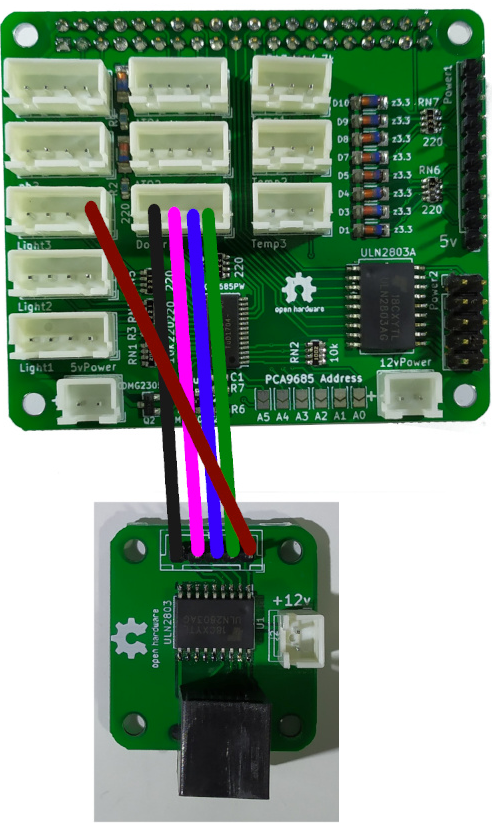
My first doser only had 3 ports, so that's why the goby board only has 4 pins. You can just use an additional PWM pin from another port to control all 4 doser pumps.
1587318346292.png

Thanks more I thought about I realized that was probably what needed to be done unless I want to not be able to use one of the pumps. Thanks for the clarification.

:)

 

robsworld78

Valuable Member
View Badges
Joined
Feb 14, 2020
Messages
1,029
Reaction score
1,293
Location
Edmonton, Canada
Rating - 0%
0   0   0
Thank you, Rob! Progress - one step at a time. Unfortunately, I can't find any up-to date-instructions on all this and it's not as intuitive as it was for the other sensors. Last question for anyone. Now that I can use the calibrate button it looks like the only option is for a 2-point calibration, is that correct. If so what solutions do you typically use for Midpoint and 2nd test setting? I assume something like distilled water for the midpoint and then a lower PH for the 2nd run since I'll be trying o run my nutrient mix 5.5 and 6.5 ph for my system.

No problem and yes its one step at a time, same with reef-pi. Here's a manual I've been putting together that might help I just added the pH calibration instructions. If something doesn't make sense or missing select the text in question and a + button will appear on right side and you can leave a comment so I can try and clear it up.


Bigtrout

Valuable Member
View Badges
Joined
Dec 16, 2018
Messages
1,189
Reaction score
2,811
Rating - 0%
0   0   0
Slightly reef-pi related news here.

I have never fooled too much with linux until I built my reef-pi and used Raspian. Curiosity, troubleshooting the pi etc has allowed me to aquire some good linux command line skills. I have had computers since the Commodore 64 days and am pretty well versed in Windows from 3.1 on to Win10 and MSDOS etc for work related stuff.
The last 2 Windows 10 updates were atrocities! So I got ticked and installed Linux Mint 19.3 as my OS and managed to get my licensed Windows 10 install into a Virtual Machine in Virtualbox on my Linux box.
Wow, what a difference. Have had the linux install for 2 weeks now, what a difference in speed and ease of use. I can do everything I did in Windows with the exception of some weird work related programs which wont run in linux. So Windows 10 is in a Virual Jail for those.

AND IT ALL STARTED WITH REEF-PI and having to learn some linux command line skills!
 

EL_HARVEY

New Member
View Badges
Joined
Apr 12, 2020
Messages
5
Reaction score
6
Rating - 0%
0   0   0
Thanks Rob this is super helpful. On item I not used in the section on ph drivers is that your instructions make the same mistake I made. The Addresses 41-45 are the hexadecimal address the UI takes
No problem and yes its one step at a time, same with reef-pi. Here's a manual I've been putting together that might help I just added the pH calibration instructions. If something doesn't make sense or missing select the text in question and a + button will appear on right side and you can leave a comment so I can try and clear it up.

Thanks Rob this is super helpful. On item to check I noticed in the section on ph drivers is that your instructions Seem to make the same mistake I made. The Addresses 41-45 are the hexadecimal address the UI takes base 10. I had to enter 69 to connect to mine at address 0x45.
 

GaryE

Well-Known Member
View Badges
Joined
Mar 12, 2020
Messages
992
Reaction score
1,321
Location
Coatesville, Indiana
Rating - 0%
0   0   0
I tinkered with Linux since 1994, but always seemed to find a reason to not switch. Well, about 4 years ago that change. I made the switch to Kubuntu and have been very happy since. I also keep a couple VM's for Windows. And I dual boot for when I want to play one of the few games I ever mess with.. (rarely)

My desk is not this clean right now...
IMG_20200207_201132.jpg
 
Last edited:

bishoptf

Valuable Member
View Badges
Joined
Jan 1, 2019
Messages
1,409
Reaction score
1,726
Location
Missouri
Rating - 0%
0   0   0
I tinkered with Linux since 1994, but always seemed to find a reason to not switch. Well, about 4 years ago that change. I made the switch to Kubuntu and have been very happy since. I also keep a couple VM's for Windows. And I dual boot for when I want to play one of the few games I ever mess with.. (rarely)

My desk is not this clean right now...
IMG_20200207_201132.jpg

I've been using it since winblows xp days, migrated and never looked back, nothing is perfect but I can configure and install just about any version in a thrid of the time, and a whole lot more stable IMHO.

:)
 

GaryE

Well-Known Member
View Badges
Joined
Mar 12, 2020
Messages
992
Reaction score
1,321
Location
Coatesville, Indiana
Rating - 0%
0   0   0
I've been using it since winblows xp days, migrated and never looked back, nothing is perfect but I can configure and install just about any version in a thrid of the time, and a whole lot more stable IMHO.

:)


I have had a few issues when upgrading major versions that have set me back a time or two, but nothing worse than the failures I have had with Microsux
 

robsworld78

Valuable Member
View Badges
Joined
Feb 14, 2020
Messages
1,029
Reaction score
1,293
Location
Edmonton, Canada
Rating - 0%
0   0   0
Thanks Rob this is super helpful. On item I not used in the section on ph drivers is that your instructions make the same mistake I made. The Addresses 41-45 are the hexadecimal address the UI takes

Thanks Rob this is super helpful. On item to check I noticed in the section on ph drivers is that your instructions Seem to make the same mistake I made. The Addresses 41-45 are the hexadecimal address the UI takes base 10. I had to enter 69 to connect to mine at address 0x45.

Glad to hear and thanks for pointing that out.
 

Bigtrout

Valuable Member
View Badges
Joined
Dec 16, 2018
Messages
1,189
Reaction score
2,811
Rating - 0%
0   0   0
I've been using it since winblows xp days, migrated and never looked back, nothing is perfect but I can configure and install just about any version in a thrid of the time, and a whole lot more stable IMHO.

:)
And my router based blocker isnt picking up hundreds of connections to microsoft when running linux! And boot time is amazing...almost instant ON!
 

GaryE

Well-Known Member
View Badges
Joined
Mar 12, 2020
Messages
992
Reaction score
1,321
Location
Coatesville, Indiana
Rating - 0%
0   0   0
And my router based blocker isnt picking up hundreds of connections to microsoft when running linux! And boot time is amazing...almost instant ON!
Since switching to ssds my boot times are ridiculous. The bios takes longer to POST than the OS does to boot.
 

Badfish2too

Community Member
View Badges
Joined
Nov 12, 2018
Messages
83
Reaction score
65
Rating - 0%
0   0   0
is there a way to make the reef pi display stuff on a monitor 24/7?
I have it in my fish room and want to be able to walk in and see stats.
Just set up a display for either the pi or on a computer. You only need a browser pointed at the ip for the pi. Or you can use a tablet. You can buy a new Amazon fire tablet for like $30 for just this purpose. Its what I did
 

Des Westcott

Well-Known Member
View Badges
Joined
May 29, 2018
Messages
646
Reaction score
1,025
Location
Durban - South Africa
Rating - 0%
0   0   0
CRON job fail! I was trying to get my feeder to go at 1300 every Sunday, Tuesday, Thursday, and Saturday. It fired today at 1300 but I forgot the asterisks is the minute field! So this in turn caused the feeder to fire at 1300 then every minute thereafter luckily I caught it about 10 minutes in

So if I put a 0 in the minute area does this look like it will work? I’m not sure now what to put in the day of the month field. If it’s An asterisks will it activate every day of the month after Tuesday at 1300?
6991023B-A18E-4473-852A-25A0AAC2245D.png
Yip. Should work like that
 

Des Westcott

Well-Known Member
View Badges
Joined
May 29, 2018
Messages
646
Reaction score
1,025
Location
Durban - South Africa
Rating - 0%
0   0   0
Just set up a display for either the pi or on a computer. You only need a browser pointed at the ip for the pi. Or you can use a tablet. You can buy a new Amazon fire tablet for like $30 for just this purpose. Its what I did

CCC5BCF5-20E0-4FBA-85BF-32952A8BC736.jpeg


I have a touch screen hooked up. Is just sitting on the window sill next to the tank at this stage. But will be built in
 

Des Westcott

Well-Known Member
View Badges
Joined
May 29, 2018
Messages
646
Reaction score
1,025
Location
Durban - South Africa
Rating - 0%
0   0   0
CCC5BCF5-20E0-4FBA-85BF-32952A8BC736.jpeg


I have a touch screen hooked up. Is just sitting on the window sill next to the tank at this stage. But will be built in

It's a very old VGA touch moitor, so needs a HDMI - VGA adaptor and then needs a USB cable for the touch component. But it works.

I have set the Pi up to run the monitor in Kiosk mode, so only displays reef-pi, not the underlying Raspbian etc. But I can SSH into the pi at any stage to turn this on or off.
 

elysics

Valuable Member
View Badges
Joined
Jan 15, 2020
Messages
1,695
Reaction score
1,607
Rating - 0%
0   0   0
An off the shelf cheap tablet will be probably cheaper and definitely less hassle than trying to make an old touch monitor work, especially when it comes to replacing it eventually.

But if you have one already anyway, why not.
 

Des Westcott

Well-Known Member
View Badges
Joined
May 29, 2018
Messages
646
Reaction score
1,025
Location
Durban - South Africa
Rating - 0%
0   0   0
An off the shelf cheap tablet will be probably cheaper and definitely less hassle than trying to make an old touch monitor work, especially when it comes to replacing it eventually.

But if you have one already anyway, why not.

Sure. But it required no work other than finding cables lying around with old PC stuff. Plug and play - no drivers, nothing!

And it has a stand and is permanently connected to power. This one came out of a supermarket. Used to be Point Of Sale tillpoint. System ws upgraded and this was replaced. I wasn't going to say no. But if I was going to go out and buy something, a tablet would make more sense. But on the other hand, a tablet would require the router to be powered up. This setup only requires the pi to be powered up (and of course have it's own power).
 

MaccaPopEye

Well-Known Member
View Badges
Joined
Jan 5, 2016
Messages
697
Reaction score
1,224
Rating - 0%
0   0   0
I have a circuit board that you can solder 8 of these outlets to. Been selling them for years and quite a few use them with no issues, they are safe. It's basically an Arduino relay module but has a snubber for inductive loads. It has it's own AC/DC converter which powers up the relays. I've got a 3D case you can print as well.

I tried those style outlets initially but they don't work well with Australian plugs. Australian plugs do fit in these sockets, but it's an extremely tight fit. I thought the first batch were just off by a mm or something so i tried 2 more batches from different sellers and all were the same. All were extremely tight and the plugs had to really be forced in. They do work though once the plugs are in, it's just not easy to get them back out again. So I guess since most people don't plan to unplug things often they should be fine but I would still advise against them, especially as there are better options now like the wifi boards.

I might have missed it but is anyone able to shed some light on what the requirements for wifi power boards are? As long as they use the IEEE 802.11b/g/n protocol will they work (as long as they are not locked by the manufacturer)?
 

TOP 10 Trending Threads

WHAT AMOUNT OF LIVE ROCK AND SAND SHOULD BE PRIORITIZED FOR OPTIMAL BIODIVERSITY/FILTRATION?

  • 100% live rock + bagged sand

    Votes: 38 27.3%
  • 100% dry rock + 100% live sand

    Votes: 47 33.8%
  • 50/50 live/dry rock, 50/50 live/bagged sand

    Votes: 30 21.6%
  • 75% live rock, 25% live sand

    Votes: 14 10.1%
  • 25% live rock, 75% live sand

    Votes: 10 7.2%
Free Phyto Promo
Spend $39+ → free 16oz Phyto · Use code FREEPHYTO at checkout · $16.99 value · Densest 6-species blend · Free shipping on every order · 100% live arrival guaranteed Spend $39+ → free 16oz Phyto · Use code FREEPHYTO at checkout · $16.99 value · Densest 6-species blend · Free shipping on every order · 100% live arrival guaranteed
Shop Now Code: FREEPHYTO
Back
Top







