



reef-pi :: An opensource reef tank controller based on Raspberry Pi.

robsworld78

Valuable Member
View Badges
Joined
Feb 14, 2020
Messages
1,029
Reaction score
1,293
Location
Edmonton, Canada
Rating - 0%
0   0   0
Today I received my Robo-Tank Deluxe controller that I won from @robsworld78. This thing is amazing. Puts all my diy builds to shame. No soldering on my end (worth the price for that alone lol). The controller and power bar are super slim. Thanks again @robsworld78 for the awesome giveaway!
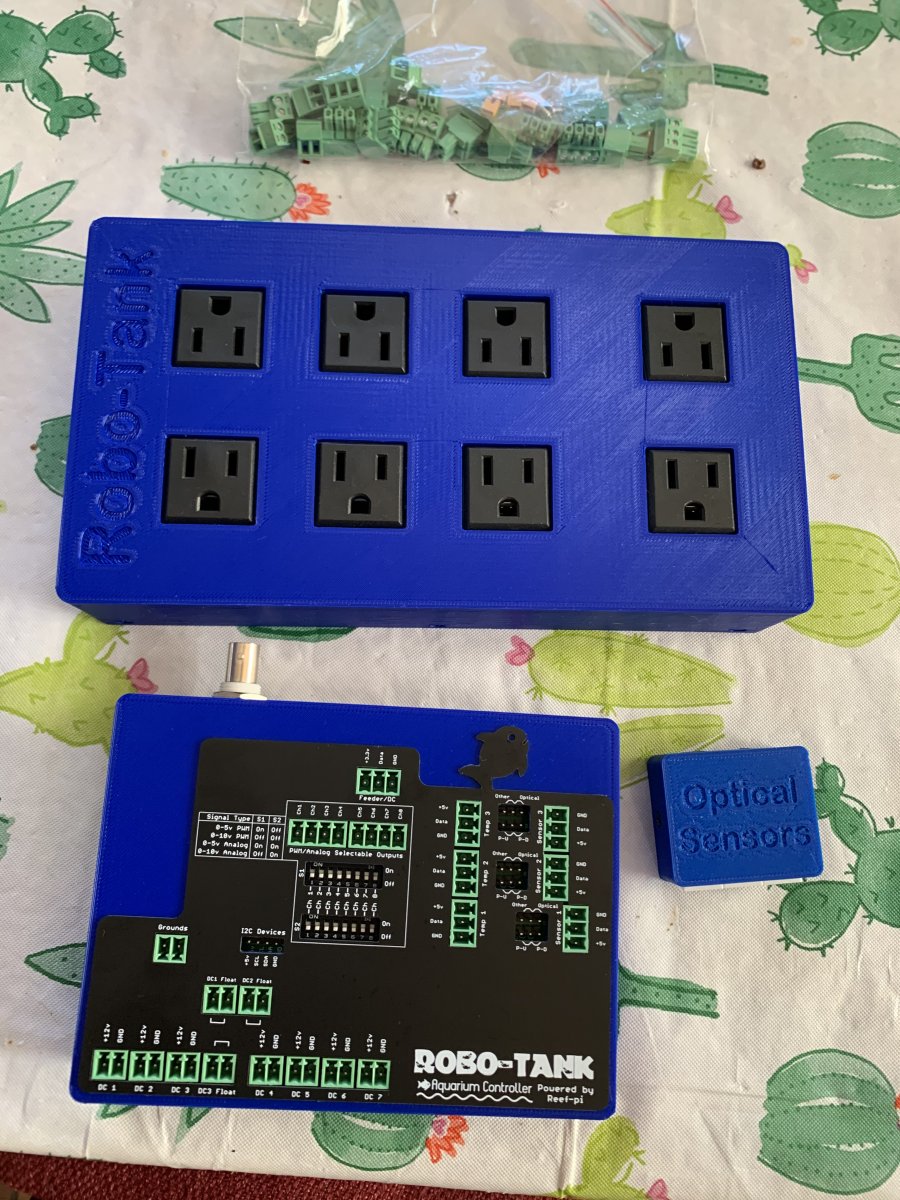
IMG_2315.jpg

No problem again lol... For anyone interested soon I'll have a higher quality power bar available, it'll have Omron 16 amp relays. I know some of you didn't like the cheaper relays being used.

 

robsworld78

Valuable Member
View Badges
Joined
Feb 14, 2020
Messages
1,029
Reaction score
1,293
Location
Edmonton, Canada
Rating - 0%
0   0   0

lmm1967

Well-Known Member
View Badges
Joined
Sep 12, 2017
Messages
563
Reaction score
809
Location
North Georgia
Rating - 0%
0   0   0

waynel

Active Member
View Badges
Joined
May 22, 2020
Messages
266
Reaction score
257
Location
Kentucky
Rating - 0%
0   0   0
If the ato pump runs more than the specified seconds for the given hour, then reef-pi will send an alert. If you have set this to 120 and check interval is 10, after 12 consecutive postive signal (i.e. water level is low) reef-pi will trigger the alert. Since its computed for every hour, it will send email every hour by default. Therese a separate alert throttle settings under configuration that you can use to suppress alerts after certain times. There is also "Disable on alert" option in ato, where the ato will automatically be disabled when alert is triggered

I can't figure out what I'm doing wrong. I have the second float switch setup as an inlet connector on address 18, named "topoffwater". I setup the second ATO, named it "topoffwater" using the "topoffwater" inlet with a check frequency of 2, control set to equipment, control pump is outlet1 on my powerbar. Setup like this, it works and switches the outlet on/off as I move the float up and down, waiting 2 seconds in between. If I set the control setting to "nothing", and enable alerts with "alert after" set to 10, 2 seconds after I enable it, I start getting emails, no matter what position the float is in.
 

Bigtrout

Valuable Member
View Badges
Joined
Dec 16, 2018
Messages
1,189
Reaction score
2,811
Rating - 0%
0   0   0

robsworld78

Valuable Member
View Badges
Joined
Feb 14, 2020
Messages
1,029
Reaction score
1,293
Location
Edmonton, Canada
Rating - 0%
0   0   0
The TV8 rated relays are ul rated, and rated for high inrush currents. Perfect for motor loads, and means the relays are alot more robust.

That's what was confusing me, the -HR is the high inrush version (100amp) but now I found this nice brochure and looks like TV8 is 117 amps, I also didn't realize that was needed for UL rating, thanks for pointing that out.


What had me interested in the G2RL is it's max operating voltage is 440v which would help with surges, the G5RL's are only 250v. I just discovered they are only TV3 so the winner is TV8 model. :)

Can I use a raspberry pi 4 for this DIY ?

You can however at the moment a recent Raspberry Pi OS update has broken one of the libraries used by reef-pi so you can't update the OS on Pi4 until the fix is available.
 

Bigtrout

Valuable Member
View Badges
Joined
Dec 16, 2018
Messages
1,189
Reaction score
2,811
Rating - 0%
0   0   0
That's what was confusing me, the -HR is the high inrush version (100amp) but now I found this nice brochure and looks like TV8 is 117 amps, I also didn't realize that was needed for UL rating, thanks for pointing that out.


What had me interested in the G2RL is it's max operating voltage is 440v which would help with surges, the G5RL's are only 250v. I just discovered they are only TV3 so the winner is TV8 model. :)


You can however at the moment a recent Raspberry Pi OS update has broken one of the libraries used by reef-pi so you can't update the OS on Pi4 until the fix is available.
Im a service engineer for cnc machinery, if theres a failure point, ive seen it.
 

Simonv92

Active Member
View Badges
Joined
Oct 21, 2014
Messages
161
Reaction score
104
Location
Italy
Rating - 0%
0   0   0
Hi all! I'm doing some tests with pH board from Roberto Buti (Github project)
On the dashboard in the current ph value I have a lot of decimal, there's a way to reduce them? maybe only one? like 8.5 or so...
Thank you very much!
 

Bigtrout

Valuable Member
View Badges
Joined
Dec 16, 2018
Messages
1,189
Reaction score
2,811
Rating - 0%
0   0   0
Hi all! I'm doing some tests with pH board from Roberto Buti (Github project)
On the dashboard in the current ph value I have a lot of decimal, there's a way to reduce them? maybe only one? like 8.5 or so...
Thank you very much!
No, currently cant reduce them in the current versions.
 

Mikeneedsahobby

Well-Known Member
View Badges
Joined
Sep 16, 2018
Messages
516
Reaction score
916
Rating - 0%
0   0   0
I am trying to figure out the pins on @Micheal Lane Ph interface board to an ML hat. I know the pins on the hat.
It is gnd, sda, sdl, 5v
bottom of board is printed with this.

In my box ph is plugged into corner. From right side of image moving left. Yellow, white, red, black. On ph board it is plugged in from bottom of image moving up yellow, white, red, black.

2B298B81-4F58-4F0D-8160-18F925E2CA05.jpeg
 
Last edited:

Matt Carden

Valuable Member
View Badges
Joined
Apr 13, 2018
Messages
1,657
Reaction score
4,036
Location
Detroit Metro
Rating - 0%
0   0   0
It is gnd, sda, sdl, 5v
bottom of board is printed with this.

In my box ph is plugged into corner. From right side of image moving left. Yellow, white, red, black. On ph board it is plugged in from bottom of image moving up yellow, white, red, black.

2B298B81-4F58-4F0D-8160-18F925E2CA05.jpeg
It is gnd, sda, sdl, 5v
bottom of board is printed with this.

In my box ph is plugged into corner. From right side of image moving left. Yellow, white, red, black. On ph board it is plugged in from bottom of image moving up yellow, white, red, black.

2B298B81-4F58-4F0D-8160-18F925E2CA05.jpeg
I had my board already bolted in so I checked the back and there it was. I bought the pre-wired plugs from
ML Reefkeeping. The wire colors matched up perfectly between the hat and Ph interface. Thanks for your help!

20200906_114830.jpg 20200906_112617.jpg
 

GaryE

Well-Known Member
View Badges
Joined
Mar 12, 2020
Messages
992
Reaction score
1,321
Location
Coatesville, Indiana
Rating - 0%
0   0   0
I am using a couple TP-Link (kasa) devices to control power to a heater and light on my new tank. It's temporary until finances settle from my recent job change.

I asked about the ability to have reef pi update the ui based on polling the devices in the past. Didn't seem to be much interest in it.

I believe I have found a good use case for doing so.

Unless you setup a DHCP reservation on your router, the kasa device will likely pull a new ip address after a power cycle. It's happened a few times to me in the last couple of months. The kasa app doesn't care, it uses the mac address to discover the device. reef-pi just happily goes about it's business thinking things are fine and not bothering to error out. It didn't even log the error.

I'm not a go programmer, however, I do know of a night nodejs package that I am able to scan and control the kasa devices in my house from a linux cmd line with. Perhaps incorporating something like this could assist with better control / monitoring of these outlets. https://www.npmjs.com/package/tplink-lightbulb
 

waynel

Active Member
View Badges
Joined
May 22, 2020
Messages
266
Reaction score
257
Location
Kentucky
Rating - 0%
0   0   0
I can't figure out what I'm doing wrong. I have the second float switch setup as an inlet connector on address 18, named "topoffwater". I setup the second ATO, named it "topoffwater" using the "topoffwater" inlet with a check frequency of 2, control set to equipment, control pump is outlet1 on my powerbar. Setup like this, it works and switches the outlet on/off as I move the float up and down, waiting 2 seconds in between. If I set the control setting to "nothing", and enable alerts with "alert after" set to 10, 2 seconds after I enable it, I start getting emails, no matter what position the float is in.

@Ranjib or anyone that might know, this is how I have it configured, still not working as I would expect:

Screen Shot 2020-09-07 at 09.45.04.png


Screen Shot 2020-09-07 at 09.44.31.png


As soon as I enable it, with the float in the up position (so that the power outlet pb1 would be off), I get email alerts, but the power outlet behaves as it should (turns off with the float up, turns on with the float down):
Screen Shot 2020-09-07 at 09.48.13.png


A macro option to send a single email/alert would be helpful, I think I could get this to work with that.

What am I doing wrong?
 

Matt Carden

Valuable Member
View Badges
Joined
Apr 13, 2018
Messages
1,657
Reaction score
4,036
Location
Detroit Metro
Rating - 0%
0   0   0
I am using an ML hat but not as a hat with a Raspberry pi 4. I am using these:
15995024881526508627556029131264.jpg

I was thinking that I could use a shared ground between the r-pi 4 and the Hat and any ground for the uln2803 header and the breakout GPIO. I will also be adding additional ULN2803 chips to control additional relays. I would like to share ground for all of these. Additionally I would think I could tie this ground into the mains ground.
 
Last edited:

theatrus

Valuable Member
View Badges
Joined
Mar 26, 2016
Messages
2,253
Reaction score
3,603
Location
Sacramento, CA area
Rating - 0%
0   0   0
I am using an ML hat but not as a hat with a Raspberry pi 4. I am using these:

15995024881526508627556029131264.jpg

I was thinking that I could use a shared ground between the r-pi 4 and the Hat and any ground for the uln2803 header and the breakout GPIO. I will also be adding additional ULN2803 chips to control additional relays. I would like to share ground for all of these. Additionally I would think I could tie this ground into the mains ground.

> I would like to share ground for all of these.

You need to share a ground for all of the DC equipment. If you can, run all GND signals along with the power supply wiring to the same power source (DC/DC, AC/DC, Vreg, etc). If you are using multiple DC/DC converters or AC/DC converters, tie all of their grounds at a common point, but keep the power/GND lines running as a pair to each supply to each load. The tie exists simply to make sure everything is at a similar reference, and only very small currents used for signals should ever cross this.

> Additionally I would think I could tie this ground into the mains ground.

Unless you have a very specific reason to, do NOT do this.
 

TOP 10 Trending Threads

WHAT AMOUNT OF LIVE ROCK AND SAND SHOULD BE PRIORITIZED FOR OPTIMAL BIODIVERSITY/FILTRATION?

  • 100% live rock + bagged sand

    Votes: 38 26.6%
  • 100% dry rock + 100% live sand

    Votes: 48 33.6%
  • 50/50 live/dry rock, 50/50 live/bagged sand

    Votes: 32 22.4%
  • 75% live rock, 25% live sand

    Votes: 15 10.5%
  • 25% live rock, 75% live sand

    Votes: 10 7.0%
Back
Top








