reef-pi :: An opensource reef tank controller based on Raspberry Pi.

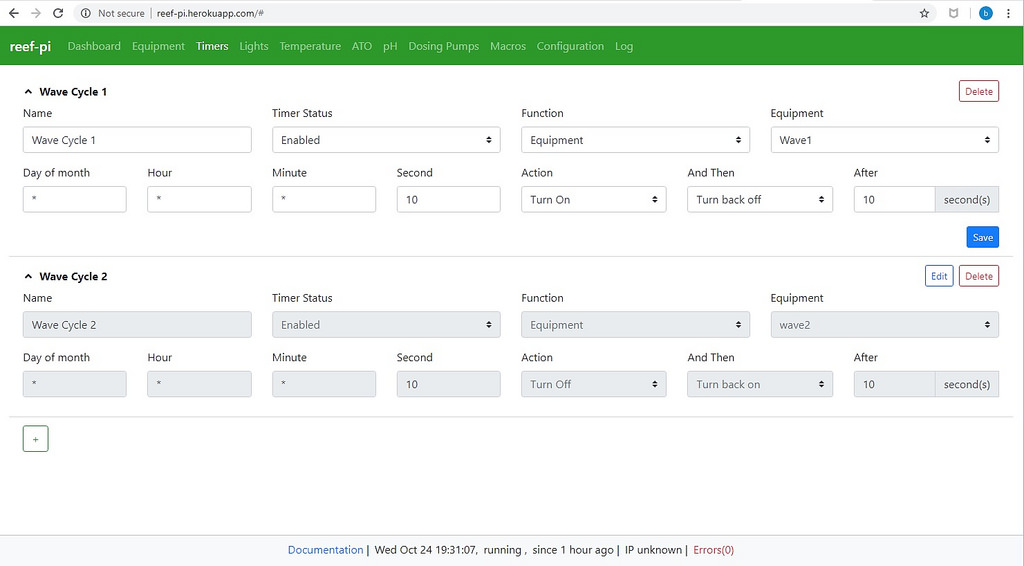
So I have been messing around with the posted heroku reef-pi and I found a way to flip flop a pair of pumps that works pretty well except that the turn on or off after time is limited to seconds and locked at 60 seconds with input validation. How hard would it be to put a broader field in the after section? I would think this could be beneficial for many other things as well. I have a sump light that runs from 7pm to 7am. To do this i have to create two timers one to turn it on at 7 pm and one to turn it off at 7am. If the range was increased in "after" I could just do one timer for on at 1900, then off after 12 hours or 0700 and it repeats daily. To flip flop my pumps every hour I am going to have to make 48 timers lol.

45540687341_5617d3eff2_b.jpg
 
What voltage?

The L293 is good for motor voltages from 4.5V up to 36V. But if you are using the existing power circuit for the power controller in the guide that uses 12 volts a 12 volt one would be easiest. Just make sure your power supply can keep up with the additional current of the motors. I saw some motors that where rated at 80 mA and some that where nearly half an amp. The system is limited to 3 amps total overall and thats max due to the buck converter.
 
The L293 is good for motor voltages from 4.5V up to 36V. But if you are using the existing power circuit for the power controller in the guide that uses 12 volts a 12 volt one would be easiest. Just make sure your power supply can keep up with the additional current of the motors. I saw some motors that where rated at 80 mA and some that where nearly half an amp. The system is limited to 3 amps total overall and thats max due to the buck converter.
I have another 5 buck converters, and i got the 12v powersupply listed on the adafruit guide. I'll go with 12v ones then. They seem quite common.
 
I am not sure on the pump. I see tons of them on amazon but I am not sure who has used them long term on here.
I used an aqualifter for a while, but it wasn't really reliable enough. I switched to a cheap peristaltic pump about a year ago (https://www.amazon.com/gp/product/B01HRPKB0O/ref=oh_aui_search_detailpage?ie=UTF8&psc=1), and it's been working great so far. I just ordered Jebao DP-3S to hook up to reef-pi since it's 3 peristaltic pumps for less than I can buy them individually.
 
As an Amazon Associate we earn from qualifying purchases.
So I have been messing around with the posted heroku reef-pi and I found a way to flip flop a pair of pumps that works pretty well except that the turn on or off after time is limited to seconds and locked at 60 seconds with input validation. How hard would it be to put a broader field in the after section? I would think this could be beneficial for many other things as well. I have a sump light that runs from 7pm to 7am. To do this i have to create two timers one to turn it on at 7 pm and one to turn it off at 7am. If the range was increased in "after" I could just do one timer for on at 1900, then off after 12 hours or 0700 and it repeats daily. To flip flop my pumps every hour I am going to have to make 48 timers lol.

45540687341_5617d3eff2_b.jpg
That field should not have any validation at 60 seconds. There may be confusion Second field on the left half of the screen. The timer uses a Cron like format, so Day Of Month, Hour, Minute, and Second define when the timer should be executed. The schedule in your screenshot is set to run every minute on the 10th second.

I think you could set up the sump light schedule as shown below (saved on http://reef-pi.herokuapp.com). It starts at 19:00, then turns back off after 43,200 seconds (60 * 60 * 12).
upload_2018-10-24_21-25-4.png


I plan to improve the duration component to let you choose seconds/minutes/hours as the unit, but that probably won't be done before the v2 final release.
 
Have you gents been able to review the code for hystersis I shared with Ranjib? There may be clues on how to implement it in there.
Not yet. I think we have to do this when we move to an interrupt based sensor drivers.
 
As an Amazon Associate we earn from qualifying purchases.
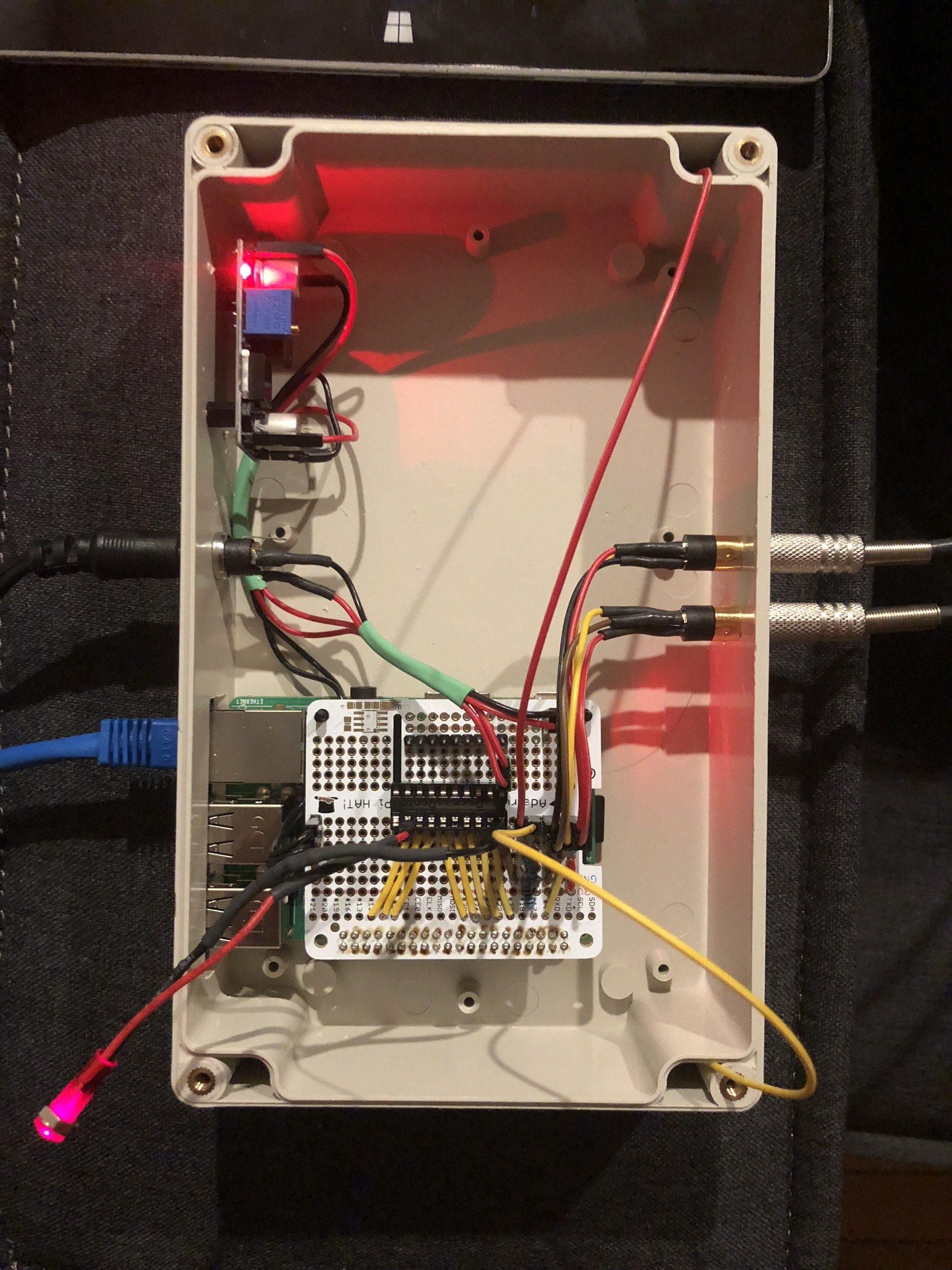
Quiet today so I will share my progress. I forgot to buy the ULN2803 which is $1.95 with $5 shipping or $6.98 shipped for 6 on amazon so I keep stalling. I also have not decided if I want to build my own relays or buy the SR P8 so for now I am testing with an LED. I have confirmed that all the outlets work, both temp sensors work and trigger the output just fine. The two wires stuffed in the corners are my ATO switch. Its set up to use a mechanical float switch which I tested and it worked as well. I was going to use an audio jack for ATO but one of the female audio jacks I received is shorted out internally so I have to order a new one. I really dont like soldering those audio jacks and they seem fragile so i am considering switching over to RJ-45 connectors. I tested macros, I also tested the notifications and have it set up to txt me and that all works as well. Last thing I did last night was set up the adafruit IO service which is not working but I still need to play with it some more.

I still plan on adding PH monitoring and doser control to this build.


31664048238_daa62c3075_k.jpg
This is looking awesome, its nicer than my own build. I love the fact that you aligned the Pi corners with the enclosure. USB and all the ports are now accessible. Very, very cool.

It will be helpful to take measurements (volts) and do thorough testing of the build before combining new circuit. The doser pump and ph circuit both will add extra complexity in wiring, knowing your current readings now will help you troubleshoot things later. The dosers build incorporates l293d and can draw as much as 600 mA current, theres a chance they can interfere with other circuits, particularly pH circuit. Make sure you use a voltage isolator.
Things get complicated as you combine the high current and low current things, as we need more sophisticated safety measures, some of which is very hard to get in through-hole form factors. I have struggled with this consistently, particularly if lights are involved. All the lm2596 boards are rated for 3A, and the perfboards also I think has around that limit. But again, from all the information you have provided, I think you are still below these limits, just be thorough and measure as you go. If you have access to oscilloscope knowing the pwm signal is also very useful. Recently, theres 5V dosing pump available via adafruit. If you use those, you can directly power it via pca9685 I think. you dont need an l293d, you'll loose the ability to control pump direction though.
The adafruit guide will be based on l293d and 12v pumps, since thats what I used when I built my doser and I have photos/circuits for those. But something to consider, if you want to simplify circuits.
 
Here is the fritzing schematic
Screen Shot 2018-08-29 at 3.45.09 PM.png
this circuit reflects my current build(12V), it can be a lot simpler if I build it today, I'll go with 5V pump, and skip the lm2596 and power the entire build with just pi, 5V 3A power supply and l293d. I'll still keep the l293d for safety and flexibility (direction). But 5v pump simplifies the circuit even further, at that point, its just pi+ perma proto board + 2 pumps + l293d = dual pump doser. Once 2.0 is out and I'll have some time, I'll test out these 5v pumps, I am very curious how many we can support, with pca9685 we'll have 16 channels, and can power 5v pumps straight (so no more l293d) , there 5v 4A power supply. I think thats the exact limit for perma proto board as well. These 5V pumps take 500ma at max, may be 6 or so.. But these are expensive as well :-(
 
I have another 5 buck converters, and i got the 12v powersupply listed on the adafruit guide. I'll go with 12v ones then. They seem quite common.
+1 . All my builds are 12V, except the pH monitor which is 5V. Take the highest voltage required adapter for your build. For me its always 12V (power strip, dosing pump, led strip etc)
 
As an eBay Associate we earn from qualifying purchases.
I am just gathering the parts for my Reef-pi build at the moment and I just wanted to check that my diy led system can be controlled directly from the pi.
At the moment I am running these LDD drivers being controlled by a Typhon controller. The controller is fairly limited in function and only has 4 channels so I would like to increase the amount of channels.
I think the Typhon has long been discontinued but it is basically this controller but with less features. It is just an Arduino.
Thanks :D

 
As an eBay Associate we earn from qualifying purchases.
+1 . All my builds are 12V, except the pH monitor which is 5V. Take the highest voltage required adapter for your build. For me its always 12V (power strip, dosing pump, led strip etc)

I have 5 of those buck converters laying around now, so i suppose I could use them for this, but I'll have to look at the 12v power supply to ensure it can support the amperage. I got the one you recommend in the adafruit guide. Should work, yes?
 
I have 5 of those buck converters laying around now, so i suppose I could use them for this, but I'll have to look at the 12v power supply to ensure it can support the amperage. I got the one you recommend in the adafruit guide. Should work, yes?
yes, its 12V 2 A ?
 
I am just gathering the parts for my Reef-pi build at the moment and I just wanted to check that my diy led system can be controlled directly from the pi.
At the moment I am running these LDD drivers being controlled by a Typhon controller. The controller is fairly limited in function and only has 4 channels so I would like to increase the amount of channels.
I think the Typhon has long been discontinued but it is basically this controller but with less features. It is just an Arduino.
Thanks :D

Should work just fine. Which specific driver you are using? most of the ldd drivers works with 3-8V PWM. If you are using pca9685, thats 5V PWM,
 

ARE YOU READY TO CONFESS TO CRAZIEST, DUMBEST, FUNNIEST THING YOU’VE EVER DONE IN REEFING?

  • Yeah, I'll confess! (Share your story in the comments!)

    Votes: 15 57.7%
  • Nah, I'll keep mine a secret...(Don't be like that, share with the class!)

    Votes: 11 42.3%
Back
Top
Home
Post thread…
Market
What's new