reef-pi :: An opensource reef tank controller based on Raspberry Pi.

Bigtrout

Valuable Member
View Badges
Joined
Dec 16, 2018
Messages
1,189
Reaction score
2,811
Rating - 0%
0   0   0
I will start a thread up.

Temp monitoring / controlling
PH monitoring
ATO
Dosing
Remote access & control.
Control on/off of pumps / skimmers

My lighting setup is easy - on/off is the extent of it so that is done using alexa & smart plugs
Flow inside the tank is simply on/off as well - at least today.

The above things for 3 tank setups.
One is comprised of a frag tank, display tank & sump.
One 30 gallon cube - mini mixed reef
One fish only (and only 1 fish) 180 gallon tank
Sounds like fun. Look into a goby hat from @Michael Lane or @theatrus makes a base board. With possibly 3 reef-pi setups thats alot of soldering if you do it all yourself. You may be able to run 2 tanks from one pi if they are next to each other.
Each hat has it own features, so see what fits what you want to do with it but the hat saves alot of soldering and makes a good jump start to getting a working reef pi setup.
I myself run a ML hat and use a seperate reef-pi ph board that was designed for reef pi. The results have been great!
 

Alaa

Community Member
View Badges
Joined
Nov 28, 2018
Messages
74
Reaction score
80
Rating - 0%
0   0   0
Hi, @Michael Lane, Pi-Hat pin continuity test
before i setup and test the new ras-pi with pi-HAT i tested the pins for continuity, and this is what i got
5 v pin connected properly to pH1, pH2, ATO1, ATO2, ATO3, 5v pin on GPIO breakout
ground connected properly all ground points on the board
3.3v pin NOT connected to any temp ports, or any other pin on the board
GPIO 4 connected to all temp ports
i don't know if the 3.3 v should be like this showing no continuity because of the 470k resistor or this is a bad connection
do i use this board on my new res-pi

sorry i got it, temp +ve pin is connected using the other 3.3v outlet (no 17) so i assume it is safe to plug the HAT and retest but that is another day
 
OP
OP
Ranjib

Ranjib

7500 Club Member
View Badges
Joined
Apr 16, 2016
Messages
9,876
Reaction score
16,680
Location
Pleasant Hill, Concord
Rating - 0%
0   0   0
Is there a guide discussing or recommending advantages / disadvantages to different Rapsberry PI hardware for the primary device?
Nothing specifically for reef-pi. The pros/cons are very similar to most other projects based on Raspberry Pi. Here is the summary:
- Pizero w: cheap, smallest power footprint (140ma) & small form factor, yet powerful enough to run reef-pi. Bad for running graphics/desktop, bad for beginners (no standard USB & LAN connector)
- Pi 3/B+: Powerful enough to run desktop along side reef-pi. Ease of use for beginners because of onboard USB and LAN ports. Consume more power, takes more space and costs more.

- Pi 3 A: Somewhere in the middle.


Given this, I think its wiser to discuss what your computer skill levels are and what type of build you are aiming for, along side any monetary constrain (though i think this is perhaps the least concerning part) for deducing the best choice for your build
 
OP
OP
Ranjib

Ranjib

7500 Club Member
View Badges
Joined
Apr 16, 2016
Messages
9,876
Reaction score
16,680
Location
Pleasant Hill, Concord
Rating - 0%
0   0   0
I will start a thread up.

Temp monitoring / controlling
PH monitoring
ATO
Dosing
Remote access & control.
Control on/off of pumps / skimmers

My lighting setup is easy - on/off is the extent of it so that is done using alexa & smart plugs
Flow inside the tank is simply on/off as well - at least today.

The above things for 3 tank setups.
One is comprised of a frag tank, display tank & sump.
One 30 gallon cube - mini mixed reef
One fish only (and only 1 fish) 180 gallon tank
If you are comfortable with command line/computers then pi zero should be enough. You can use Kasa smart plugs (HS103, 110, 105, 300) with reef-pi.
 

Phildago

Well-Known Member
View Badges
Joined
Oct 11, 2019
Messages
854
Reaction score
908
Location
Broad Channel
Rating - 0%
0   0   0
Hey guys, I just got my reef pi up and running. The first piece of equipment I was hoping to control is my dosing pump. I have a jebao dp-3 currently dosing for my tank, and I was hoping I could hook it up. I know most people use the slave models for their builds, but I'm having a hard time finding out if the master could also be controlled? Does anybody know if it's possible?
 

marekd1

Active Member
View Badges
Joined
Dec 24, 2019
Messages
133
Reaction score
199
Rating - 0%
0   0   0
Yup, I just looked at the FAQ, and it clearly states:


I'll have to experiment to find the right colors with these probes. Glad I didn't solder yet :]

Here are the connection points:

RASP-PIGPIO4 to PIN2 DQ
RASP-PI PIN1 (3V) to PIN3 VDD
RASP-PIN6 (GDN) to PIN1 GDN

Pullup Resistor between PIN 2 and PIN3
 

marekd1

Active Member
View Badges
Joined
Dec 24, 2019
Messages
133
Reaction score
199
Rating - 0%
0   0   0
Hey guys, I just got my reef pi up and running. The first piece of equipment I was hoping to control is my dosing pump. I have a jebao dp-3 currently dosing for my tank, and I was hoping I could hook it up. I know most people use the slave models for their builds, but I'm having a hard time finding out if the master could also be controlled? Does anybody know if it's possible?


Definitely possible but all depends how comfortable you are with soldering. The easiest way would be just to connect 4 channel 5 V relay board. You could follow the same guide as for the slave but motors would be connecting to the relay so you would need to remove the existing connections from the control board
 

Phildago

Well-Known Member
View Badges
Joined
Oct 11, 2019
Messages
854
Reaction score
908
Location
Broad Channel
Rating - 0%
0   0   0
Definitely possible but all depends how comfortable you are with soldering. The easiest way would be just to connect 4 channel 5 V relay board. You could follow the same guide as for the slave but motors would be connecting to the relay so you would need to remove the existing connections from the control board
I'm comfortable with soldering as long as nothing is super small and closely located near other important connections... My main fear with soldering is accidentally burning something else nearby, but I'm good with basic soldering connections
 

marekd1

Active Member
View Badges
Joined
Dec 24, 2019
Messages
133
Reaction score
199
Rating - 0%
0   0   0
BTW @Ranjib, since I've been doing Auto Water Changes, I have been wondering more and more about monitoring Salinity / SG / EC. Any idea if this could be incorporated into Reef-Pi? Is a reasonable probe / sensor even available?


Atlas Scientific has very nice stamp sensors. It would be nice if SG/ Salinity /ORP support could be added. The PH from what I understand is already supported with the Atlas Scientific board. Any possibilities of adding this devices to the support matrix?
 

marekd1

Active Member
View Badges
Joined
Dec 24, 2019
Messages
133
Reaction score
199
Rating - 0%
0   0   0
That makes sense, but I'm doubtful it would work. The DC motors have a lower threshold to turn on, and I've found that mine seem to need at least 50% to turn. I tend to tweak time and schedule in order to keep my levels where I want them, so dosing half as often would be the approach I take. Then again, I have an hourly dosing schedule now...


I've been testing with different pumps and less than 70% may have unreliable measurements. I would suggest to keep power at 80-100% and play with time. i.e. 0.5sec less to reduce the dose to less than 1ml. From my testing thus far it appears to work very well. I tried as low as 0.1sec for time and it seems to work well
 

marekd1

Active Member
View Badges
Joined
Dec 24, 2019
Messages
133
Reaction score
199
Rating - 0%
0   0   0
I'm comfortable with soldering as long as nothing is super small and closely located near other important connections... My main fear with soldering is accidentally burning something else nearby, but I'm good with basic soldering connections


Then you should have no problem. If you do not want to cut any wires you can first just disconnect the connectors for the motors from the control board and insert wires directly from the relay to the connector. The other pin on the connector would go to ground.

If you unplug the control board there is noting to blow. you will need 12V on the relay contacts to the motor and use 5V control voltage to switch the relays. since all GPIO pins are at 3.3V level you will need to most likely insert the ULN chip (as per the salve instructions) but you can also use 2n2222 as 3.3V to 5V level shifters.
 

Phildago

Well-Known Member
View Badges
Joined
Oct 11, 2019
Messages
854
Reaction score
908
Location
Broad Channel
Rating - 0%
0   0   0
Then you should have no problem. If you do not want to cut any wires you can first just disconnect the connectors for the motors from the control board and insert wires directly from the relay to the connector. The other pin on the connector would go to ground.

If you unplug the control board there is noting to blow. you will need 12V on the relay contacts to the motor and use 5V control voltage to switch the relays. since all GPIO pins are at 3.3V level you will need to most likely insert the ULN chip (as per the salve instructions) but you can also use 2n2222 as 3.3V to 5V level shifters.
Thanks for the info. So then it sounds like this is a on of switch for the motors controlled at the relay...
 

marekd1

Active Member
View Badges
Joined
Dec 24, 2019
Messages
133
Reaction score
199
Rating - 0%
0   0   0
Thanks for the info. So then it sounds like this is a on of switch for the motors controlled at the relay...


exactly…. if you want to get fancy you can also use the PCA 9685 PWM control with


motors will go directly to the l298N.

here is a good article to get familiar with how to use it.


you will need to use PWM from the PCA9685 and few GPIO pins to control direction. Same concepts as for Arduino but you would use I/O from Rasp-PI instead.
 

Phildago

Well-Known Member
View Badges
Joined
Oct 11, 2019
Messages
854
Reaction score
908
Location
Broad Channel
Rating - 0%
0   0   0
exactly…. if you want to get fancy you can also use the PCA 9685 PWM control with


motors will go directly to the l298N.

here is a good article to get familiar with how to use it.


you will need to use PWM from the PCA9685 and few GPIO pins to control direction. Same concepts as for Arduino but you would use I/O from Rasp-PI instead.
I'll give that a read through for sure and reassess what my capabilities are. I'm good with diy electronics that are all wiring, but this is my first project with programing coming into play. I'll have to learn exactly how all this stuff interacts.

I don't think I'd have any need to reverse the direction of my dosing pump, but speed control would be nice for getting it finely tuned.

Do you have any recommendations for reef pi dosing builds or should I just stick to the instructions on the reef pi web page?
 

marekd1

Active Member
View Badges
Joined
Dec 24, 2019
Messages
133
Reaction score
199
Rating - 0%
0   0   0
I'll give that a read through for sure and reassess what my capabilities are. I'm good with diy electronics that are all wiring, but this is my first project with programing coming into play. I'll have to learn exactly how all this stuff interacts.

I don't think I'd have any need to reverse the direction of my dosing pump, but speed control would be nice for getting it finely tuned.

Do you have any recommendations for reef pi dosing builds or should I just stick to the instructions on the reef pi web page?


You do not need to implement the reverse pins. Here is the guide that you can use. Since you will unplug the DC motors from the JEBAO's controller they will then plug in directly as shown here..


lmm1967

Well-Known Member
View Badges
Joined
Sep 12, 2017
Messages
563
Reaction score
809
Location
North Georgia
Rating - 0%
0   0   0
If you are comfortable with command line/computers then pi zero should be enough. You can use Kasa smart plugs (HS103, 110, 105, 300) with reef-pi.
Thank you - I've been in IT for (lets not talk about things that remind us of how old we are) - I'm quite happy in a CLI so I think an order for a pi zero w is in the very near future.
 

lmm1967

Well-Known Member
View Badges
Joined
Sep 12, 2017
Messages
563
Reaction score
809
Location
North Georgia
Rating - 0%
0   0   0
Nothing specifically for reef-pi. The pros/cons are very similar to most other projects based on Raspberry Pi. Here is the summary:
- Pizero w: cheap, smallest power footprint (140ma) & small form factor, yet powerful enough to run reef-pi. Bad for running graphics/desktop, bad for beginners (no standard USB & LAN connector)
- Pi 3/B+: Powerful enough to run desktop along side reef-pi. Ease of use for beginners because of onboard USB and LAN ports. Consume more power, takes more space and costs more.

- Pi 3 A: Somewhere in the middle.


Given this, I think its wiser to discuss what your computer skill levels are and what type of build you are aiming for, along side any monetary constrain (though i think this is perhaps the least concerning part) for deducing the best choice for your build

Monetary constraints - HA - this is reefing! In all seriousness - I have a bunch of Apex stuff running 3 tanks right now, a bunch of almost brand new GHL stuff running 2 tanks. All that is going to be sold - I'm tired of the lackluster support from companies that believe THEY are the customer. Ask either of those companies a question that they dont' have a solid answer for and they immediately move into a mode of telling you to convince them why you would want to do what you are asking them if they can achieve. I simply don't get it.

That's a lot of words to say budget is not my top priority.

Computer skills - sr.level network engineer, sr. level sysadmin (Win & Linux), technical manager for IT architects. I'm a total hack at writing code though. I can snag scripts, automations from github or other online resources - and usually modify them to fit my needs. I don't write code from scratch.

I solder like a 12 year old - it'll probably work but needs to be hidden cause it'll be real ugly with 10X more solder than is needed.

All that said - I'm convinced reef-pi is going to fill my needs better than what's on the market these days.
 

Bigtrout

Valuable Member
View Badges
Joined
Dec 16, 2018
Messages
1,189
Reaction score
2,811
Rating - 0%
0   0   0
Monetary constraints - HA - this is reefing! In all seriousness - I have a bunch of Apex stuff running 3 tanks right now, a bunch of almost brand new GHL stuff running 2 tanks. All that is going to be sold - I'm tired of the lackluster support from companies that believe THEY are the customer. Ask either of those companies a question that they dont' have a solid answer for and they immediately move into a mode of telling you to convince them why you would want to do what you are asking them if they can achieve. I simply don't get it.

That's a lot of words to say budget is not my top priority.

Computer skills - sr.level network engineer, sr. level sysadmin (Win & Linux), technical manager for IT architects. I'm a total hack at writing code though. I can snag scripts, automations from github or other online resources - and usually modify them to fit my needs. I don't write code from scratch.

I solder like a 12 year old - it'll probably work but needs to be hidden cause it'll be real ugly with 10X more solder than is needed.

All that said - I'm convinced reef-pi is going to fill my needs better than what's on the market these days.
The great thing is everyone fits in here. This is a great project. Everyone that builds one ends up helping the next guy. Some on here are good at computer skills and contribute in that way. Some can design new boards. Some can wrtie the code amd help there. Some are good troubleshooters and help peiple that get stuck on a build. But everyone can build a reef pi setup to fit their own aquarium. You dont even need a reef, alas im a freshwater guy who built one for a freshwater planted tank.
Ask questions. Help out when you can. Build your own controller the way you want. Theres alot of satisfaction in having your own controller that you built running your tank better than those storebought controllers could hope to.
 

Des Westcott

Well-Known Member
View Badges
Joined
May 29, 2018
Messages
646
Reaction score
1,025
Location
Durban - South Africa
Rating - 0%
0   0   0
I took some notes on setting up a pH board today, so I'll share them here too.

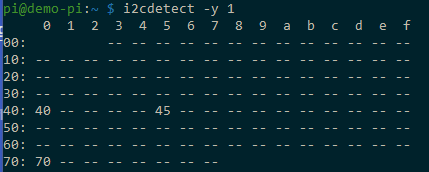
Verify the i2c address by running i2cdetect

image


0x40 and 0x70 are the PCA9685 PWM chip. 0x45 is the pH board.

In reef-pi, make sure pH is enabled in the Configuration | Settings tab.

image


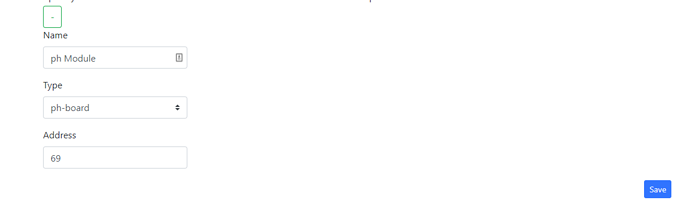
Then, on the Configuration | Drivers tab, add a driver entry for the ph-board. The default address should be incorrect since it is already assigned to the pca9685, with both jumpers it should be 69 (0x45). reef-pi expects a decimal value instead of the hex value.

HexDecimal
0x4064
0x4165
0x4468
0x4569
image


With correct address...

image


After that, you should be able to create an Analog Input on Configuration | Connectors.

image


Finally, you can add a pH.

image

Just followed @Michael Lane directions above to set up pH. Was really easy. Thanks for sending all the goodies Michael!!!
 

Bigtrout

Valuable Member
View Badges
Joined
Dec 16, 2018
Messages
1,189
Reaction score
2,811
Rating - 0%
0   0   0
Just followed @Michael Lane directions above to set up pH. Was really easy. Thanks for sending all the goodies Michael!!!
I have found the reef pi ph board with a milwaukee probe to be very accurate. Neat to see the daily ph cycle when the lights ramp up and the plants get going and use the co2.
I can now use the amount of ph change to tell when its time to change water.
Had the ph board for half year and it hasnt changed calibration numbers yet.
 

TOP 10 Trending Threads

WHAT AMOUNT OF LIVE ROCK AND SAND SHOULD BE PRIORITIZED FOR OPTIMAL BIODIVERSITY/FILTRATION?

  • 100% live rock + bagged sand

    Votes: 38 26.0%
  • 100% dry rock + 100% live sand

    Votes: 48 32.9%
  • 50/50 live/dry rock, 50/50 live/bagged sand

    Votes: 34 23.3%
  • 75% live rock, 25% live sand

    Votes: 15 10.3%
  • 25% live rock, 75% live sand

    Votes: 11 7.5%
Back
Top