reef-pi :: An opensource reef tank controller based on Raspberry Pi.

This isn't a big deal. You can use a simple RC integrator circuit to turn the pwm into analog (aka low pass filter). Put a resistor on the output with a capacitor to ground. I used this technique to control Mars Aqua lights. I can help with specific values this evening.
exactly, 0-5V analog should work with 5V pwm, if not you can throw in some RC circuit to make it work
 
@Ranjib I've got a couple comments/questions

1. I'm definitely interested to see what hardware you can salvage from the Digital Aquatics kits that are now obsolete and unsupported

2. Have you done any investigations/studies on the limitations of the various pi models? I'm interested to give this a shot with the Pi Zero W instead of buying a Pi 3 kit strictly because of cost. I just want to make sure I'm not losing any functionality or limiting myself somehow by doing so.

Cheers on an awesome build and project! And your write ups on adafruit are fantastic and easy to follow.
pi zero can run pretty muchg everything as long as you are not running graphical user interface , i.e. install raspbian lite . reef-pi is written in go and is pretty lightweight compared to python/nodejs based apps. Its nearly as efficient as C. I run pi zero based AIO builds with ATO, Temperature , outlets and 2 channel pwm without any issues. I'l recommend going with the recommend check intervals and observe the CPU/Memory utilization and then go from there. Lesser check intervals will lead to higher CPU/Memory consumption. You want to run your build at less than 30% CPU and memory usage
 
From what I've read, the pump itself is analog and the controller is pwm, so it all depends on where you are adding the reef-pi connection.

I actually did a quick test of the PWM connection last night. I wired a 3.5 audio jack into the input for the Jabao controller (it comes with a dc jack in that spot so I just bypassed that to connect to the board), and changed the mode to "C" which is supposed to be controller mode. From there I just plugged in my Kessil input wire and played around with the lighting controls a bit. It did work, though I wasn't sure which channel was for what so I was essentially putting in numbers at random. I couldn't get a feeling for speed changes without taking the pump out of the tank, so I'm not sure if the controller was working to that degree either. What I did find was that a "0" setting on both channels turned it off, and 1-50 on both turned it on. A 0/50 made it kind of twitch a bit but not move, which I assume is some kind of conflict. I didn't want to go higher than 50 because I've read about the 5V signal max.

I also came to the same conclusion as @pickupman66 - writing the script to control it will be the challenge. @Ranjib you linked to the feed button example, which looks like a good place to start. I see it's a python script - would it get added into reef-pi as a macro? Is there a config for "if [this] --> run [script]"?

did you use 5V pwm or 10V pwm?Kessil uses 10V pwm, and i wont recommend using that. Use PCA9685 to get 5V PWM directly, without any transistor in between.
 
I am plannimg on opening all my DA module and share pics on here to see if we can use any of these module with Pi. I think it will help a lot of people recycle their DA stuff.

I am actually asking myself the same question regarding the pi zero or 3B+

Anyone knows the limitations between the 2 in terms of expandability?

Pi three is way more powerful, if you are planning to use GUI , then dont choose pi zero at all. Pi zero W is handy, small and does the job for pretty much all my builds except camera. I run all my builds in text mode, without any GUI (raspian lite)
 
It should be wrong in the documentation then. Unfortunately I don't have that connector yet as I'm waiting for a larger order to avoid shipment costs. I tested it with just some normal jumper connectors and the temperature sensors (I believe I tested 3 DS18B20's simultaneously) did work for me.
Priority at the moment is to complete the PWM module, lay-out has been updated, BOM has been checked (several times) and I'm completing the documentation now. Will order the new PWM PCB's later today and upload to Github all files as soon as the doc is finished. Then I would like to make a review and update of the HAT module package. Therefor it's very helpful to get your feedback :)
Thanks for doing this it cleaned up my build a bunch. I'll mention anything else I might run across. My direct needs now don't require PWM, but once the board is available i'll add it to the stack and do some testing as well.
 
My last question for the time being is:

Reef pi offers a ramp up/down on a 2h schedule. Can it be modify to a shorter ramp up/down? Like every 15mins.
Not yet. for 2.0 release we are adding a diurnal setting other than the 12 point (2 hour apart) auto mode. Note: though you specify the values in 2 hour interval, reef-pi will actually calculate the delta every 1 minute (linear interpolation) and apply it accordingly.
I am adding support for fine grained pwm control and smoother ramp up/down right now, but it will likely be available after 2.0
 
@wykat I think I found an error in your board layout or documentation. On the temperature sensor the tip goes to the GPO line with 4.7K resistor the middle ring goes to pin 17. I could not get the sensor working till I swapped them. hoe that makes sense Thanks
Is this in the official guides? We should update it if theres any mistake in those..
 
I got all three of my temps up and going thanks for the help. Is it possible to have all of them in the same graph?
NOt currently :-( . If you have adafruit.io configured, you can do it over there
 
Hmmm, sounds like it might be worth the extra couple bucks to grab a pi 3 and just have a smoother experience all around
Dont run GUI with pi zero, its not worth it
 
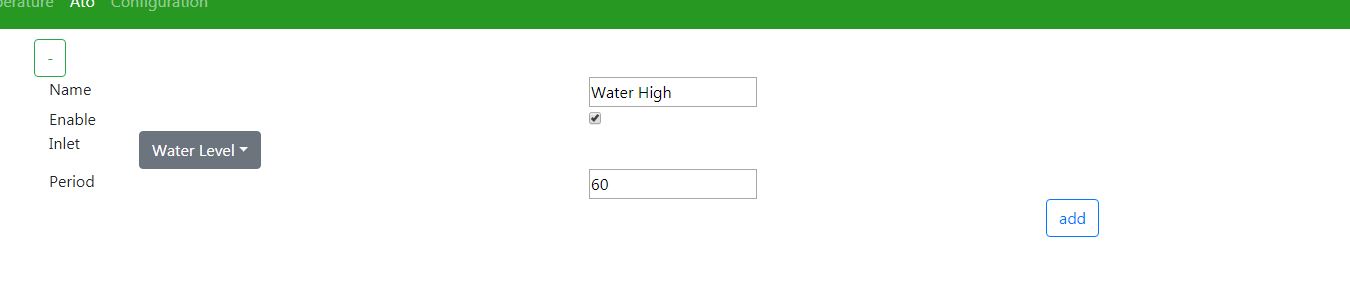
im running rc0 and have noting that looks like that either. This is my screen shot and hitting save doesnt add it anyhow, but there is no option as to what to control either.
DJKLNA6.jpg
You'll get the pump control option after you have added the sensor
 
Pi three is way more powerful, if you are planning to use GUI , then dont choose pi zero at all. Pi zero W is handy, small and does the job for pretty much all my builds except camera. I run all my builds in text mode, without any GUI (raspian lite)
Is there a difference between direct connected monitor and remote access when running a GUI on the zero? I've got a 3, but after building it I realized how little of the pi I needed (usb, network port, processor and memory usage very low, etc. ), so curious for future use.
 
@ScottBrew running pi-zero If you are talking about using VNC To remote into the pi . It will NOT WORK. The pi zero is not fast enough to even sync from my experience. you can use something like putty to get the pi zero command line and it works absolutely perfect.. I have found that once you have your Reef-pi up and running this is you need to run reef-pi even on a pi3 ..

My hope is (not pushing ) some day gpio expansion will come and we can run more then one reef-pi on the same raspberry pi . I would also like to see a Maintenance charting database and live and materials tracking. This would be beyond pi zero ability i believe .
 
@ScottBrew running pi-zero If you are talking about using VNC To remote into the pi . It will NOT WORK. The pi zero is not fast enough to even sync from my experience. you can use something like putty to get the pi zero command line and it works absolutely perfect.. I have found that once you have your Reef-pi up and running this is you need to run reef-pi even on a pi3 ..

My hope is (not pushing ) some day gpio expansion will come and we can run more then one reef-pi on the same raspberry pi . I would also like to see a Maintenance charting database and live and materials tracking. This would be beyond pi zero ability i believe .
Thank you for the reply. My question was more posed as being able to access the GUI remote (on home network) so that my wife or daughters can turn on feed mode, for when I am not home, without using a command line. I personally don't want to use a command line every time I want to run a macro myself, even though I am comfortable doing so. If I add any more automation to the system, I will run out of GPIO outputs to run them and then may have to add a second pi to split up the tasks, unless the expansion is available. The pi3b+ is certainly undertaxed and capable of running hundreds of input/outputs.
 
Thank you for the reply. My question was more posed as being able to access the GUI remote (on home network) so that my wife or daughters can turn on feed mode, for when I am not home, without using a command line. I personally don't want to use a command line every time I want to run a macro myself, even though I am comfortable doing so. If I add any more automation to the system, I will run out of GPIO outputs to run them and then may have to add a second pi to split up the tasks, unless the expansion is available. The pi3b+ is certainly undertaxed and capable of running hundreds of input/outputs.

Yes the Web interface Reef-pi gui is a website . Its how you access it regardless of the raspberry pi your using.
 
Thank you for the reply. My question was more posed as being able to access the GUI remote (on home network) so that my wife or daughters can turn on feed mode, for when I am not home, without using a command line. I personally don't want to use a command line every time I want to run a macro myself, even though I am comfortable doing so. If I add any more automation to the system, I will run out of GPIO outputs to run them and then may have to add a second pi to split up the tasks, unless the expansion is available. The pi3b+ is certainly undertaxed and capable of running hundreds of input/outputs.

I have a PiZero on my brine shrimp hatchery and it runs on Raspbian Lite.

I can log into it's IP address just fine from any of my devices without having to use the GUI. The GUI is only necessary if you want to view the full desktop via VNC or the likes.

To access Reef-Pi, just log onto the appropriate IP address and log in. No GUI necessary.

So yes, your wife and kids can access it easily when you are away.
 
did you use 5V pwm or 10V pwm?Kessil uses 10V pwm, and i wont recommend using that. Use PCA9685 to get 5V PWM directly, without any transistor in between.
I was using your Kessil PCA9685 circuit, so it was 10V, I didn't want to build a new one just to test it. I though capping it at 50% would be ok for the test.
 
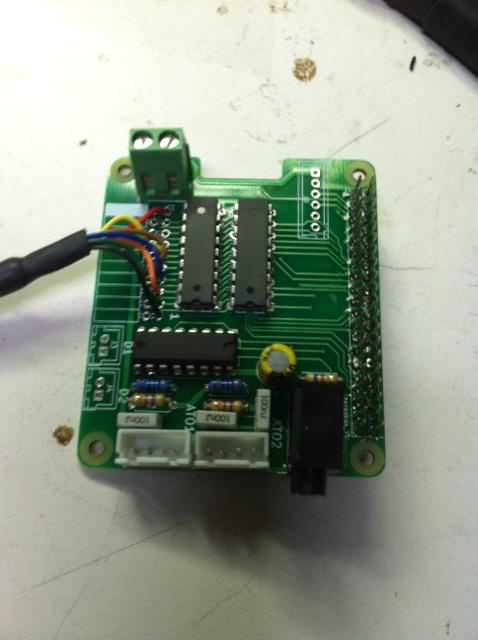
I know there was talk at some point on making a premade board for reefpi with many of the circuits already made to just plug the pie into and components to the propper plugs/solder spots did anything ever come of that?
 
I know there was talk at some point on making a premade board for reefpi with many of the circuits already made to just plug the pie into and components to the propper plugs/solder spots did anything ever come of that?

Yes @wykat did this, I just populated a board and put it in service.

035IDI0.jpg
 

TOP 10 Trending Threads

ARE YOU READY TO CONFESS TO CRAZIEST, DUMBEST, FUNNIEST THING YOU’VE EVER DONE IN REEFING?

  • Yeah, I'll confess! (Share your story in the comments!)

    Votes: 18 58.1%
  • Nah, I'll keep mine a secret...(Don't be like that, share with the class!)

    Votes: 13 41.9%
Back
Top
Home
Post thread…
Market
What's new