


reef-pi :: An opensource reef tank controller based on Raspberry Pi.

Des Westcott

Well-Known Member
View Badges
Joined
May 29, 2018
Messages
646
Reaction score
1,025
Location
Durban - South Africa
Rating - 0%
0   0   0
Quick question about something I've noticed.

Our electricity supplier here in SA has just started implementing "load shedding" where there is supply problems and everyone has scheduled power outages. My area typically has 2 hours a day, occasionally 2 sessions of 2 hours. This will typically last a week and then they will be back on track. It doesn't worry me and my tank. I'm equipped to handle it.

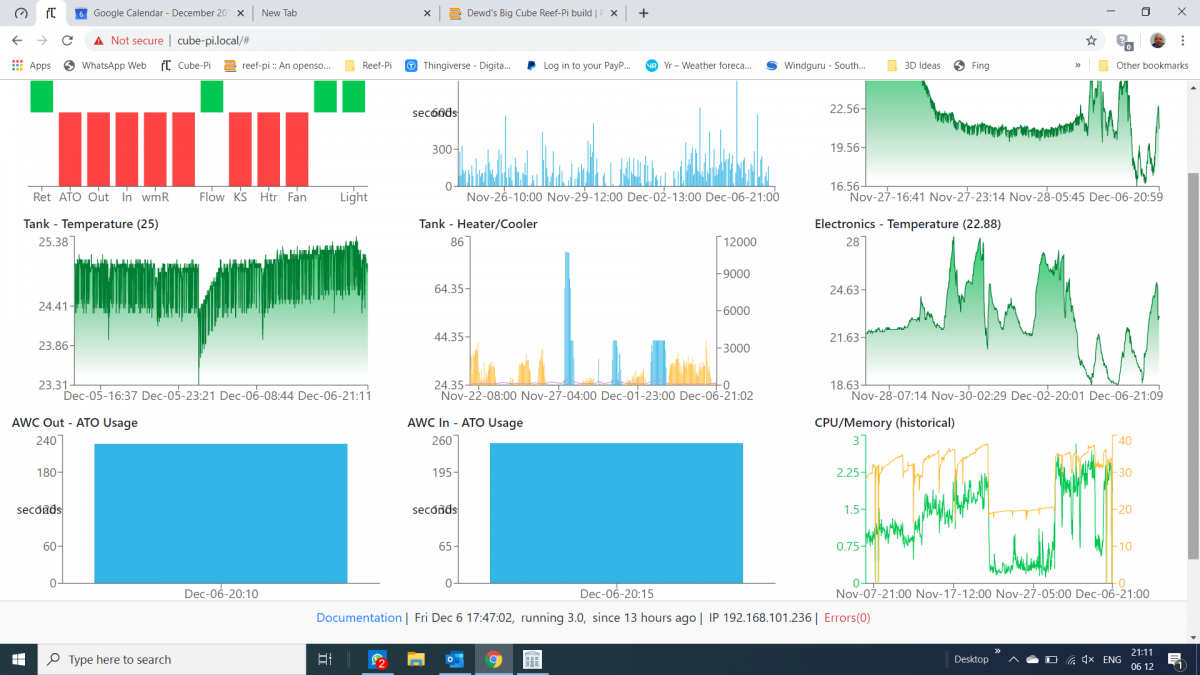
BUT i noticed something interesting with the ATO usage graphs below. My main Tank ATO usage in the top centre has data saved from as far back as the 26th November. The AWC Out and AWC In at the bottom left and centre lose all their data every time the Pi loses power. Not sure if this is some sort of bug or not.

2019-12-06 (2).png
 

Blaxkin

Community Member
View Badges
Joined
Oct 4, 2019
Messages
27
Reaction score
46
Rating - 0%
0   0   0
Sorry for a temperature question again :rolleyes:

its not possible for me to write here if its 85 ignore or skip this value ?

func (c *Controller) Read(tc TC) (float64, error) {
log.Println("Reading temperature from device:", tc.Sensor)
if c.devMode {
log.Println("Temperature controller is running in dev mode, skipping sensor reading.")
if tc.Fahrenheit {
return telemetry.TwoDecimal(78.0 + (3 * rand.Float64())), nil
} else {
return telemetry.TwoDecimal(24.4 + (1.5 * rand.Float64())), nil
}
}
fi, err := os.Open(filepath.Join("/sys/bus/w1/devices", tc.Sensor, "w1_slave"))
if err != nil {
return -1, err
 

buddy.

Active Member
View Badges
Joined
May 16, 2018
Messages
293
Reaction score
604
Location
Australia
Rating - 0%
0   0   0
@Blaxkin I used to get those 85 deg errors a while back but i changed out a power supply which fixed it.
Since updating to 3.0 im getting these errors, which I never had in previous versons, but in negative 2035 and 2046... I wonder if they are related.

temp.JPG
 

Blaxkin

Community Member
View Badges
Joined
Oct 4, 2019
Messages
27
Reaction score
46
Rating - 0%
0   0   0
i found some infos in the sensor documentation.

"Under parasite power, if tRSTL > 960μs, a power-on reset can occur."

Maybe this is my Problem ? I use all Sensors in parasite.

@buddy. ok negative i don't have an the power supply i changed

i think a good way is to ignore the error values and to fix the graph maybe from 15 to 30 or what else
 
Last edited:
OP
OP
Ranjib

Ranjib

7500 Club Member
View Badges
Joined
Apr 16, 2016
Messages
9,876
Reaction score
16,680
Location
Pleasant Hill, Concord
Rating - 0%
0   0   0
@Blaxkin I used to get those 85 deg errors a while back but i changed out a power supply which fixed it.
Since updating to 3.0 im getting these errors, which I never had in previous versons, but in negative 2035 and 2046... I wonder if they are related.

temp.JPG
No clue :0-(
 
OP
OP
Ranjib

Ranjib

7500 Club Member
View Badges
Joined
Apr 16, 2016
Messages
9,876
Reaction score
16,680
Location
Pleasant Hill, Concord
Rating - 0%
0   0   0
i found some infos in the sensor documentation.

"Under parasite power, if tRSTL > 960μs, a power-on reset can occur."

Maybe this is my Problem ? I use all Sensors in parasite.

@buddy. ok negative i don't have an the power supply i changed

i think a good way is to ignore the error values and to fix the graph maybe from 15 to 30 or what else
Thats a good find. Let us know if changing that fixes your problem
 
OP
OP
Ranjib

Ranjib

7500 Club Member
View Badges
Joined
Apr 16, 2016
Messages
9,876
Reaction score
16,680
Location
Pleasant Hill, Concord
Rating - 0%
0   0   0
Sorry for a temperature question again :rolleyes:

its not possible for me to write here if its 85 ignore or skip this value ?

func (c *Controller) Read(tc TC) (float64, error) {
log.Println("Reading temperature from device:", tc.Sensor)
if c.devMode {
log.Println("Temperature controller is running in dev mode, skipping sensor reading.")
if tc.Fahrenheit {
return telemetry.TwoDecimal(78.0 + (3 * rand.Float64())), nil
} else {
return telemetry.TwoDecimal(24.4 + (1.5 * rand.Float64())), nil
}
}
fi, err := os.Open(filepath.Join("/sys/bus/w1/devices", tc.Sensor, "w1_slave"))
if err != nil {
return -1, err

yes, thats absolutely possible. But its very specific to your issue. It will not work if the controller used in a different range and it may mask real issues. A good way of fixing this will be to apply moving average instead, which will work irrespective of what temperature range the controller is operating on. This will take a bit more time and effort, but thats the right thing to do.
 

Blaxkin

Community Member
View Badges
Joined
Oct 4, 2019
Messages
27
Reaction score
46
Rating - 0%
0   0   0
Ok :) Can you say to me where i can change this value ? :)

I think in the linux driver w1_slave i found it. But on Raspberry i don't know

/* prevent the slave from going away in sleep */
atomic_inc(THERM_REFCNT(family_data));
memset(rom, 0, sizeof(rom));
while (max_trying--) {
verdict = 0;
crc = 0;
if (!w1_reset_select_slave(sl)) {
int count = 0;
unsigned int tm = 750;
unsigned long sleep_rem;
w1_write_8(dev, W1_READ_PSUPPLY);
external_power = w1_read_8(dev);
if (w1_reset_select_slave(sl))
continue;
/* 750ms strong pullup (or delay) after the convert */
if (w1_strong_pullup == 2 ||
(!external_power && w1_strong_pullup))
w1_next_pullup(dev, tm);
w1_write_8(dev, W1_CONVERT_TEMP);
if (external_power) {
mutex_unlock(&dev->bus_mutex);
sleep_rem = msleep_interruptible(tm);
if (sleep_rem != 0) {
ret = -EINTR;
goto post_unlock;
}
 
OP
OP
Ranjib

Ranjib

7500 Club Member
View Badges
Joined
Apr 16, 2016
Messages
9,876
Reaction score
16,680
Location
Pleasant Hill, Concord
Rating - 0%
0   0   0
Quick question about something I've noticed.

Our electricity supplier here in SA has just started implementing "load shedding" where there is supply problems and everyone has scheduled power outages. My area typically has 2 hours a day, occasionally 2 sessions of 2 hours. This will typically last a week and then they will be back on track. It doesn't worry me and my tank. I'm equipped to handle it.

BUT i noticed something interesting with the ATO usage graphs below. My main Tank ATO usage in the top centre has data saved from as far back as the 26th November. The AWC Out and AWC In at the bottom left and centre lose all their data every time the Pi loses power. Not sure if this is some sort of bug or not.



2019-12-06 (2).png
Can you file a issue in github to track this. I need to dig deeper into this. Somethings to remember
- reef-pi stores all stats in memory to reduce disk io. This is a global strategy to avoid sad card wear and tier as much as possible,
- reef-pi will save the stats in disk (sd card ) during regular shutdown and hourly roll up .
- if you are shutting down the pi abruptly , it is expected to loose the current hours data,

I have to decipher if your condition is as expected due to those. Or we have a bug somewhere
 

MikeSpike

Community Member
View Badges
Joined
Jan 2, 2019
Messages
88
Reaction score
54
Rating - 0%
0   0   0
@Ranjib is the check frequency Time in the ATO tab just for turning ON. E.g. I set the frequency to 2 minutes - it will check if the tanks needs more water every 2 mins. However When it does turn the ATO pump on it will then monitor real time to know when to turn it off? Or will it only check the sensor again in another 2 mins (and my tank will be full of RODI) - in which case I would set my time to something like 5 seconds.
thank u
 
OP
OP
Ranjib

Ranjib

7500 Club Member
View Badges
Joined
Apr 16, 2016
Messages
9,876
Reaction score
16,680
Location
Pleasant Hill, Concord
Rating - 0%
0   0   0
@Ranjib is the check frequency Time in the ATO tab just for turning ON. E.g. I set the frequency to 2 minutes - it will check if the tanks needs more water every 2 mins. However When it does turn the ATO pump on it will then monitor real time to know when to turn it off? Or will it only check the sensor again in another 2 mins (and my tank will be full of RODI) - in which case I would set my time to something like 5 seconds.
thank u
The second one. Configure the ato to run every 5 seconds. I’ll be changing the default check frequency to 5 in next minor release

We are thinking of a feature akin to option 1, as you called out. Feel free to add comments in the tracking issue https://github.com/reef-pi/reef-pi/issues/701

 

Schreiber

Leviathan
View Badges
Joined
Jun 28, 2016
Messages
475
Reaction score
594
Location
Knoxville
Rating - 0%
0   0   0
Is there a good write-up somewhere about setting up a pH probe for 3.0? The adafruit guide is outdated now & I'm having trouble getting my pH board to be recognized.

Also, I've got a really weird bug when I try to go to my connectors:
TypeError: this.state.driver is undefined
in t in div in div in div in t in Connect(t) in div in div in t in div in t in t in div in div in div in div in t in Connect(t) in t in a

This error when I go to the log:
Error: Minified React error #31; visit https://reactjs.org/docs/error-deco...e.drivers.filter(...)[0] is undefined&args[]= for the full message or use the non-minified dev environment for full errors and additional helpful warnings.
in td in tr in tbody in table in div in div in t in Connect(t) in t in div in div in div in div in t in Connect(t) in t in a
 
OP
OP
Ranjib

Ranjib

7500 Club Member
View Badges
Joined
Apr 16, 2016
Messages
9,876
Reaction score
16,680
Location
Pleasant Hill, Concord
Rating - 0%
0   0   0
Is there a good write-up somewhere about setting up a pH probe for 3.0? The adafruit guide is outdated now & I'm having trouble getting my pH board to be recognized.

Also, I've got a really weird bug when I try to go to my connectors:
TypeError: this.state.driver is undefined
in t in div in div in div in t in Connect(t) in div in div in t in div in t in t in div in div in div in div in t in Connect(t) in t in a

This error when I go to the log:
Error: Minified React error #31; visit https://reactjs.org/docs/error-decoder.html?invariant=31&args[]=TypeError: e.drivers.filter(...)[0] is undefined&args[]= for the full message or use the non-minified dev environment for full errors and additional helpful warnings.
in td in tr in tbody in table in div in div in t in Connect(t) in t in div in div in div in div in t in Connect(t) in t in a
I am really slacking on updating the docs.. here are the steps:
- Go to drivers tab and add a new driver , choose type as ph board and address 64 (or whatever you have configured, get it using i2cdetect)
- Once the driver is added, head over to the connector tab and create an analog input , with the new driver and pin 0.
- Head over to ph tab and create a probe , associate the newly created analog input with it


Thats it. The connector UI issue you are facing indicates you have connectors that have non-existent driver. It can happen due to 2 -> 3 upgrade or some other issues (deleted driver without deleting connectors). Reset database if possible, and make sure to delete connectors before deleting their associated drivers
 

Schreiber

Leviathan
View Badges
Joined
Jun 28, 2016
Messages
475
Reaction score
594
Location
Knoxville
Rating - 0%
0   0   0
I am really slacking on updating the docs.. here are the steps:
- Go to drivers tab and add a new driver , choose type as ph board and address 64 (or whatever you have configured, get it using i2cdetect)
- Once the driver is added, head over to the connector tab and create an analog input , with the new driver and pin 0.
- Head over to ph tab and create a probe , associate the newly created analog input with it


Thats it. The connector UI issue you are facing indicates you have connectors that have non-existent driver. It can happen due to 2 -> 3 upgrade or some other issues (deleted driver without deleting connectors). Reset database if possible, and make sure to delete connectors before deleting their associated drivers

Thanks for the suggestions. That's exactly what happened, I deleted the pH driver to troubleshoot it.

I just reset my database & started from scratch. Everything is good so far! The only minor thing I've run into is the annoying pH probe calibration. Whenever you type in a value, it outlines the box in red & says it's not valid. However, if you click the arrows to the side to go up by one, then back down by one to the same value, it lets you calibrate it.
 

MikeSpike

Community Member
View Badges
Joined
Jan 2, 2019
Messages
88
Reaction score
54
Rating - 0%
0   0   0
The second one. Configure the ato to run every 5 seconds. I’ll be changing the default check frequency to 5 in next minor release

We are thinking of a feature akin to option 1, as you called out. Feel free to add comments in the tracking issue https://github.com/reef-pi/reef-pi/issues/701

Thank you!

One other suggestion (apologies don't understand how to do on GitHub) would be good if you could click on the bar chart in the dashboard to make things go on and off rather than having to go to the equipment tab
 

hhaase

Active Member
View Badges
Joined
Nov 11, 2019
Messages
418
Reaction score
344
Rating - 0%
0   0   0
Based on Ranjib's input, here's my updated hat board. Same concept as before, basically taking my previous one and adding the PH and Orp probe circuits. But based on the ReefPi PH probe board, instead of the Atlas Scientific. The various chips needed for these circuits aren't cheap, but still a lot more affordable than using the Atlas stuff, that's for sure.

Schedule wise, I'm hoping to have these ready to test around the end of the year. I should probably get another Pi or two at some point as well, since I plan on using these in a few locations once the tank gets here.


Reefpi v0_2_1.jpg
 
OP
OP
Ranjib

Ranjib

7500 Club Member
View Badges
Joined
Apr 16, 2016
Messages
9,876
Reaction score
16,680
Location
Pleasant Hill, Concord
Rating - 0%
0   0   0
Thank you!

One other suggestion (apologies don't understand how to do on GitHub) would be good if you could click on the bar chart in the dashboard to make things go on and off rather than having to go to the equipment tab
We have discussed something similar, a widget instead of chart for equipment in dashboard, that will allows switching equipment on/off from dashboard directly .ill see if we can get it done soonish
 
OP
OP
Ranjib

Ranjib

7500 Club Member
View Badges
Joined
Apr 16, 2016
Messages
9,876
Reaction score
16,680
Location
Pleasant Hill, Concord
Rating - 0%
0   0   0
Based on Ranjib's input, here's my updated hat board. Same concept as before, basically taking my previous one and adding the PH and Orp probe circuits. But based on the ReefPi PH probe board, instead of the Atlas Scientific. The various chips needed for these circuits aren't cheap, but still a lot more affordable than using the Atlas stuff, that's for sure.

Schedule wise, I'm hoping to have these ready to test around the end of the year. I should probably get another Pi or two at some point as well, since I plan on using these in a few locations once the tank gets here.


Reefpi v0_2_1.jpg

Looks awesome .
Remind us again what all this board will offer ? I noticed double ph probe , db9 for power strip , couple of temp probe and two ato probe ( photoelectric ). No float switch and 10v pwm output right ?
 

TOP 10 Trending Threads

WHAT AMOUNT OF LIVE ROCK AND SAND SHOULD BE PRIORITIZED FOR OPTIMAL BIODIVERSITY/FILTRATION?

  • 100% live rock + bagged sand

    Votes: 38 27.1%
  • 100% dry rock + 100% live sand

    Votes: 47 33.6%
  • 50/50 live/dry rock, 50/50 live/bagged sand

    Votes: 31 22.1%
  • 75% live rock, 25% live sand

    Votes: 14 10.0%
  • 25% live rock, 75% live sand

    Votes: 10 7.1%
Back
Top




