reef-pi :: An opensource reef tank controller based on Raspberry Pi.

Barclay

New Member
View Badges
Joined
Jan 9, 2014
Messages
16
Reaction score
6
Location
Potenza Italy
Rating - 0%
0   0   0
[QUOTE = "Urtoo, post: 6972038, membro: 125000"]
Barclays, hai seguito la guida?
Ecco il link, devi configurare i2c in raspi-config
[URL unfurl = "true"] https://learn.adafruit.com/reef-pi-installation-and-configuration/raspberry-pi-configuration [/ URL]
[/CITAZIONE]
Hi, please read my post...
[QUOTE = "Urtoo, post: 6972038, membro: 125000"]
Barclays, hai seguito la guida?
Ecco il link, devi configurare i2c in raspi-config
[URL unfurl = "true"] https://learn.adafruit.com/reef-pi-installation-and-configuration/raspberry-pi-configuration [/ URL]
[/CITAZIONE]
please, read my post

 

burningbaal

Active Member
View Badges
Joined
Aug 13, 2019
Messages
232
Reaction score
252
Location
Near Seattle
Rating - 0%
0   0   0
anyone know a quick guide on telling reef-pi (v3.1) how to use pwm? I'm trying to get Michael Lane's Mars Aqua adapter working and can't find any info on adding a pwm driver.
He'll help later this evening, but figured the hive mind might have something ready-at-hand and take some burden off of him
 

Phildago

Well-Known Member
View Badges
Joined
Oct 11, 2019
Messages
854
Reaction score
908
Location
Broad Channel
Rating - 0%
0   0   0
anyone know a quick guide on telling reef-pi (v3.1) how to use pwm? I'm trying to get Michael Lane's Mars Aqua adapter working and can't find any info on adding a pwm driver.
He'll help later this evening, but figured the hive mind might have something ready-at-hand and take some burden off of him
You have to go into the terminal configuration and enable i2c communication
 

Michael Lane

Well-Known Member
View Badges
Joined
Aug 11, 2018
Messages
677
Reaction score
1,121
Rating - 0%
0   0   0
anyone know a quick guide on telling reef-pi (v3.1) how to use pwm? I'm trying to get Michael Lane's Mars Aqua adapter working and can't find any info on adding a pwm driver.
He'll help later this evening, but figured the hive mind might have something ready-at-hand and take some burden off of him

It sounds like you already have i2c enabled, so the next step is to verify that the i2c bus is working.

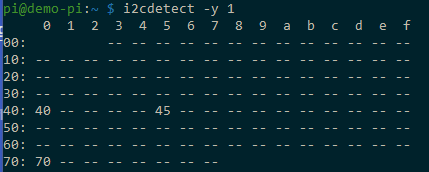
Verify the i2c address by running i2cdetect. You can install it with the following command if you don't already have it.
Bash:
sudo apt-get install i2c-tools

Bash:
i2cdetect -y 1

image


0x40 and 0x70 are the PCA9685 PWM chip. 0x45 is my pH module.

Next, in reef-pi, make sure you have Lighting and Dosing enabled at Configuration | Settings (depending on what you want to do). You'll need to Reload reef-pi from Configuration | Admin and then refresh your browser window.

1579740359277.png


A driver needs to be associated with the pwm chip at Configuration | Drivers

1579740553718.png


You can name it whatever makes sense to you. Choose pca9685 as the Type and keep 64 as the address unless your pca9685 was listed with an address different from 0x40. Use whatever frequency makes sense for your hardware.

Now you can create a Jack for the light or doser. Navigate to Configuration | Connectors. Click the Add button under jacks and create the jack you intend to use. In my case, I'm using pins 13 and 14 (exposed as the left pins on Light1 on my board). Be sure to choose the driver set up in the previous step.
1579741013756.png


From there, it's similar to previous versions of reef-pi. Create a new light and set it up as you like.
1579741232308.png

I like to switch to manual mode to test the outputs first.
1579741322556.png


This lets you change the output in real time without having to edit and save.
1579741375601.png
 

burningbaal

Active Member
View Badges
Joined
Aug 13, 2019
Messages
232
Reaction score
252
Location
Near Seattle
Rating - 0%
0   0   0
It sounds like you already have i2c enabled, so the next step is to verify that the i2c bus is working.

Verify the i2c address by running i2cdetect. You can install it with the following command if you don't already have it.
Bash:
sudo apt-get install i2c-tools

Bash:
i2cdetect -y 1

image


0x40 and 0x70 are the PCA9685 PWM chip. 0x45 is my pH module.

Next, in reef-pi, make sure you have Lighting and Dosing enabled at Configuration | Settings (depending on what you want to do). You'll need to Reload reef-pi from Configuration | Admin and then refresh your browser window.

1579740359277.png


A driver needs to be associated with the pwm chip at Configuration | Drivers

1579740553718.png


You can name it whatever makes sense to you. Choose pca9685 as the Type and keep 64 as the address unless your pca9685 was listed with an address different from 0x40. Use whatever frequency makes sense for your hardware.

Now you can create a Jack for the light or doser. Navigate to Configuration | Connectors. Click the Add button under jacks and create the jack you intend to use. In my case, I'm using pins 13 and 14 (exposed as the left pins on Light1 on my board). Be sure to choose the driver set up in the previous step.
1579741013756.png


From there, it's similar to previous versions of reef-pi. Create a new light and set it up as you like.
1579741232308.png

I like to switch to manual mode to test the outputs first.
1579741322556.png


This lets you change the output in real time without having to edit and save.
1579741375601.png
This looks better. I'll see if it actually lights up soon, but the config is there now!
I guess either the i2cdetect is required (it was new when I retrieved it) or I was just too blind to notice the other driver in the dropdown...Either way, I'm closer than I was!
 

fulltang

Active Member
View Badges
Joined
Dec 12, 2018
Messages
192
Reaction score
176
Rating - 0%
0   0   0
Here is one of my latest build, involving a pi zero, a temperature sensor and a float switch. It’s powered by 5v 2.4A micro USB adapter directly. Tiny and feature rich when combined with smart plugs , I am using it to benchmark various power banks for backup /emergency use cases.
3D models: https://www.thingiverse.com/thing:4077533

Here is how it looks in real life
747D93DB-5CF7-47D3-9A8D-B7794DD429AF.jpeg


Internals
E138B991-C356-46E6-A0A8-10F1B1521911.jpeg
EFA8B2FE-5E8F-493D-9A10-6C0D5395B654.jpeg

Hello! I'm currently in the process of setting up my first tank (a 2gallon pico jar) and I'm exploring the idea of a reef-pi to control temp in conjunction with some smart plugs, and this set up looks ideal. I live in the Bay Area and a victim of PG&E's power safety shutoffs during the summer, so being able to run off battery power is incredibly valuable to me. I really only need temperature control for my heater/fan, and my light would be a plus.

Do you have any further instruction on how to wire this up? Thank you so much for your hard work.
 

burningbaal

Active Member
View Badges
Joined
Aug 13, 2019
Messages
232
Reaction score
252
Location
Near Seattle
Rating - 0%
0   0   0
Hello! I'm currently in the process of setting up my first tank (a 2gallon pico jar) and I'm exploring the idea of a reef-pi to control temp in conjunction with some smart plugs, and this set up looks ideal. I live in the Bay Area and a victim of PG&E's power safety shutoffs during the summer, so being able to run off battery power is incredibly valuable to me. I really only need temperature control for my heater/fan, and my light would be a plus.

Do you have any further instruction on how to wire this up? Thank you so much for your hard work.
Welcome!

You can start here, but the easiest way is probably to buy from Michael Lane's Tindie store (his goby hat) or from Schreiber's current Leviathan Kickstarter.
Any of those options have readily-available plans to include temperature control, power control, and lighting. you'll need to be a little extra conscious of power consumption if you're expecting PG&E's extended outages, but @Ranjib (creator) is in the bay area, so I'm guessing he is in your boat as well :)

first tank as a pico, eh? pretty hard way to get started, best of luck!
 

fulltang

Active Member
View Badges
Joined
Dec 12, 2018
Messages
192
Reaction score
176
Rating - 0%
0   0   0
Welcome!

You can start here, but the easiest way is probably to buy from Michael Lane's Tindie store (his goby hat) or from Schreiber's current Leviathan Kickstarter.
Any of those options have readily-available plans to include temperature control, power control, and lighting. you'll need to be a little extra conscious of power consumption if you're expecting PG&E's extended outages, but @Ranjib (creator) is in the bay area, so I'm guessing he is in your boat as well :)

first tank as a pico, eh? pretty hard way to get started, best of luck!

Thanks!

I've seen those options and they all look feature packed, which is awesome, but I don't think that I'd be scratching the surface of their potential in my use case. @Ranjib 's mini on the otherhand looks like it's just using a base zero, which is slick given that I ordered a zero w earlier today, and I only really need temperature/smart plug functions.

You're spot on regarding the power consumption, that's a major factor in my choosing to go with a jar in the first place. I have a backup pump that can be powered via USB, which may suffice for the short ones. Being able to run the reef-pi on battery is really for peace of mind, so that if power goes off while I'm at work, I can monitor the situation remotely and decide if I need to cut out early to handle it. For the extended ones, I can empty a bit of water and drive it over to my brother's house 10 minutes away since he's on a sweet spot on the grid!

Regarding the challenge of starting with a pico, I've done a lot of research and after speaking with and following @brandon429 (the Jargod) I'm pretty confident that things will be fine.

Here's a few pics of my rig mocked up, yet to be finalized. Planning on ditching the inkbird for the reef-pi for reliability and wifi-reporting.

J27AT6k.jpg KaWBark.jpg LqMjJbq.jpg NsxFTmz.jpg
 
Last edited:

burningbaal

Active Member
View Badges
Joined
Aug 13, 2019
Messages
232
Reaction score
252
Location
Near Seattle
Rating - 0%
0   0   0
This looks better. I'll see if it actually lights up soon, but the config is there now!
I guess either the i2cdetect is required (it was new when I retrieved it) or I was just too blind to notice the other driver in the dropdown...Either way, I'm closer than I was!
update for any who are curious: This did fix my issue, except that I go from black to 100% brightness between 8-10%, I'm thinking my light might not be quite the type that benefits from the Mars Aqua adapter? No difference in visual brightness from 10 to 100% on either channel. Also a fade effect is observed when changing from 8 to 10%...seems significant. Occasionally when turning from 10% to 9% it will go to a partial brightness, others it flickers, others it just turns off.
 
OP
OP
Ranjib

Ranjib

7500 Club Member
View Badges
Joined
Apr 16, 2016
Messages
9,876
Reaction score
16,680
Location
Pleasant Hill, Concord
Rating - 0%
0   0   0
Thanks!

I've seen those options and they all look feature packed, which is awesome, but I don't think that I'd be scratching the surface of their potential in my use case. @Ranjib 's mini on the otherhand looks like it's just using a base zero, which is slick given that I ordered a zero w earlier today, and I only really need temperature/smart plug functions.

You're spot on regarding the power consumption, that's a major factor in my choosing to go with a jar in the first place. I have a backup pump that can be powered via USB, which may suffice for the short ones. Being able to run the reef-pi on battery is really for peace of mind, so that if power goes off while I'm at work, I can monitor the situation remotely and decide if I need to cut out early to handle it. For the extended ones, I can empty a bit of water and drive it over to my brother's house 10 minutes away since he's on a sweet spot on the grid!

Regarding the challenge of starting with a pico, I've done a lot of research and after speaking with and following @brandon429 (the Jargod) I'm pretty confident that things will be fine.

Here's a few pics of my rig mocked up, yet to be finalized. Planning on ditching the inkbird for the reef-pi for reliability and wifi-reporting.

J27AT6k.jpg KaWBark.jpg LqMjJbq.jpg NsxFTmz.jpg
Just use zero and a temperature sensor and pair it with a hs105 smart plug. that should suffice your need.
For the emergency situation, I'll suggest using staright portable power banks (e.g. duracell) in conjunction with 5v usb driven air stone or submersible pump or both. They'll give you anywhere in between 5-24 hours of backup, depending upon which power bank you are using. I am assuming temperature (heating in particular), is not needed that time. I live very close (as you guessed) and your case is the exact reason i expedite the power consumption related benchmarking. I am moving out of bay area to pleasant hill and I would be more prone to these issues. Expect more IM (incident management) related features to land in reef-pi project.
 
OP
OP
Ranjib

Ranjib

7500 Club Member
View Badges
Joined
Apr 16, 2016
Messages
9,876
Reaction score
16,680
Location
Pleasant Hill, Concord
Rating - 0%
0   0   0
update for any who are curious: This did fix my issue, except that I go from black to 100% brightness between 8-10%, I'm thinking my light might not be quite the type that benefits from the Mars Aqua adapter? No difference in visual brightness from 10 to 100% on either channel. Also a fade effect is observed when changing from 8 to 10%...seems significant. Occasionally when turning from 10% to 9% it will go to a partial brightness, others it flickers, others it just turns off.
You played with the pwm frequency?
 
OP
OP
Ranjib

Ranjib

7500 Club Member
View Badges
Joined
Apr 16, 2016
Messages
9,876
Reaction score
16,680
Location
Pleasant Hill, Concord
Rating - 0%
0   0   0
No... Probably what I need to look at next, but I need to learn about it
My suggestion will be:
  • Decide on a range (e,g. 20-1K)
  • Test light at various points in between , say 200Hz apart, so 20, 220, 440, 800 etc. Set the frequeny under driver . and reload reef-pi in between.
  • Once you have a working frequenyc, tune it further for +/- 100 Hz, if needed.
 

burningbaal

Active Member
View Badges
Joined
Aug 13, 2019
Messages
232
Reaction score
252
Location
Near Seattle
Rating - 0%
0   0   0
My suggestion will be:
  • Decide on a range (e,g. 20-1K)
  • Test light at various points in between , say 200Hz apart, so 20, 220, 440, 800 etc. Set the frequeny under driver . and reload reef-pi in between.
  • Once you have a working frequenyc, tune it further for +/- 100 Hz, if needed.
looks like the issue is that my light's drivers are meant to recieve the pwm directly, not through an analog converter. I've spliced the driver's vdim wire into the channel wire running to @Michael Lane 's Mars aqua adapter and it seems to be working correctly for the blues. I think I need to redo the soldering on the white as it is not always lighting up.
 
OP
OP
Ranjib

Ranjib

7500 Club Member
View Badges
Joined
Apr 16, 2016
Messages
9,876
Reaction score
16,680
Location
Pleasant Hill, Concord
Rating - 0%
0   0   0
looks like the issue is that my light's drivers are meant to recieve the pwm directly, not through an analog converter. I've spliced the driver's vdim wire into the channel wire running to @Michael Lane 's Mars aqua adapter and it seems to be working correctly for the blues. I think I need to redo the soldering on the white as it is not always lighting up.
Keep us posted,
 

afrorod

New Member
View Badges
Joined
Jan 24, 2020
Messages
1
Reaction score
0
Rating - 0%
0   0   0
Does anybody know if reef pi works with a Raspberry pi B rev2? I can get the web GUI running but none of the IO work. Not even test LEDs.
 

Turners_aqua

New Member
View Badges
Joined
Jan 10, 2020
Messages
2
Reaction score
0
Rating - 0%
0   0   0
@Ranjib im having lots of issues at the minute. will reef-pi run on pi4? not sure if this is my issue!!
i keep getting telemetry errors 'please enter valid aio key' even when entered correctly
now the reef-pi shows fatal error and i can not reload

any help please ?
 

AbjectMaelstroM

Valuable Member
View Badges
Joined
Jul 21, 2019
Messages
1,535
Reaction score
1,709
Location
RVA
Rating - 100%
1   0   0
Well dang, so going back to repeated probe failures that I had a while back that I attribute to a corrupted install.... I think I found the actual culprit.

One of the viparspectra lights wired for pwm is causing the issue, specifically, my wiring job for the plugs (I think).

I unplugged both lights and probes were reading fine. I plug one light in and it's fine; I plug same light into the 2nd port and all is fine; I plugged the 2nd light in to the first port and errors start. I then swapped the cables from the working light and no dice, errors still occur. So I'm thinking it's the aviation plug wiring on the light. Gonna take the light down and open it up see what's what. Weird thing is that the lights work as expected, turn on and off and each channel dims as it should... But the probes start throwing errors once the 2nd light is plugged in.

I'm exhausted ;Blackeye, might just buy a set of hydras and call it a day lol..... But not just yet.
 

TOP 10 Trending Threads

WHAT AMOUNT OF LIVE ROCK AND SAND SHOULD BE PRIORITIZED FOR OPTIMAL BIODIVERSITY/FILTRATION?

  • 100% live rock + bagged sand

    Votes: 38 27.3%
  • 100% dry rock + 100% live sand

    Votes: 47 33.8%
  • 50/50 live/dry rock, 50/50 live/bagged sand

    Votes: 30 21.6%
  • 75% live rock, 25% live sand

    Votes: 14 10.1%
  • 25% live rock, 75% live sand

    Votes: 10 7.2%
Back
Top